![fYC-AMPv2.04 LITE [Final] (Advanced Mod Pack)](https://storage.moh-db.com/modscreen/1.5.png)
Custom UI
fYC-AMPv2.04 LITE [Final] (Advanced Mod Pack)
Creator
electrickrypt
Version
V2.0
Game Type
MOHAA
Reborn Compatible
All
Description
[INCLUDES]
GENERAL
Interactive fYC-Style Menu
MODS
Additional Visual Decals (Graphics)
Amplified In-Game Server Browser
Amplified Sound
Amplified Textures & Bullet Holes
Amplified Weapons
Bug-Free Lean Toggles
CoD2 Hit Direction Indicator
fYC Animated Compass
fYC Custimizable Accuracy Crosshairs
fYC fullhairs (400x300 & 800x600)
fYC Neon Accuracy Scope
fYC Red Hud
fYC Violent Blood v3.1
MP3 Player
Scripts (Quick-Scope[2] & Silent-Shot)
Silent Text
SECURITY
Admin Abuse Alert
Admin Abuse Protection
Alias Protection
Default Name Kick-Prevention
Load A.M.P. Defaults
Network System Settings Protection
Quit Confirmation
FEATURES
Additional HD Resolutions (1280x720; 1680x1050; & 1920x1080)
Amplified System Settings v2.1
Console Error Fix(es)
Customizable Favorite Server (1)(Modifiable in-game)
Customizable Taunt (1)(Modifiable in-game)
Easy Demo File Recording
Easy Mod Add-on Support
Easy Server Reconnect
Easy Vid Restart
Easy Windowed Mode
FPS Console Flood Prevention (max_packet_usercmds)
FPS Vertical Sync Fix
No-CD Patch
Reborn Patch Version Check
UberSound Fix
Verify Successful A.M.P. Load
OTHER
Cinematic
CVAR List (With descriptions and available variables)
Developer Mode
FPS Meter
Lag-O-Meter
Mini-Console
Qconsole Logging
Installation Guide
[!IMPORTANT!]
* fYC-A.M.P. is intended and designed for Medal of Honor Allied Assault only! Installing fYC-A.M.P. on any Medal of Honor expansion or any other game will damage your game installation!
* Before installing fYC-A.M.P., back up the following files:
[unnamedsoldier.cfg, MOHAA.exe, cgamex86.dll]
* Remove all other mods to prevent any conflicts.
* Performing an uninstallation via the provided uninstaller.exe will replace the following files with the original Medal of Honor Allied Assault v1.11 files:
[MOHAA.exe, cgamex86.dll, unnamedsoldier.cfg, video folder contents, & sound/mus_MainTheme.mp3]
* It is recommended to disable vertical refresh / VSYNC settings via your video driver control panel.
[INSTALLATION]
1] Run the fYC-A.M.P. installer (installs in 'PROGRAM FILES\EA GAMES\MOHAA' directory by default).
2] Run MoHAA and apply game settings.
3] Join a server and apply menu settings.
4] (Optional, but highly recommended!)
Once desired settings are configured, browse to your the following folder:
'EA GAMES\MOHAA\main\configs'
- Open both foresight.cfg & new.cfg and delete all data inside and save.
- Now make all three configuration files (foresight.cfg, newconfig.cfg, & unnamedsoldier.cfg) Read-only.
- Once your unnamedsoldier.cfg is read-only, you must disable the read-only option in order to save any changes. Don't forget to re-enable the read-only option after making changes to prevent any unintended changes.
- Performing this step will assure you that your settings are as secure and static as they were the first time A.M.P. was configured.
Configuration
================================================================================================|
fYCcreationZ Medal of Honor Allied Assault Advanced Mod Pack version 2.04 [LITE FINAL]
================================================================================================|
[VERSION] fYC-A.M.P. v2.04
[SERIES] LITE FINAL
[TYPE] Advanced Mod Pack (Legit)
[RELEASE DATE] 3.13.13
[CREDITS] electrickrypt
[WEBSITE] www.fYCcreationZ.blogspot.com
================================================================================================|
CHANGE LOG:
+ Added additional visual decals (graphics).
+ Added new team head icons.
+ Fixed default crosshair ('load default settings').
+ Reduced file size.
+ Reduced mod addon support.
+ Tweaked fYC Menu.
+ Updated fYC Violent Blood to version 3.1 (Now more immersive).
+ Updated information (wall decals option is required to see blood splats).
+ Updated installation instructions (.cfg protection).
================================================================================================|
ISSUES:
+ Anti-Aliasing Edge-detect Filter causes graphic anomalies in fYCmenu.
(ATI Catalyst Version 12.10 & 13.1*).
*Not tested with any other driver or with any Nvidia GPUs/Software.
+ Not tested on any Medal of Honor expansion packs (Spearhead, Break Through).
================================================================================================|
[!TERMS OF AGREEMENT!]
* fYCcreationZ is not responsible for any damages done to your installation of Medal of Honor or
any other game!
* By downloading fYC-A.M.P. to your PC, you agree to use at your own risk!
* You also agree to the 'important' and 'installation' information provided below.
[!IMPORTANT!]
* fYC-A.M.P. is intended and designed for Medal of Honor Allied Assault only!
-Installing fYC-A.M.P. on any Medal of Honor expansion or any other game will damage your game
installation!
* Before installing fYC-A.M.P., back up the following files:
[unnamedsoldier.cfg, MOHAA.exe, cgamex86.dll]
* Remove all other mods to prevent any conflicts.
* Performing an uninstallation via the provided uninstaller.exe will replace the following files
with the original Medal of Honor Allied Assault v1.11 files:
[MOHAA.exe, cgamex86.dll, unnamedsoldier.cfg, video folder contents, & sound/mus_MainTheme.mp3]
* It is recommended to disable vertical refresh / VSYNC settings via your video driver control panel.
[INSTALLATION]
1] Run the fYC-A.M.P. installer (installs in 'PROGRAM FILES\EA GAMES\MOHAA' directory by default).
2] Run MoHAA and apply game settings.
3] Join a server and apply menu settings.
4] (Optional, but highly recommended!)
Once desired settings are configured, browse to your the following folder:
'EA GAMES\MOHAA\main\configs'
-Open both foresight.cfg & new.cfg and delete all data inside and save.
-Now make all three configuration files (foresight.cfg, newconfig.cfg, & unnamedsoldier.cfg) Read-only.
-Once your unnamedsoldier.cfg is read-only, you must disable the read-only option in order to
save any changes. Don't forget to re-enable the read-only option after making changes to prevent
any unintended changes.
-Performing this step will assure you that your settings are as secure and static as they were
the first time A.M.P. was configured.
================================================================================================|
[INCLUDES]
GENERAL
Interactive fYC-Style Menu
MODS
Additional Visual Decals (Graphics)
Amplified In-Game Server Browser
Amplified Sound
Amplified Textures & Bullet Holes
Amplified Weapons
Bug-Free Lean Toggles
CoD2 Hit Direction Indicator
fYC Animated Compass
fYC Custimizable Accuracy Crosshairs
fYC fullhairs (400x300 & 800x600)
fYC Neon Accuracy Scope
fYC Red Hud
fYC Violent Blood v3.1
MP3 Player
Scripts (Quick-Scope[2] & Silent-Shot)
Silent Text
SECURITY
Admin Abuse Alert
Admin Abuse Protection
Alias Protection
Default Name Kick-Prevention
Load A.M.P. Defaults
Network System Settings Protection
Quit Confirmation
FEATURES
Additional HD Resolutions (1280x720; 1680x1050; & 1920x1080)
Amplified System Settings v2.1
Console Error Fix(es)
Customizable Favorite Server (1)(Modifiable in-game)
Customizable Taunt (1)(Modifiable in-game)
Easy Demo File Recording
Easy Mod Add-on Support
Easy Server Reconnect
Easy Vid Restart
Easy Windowed Mode
FPS Console Flood Prevention (max_packet_usercmds)
FPS Vertical Sync Fix
No-CD Patch
Reborn Patch Version Check
UberSound Fix
Verify Successful A.M.P. Load
OTHER
Cinematic
CVAR List (With descriptions and available variables)
Developer Mode
FPS Meter
Lag-O-Meter
Mini-Console
Qconsole Logging
[DETAILS_GENERAL]
INTERACTIVE fYC-STYLE MENU
-The control panel for A.M.P.
-Accessed by pressing Escape.
-Must click Apply to save settings.
-Clicking Quit will prompt you to quit the game application to the Windows Desktop.
[DETAILS_MODS]
ADDITIONAL VISUAL DECALS (GRAPHICS)
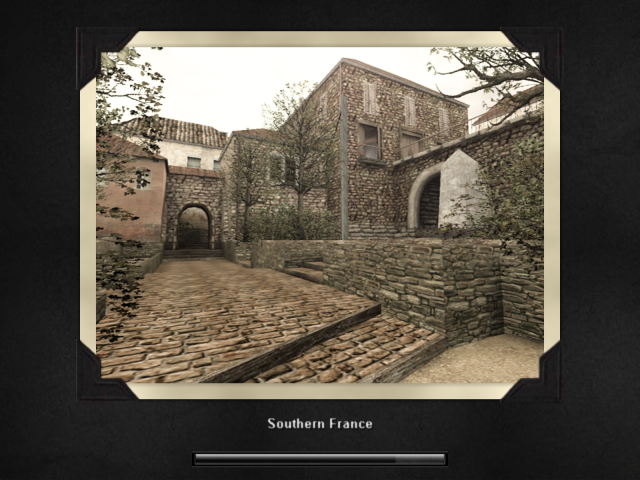
-Adds missing stock decals (graphical details) to your game that was not included with the game itself.
-Applies to the following three maps: Algiers, Remagen, & Southern France.
AMPLIFIED IN-GAME SERVER BROWSER
-Can be accessed via main menu or while in-game.
-Will save loaded servers. Will not reload server list each time it is accessed.
(Default server browser reloads server list each time it is accessed.)
AMPLIFIED SOUND
-Main menu music used from Call of Duty 4.
-High quality sound files used for weapons, death, health, and more.
-Additional sound modifications.
AMPLIFIED TEXTURES
-Additional & improved texture modifications used for eye-candy purposes.
-Improved bullet holes.
*Disabled 'Compressed Textures' (CVAR 'r_ext_compressed_textures 0') required to see some custom textures.
*Enabled 'Wall Decals' (CVAR 'cg_marks_add 1') required to see bullet holes.
AMPLIFIED WEAPONS
-Additional and improved visual & audio effects.
BUG-FREE LEAN TOGGLES
-Easily toggle lean-binds via the menu.
-Will not glitch during the toggle.
COD2 HIT DIRECTION INDICATOR
-Easily and visually see which direction you are being attacked from.
-Located near center of screen.
-Imported from Call of Duty 2.
fYC ANIMATED COMPASS
-Animated red compass.
-Health meter embedded inside.
-Health Pulsates.
fYC CUSTOMIZABLE ACCURACY CROSSHAIRS
-15 customized accuracy crosshairs.
-Click on one crosshair to use singly.
-Customize your own crosshair by overlapping multiple crosshairs.
(Click 'CUSTOM ON' to allow overlapping. Click 'CUSTOM OFF' to disable overlapping.)
fYC FULLHAIRS
-A high resolution crosshair that layers with main crosshair and scope.
-Basic black cross design.
-400x300 resolution size.
-800x600 resolution size.
-Must re-enable after every match.
fYC NEON ACCURACY SCOPE
-A clean neon green accuracy scope designed to work with customizable crosshairs.
fYC RED HUD
-Ingame text is now blood red.
-Chat and death text slightly differ in color shade.
fYC VIOLENT BLOOD v3.1
-A violently detailed blood mod.
-Now with more realistic blood spills & a more immersive experience with light/hard hits & splats.
-Includes a body hit indicator that highlights hit points with an animated ripple.
*Enabled 'Wall Decals' (CVAR 'cg_marks_add 1') required to see bullet holes.
MP3 PLAYER
-MP3 media player interface
-Allows you to play up to ten MP3 audio files within the game.
-To get the MP3 PLAYER to function properly, you must rename (ten) MP3s of your
choice '1.mp3' up to '10.mp3' and place them in your MOHAA/main/MP3 folder.
-Volume bar controls the volume of ingame sound, not the played MP3.
SCRIPTS
-Quick Scope 1
Hold mouse1 button to aim with scope and release to fire.
Aim and tap mouse1 quickly to perform a quickscope shot.
-Quick Scope 2
Same as Quick Scope 1, but automatically crouches after firing weapon.
-Silent Shot
Executes the silent shot script (mainly meant for rifles).
Fires a shot without making a noise, though weapon is then dropped.
SILENT TEXT
-No audio 'clicks' from chat and server data.
[DETAILS_SECURITY]
ADMIN ABUSE ALERT
-A.M.P. will notify you via text and audio if the server is flooding you with
aliases and/or setu commands, unbinding your keys, forcing you to quit, crash, etc...
-Text notifications will display on left side of screen with description of action.
-Alarm audio will sound when a critical command has attempted to be forced on you.
ADMIN ABUSE PROTECTION
-Protection against abusive admins who attempt to force your game to crash, unbind
your keys, and more.
ALIAS PROTECTION
-A.M.P. will protect your aliases and prevent the server from flooding you with
aliases.
DEFAULT NAME KICK-PREVENTION
-You will not get kicked for using the default name 'unnamedsoldier'.
LOAD A.M.P. DEFAULTS
-Easily reload the settings A.M.P. provides.
NETWORK SYSTEM SETTINGS PROTECTION
-Important network and system performance settings backed up in a mandatory loaded
file for security.
QUIT CONFIRMATION
-When clicking on the 'Quit' button, A.M.P. will prompt you with a confirmation
asking if you really want to quit.
-Helps to prevent closing MOHAA unintentionally.
[DETAILS_FEATURES]
ADDITIONAL HD RESOLUTIONS
-1280x720 resolution support.
-1680x1050 resolution support.
-1920x1080 resolution support.
AMPLIFIED SYSTEM SETTINGS v2.1
-Easily maximize all available settings with a chosen resolution.
(Includes enhanced curve detail.)
-Static settings to help improve performance and stability.
CONSOLE ERROR FIX(ES)
-Removes constant flooding of console errors.
CUSTOMIZABLE FAVORITE SERVER (1)
-Easily enter in your server IP of choice and choose a key to bind it to.
-Modifiable in game at any time.
CUSTOMIZABLE TAUNT (1)
-Easily enter in your taunt of choice and choose a key to bind it to.
-Modifiable in game at any time.
EASY DEMO FILE RECORDING
-Record gameplay to demo file format (dm3).
-Recording status is displayed on top left side of screen.
-Record up to six dm3 files (1.dm3, 2.dm3, 3.dm3, 4.dm3, 5.dm3, & 6.dm3).
-Start playback of a recorded demo file by typing 'playdemo 1' in console.
-Saves the recorded file to MOHAA/main/demos directory.
EASY MOD ADD-ON SUPPORT
-Easily have A.M.P. automatically execute a script or mod add-on for you.
-Currently supports up to three executions.
-Successful add-on execution is verified on game start up via console.
EASY SERVER RECONNECT
-Easily and quickly reconnect to servers with a click of a button.
EASY VID RESTART
-Easily perform a video restart with a click of a button via the A.M.P. menu.
EASY WINDOWED MODE
-Easily toggle between window modes with a click of a button via the A.M.P. menu.
FPS CONSOLE FLOOD PREVENTION (max_packet_usercmds)
-Frames are limited to 200 or below in order to prevent 'max_packet_usercmds' from
constantly flooding console.
FPS VERTICAL SYNC FIX
-Frame cap offsets designed to create a more accurate vertical sync resulting in
smoother performance.
NO-CD PATCH
-No CD Patch for MoHAA version 1.11.
REBORN PATCH VERSION CHECK
-Easily check if the current server you are connected to is running Reborn Patch.
(unofficial mohaa patch v1.12)
-If server is running the Reborn Patch, information will be displayed on top-right
side of the screen via the miniconsole or via console along with the server's
patch configuration.
-Note: Miniconsole does not always function. Rely on console for server information.
UBERSOUND FIX
-Fixes missing sounds.
-Most common while playing singleplayer maps on multiplayer mode.
VERIFY SUCCESSFUL A.M.P. LOAD
-You are notified of a successful A.M.P. load with scrolling text across console
after loading MOHAA.exe.
[DETAILS_OTHERS]
CINEMATIC
-Stops all ambient sound.
CVAR LIST
-Displays the list of CVARS used by the Amplified Settings along with the
descriptions and available variables.
-Can be accessed via the MoHAA Options menu.
DEVELOPER MODE
-Allows you to view communication information between your PC, game, and server
within console or miniconsole.
-Great for debugging.
FPS METER
-Enables the Frames Per Second Meter on the bottom of the screen.
-For best performance, cap your FPS via the 'Video Options' menu by selecting the
matching number of your monitor's refresh rate.
LAG-O-METER
-Enables the Lag-O-Meter on the bottom of the screen.
-Allows you to identify the latency between you and the server via a graph.
MINI-CONSOLE
-Displays a miniature version of the console on the top right side of the screen so
you can view live communication information between your PC, game, and server.
-Toggle 'Developer' mode on to view extra info.
-Great for debugging.
QCONSOLE LOGGING
-Enables logging of console/server activity.
-Log file can be found in MOHAA/main folder (qconsole.log).
[PAST RELEASES]
================================================================================================|
fYCcreationZ Medal of Honor Allied Assault Advanced Mod Pack version 2.03 [LITE BETA 3]
================================================================================================|
[VERSION] fYC-A.M.P. v2.03
[SERIES] LITE BETA v3
[TYPE] Advanced Mod Pack (Legit)
[RELEASE DATE] PRIVATE
[CREDITS] electrickrypt
[WEBSITE] www.fYCcreationZ.com
[HELP & SUPPORT] N/A
[SPECIAL THANKS] N/A
================================================================================================|
CHANGE LOG:
+ Added additional console error fixes.
+ Added additional HD resolution (1920x1080)
+ Added bullet hole mod.
+ Added cinematic bind.
+ Added qconsole logging.
+ Added quick-scope scripts.
+ Added silent-shot script.
+ Fixed cinematic.
+ Fixed keybinds (UNVERIFIED).
+ Fixed some shaders misidentified as cheats by servers.
+ Fixed some texture problems.
+ Improved MP3 player interface.
+ Removed fYC Rocket TrailZ.
+ Tweaked AMPlified Settings (com_maxfps 60 to sync with 60Hz refresh rate).
+ Upgraded AMPlified System Settings to version 2.1.
+ Upgraded fYC Violent Blood to version 3.0 (Created a more realistic blood splat and spill).
+ ...Additional minor fixes and modifications for error prevention and efficiency purposes.
================================================================================================|
fYCcreationZ Medal of Honor Allied Assault Advanced Mod Pack version 2.02 [LITE BETA 2]
================================================================================================|
[VERSION] fYC-A.M.P. v2.02
[SERIES] LITE BETA v2
[TYPE] Advanced Mod Pack (Legit)
[RELEASE DATE] 04/20/2011
[CREDITS] electrickrypt
[WEBSITE] www.fYCcreationZ.com
[HELP & SUPPORT] N/A
[SPECIAL THANKS] N/A
================================================================================================|
CHANGE LOG:
Not available, First public release.
================================================================================================|
Credits
electrickrypt http://www.fyccreationz.blogspot.co.uk/
Related MOHAA Mods
More Custom UI →

Engine & Patch Compatibility
Community-tested verification on official patches & Reborn
0.00 reviews
Community Rating & Discussions
Rate this mod and share feedback or installation tips with fellow players.
Your Rating:
Leave a Comment / ReviewLog in to join the discussion
Loading discussions...
Downloads
903
Total Downloads
Date Added
April 27, 2013
Download
Mod Information
Rating4.0/5
RebornAll
Support
electrickrypt