
Admin Tools
OwN-3m-All’s Ubermod V2
Creator
OwN-3m-All
Version
V2.0
Game Type
MOHAA
Reborn Compatible
3.1 Only
Description
What is this mod?
It’s a collection of mods, configs, and scripts all-in-one! It is the only mod you need on your server. Anti-crash fixes and anti-shark fixes have been implemented in this mod. This mod uses creaper’s weapons mod.
Features the following mods:
• The Push Mod
• Rabbit Mod
• Freeze-Tag
• Capture the Flag
• Objective Mods
• FFA Mods
• Liberation
• Demolition
• Base Assault
• Base Builder
• Build-A-Base
• Last man standing
• Team balancer
• Countdown
• Beach Soccer
• Scrim Configs and Modes
• DM to OBJ Conversions
• SP to MP map conversions
Installation Guide
Install Instructions:
Make a backup / copy of your current mods on the server. You'll need to remove all mods, as some mods may conflict with the ubermod. The ubermod has everything you could ever possibly want.
Requires Latest Version of Reborn 1.12 Server Patch:
This mod requires the server to be running the latest version of Reborn. This is the unofficial 1.12 patch that adds new functionality that is critical to the operation of this mod. To download and for more information, visit X-Null.
http://www.x-null.net/
Setting Up Server Configs Used by the Mod:
1. Extract the zip to a folder on your PC using a program like WinRar.
2. From this folder, browse in the server_mod directory by double clicking it.
3. If your server runs a Linux server, double click on the linux folder.
4. If your server runs a Windows server, double click on the windows folder.
5. Within this directory, double click on the main folder.
6. Double click the configs directory.
7. Run the MohaaConfigGenerator.exe program to setup your default config settings
Using MohaaConfigGenerator:
The MOHAA Config Generator program looks like this:
[img=http://www.dinofly.com/files/mohaa/ubermod/mohaa_config_editor.jpg]
The config folder should be set to the current directory of all the configs. However, if you wantto use the config generator for other configs, click the “Browse...” button and pick a folder where you have config files. It is recommended not to change this!
• In the “Clan Tag” field enter your clan’s tag (for example -*B[w]*- )
• In the “Full Clan Name” field, enter your clan’s full name (for example: Brothers in War)
• In the “Scrim Password” field, set your clan’s desired scrim password.
• In the Default Weapon Config dropdown, pick your default weapon config. (ECL and TWL modes use Sniper Only OGL [2-shots 1 kill] settings)
• In the Max Players dropdown, choose the number of slots your server is allowed to run.
• In the Server IP field, type in your server’s IP address and Port. (Example: 6.1.1.1:12203)
When you’ve finished setting your server’s desired settings, click on “Save Input” and then click on “Update Configs”
Your config files have now been customized automatically for you!
Edit the Server.cfg Config File:
Go back to the previous directory where you see the mod, configs folder, and server.cfg. Edit the server.cfg to set your defaults (rcon password and stuff). This is the only config file you’ll need to edit manually. Save your changes and close your text editor.
Create Admin Accounts:
For a Windows server, the admins.ini file is in the main folder. For a Linux server, the admins.ini file is located in the MOHAA folder. You need to edit this file to create admin accounts with different permissions and custom logins.
Read the “Reborn ReadMe.pdf” for help.
Code:
//This is example:
login=test password=test rights=16383
Gives the test user full rights to the server using a login of test and a password of test.
For more help, please check out this link:
http://www.x-null.net/forums/showthr...4842#post14842
Stop your server using your provider’s control panel. Save the file and upload this to your server.
Upload the Server Mod, Configs Folder, and Server.cfg:
Stop your server using your provider’s control panel.
Upload the files in the server_mod\windows\ or server_mod\linux\ folder depending on your server’s operating system to the server’s MOHAA\MAIN directory. Start the server. Your server is now running the Ubermod.
Clientside Admin Menu Install:
Move the files in the local_mod\main directory to your local PC’s MOHAA\MAIN directory. When you join your server, press F11 to setup the menu’s key bindings.
For a complete guide on how to use and setup the admin clientside mod, check out this video guide:
http://www.youtube.com/watch?v=MlenMg2sJXg
You’re done! The Ubermod is installed on your server! Everything is configured for you to run anything!
Configuration
Notes / Help
Ultimate Video Guide:
Check out this video guide which walks you through the entire process of configuring and using the ubermod!
http://www.youtube.com/watch?v=hRsm06BfNkA
Notes:
The MOHAAConfigGenerator program is written in C#. You must install or already have installed Microsoft’s .NET Framework 2.0. You can download and install this here:
Windows 7, Vista, XP x64 (64-bit Editions):
http://www.microsoft.com/en-us/downl...s.aspx?id=6523
Windows 7, Vista, XP (x86 Editions):
http://www.microsoft.com/en-us/downl....aspx?id=16614
The MOHAAConfigGenerator application works on all Windows versions. Sorry, but there is noLinux version.
Help:
If you discover any bugs, have questions, or need help configuring something, post in the Ubermod thread at x-null!
http://www.x-null.net/forums/forum.php
Credits
Credits:
Created by OwN-3m-All:
The Push Mod
Rabbit
OwN’s Special Teleporter Mod
Last Man Standing
Team Balancer
All Config Files
Some Script Files
Other Mods:
Other mods are created by their respected authors. The admin menu is a variant of the menu
released by Merlin.
Thanks to:
Elgan (elgbot and others)
Sor
Other x-null members
RazorRapid for REBORN!
Merlin
Creaper
MOHAA Community
And others I may have missed. Your work has helped shaped this mod!
Related MOHAA Mods
More Admin Tools →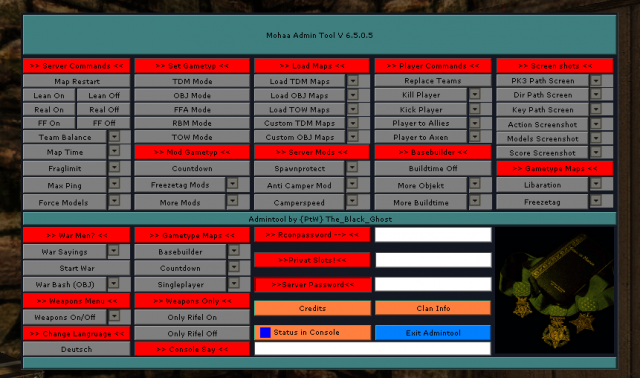



Engine & Patch Compatibility
Community-tested verification on official patches & Reborn
0.00 reviews
Community Rating & Discussions
Rate this mod and share feedback or installation tips with fellow players.
Your Rating:
Leave a Comment / ReviewLog in to join the discussion
Loading discussions...
Downloads
372
Total Downloads
Date Added
April 27, 2013
Download
Mod Information
Rating5.0/5
Reborn3.1 Only
Requirements
latest version of Reborn www.x-null.net
Support
OwN-3m-All