
Medal of Honor: Allied Assault Mods (MOHAA)
Discover and download community-created modifications to enhance your Medal of Honor: Allied Assault experience.
12 Mods Found
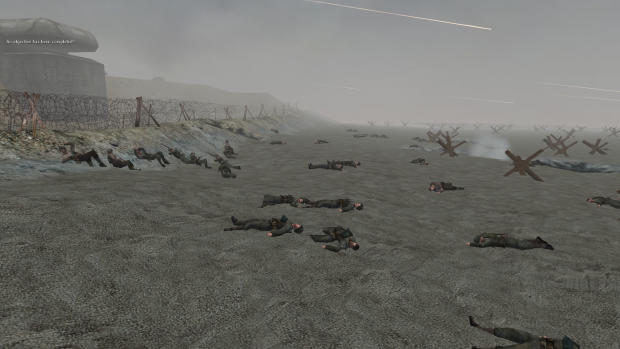
CorpseStay SP v1.0 addon
This is a SP 'corpse stay' mod, meaning AI that die leave 'permanent' corpses! Currently only supports Allied Assault. // ------------------------------------------------------------------------------- // ------------------------------------------------------------------------------- // CorpseStay SP v1.0 by Smithy // ------------------------------------------------------------------------------- // ------------------------------------------------------------------------------- // INFO This is a SP corpses stay mod, meaning AI that die leave 'permanent' corpses! **NOTE**: Please note that this mod changes some default files. You will need to merge any changes if you have mods that conflict with this one. Change are commented with 'crpsty' in the files. // INSTALLATION: For Allied Assault: Put the zzz_CorpseStayAA_SP.pk3 file inside your mohaa/main directory. For Spearhead: NOT SUPPORTED YET For Breakthrough: NOT SUPPORTED YET Example config: seta crpsty_sp_corpses "50" seta crpsty_sp_debug "0" __________________________________________________________________________________________ // CONFIG - you can input these commands into the console when you load up a level __________________________________________________________________________________________ crpsty_sp_corpses - is the number of corpses allowed at any given time (use wisely). Minimum of 5 corpses Maximum of 100 corpses Default is 30 corpses crpsty_sp_debug - is whether or not to print debug messages to the console If you DON'T want debug messages, use 0 If you DO want debug messages, use 1 You can change these cvars at any point during the map. Changes to crpsty_sp_corpses will kick in as soon as any AI dies again. // NOTES crpsty_sp_corpses has a maximum of 100 as we don't want to flood the game with too many entities. It is more than enough though. You will rarely hit 100 corpses. Keep an eye on your fps. If it gets too low on some missions, just decrease crpsty_sp_corpses
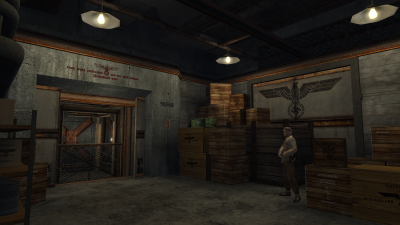
Morocco SP v1.1 addon
//==========================================================================================================// // LEVEL: test_morocco (SP) // CAMPAIGN: Operation Torch // TITLE: Morocco // VERSION: 1.1 (27/02/19) // GEOMETRY/DESIGN: 1337Smithy // SCRIPTING: 1337Smithy //==========================================================================================================// //==========================================================================================================// *** INSTALLATION //==========================================================================================================// Remove any mods you already have installed, then put the zzzzzzzzzzzzzzzzzzzzzz_Morocco_SP.pk3 file into your MOHAA/main folder. //==========================================================================================================// *** RUNNING (AND CHOOSING DIFFICULTY) //==========================================================================================================// ***If you want to set a difficulty (other than default), make sure to do it BEFORE loading the map.*** Firstly, choose a difficulty via console (no quotes): EASY: "skill 0" MEDIUM: "skill 1" HARD: "skill 2" Secondly, type "map test_morocco" (no quotes) in console to run the map. //==========================================================================================================// *** STORY //==========================================================================================================// You are an OSS operative sent behind enemy lines on the eve of Operation Torch in Morocco. Your objective is to sabotage enemy activity in the area and acquire any intelligence the Germans may have on the allied operation. Another intelligence officer disappeared in this area some time ago, so we need to find out if she was captured and if so what information they 'acquired' from her. //==========================================================================================================// *** INFO //==========================================================================================================// First part of my Morocco singleplayer campaign. I am releasing this on its own as I may not be able to release the other parts as quickly as I'd like. This ensures at least some of the campaign is played. I am including the map file with this release. Anyone is free to take assets from this package, be it level geometry, scripts or anything else. This is your permission, so no more is needed :). //==========================================================================================================// *** CREDITS //==========================================================================================================// A few textures were taken from Enhanced Textures mod for MOHAA (https://www.moddb.com/mods/enhanced-textures) Some axis skins taken from several authors. The rest is basically me. Some inspiration from the original missions of course.
Jvbots Xtra Addon V21
======================================== XYZ - Xtra Addon V2.1 ======================================== *********************** What's included? *********************** + Botmenu v2 by Ric-Hard ------------------------- + Additional Fixes: ----------------- * Leash error fixes (by Sor) * spawnhandler fixes (by Sor) * attack.scr error (by Blade) * Realistic weapons for bots (by Blade) * Rifle hit/whip sounds as well as the toses_ sound. (by Sor) + Bot Scoreboard V3 by Sor --------------------------- V3: * No more lag when playing with more than 22 bots (dependant on system though) V2: * I've redone the entire system * New ui scoreboard (ui/bot_scoreboard.urc) * Keeps track of up to 32 bots (players included) * Dead bots/players indicated in yellow * Player deaths are now displayed and accurately * Player kills are now displayed (playerkills and botkills added together) accurately * Bots gain kill if they kill players (lose a kill if they kill a teamplayer) * All players get displayed; I cannot display their names (so I display their clientnumber if there are more than 2 players) * Scoreboard FULLY viewable by all players on the server (if they have the ui/bot_scoreboard.urc file of course) * Use of globalwidgets reduces the cvar use from 90 to 32. * Increased efficiency; reduction of lag * No more executions from the lib_game.scr script; reduction of lag + Bot Killboard V2 by Sor --------------------------- v2.1: * Bots who aren't killed by players/bots get displayed with "NAME died" v2: * New killboard HUD & Colour, just like the player killboard * Bugfix v1: * Works on all resolutions * Shows which bot killed which or which bot killed which player (up to 5 at the same time) * Displayed on a non-disturbing place on the screen + Misc New Features -------------------- * Now you can see which bot killed you (under the compass) *********************** EDITED *********************** Edited Scripts: - global/jv_bots/spawnhandler_default.scr - global/jv_bots/lib_weapon.scr - global/jv_mp_players.scr - anim/attack.scr Added Scripts: - global/jv_bots/botscoreboard.scr - global/jv_bots/botscoreboard_v2.scr - global/jv_bots/killboard.scr *********************** INSTALL *********************** Place the pk3 in your main. Now open your unnamedsoldier.cfg file in main/config/ Add these lines (replace with the keys you want) to your binds: bind my_key "pushmenu xyz_bot_Scoreboard" bind my_key "togglemenu bmv2"
Jvbots Multiplayer Bot Script V11
These are the 2 standard files that are needed when playing with bots in multiplayer games. Mostly they come standard with each download of each individual botted maps. The 2 files are: jv_bot01.pk3 jv_bot01_update1.pk3 Multiplayer Bot script for MoH:AA obj ============================================= by jv_map version 1.1-update#1 --------------------------------------------- Copyright (c) 2002-2003 Jeroen Vrijkorte All rights reserved. --------------------------------------------- Redistribution is unrecommended. COPYRIGHT HOLDERS WILL NOT BE LIABLE FOR ANY DIRECT, INDIRECT, SPECIAL OR CONSEQUENTIAL DAMAGES ARISING OUT OF ANY USE OF THE SOFTWARE OR DOCUMENTATION. --------------------------------------------- jv_map@planetmedalofhonor.com http://www.planetmedal.com/freebrief --------------------------------------------- Minor update & bugfix. Should not be used with anything but jv_bot01.pk3. For personal use only (do not distribute this pk3 along with your maps).
Dogs Script
If you want to spawn dogs into your stock MP maps with no pathnodes then add this file to your main or mainta directory it contains dmdogs.scr and a sample script for mohdm2 usage: in level script main: level waittill spawn exec global/dmdog.scr end in thread or script exec global/dmdog.scr::dogspawn example: exec global/dmdog.scr::dogspawn ( -1053 -2847.22 -4.12 ) 45 1 5 axis 1 FFA example: exec global/dmdog.scr::dogspawn ( -1053 -2847.22 -4.12 ) 45 1 5 also creates two variables level.axis_dogs and level.allies_dogs that you can use in script JV's soundfix added for sounds dog sounds work for mohaa on a server . You can also precache this .tik dogsounds.tik which I think may work for spearhead . If not try maybe makeing a .scr file with the dogsounds you need and run it from the level script .
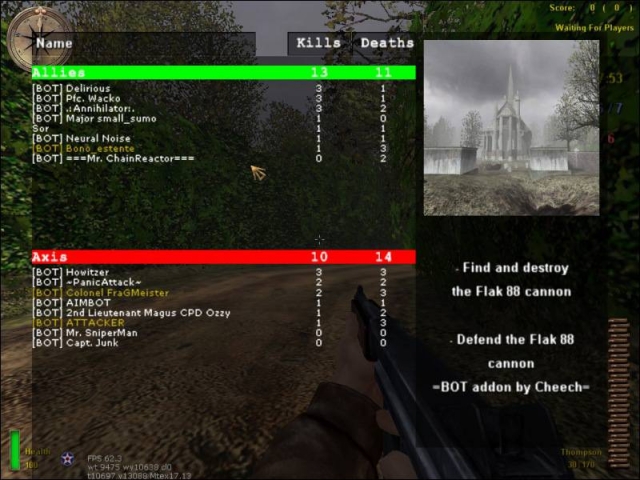
Complete Bots Mod V31
///////////////////////////////////////////// /////////////The Complete Mod v3.1/////////// ///////////////////////////////////////////// Thank you for downloading this file at www.mohaairborne.co.cc VERSION: 3.1 TYPE: Bot Fix, Mod Addon, Mod fix DATE: 24th of May 2009 CREDIT: Proximo & $or – Botaddon, mods… $or - Fixes {SFX} Cobra - C47 Mod >>>>>>>>>>>Zip Contents>>>>>>>>>>>>>>>>>>>>>> V3.0? >>>>>>>>>>>>>>>>>>>>>>>What else was New??>>>>>>>>>>>>>>>>>>>>>>>>>FIXES>>>>>>>>>>>>>>>>>>>>>>>>>IMPORTANT NOTES don't forget to set team damage "ON" (see team damage on.jpg) >>>>>>>>>>>INSTALLATION>>>>>>>>>>UNINSTALLATION>>>>>>>>>>>>>>>>>>>>>>>>Bot Scoreboard V3.0>>>>>>>>>>>>>>>>>>>>>>>>Bot Killboard V2.1>>>>>>>>>>>>>>>>>>>>>>>>Misc Features>>>>>>>>>>>>>>>>>>>MOD CONTENTS<<<<<<<<<<<<<<<<<<<<<<<<< view the xyz_plane_c47_fix.txt/.rtf file for the additions/fixes that file brings. ****PLANES Compatiblity**** DM OBJ ------- ---------- despair Bastogne (tank+planes) omaha doggreen beachobj gloomcove bob_carentan hitler's farm bobobjaa01 m3l3 bobobjaa02 m5l1b bobobjaa03 mohdm1 gloomcove mohdm2 obj_maromg mohdm3 obj_omaha_doggreen mohdm4 obj_stalingrad_final_bots mohdm5 obj_team1 mohdm6 obj_team3 mohdm7 obj_team4 mp_anzio_dm omaha 60th annivesairy mp_bahnhof_dm Prado1_obj mp_berlin_tow st renan mp_bizerteharbor_dm st lo mp_flughafen_tow swordbeach mp_gewitter_dm utah mp_holland_dm 0815_final_fixed mp_malta_dm ALL OTHER MAPS DON'T HAVE PLANES OR DO ALREADY HAVE PLANES ****TANK Compatiblity**** mohdm2 Bastogne ****C47 Compatiblity**** obj_team3 xyz_botaddon_TheSiege xyz_botaddon_OperationSealion xyz_botaddon_obj_longest xyz_botaddon_m5L1b xyz_botaddon_anubis xyz_botaddon_duenkirchen bobobj001 bobobj002 bobobj003 ****Parachute Mod Compatibility**** All maps who support the Planes-Mod and the C47-Mod ---------------------------------------------- Any problems,bugs,requests or if you want to play this mod on your server(or publish it on your site)PLS contact us On our Site: www.mohaairborne.co.cc Or just e-mail us: PROXIMO $oldier Of Ra mohaa_j_fox@hotmail.com MOHAALennySoldier@hotmail.com Check the site for awsome skins, more botmaps and more, we have over 130 botmaps!!!!! On our Site: www.mohaairborne.co.cc
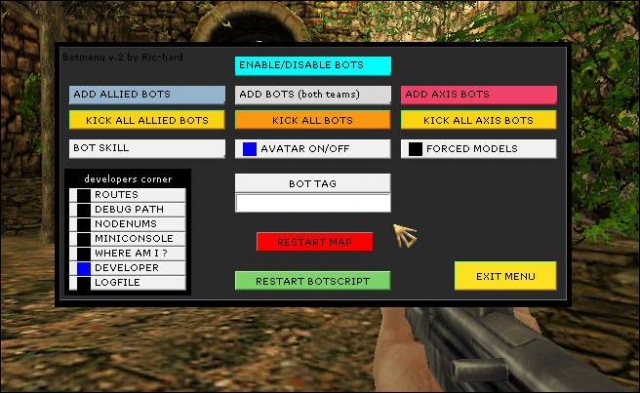
Bot Scoreboard Bot Menu v2
//////////////////////////////////////////////// ////////BOT SCOREBOARD and Botmenu_V2////////// ////////////////////////////////////////////// VERSION: 1.0 Beta TYPE: Bot tools DATE: 10th of July 2008 CREDIT: Bot Menu (v2) - Ric-Hard Bot Scoreboard - URC Clan >>>>>>>>>>>>>>>>>Installation>>>>>>>>>>>>>>>BOT SCOREBOARD: BETA>>>>>>>>>>>>>>>Bot Menu V2>>>>>>>>>>>>>>>CONTACT
Bot mapper
/////////////////////////////////////////////////////////////////////////////////////////////////////////// Botmap maker system created by bdbodger ( bdbodger@hotmail.com ) ©2004 You are free to use this script for noncommercial use as long as you do not remove this message and if you edit the script you indicate in the script the changes you have made . This script is offered as is and author is not responsible for improper use . ////////////////////////////////////////////////////////////////////////////////////////////////////////////// setup: Put the user_Bdbodger_botmapper.pk3 in the main directory When running the Botsmapper.scr you will need to use the botspawnmenu I suggest you type: bind b pushmenu botspawnmenu into the console to make mapping easier , you can use any free key for this . I have included a test or sample script for obj_team1 it contains the following maps/obj/obj_team1_bot.scr maps/obj/obj_team1_save.scr maps/obj/obj_team1.scr The some of the lines in the original maps/obj/obj_team1.scr have been changed and these lines added ////////////////////////////////////////////////////////////////////////////////////////////////////////////// // This will run the bots scripts but only the first round // to make the final script paste into the top of the maps/obj/obj_team1.scr ////////////////////////////////////////////////////////////////////////////////////////////////////////////// waitexec maps/obj/obj_team1_bot.scr ////////////////////////////////////////////////////////////////////////////////////////////////////////////// // to reedit the script comment out the waitexec maps/obj/obj_team1_bot.scr and uncomment these lines ////////////////////////////////////////////////////////////////////////////////////////////////////////////// //waitexec maps/obj/obj_team1_save.scr //exec global/Botsmapper.scr ////////////////////////////////////////////////////////////////////////////////////////////////////////////// There are two buttons on the menus 1 is to write the final script and 1 writes a save script the difference is simple the save script does not spawn the pathnodes or pathnodes for things like the bombnodes it spawns the temp models. I suggest that you do both and while makeing your map you save then as I have in obj_team1_bot.scr and obj_team1_save.scr that will make makeing changes a lot easier . ////////////////////////////////////////////////////////////////////////////////////////////////////////////// These lines have been commented out //$flak88_weapon1_trigger thread flak88_random_setup $flak88_weapon1_explosive //$flak88_weapon1 $flak88_target1 $flak88_base1 4 //$flak88_weapon1_explosive thread global/obj_dm.scr::bomb_thinker The botmapper script will add these lines to the script writeout but not the save script. Examine the maps/obj/obj_team1_bot.scr for more details , as you see I have added a second objective $flak88_weapon1_explosive thread global/jv_obj_dm.scr::bomb_thinker $bomb2 thread global/jv_obj_dm.scr::bomb_thinker waitthread global/jv_bots/jv_mp_ai.scr::enable ////////////////////////////////////////////////////////////////////////////////////////////////////////////// On the botspawnmenu I have added a special model "bsp_bomb" this is for bombs that are created in the bsp to use it set the targetname to the targetname of the model that is in the map , this is to add keys to the model for the bots. ////////////////////////////////////////////////////////////////////////////////////////////////////////////// When setting the auto pathnodes on the menu you will not be able at this time to edit or move them later there is however pathnode on the nodes menu that you can use to add anymore pathnodes you think are needed , when added this way you will be able to move them later. In wide areas it is better to make the auto nodes by running up 1 side then the other. You can adjust the spaceing of the nodes from the menu . While in auto nodes mode you will not be able to spawn anything else from the menu so be sure to turn auto nodes off before doing anything else . ////////////////////////////////////////////////////////////////////////////////////////////////////////////// When the objective models are spawned in the final script I did not use spawnflags 1 to make them not solid I don't know if it is that or not but I found with the second objective that I had to make the trigger_use and bomb some distance from the model I assume because of the bounding box of the model . ////////////////////////////////////////////////////////////////////////////////////////////////////////////// The menu will add the .destroyed_model key to the model if that modes has a destroyed model . I also have the destroyed models on the menu but they are not really needed to be on there .The same applies to the pulse models the non pulse models have been added to the menu but are not needed the pulse models when spawned will add the .explosivemodel key to the bomb for use in the global/jv_obj_dm.scr::bomb_thinker thread . ////////////////////////////////////////////////////////////////////////////////////////////////////////////// Most things that have keys that are always used for that type of thing like the targetname of a bombnode are added by the botmapper.scr to the menu these things can be changed but it is usually not nessesary for a test I added a trigger_use to the bsp_model on the flak88 to replace the 1 that was being used by the flak88 seems to work as well as the original like I said before it may be better to set spawnflags 1 on the objective models . ////////////////////////////////////////////////////////////////////////////////////////////////////////////// At this time the setsize on the triggers is predefined println "level.obj_model[" local.i "] setsize ( -25 -25 0 )( 25 25 50 )" This seems to work ok ////////////////////////////////////////////////////////////////////////////////////////////////////////////// For the test map I set on the botmapsetup menu that you can get to from the botspawnmenu level.alliesbots = 7 level.axisbots = 1 ////////////////////////////////////////////////////////////////////////////////////////////////////////////// Tips: You can not move when any of the menus are open but if you click outside the menu you can point yourself in a different direction to get the mouse back quickly open and close the console . Do not use esc to exit the menus if you do the cvars will not be set use the exit menu buttons .The last item edited or created will be on the menu when you reopen the menu at this time you have to use the + or - buttons to go through the entities but if you create and delete a entity then the menu will be at the last entity .Either delete button will delete the current entity as seen in the position area . ////////////////////////////////////////////////////////////////////////////////////////////////////////////// Routelists: If you set the routelist key on an entity then a routelist will be created automatically . I have allowed 4 routes per routelist . You only need to set the routes on 1 routelist if that routelist is used on another entity it will have the same routes on it's list . I am sorry I forgot to use an example of that on the test map but the output will look something like this . // level.routelist[route1][1] = "b" level.routelist[route1][2] = "bb" level.routelist[route1][3] = "bbb" level.routelist[route1][4] = "bbbb" ////////////////////////////////////////////////////////////////////////////////////////////////////////////// To select a node or model in front of you use the use key and it will be automatically selected and the menu updated Also the show beam and arrow will then point to it . //////////////////////////////////////////////////////////////////////////////////////////////////////////////
Bot Menu v2
Botmenu version 2, for jv_map bots. by Ric-hard http://www.ric-hard.tk U nead to bind it to a key, bind keyofyourchoice togglemenu bmv2
Bot-Builder = JV_BOT + BASEBUILD
Bot Builder
moh_eaglear_bots
Multiplayer Bot script for MoH:AA / Spearhead / Breakthrough maps
Medal of Honor: Allied Assault Mods (MOHAA) — Complete Community Archive
Welcome to the premier repository for Medal of Honor: Allied Assault mods. Since the game's groundbreaking release in 2002 by 2015, Inc. and EA, MOHAA has inspired one of the longest-standing modding communities in first-person shooter history. MOH-DB preserves, categorizes, and serves over 1,600 verified community modifications, custom enhancements, and competitive utilities for Allied Assault, Spearhead, and Breakthrough.
Explore MOHAA Mod Categories
Player Skins & Uniforms
Over 700 historically accurate and creative player uniforms for Allied and Axis factions. Equip authentic U.S. Army Rangers, 101st and 82nd Airborne paratroopers, British Commandos, Soviet Red Army conscripts, Wehrmacht Heer infantry, Fallschirmjäger, and Waffen-SS camouflage patterns, as well as classic community clan skins.
Weapon Models & Reskins
Enhance your WWII arsenal with ultra-detailed weapon replacements and high-resolution textures. Popular downloads include authentic wood-finish Kar98k sniper rifles, realistic metallic sheen M1 Garand models with classic "ping" animation refinements, Thompson submachine guns, MP40s, BAR 1918 rifles, and custom iron-sight alignments.
Soundpacks & Realism Audio
Transform the sonic atmosphere of Allied Assault. Replace compressed 2002 Quake-engine sound effects with cinema-grade gunfire recordings, authentic distant artillery rumblings, terrifying Stuka dive-bomber sirens, supersonic bullet cracks, metal ricochets, and remastered German and American voice callouts.
HUDs, Menus & Crosshairs
Modernize the in-game interface for 1080p, 1440p, and 4K widescreen displays. Download minimalist competitive heads-up displays, custom dot and crosshair overlays, cleaner compass indicators, redesigned main menus, and unobtrusive health and ammunition counters favored by competitive league players.
Server Utilities & Admin Scripts
Run resilient, modern multiplayer game servers with essential server-side utilities. Includes automated map rotators, anti-cheat detection tools, voting scripts, custom match timers, ping balancers, and administrative rcon managers designed for dedicated servers running 24/7.
MOHAA Reborn 1.12 Community Patch
The gold standard community patch for modern MOHAA servers and clients. The Reborn 1.12 patch resolves legacy buffer overflows, fixes client query exploits, expands internal script limits for complex mods, and provides a built-in server browser to replace the defunct GameSpy master server.
How to Install MOHAA Mods: Quick Guide
Identify Your Target Directory
MOHAA stores all game assets in subfolders inside the root installation directory:
- MOHAA (Base):
.../MOHAA/main/ - Spearhead:
.../MOHAA/mainta/ - Breakthrough:
.../MOHAA/maintt/
Paste Without Extracting
Download the mod archive from MOH-DB. If it is zipped (.zip or .rar), extract the enclosed .pk3 file. Place this .pk3 directly into your game's /main/ folder.
How to Remove or Troubleshoot
To remove any mod, simply delete its .pk3 file from the /main/ folder. The game will immediately return to stock behavior without reinstalling.
Frequently Asked Questions about MOHAA Mods
To install MOHAA mods, copy the downloaded .pk3 file directly into your Medal of Honor Allied Assault installation folder under /main/ (or /mainta/ for Spearhead, and /maintt/ for Breakthrough). You do not need to unpack or extract the .pk3 archive—the game engine loads it automatically upon launch.