
Medal of Honor: Allied Assault Mods (MOHAA)
Discover and download community-created modifications to enhance your Medal of Honor: Allied Assault experience.
127 Mods Found
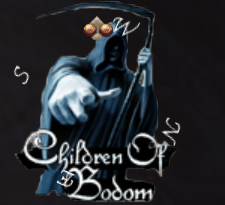
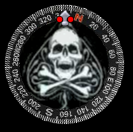
Children Bodom Compass
Children Of Bodom Compass By: Gangreen. (dob_clan@hotmail.com) This mod will replace the standard compass with a children of bodom-themed compass. Don't use this mod in another one, or sell it, or do anything else appart from using it for your game, without my agreement. /////////////////// //How to install:// /////////////////// Place the pk3file in the folder main, maintt or mainta. to uninstal it, delete the file.
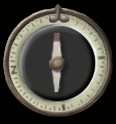
Moh Pacific Assault Compass
Read Me File:: [>>>>>>>>>>>>>>>>>>>>>>>>>>>>>>>>>>>>>>>>>>>>>>>>>>>>>>>>>>>>>>>>>>>>>>>>>>>>

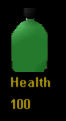
Canteen Health Meter
++++++++++++++++++++++++++++++++++++++++++++++++++++++++++++ Are you tired of the same old boring health meter bar? Here's a new one for you to try. I left the colors pretty much the same as the original health meter. Hope you like it. ++++++++++++++++++++++++++++++++++++++++++++++++++++++++++++ To Install: Extract the pk3 file to your main folder. To Uninstall: Either delete the pk3 or move it to another folder. ++++++++++++++++++++++++++++++++++++++++++++++++++++++++++++ Please do not alter or republish this as your own without my prior consent. ++++++++++++++++++++++++++++++++++++++++++++++++++++++++++++ Tools: Paint Shop Pro Quick Zip 4.60.015 ++++++++++++++++++++++++++++++++++++++++++++++++++++++++++++ Any questions, comments, death threats, or adulation that cannot be communicated on this site should be sent to me by email. "Chief" alias edraircren at yahoo dot com
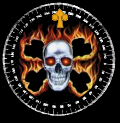

Realistic Weapon Names HUD
Vdog77's Realistic Weapon HUD V2 ***Description- This file will change the default weapon names that appear on your ammo HUD to the actual names of the weapons in real life. Below is a list of the new weapon names. Since V1 I made the Sten Mark II into the Sten Mark V, which is correst, and I fixed the Panzershreck name. ***Installation-Place in either Main,Mainta,or Maintt. This file will work for all versions of MOHAA in other words. If you have any questions contact me at: sp0rtdude101@yahoo.com (sp0rtdude101 AT YAHOO DOT COM) or at MOHAA filefront forums"Vdog77" Thanks! BAR----M1918 Browning Automatic Rifle BAZOOKA----M1A1 Bazooka BERETTA----Beretta Modello 1934 CARCANO----Carcano M1938 Carbine COLT45----Colt M1911A1 G43----Gewehr 43 Sniper KAR98----Mauser Karbinier 98k KAR98SNIPER----Mauser Karbinier 98k Sniper LEE-ENFIELD----Lee Enfield No.4 Mk. I M2 FRAG----Mk.II Frag MOSIN NAGANT----Mosin Nagant M1891/30 MP40----Maschinenpistole 40 MP44----Maschinenpistole 44 NAGANT REVOLVER----Nagant M1895 Revolver P38----Walther Pistole 38 PANZERSHRECK----Raketenpanzerbuchse PPSH----PPSH 41 SHOTGUN----Winchester Model 1897 HI-STANDARD----Model HD MS Military SPRINGFIELD----Springfield M1903A4 Sniper STEILANGRANTE----Model 24 Stielhandgranate STEN----Sten Mk. V THOMPSON----M1A1 Thompson WEBLEY----Webley Mk. VI MOSCHETTO----Moschetto Automatico Beretta 1938 SVT40----Tokarev SVT 40 PIAT----Projector,Infantry,Anti-Tank DELISLE----De Lisle Commando Carbine MILLS BOMB----No.36M Mk.I Frag RUSSIAN F1----F1 Frag BOMBABREDA----Breda Modello 30

Niceguyeddies Weapon Bar
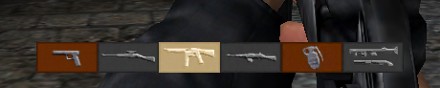
|RÐ|NiceGuyEddie's Weapon Bar - Readme file ============================================== Made by |RÐ|NiceGuyEddie (mohfiles.com nickname: Karl Wernicke) from Holland. Here's a small readme file with all the things you need to do and not need to do. And other stuff you might wish to know. DESCRIPTION -------------- This is a weapon bar in a bit wood style, but with the iron weapons from the normal weapon bar. The screenshots will tell you more about it. INSTALLATION --------------- To install my weapon bar, put the 'niceguyeddies_weapon_bar.pk3' file into your Main, Mainta or Maintt folder (or all of them). For those who never installed a file before, follow this: C:\Program Files\EA GAMES\MOHAA\ (and then, find the Main, Mainta or Maintt folder). Maybe your folder is located elsewhere, and if that's the case, search the folder EA GAMES. Now go and play, and don't forget I've spent two whole evenings on it! Searching included ;) CONTACT ---------- This weapon bar is made by |RÐ|NiceGuyEddie (that's me). My e-mail: nice_guy_eddie90@yahoo.com Feel free to send me your suggestions, I'll use them for next files! ATTENTION! ------------- You may distribute and copy this file as many times as you want, but please always include this readme file and the screenshots when you put it on a website. Thanks. This is free software. It may NOT be used for commercial purposes. MISCELLANEOUS ---------------- Used tools: -PakScape -PictureIt! 7.0 -Pak1.pk3 source files Greetings, |RÐ|NiceGuyEddie

Axis Weapon Bar
Alwas Play on the Axis? This makes the weapons bar on the bottom resemble more of the axis guns. I was making this for someone, so I hurried on it, so it isn't perfect. Install: put in main for Allied Assult, mainta for Spearhead, and mainta for breakthough. Uninstall: remove from the folder you put it in. Do whatever you want with the mod, but don't claim it as your own. --[GZA]DisasterMaster www.groundzeroarcade.com
Red Weird Bullets HUD
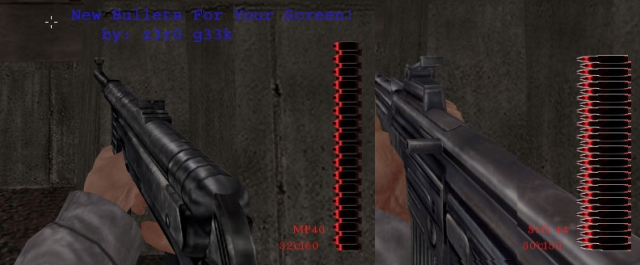
Hello Soldier! I'm glad you accept this mission ;-) This Medal of Honor: Allied Assault Red Weird Bullets Will change the bullets for Red Weirds! ;) see screenshot! To INSTALL: Move The PK3 File Into Your MOHAA Directory. (z°Red_weird_bullets.pk3) (default: C:/Program Files/Ea Games/MOHAA/Main/) Made & Zip by: z3r0 g33k mail me for any questions or comments or requets: marilynmansonfamily@hotmail.com *ALWAYS DISTRIBUTE THIS READ-ME FILE WHEN TRADING* August.16.2003 1:26 AM
Silver Bullets HUD
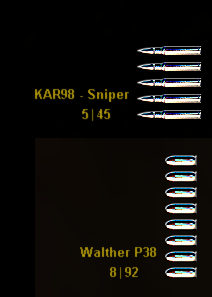
|\|\|\|\|\|\|\|\|\|\|\|\|\|\|\|\|\|\|\|\| .:DeamonEyes Mods:.|\|\|\|\|\|\|\|\|\|\|\|\|\|\|\|\|\|\|\|\| -=-=- Info & Description -=-=- This Mod Is Pretty Simple As I Am still Getting To Grips With Mod Making. This Mod Changes The Bullets On The Right Hand Side From The Horrible Murky Brown Metal TO Pure Silver Bullets. Kool Eh? For Some Reason This Has Mad Me More Accurate And Helps Me Kill in Less Shots! Stanges! Give It A Go Lads/Lasses Hope U Like it. Please Send Me Your Thoughts Via E-Mail (See Contact) Or Wright Your Comments On MoHFiles.com -=-=- Installation -=-=- Simply Place The ".pk3" File Into Your MoHaa\Main Folder And Hey Presto! Your Ready To Play :) -=-=- Uninstallation -=-=- Simply Delete or Remove And Place In Another Folder, Preferably Called "MoHaa .pk3 Files Not In Use" Or Something simlar. That Way You Still Have The Mod But It Wont Be On The Game :) -=-=- Contact -=-=- As Usual E-Mail Me On - Shortyjj357@hotmail.com E-Mail The Clan (>) - Razer@gcbclan.co.uk# Website - www.gcbclan.co.uk -=-=- Mod Designer -=-=- Clan Name / / /¯_ /¯¯' |¯`) \ \ \_/ (¯ /¯¯\ |¯¯) | | | | ´¯|¯` |\ |\ /\ |\ | --- >--XsoriHitman \ \ \__| \__, |__) / / ¯¯ ¯¯ /¯\ ._) \__/ |¯¯\ | |´¯`| | | | \| \ /--\ | \| --- Modder Name |¯¯\ |_¯ /\ |\ |\ /¯¯\ |\ | \¯¯ \_/ |_¯ (¯ --- DeamonEyes |__/ |__ /--\ | \| \ \__/ | \| /__ _/ |__ ._) ---


Metal Blood Health Meter
|\|\|\|\|\|\|\|\|\|\|\|\|\|\|\|\|\|\|\|\|\|.:DeamonEyes:.|\|\|\|\|\|\|\|\|\|\|\|\|\|\|\|\|\|\|\|\|\|\|\|\|\|\|\|\|\|\| -=-=- Info & Description -=-=- This Mod Only Changes The Helth Bar In The Bottom Left Corner. When You Are Not Hurt The Bar Will Green With A Metal Looking Outline. This Out Line Will Have Bit Of Red On (Blood). When You Are Being Shot It Will Flash Red And The Same When You Pick Up A Health Pack. When You Are Dead It Will Turn Completely Red. -=-=- Installation -=-=- Simply Place The ".pk3" File into Your MoHaazMain Folder, Click On MoHaa.exe And Have Fun! -=-=- Uninstallation -=-=- Simply Remove The File From You MoHaa\Main Folder -=-=- Contact -=-=- E-mail Me @ - shortyjj357@hotmail.com E-Mail The Clan @ - Razer@gcbclan.co.uk Website - www.gcbclan.co.uk -=-=- |Authers Of Mod| -=-=- Clan Name / / /¯_ /¯¯' |¯`) \ \ \_/ (¯ /¯¯\ |¯¯) | | | | ´¯|¯` |\ |\ /\ |\ | --- >--XsoriHitman \ \ \__| \__, |__) / / ¯¯ ¯¯ /¯\ ._) \__/ |¯¯\ | |´¯`| | | | \| \ /--\ | \| --- Modder Name |¯¯\ |_¯ /\ |\ |\ /¯¯\ |\ | \¯¯ \_/ |_¯ (¯ --- DeamonEyes |__/ |__ /--\ | \| \ \__/ | \| /__ _/ |__ ._) ---
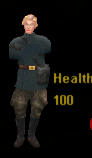
Loretta Long Health Meter
Here's a custom health meter I created from one of Magna Carta's skins. I used his Loretta Long player skin to make it (with his permission of course). Hope you like it. To install extract the pk3 to your main/mainta folder. To uninstall simply delete it or move it to a different folder. Created by Chief. Do not republish this as your own work. If you wish to include this in another package or such, you must first obtain permission from both myself and Magna Carta. For more custom skins, health meters and other mods and add-ons go to: http://tazcook.com Contact Chief or Magna Carta at www dot tazcook dot com Thanks for your download
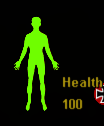
Human Body Health Bar
-=========== HumanBody HealthBar ============- -=========== made by VenonGuard ============- Copy "zz-Corpo_Humano_healthbar.pk3" to your main or mainta folder.Credit for the mod goes to me, VenonGuard (venonguard@hotmail.com) -=========== HumanBody HealthBar ============- -=========== criado por VenonGuard ============- Copie o arquivo "zz-Corpo_Humano_healthbar.pk3" para a pasta main ou mainta.Creditos pela modificação vai para mim, VenonGuard (venonguard@hotmail.com)

Blue Health Bar
You should no the score by now...Put it in main. First Mod At MoH:AA I got Bored Of The Orignal Hud Display so well.. FeedBack Welcome; Any Questions Voltation@gmail.com Thankyou!


Medal of Honor: Allied Assault Mods (MOHAA) — Complete Community Archive
Welcome to the premier repository for Medal of Honor: Allied Assault mods. Since the game's groundbreaking release in 2002 by 2015, Inc. and EA, MOHAA has inspired one of the longest-standing modding communities in first-person shooter history. MOH-DB preserves, categorizes, and serves over 1,600 verified community modifications, custom enhancements, and competitive utilities for Allied Assault, Spearhead, and Breakthrough.
Explore MOHAA Mod Categories
Player Skins & Uniforms
Over 700 historically accurate and creative player uniforms for Allied and Axis factions. Equip authentic U.S. Army Rangers, 101st and 82nd Airborne paratroopers, British Commandos, Soviet Red Army conscripts, Wehrmacht Heer infantry, Fallschirmjäger, and Waffen-SS camouflage patterns, as well as classic community clan skins.
Weapon Models & Reskins
Enhance your WWII arsenal with ultra-detailed weapon replacements and high-resolution textures. Popular downloads include authentic wood-finish Kar98k sniper rifles, realistic metallic sheen M1 Garand models with classic "ping" animation refinements, Thompson submachine guns, MP40s, BAR 1918 rifles, and custom iron-sight alignments.
Soundpacks & Realism Audio
Transform the sonic atmosphere of Allied Assault. Replace compressed 2002 Quake-engine sound effects with cinema-grade gunfire recordings, authentic distant artillery rumblings, terrifying Stuka dive-bomber sirens, supersonic bullet cracks, metal ricochets, and remastered German and American voice callouts.
HUDs, Menus & Crosshairs
Modernize the in-game interface for 1080p, 1440p, and 4K widescreen displays. Download minimalist competitive heads-up displays, custom dot and crosshair overlays, cleaner compass indicators, redesigned main menus, and unobtrusive health and ammunition counters favored by competitive league players.
Server Utilities & Admin Scripts
Run resilient, modern multiplayer game servers with essential server-side utilities. Includes automated map rotators, anti-cheat detection tools, voting scripts, custom match timers, ping balancers, and administrative rcon managers designed for dedicated servers running 24/7.
MOHAA Reborn 1.12 Community Patch
The gold standard community patch for modern MOHAA servers and clients. The Reborn 1.12 patch resolves legacy buffer overflows, fixes client query exploits, expands internal script limits for complex mods, and provides a built-in server browser to replace the defunct GameSpy master server.
How to Install MOHAA Mods: Quick Guide
Identify Your Target Directory
MOHAA stores all game assets in subfolders inside the root installation directory:
- MOHAA (Base):
.../MOHAA/main/ - Spearhead:
.../MOHAA/mainta/ - Breakthrough:
.../MOHAA/maintt/
Paste Without Extracting
Download the mod archive from MOH-DB. If it is zipped (.zip or .rar), extract the enclosed .pk3 file. Place this .pk3 directly into your game's /main/ folder.
How to Remove or Troubleshoot
To remove any mod, simply delete its .pk3 file from the /main/ folder. The game will immediately return to stock behavior without reinstalling.
Frequently Asked Questions about MOHAA Mods
To install MOHAA mods, copy the downloaded .pk3 file directly into your Medal of Honor Allied Assault installation folder under /main/ (or /mainta/ for Spearhead, and /maintt/ for Breakthrough). You do not need to unpack or extract the .pk3 archive—the game engine loads it automatically upon launch.