
Medal of Honor: Allied Assault Mods (MOHAA)
Discover and download community-created modifications to enhance your Medal of Honor: Allied Assault experience.
127 Mods Found
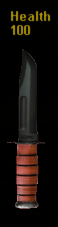
K Bar Health Meter
Here's a new health meter that looks like the Marines K-Bar. Hope you like it. To install copy or extract the pk3 to your main folder. To uninstall simply delete it or move it to a different folder. Created by edraircren, alias "Chief." Do not republish this as your own work. If you wish to republish this as part of a package or other work you must first request permission to do so. Thanks for downloading it. Contact edraircen at yahoo dot com (No spam please)
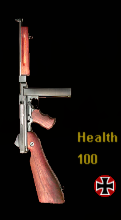
Thompson Health Meter
Here's a new health meter that looks like the Thompson smg. I decided to offer two sizes when a fellow member suggested my first one was too big. Hope you like it. To install copy or extract the pk3 to your main folder. To uninstall simply delete it or move it to a different folder. Created by edraircren, alias "Chief." Thanks go to Leutenant Baker for his valuable input and suggestions. Do not republish this as your own work. If you wish to republish this as part of a package or other work you must first request permission to do so. Thanks for downloading it. Contact edraircen at yahoo dot com (No spam please)

Smooth Grey Health Bar
Smooth Gray Health Bar ====================== To Install Place in your mohaa/main folder To Uninstall Just delete the file ====================== www.thepchs.com
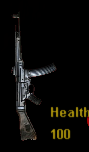
Mp44 Health Meter
Here's another new health meter. This one's made as the MP44. Hope you like it. To install copy or extract the pk3 of your choice to your main folder. To uninstall simply delete it or move it to a different folder. Created by edraircren, alias "Chief." Do not republish this as your own work. If you wish to republish this as part of a package or other work you must first request permission to do so. Thanks for downloading it. Contact edraircen at yahoo dot com (No spam please)
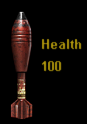
Mortor Shell Health Bar
*********************************************************************************************************************** This Mortor Shell Healthbar was created by -|WoD|-Carbon! It makes your healthbar a mortor shell, the exact mortor shell used in mohaas. Have fun! *********************************************************************************************************************** ~Installation~ Place the user-mortorshell_healthbar.pk3 into your Mainta or Maintt folder! If you are using Breakthrough put it in the Maintt folder. If you are using Spearhead put it in the Mainta folder. *********************************************************************************************************************** ~Credits~ EA for the original mortor shell skin. Carbon131(me,) for making it fit the screen and spending 30 minute finding the right rect position! *********************************************************************************************************************** ~Contact~ Xfire - carbon131 E-mail - warriorsofdoom_clan@yahoo.com Website - www.warriorsofdoom.co.nr *********************************************************************************************************************** ~Server~ Want to play a Base-Builder server? Check out my server(Base-Builder Mission) IP: 98.209.73.163 I hope you enjoy this healthbar! =============================================================================================================== CCCCCCCCCCCCCC AAAAA RRRRRRRRRRR BBBBBBBBBB OOOO NNNNN NNN CCCCCCCCCC AAAAAAAAAA RRRRRRRRRRRR BBB BBB OOOOOOO NNN NN NNN CCCCCCC AAAAA AAAAA RRR RRR BBB BBB OOOOOOOOOO NNN NN NNN CCCCCC AAAAAA AAAAAA RRR RRR BBB BBB OOOO OOOO NNN NN NNN CCCC AAAAAAAAAAAAAAAA RRRRRRRRRRRRR BBBBBBBBB OOO OOO NNN NN NNN CCCC AAAAAA AAAAAA RRRRRRRRRRRRR BBB BBB OOO OOO NNN NN NNN CCCCCC AAAAAA AAAAAA RRR RRR BBB BBB OOO OOO NNN NNNN CCCCCCC AAAAAA AAAAAA RRR RRR BBB BBB OOOO OOOO NNN NNNN CCCCCCCCCC AAAAAA AAAAAA RRR RRR BBB BBB OOOOOOOOO NNN NNNN CCCCCCCCCCCCCCC AAAAAA AAAAAA RRR RRR BBBBBBBBBB OOOO NNN NNN ===============================================================================================================
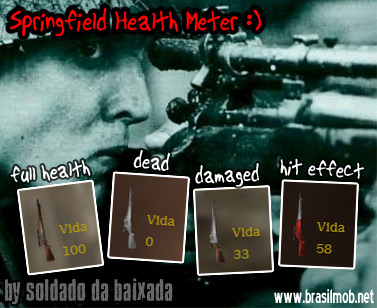
Springfield Health Meter
.:PORTUGUÊS:. >> SPRINGFIELD HEALTH METER > SPRINGFIELD HEALTH METER
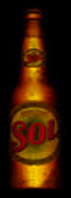
Sol Beer Health Bar
Sol Healthbar. =================== Mod made by Mr_G (Mr_Gamer) =================== Credits: ~Mr_G ~Sol =================== Remodding can be done. Give credit!! =================== Made for the Medal of Honor community!

Kewl Health Bar
About ======= This skin is for the Health Meter in all versions of Allied Assault. I think it's cool. So, I thought I'd share my creation with the MoHAA world. Enjoy the skin! If you like it, e-mail it to all of your friends. But, don't publish it as your own and take all the credit for it. If I see someone taking credit for it, I will announce that they stole it. Thanks! Installation ============== To install, click on My Computer, go to C:, then go to /Program Files, from there go to /EA GAMES, then /MOHAA, and put it in your /main, /mainta, and/or /maintt folder. Give me your feedback at franklin.da.cookie.monsta at gmail dot com!
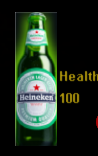
Heineken Beer Health Bar
Heineken Healthbar! =================== Mod made by Mr_G (Mr_Gamer) =================== Credits: ~Mr_G ~Heineken =================== Remodding can be done. GIVE CREDIT TO ME!! =================== Made for the Medal of Honor community!



Daemoneyes Crosshairs
/|/|/|/|/|/|/|/|/|/|/|/|/|/|/|/|/|/|/|/|/|/|/|/|/|/|/ DEAMON EYES /|/|/|/|/|/|/|/|/|/|/|/|/|/|/|/|/|/|/|/|/|/|/|/|/|/|/|/|/| -=-=- |INFO & Description| -=-=- .:The CrossHair Colours:. 1 - Blue, Red & White 2 - Blue, Red & Green 3 - Red, White & Green 4 - Red, Orange & Green .:Description:. This Is Virtually The Same Crosshair Mod As In The [V.1], The Only Differences Are This One Is Twice As Big And Easyier to see And In Different Colours. I Have Also Changed The Layout Of The Crosshair Making It Look Better And Most Important More Accurate Than [V.1]. -=-=- |Installation| -=-=- Pick Wich Everone You Think Suits You And Place It In Your MoHAA\main Folder Usually - C:\Programfiles\Eagames\MOHAA\Main --- May Be Different -=-=- |Uninstallation| -=-=- I Don't See Why You Would WAnt To Do This, You Must Be Living In A Mental Home, But Anyway Just Remove From Your MoHaa\Main Folder -=-=- |Agreement| -=-=- 1 - Do Not Abuse These Files I Worked Hard On Them 2 - You May Edit The Files But ONLY With My Concent! (E-mail Me - See Contact) 3 - Enjoy Using My Files And Have Fun With Them 4 - Any Comments On These Files Send Your Comments To Me. (For My Email See Contact) -=-=- |Contact| -=-=- E-mail Me @ - shortyjj357@hotmail.com E-Mail The Clan @ - Razer@gcbclan.co.uk Website - www.gcbclan.co.uk -=-=- |Authers Of Mod| -=-=- Clan Name:=- >--XsoriHitman Modder Name:=- DeamonEyes Of cause

Bullseye Crosshair
================================================================================= Copy "zzzzzzzzBeastie_Bullseye_Crosshair.pk3" into your main or mainta folder. ================================================================================= To uninstall just remove from the folder. Beastie_Reece =================================================================================

Bullets Crosshair
Install: MohAA/Main/Mainta I made this d00ds -]e²[-Bullet•SGM

Blue Dot Crosshair
Okay, So I have a CrossHairs now, Very basic... I like it. =] Hope you do to. Happy Killing -Installation- Place the .Pk3 file in your main (C:/Program files/EA GAMES/Mohaa/Main) -uninstallation- Remove/Delete the .PK3 file from your main (C:/Program files/EA GAMES/Mohaa/Main) Hope this helps Happy Killings Mason Fraser - Aka - Gun-Fire

Blue Box Crosshair
================================================================================= Copy "zzzzzzzzBeastie_Blue_Box_Crosshair.pk3" into your main or mainta folder. ================================================================================= To uninstall just remove from the folder. Beastie_Reece =================================================================================

Toiletmasters Death Messages
+===========+ |(un)install| +===========+ Just place the toiletmasterdeathmessages.txt-file in your mohaa/main folder. To uninstall, remove it. ------- +===========+ |Description| +===========+ It changes a lot of messages in the game. ------- +==========+ |READ THIS!| +==========+ DO NOT CHANGE THE NAME OF THIS FILE, YOU MAY TRANSPORT IT, BUT ONLY IF YOU GIVE ME -TOILETMASTER- SOME CREDIT FOR IT! -------
Rfs Death Messages
***** R || F ***** Release Date: 01-28-03 ReCoil || Factor Custom Startup and Death Messages ****WARNING CONTAINS ADULT LANGUAGE**** Client Side only MOD! If your stupid like me, that means that everyone has to have it to experience the fun. For SpearHead Only!!!.. Reworked the localization file to provide a some what shocking and could be received as vulgar in game messages. Definitely not in the realm of realism. I would not have normally made such a shocking mod but yours truly - "Captain Kick Your Ass" made me. So kindly direct all negative feedback to him... LOL Feel free to change and mod to your own liking as well... :) Skin not wroking? Try unchecking the box "Texture Compression" in SpearHead - Options - Video. This goes for MOHAA as well.. :) **************************************************************************************************** Place the .pk3 file into the MOHAA/mainta folder in Medal of Honor SpearHead. To remove the skin, just delete the .pk3 file. Enjoy :) tcfool@attbi.com ******************************************************************************************************* Disclaimer: All images were either created, modified, improved upon and/or because I have no real talent blatantly ripped off by ReCoil || Factor. So if you see some graphical rendition in my work that you think is yours "Well Thanks" and please remember one thing - There is a Very Fine Line Between "Hobby" and "Mental Illness"
Medal of Honor: Allied Assault Mods (MOHAA) — Complete Community Archive
Welcome to the premier repository for Medal of Honor: Allied Assault mods. Since the game's groundbreaking release in 2002 by 2015, Inc. and EA, MOHAA has inspired one of the longest-standing modding communities in first-person shooter history. MOH-DB preserves, categorizes, and serves over 1,600 verified community modifications, custom enhancements, and competitive utilities for Allied Assault, Spearhead, and Breakthrough.
Explore MOHAA Mod Categories
Player Skins & Uniforms
Over 700 historically accurate and creative player uniforms for Allied and Axis factions. Equip authentic U.S. Army Rangers, 101st and 82nd Airborne paratroopers, British Commandos, Soviet Red Army conscripts, Wehrmacht Heer infantry, Fallschirmjäger, and Waffen-SS camouflage patterns, as well as classic community clan skins.
Weapon Models & Reskins
Enhance your WWII arsenal with ultra-detailed weapon replacements and high-resolution textures. Popular downloads include authentic wood-finish Kar98k sniper rifles, realistic metallic sheen M1 Garand models with classic "ping" animation refinements, Thompson submachine guns, MP40s, BAR 1918 rifles, and custom iron-sight alignments.
Soundpacks & Realism Audio
Transform the sonic atmosphere of Allied Assault. Replace compressed 2002 Quake-engine sound effects with cinema-grade gunfire recordings, authentic distant artillery rumblings, terrifying Stuka dive-bomber sirens, supersonic bullet cracks, metal ricochets, and remastered German and American voice callouts.
HUDs, Menus & Crosshairs
Modernize the in-game interface for 1080p, 1440p, and 4K widescreen displays. Download minimalist competitive heads-up displays, custom dot and crosshair overlays, cleaner compass indicators, redesigned main menus, and unobtrusive health and ammunition counters favored by competitive league players.
Server Utilities & Admin Scripts
Run resilient, modern multiplayer game servers with essential server-side utilities. Includes automated map rotators, anti-cheat detection tools, voting scripts, custom match timers, ping balancers, and administrative rcon managers designed for dedicated servers running 24/7.
MOHAA Reborn 1.12 Community Patch
The gold standard community patch for modern MOHAA servers and clients. The Reborn 1.12 patch resolves legacy buffer overflows, fixes client query exploits, expands internal script limits for complex mods, and provides a built-in server browser to replace the defunct GameSpy master server.
How to Install MOHAA Mods: Quick Guide
Identify Your Target Directory
MOHAA stores all game assets in subfolders inside the root installation directory:
- MOHAA (Base):
.../MOHAA/main/ - Spearhead:
.../MOHAA/mainta/ - Breakthrough:
.../MOHAA/maintt/
Paste Without Extracting
Download the mod archive from MOH-DB. If it is zipped (.zip or .rar), extract the enclosed .pk3 file. Place this .pk3 directly into your game's /main/ folder.
How to Remove or Troubleshoot
To remove any mod, simply delete its .pk3 file from the /main/ folder. The game will immediately return to stock behavior without reinstalling.
Frequently Asked Questions about MOHAA Mods
To install MOHAA mods, copy the downloaded .pk3 file directly into your Medal of Honor Allied Assault installation folder under /main/ (or /mainta/ for Spearhead, and /maintt/ for Breakthrough). You do not need to unpack or extract the .pk3 archive—the game engine loads it automatically upon launch.