
Medal of Honor: Allied Assault Mods (MOHAA)
Discover and download community-created modifications to enhance your Medal of Honor: Allied Assault experience.
127 Mods Found
Hitmans Death Messages Ii
Hitman's Death Messages Creator: [DS] SGM. Hitman Time Created: 8/4/02 Installation: Simply place this file in your Global folder, or, lacking that, just put it in your Mohaa/main folder. Comments: New release, people may not have liked my first release... This one does not chagne too much. Please post your comments on site or send comments to mwood@beld.net NOTE: This mod changes names of certain weapons and messages like "5 seconds to clear room" You have been warned!
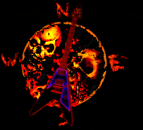

Devil Skull Compass
hp_124 compass Install: Place the Pk3 in mohaa main folder. Uninstall:Delete the Pk3 from mohaa main. If you have any questoins email me at hp_124@hotmail.com Injoy

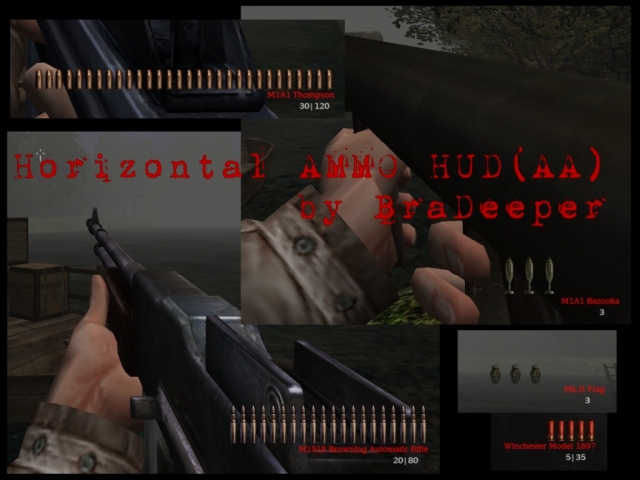
Horizontal Ammo HUD
--------------Horizontal AMMO HUD(AA)------------- by BraDeeper Forgive my english... Hi, like you can see from screenshots i changed the ammo hud, with this mod every single bullet is shown in a horizontal way, and disappears when you shot... you already know. I changed the weapon names with the Vdog77's Realistic Weapon HUD(V2) (THANK U FOR YOUR WORK) and with a different color and font(SH). This is a mod for Allied Assault, i'm working to the Spearhead one too... Ah, for all the weapons (the screenshots show only allied weapons, i forgot the axis...sorry) I use the 1280x1024 resolution when i play and the effect is good, i hope it works with other resolution too. The only thing i don't like is that the bullets disappear from right to left, i don't know how to fix it (maybe changing the position of health bar and ammo hud but i like where they are...). Hope you like it Credits: Vdog77 for his "Realistic Weapon HUD(V2)" BraDeeper

Ice Blue Skull Health Meter
Just a nice custom health meter ice blue when full,flashes red when takin damage and 3 skulls with black background when dead. email flakrider@hotmail.com
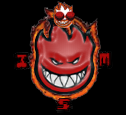
Spitfire Compass
Live To Burn =][= Spitfire Compass /\/\/\/\/\/\/\/\/\/\/\/\/\/\/\/\/\/\ Hi again , here is my 2nd custom compass , i think much of you have been desapointed with my 1st compass because it was too personaized but now this is a compass for everyone ;) /\/\/\/\/\/\/\/\/\/\/\/\/\/\/\/\/\/\ Description: Its a compass based in Spitfire skate wheels , i hope you enjoy it /\/\/\/\/\/\/\/\/\/\/\/\/\/\/\/\/\/\ InStAlAtIoN: Unpack the zip file to EA GAMES\MOHAA\main folder; UnInStAlAtIoN: Simply remove or delete (i dont think you wanna do that... hehe) the .pk3 file from the main folder. /\/\/\/\/\/\/\/\/\/\/\/\/\/\/\/\/\/\ Well its all for now , enjoy my mod as i did making it. i leave you now with my other mods: OtHeR MoDs: Ivan Crosshair Ivan Crosshair v.1.2 Assault Springfield Carbon Camo Springfield(NeW) Ivan Compass CyA All (for now...) hehehe ;) ____ ____ /_ /\ / _/\ ___ __ / / / / / _\/ _ __ ___ / |\ / /\ / / / / / / | |\ / /\ / |\ / /| | |/ / / / / / / / / | | |/ / / / | | / / | | / / / _/ / / / /_/ | |_/ / / / __ | | / / /| |/ / / /___/ / /___/\ |____/ / / / _| | | /_/ / |___/ / \___\/ \___\/ \____\/ /_/ / |_| | \_\/ \___\/ \_\/ \_\|

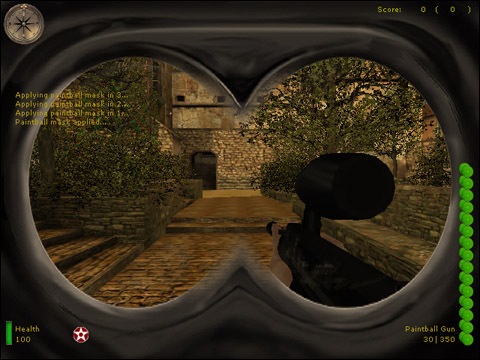
Paintball Mask
PLEASE REPORT ANY BUGS TO WAKESKATER@YAHOO.com!!! PLEASE REPORT ANY BUGS TO WAKESKATER@YAHOO.com!!! PLEASE REPORT ANY BUGS TO WAKESKATER@YAHOO.com!!! ---------------------------- MOHAA Paintball Mask Version 0.5 Scripting: 7th.DeltaAssassin (www.geocities.com/wakeskater21/mohaa.htm) ---------------------------- To insure better performance, please remove any mods currently installed. Although this mod should not affect regular gameplay, things happen. ---------------------------- ***Install: -Place "ZzZzZz-PaintballMask.pk3" in your mohaa/main directory. ***Un-Install: -Remove "ZzZzZz-PaintballMask.pk3" from your mohaa/main directory. ---------------------------- MOHAA Paintball Mask Version 0.5 Features: Adds a paintball mask overlay to your game. ---------------------------- TO ADD THE MASK TO CUSTOM MAPS USE THE FOLLOWING: //ADD THIS AFTER THE "level waittill spawn" IN YOUR MAP SCRIPT!!! thread paintballmask_start end roundbasedthread: // Can specify different scoreboard messages for round based games here. level waitTill prespawn level waittill spawn // set the parameters for this round based match level.dmrespawning = 0 // 1 or 0 level.dmroundlimit = 5 // round time limit in minutes level.clockside = kills // set to axis, allies, kills, or draw level waittill roundstart end paintballmask_start: wait 1 $player thread paintmask end paintmask: iprintln ("Applying paintball mask in 3...") wait 1 iprintln ("Applying paintball mask in 2...") wait 1 iprintln ("Applying paintball mask in 1...") wait 1 fadein 1 huddraw_shader 200 "textures/hud/gasmask_overlay" huddraw_align 200 left top huddraw_rect 200 0 0 640 480 huddraw_virtualsize 200 1 huddraw_color 200 1 1 1 huddraw_alpha 200 1 iprintln ("Paintball mask applied...") end ---------------------------- Contact: wakeskater21@yahoo.com Contact me if you would like to join the team.... we are looking for a modler with experience in creating animations.

Army Health Bar
This is a healtbar for use in Medal of Honor Allied Assault only. It has the colors of the army, and when hurt, there is a blood-color. How to install: Put the .pk3 file in your Mohaa/Main map and it should work. How to Uninstall: Remove the .pk3 file! easy, isn't it!

Dressed Girl Health Bar
A health bar of a dressed girl.. though watch what happens when you lose health ;)

Quake Style Health Meter Ammo Bar
A nice HUD mod from Creaper. Changes your health meter and your ammo/clip counter to a more Quake like variant.
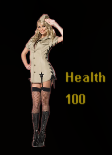
Intrinsic Health Bar
This is a health bar that I created. It features a sexy blond in military garb saluting. Simply put it into your Mohaa/main folder. To un-install, remove pk3 from your main folder. Any questions, contact me at PnCpChw7@comcast.net

Beer Health Bar
**************************=FCF=Mr.AnArChy(uk)************************** **************************Beer Health Bar********************************** Hi, Hope that you like my first health bar mod. Being a true brit, it was only right that it should be beer!! when you get hit the bottle has a shuddering (kind of) effect. Drop the file into your main/mainta folder and bob's yer mothers brother!! Please feel free to do what you want with this file, but give me credit if you modify it. Cheers!!!

Acj Health Meter
Made: Jan. 6, 2006. This is a healthmeter with a sophisticated appeal. sleek and clean. To install : simply put the .PK3 file to MOHAA/main/ directory. To uninstall: delete the file... [Please do not modify my works without written permission.] -Tag: A Cowboys Job / Nosebleed -Aim: Digital Engine 9 -Email: bigwonderworm@hotmail.com



Medal of Honor: Allied Assault Mods (MOHAA) — Complete Community Archive
Welcome to the premier repository for Medal of Honor: Allied Assault mods. Since the game's groundbreaking release in 2002 by 2015, Inc. and EA, MOHAA has inspired one of the longest-standing modding communities in first-person shooter history. MOH-DB preserves, categorizes, and serves over 1,600 verified community modifications, custom enhancements, and competitive utilities for Allied Assault, Spearhead, and Breakthrough.
Explore MOHAA Mod Categories
Player Skins & Uniforms
Over 700 historically accurate and creative player uniforms for Allied and Axis factions. Equip authentic U.S. Army Rangers, 101st and 82nd Airborne paratroopers, British Commandos, Soviet Red Army conscripts, Wehrmacht Heer infantry, Fallschirmjäger, and Waffen-SS camouflage patterns, as well as classic community clan skins.
Weapon Models & Reskins
Enhance your WWII arsenal with ultra-detailed weapon replacements and high-resolution textures. Popular downloads include authentic wood-finish Kar98k sniper rifles, realistic metallic sheen M1 Garand models with classic "ping" animation refinements, Thompson submachine guns, MP40s, BAR 1918 rifles, and custom iron-sight alignments.
Soundpacks & Realism Audio
Transform the sonic atmosphere of Allied Assault. Replace compressed 2002 Quake-engine sound effects with cinema-grade gunfire recordings, authentic distant artillery rumblings, terrifying Stuka dive-bomber sirens, supersonic bullet cracks, metal ricochets, and remastered German and American voice callouts.
HUDs, Menus & Crosshairs
Modernize the in-game interface for 1080p, 1440p, and 4K widescreen displays. Download minimalist competitive heads-up displays, custom dot and crosshair overlays, cleaner compass indicators, redesigned main menus, and unobtrusive health and ammunition counters favored by competitive league players.
Server Utilities & Admin Scripts
Run resilient, modern multiplayer game servers with essential server-side utilities. Includes automated map rotators, anti-cheat detection tools, voting scripts, custom match timers, ping balancers, and administrative rcon managers designed for dedicated servers running 24/7.
MOHAA Reborn 1.12 Community Patch
The gold standard community patch for modern MOHAA servers and clients. The Reborn 1.12 patch resolves legacy buffer overflows, fixes client query exploits, expands internal script limits for complex mods, and provides a built-in server browser to replace the defunct GameSpy master server.
How to Install MOHAA Mods: Quick Guide
Identify Your Target Directory
MOHAA stores all game assets in subfolders inside the root installation directory:
- MOHAA (Base):
.../MOHAA/main/ - Spearhead:
.../MOHAA/mainta/ - Breakthrough:
.../MOHAA/maintt/
Paste Without Extracting
Download the mod archive from MOH-DB. If it is zipped (.zip or .rar), extract the enclosed .pk3 file. Place this .pk3 directly into your game's /main/ folder.
How to Remove or Troubleshoot
To remove any mod, simply delete its .pk3 file from the /main/ folder. The game will immediately return to stock behavior without reinstalling.
Frequently Asked Questions about MOHAA Mods
To install MOHAA mods, copy the downloaded .pk3 file directly into your Medal of Honor Allied Assault installation folder under /main/ (or /mainta/ for Spearhead, and /maintt/ for Breakthrough). You do not need to unpack or extract the .pk3 archive—the game engine loads it automatically upon launch.