
Medal of Honor: Allied Assault Mods (MOHAA)
Discover and download community-created modifications to enhance your Medal of Honor: Allied Assault experience.
10 Mods Found
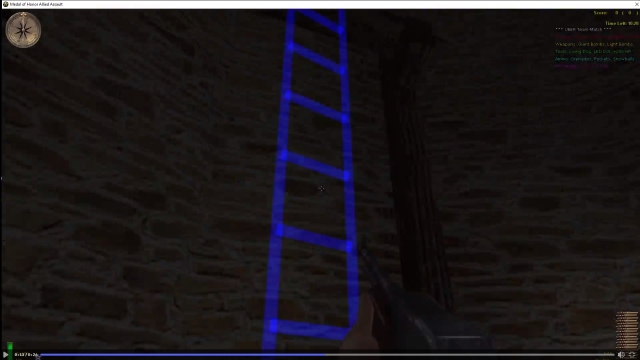
Ladder Spawning
This compact server side script Mod allows you to dynamically spawn new Ladders on any existing map. Making new places avialable, possibly changing the strategy on Multiplayer and Story maps. How To Install Copy the .pk3 for your current Medal of Honor game (AA, BT, SH) and paste in the "Medal of Honor/main" folder (same folder as Pak0.pk3, Pak1.pk3, Pak2.pk3). If using Elgan's Admin Pro mod, copy the .pk3 from the Elgan's Admin Pro folder instead (applies for all 3 Medal of Honor games). Uninstall by deleting the .pk3 mod file from the "main" folder. Adding Ladders To Maps Spawn an invisible ladder trigger_multiple (visible if using the "spawn laser" parameter). All ladders will be 20+ units away from any walls to prevent players getting stuck when climbing (20 units behind origin's coords when facing ladder's angle). ----------------------------------------------------------------------------- Parameters: origin, angle for players to attach, ladder height (minimum = 70), ladder width from center (default = 13.5), thickness of ladder (default = 1) extending into the wall when facing ladder's angle, ... ... spawn solid clip (0 = no, 1 = yes), spawn laser (0 = no, 1 = 1 laser, 2 = 2 lasers outlining ladder, 3 = ladder with visible rungs), laser color [default = ( 0 0 1 ) or blue]. Example: exec global/spawnladder.scr ( -200 300 0 ) 180 500 13.5 1 0 0 Example2: local.ladder = thread global/spawnladder.scr::main ( -200 300 0 ) 180 500 13.5 1 1 3 ( 0 0 1 ) ----------------------------------------------------------------------------- This mod will not work outside of UBER MODS unless nangla_aa_torso.st is also included, or unless another mike_torso.st file is modified. In another mod's mike_torso.st (or similar torso.st), remove all 8 CAN_CLIMB_DOWN_LADDER, CAN_CLIMB_UP_LADDER conditions from these 2 states: LADDER_IDLE_LEFT, LADDER_IDLE_RIGHT. Turn these... LADDER_UP_RIGHT : FORWARD LOOKING_UP "-30" CAN_CLIMB_UP_LADDER LADDER_UP_RIGHT : BACKWARD !LOOKING_UP "-30" CAN_CLIMB_UP_LADDER LADDER_DOWN_LEFT : FORWARD !LOOKING_UP "-30" CAN_CLIMB_DOWN_LADDER LADDER_DOWN_LEFT : BACKWARD LOOKING_UP "-30" CAN_CLIMB_DOWN_LADDER into these... LADDER_UP_RIGHT : FORWARD LOOKING_UP "-30" LADDER_UP_RIGHT : BACKWARD !LOOKING_UP "-30" LADDER_DOWN_LEFT : FORWARD !LOOKING_UP "-30" LADDER_DOWN_LEFT : BACKWARD LOOKING_UP "-30"
Snipers + Rifles Only Mod
For this script, all players can only have snipers or rifles (plus pistol & grenades), and each player is given both team's snipers or rifles. If they choose a different weapon class, the weapon is removed as soon as their hand isn't empty anymore and inventory >= 1. That should prevent most "player::Sentient::deactivateWeapon, Tried to deactivate a non-active weapon in hand 0" errors, but if you see 2+ errors after a player died, he's probably trying his hardest to drop an MG, Bazooka, etc after he spawns, before the weapon is removed (very small chance that he succeeds, if at all). Whenever a player dies with both rifles (or inventory >= 3, when players in this script start with 4), both rifles or snipers are dropped, and the extra dropped weapon can be picked up or provide ammo. Whenever a player dies with only one rifle/sniper, or with < 3 inventory items, only one other rifle/sniper drops. Two rifles should still drop if the player threw all his grenades. I didn't add the "drop the opposite team's rifle or sniper if you drop the weapon without dying". Since players already spawn with both team's rifles or snipers, it would get out of control if people keep dropping 2 rifles for each drop, then one person could drop 4 rifles when he only has 2 in his inventory
Nuclear Explosion Effect
"// Nuclear explosion effect developed by IneQuation aka Rookie One :) // Feel free to use/modify it as long as you credit me as the creator."
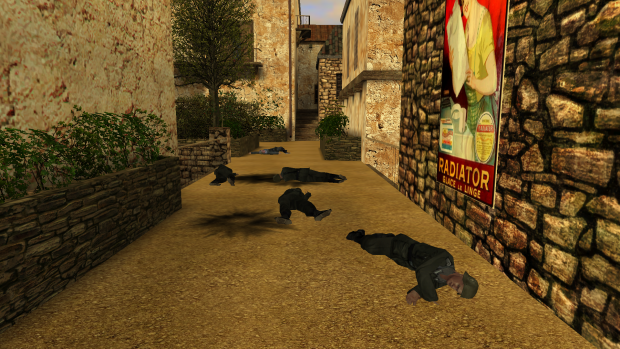
CorpseStay Multiplayer
// ------------------------------------------------------------------------------- // ------------------------------------------------------------------------------- // CorpseStay v2.2 by 1337Smithy // ------------------------------------------------------------------------------- // ------------------------------------------------------------------------------- // INFO This is a server-side corpses stay mod, meaning players who die will leave 'permanent' corpses! **NOTE**: Please note that this mod changes two files used by the player model tikis. Be sure to merge these changes with any changes you may or may not have made to the same files (found in models/player/base). The changes simply 'exec' either 'crpsty_playerspawned2.scr' or 'crpsty_setdeathanim2.scr', so just search for these in those files to find what I changed. // INSTALLATION: For Allied Assault: Put the zzz_CorpseStay_AA_MP.pk3 file inside your server's mohaa/main directory. For Spearhead: Put the zzz_CorpseStay_SH_MP.pk3 file inside your server's mohaa/mainta directory. For Breakthrough: Put the zzz_CorpseStay_BT_MP.pk3 file inside your server's mohaa/maintt directory. Then do: Put "exec global/corpsestay2.scr" (without quotes) inside your global/DMprecache.scr (or however you start your mod scripts) Example server config: seta crpsty_mp_corpses "5" seta crpsty_mp_deathsink "1" seta crpsty_mp_debug "0" And if it's installed right, you should get "***[CorpseStay]***: (game) MP version 2.2 is running!" in your server console when the server finishes booting up. // CONFIG crpsty_mp_corpses is the number of corpses allowed at any given time (use wisely). If you want NO corpses to stay, use 0 If you want UNLIMITED corpses, use -1 (not recommended) If you want any other (positive) number, use any other (positive) number! duh :P crpsty_mp_deathsink is whether or not to make the corpses sink into the ground when they are removed If you want NO sinking, use 0 (they just pop out of the world like normal) If you DO want sinking, use 1 crpsty_mp_debug is whether or not to print debug messages to the server console If you DON'T want debug messages, use 0 If you DO want debug messages, use 1 You can change these cvars at any point during the map. Changes to crpsty_mp_corpses will kick in as soon as any player dies again, the rest are instant. !!!ADVICE!!! Make sure to use crpsty_mp_corpses wisely and be mindful of how many your server should have. Not only does it affect the FPS with all those polys lying around, but it also increases the number of level entities being syncronised on your server. There is a maximum, you know! So if your server crashes because of 'no free edicts', you'll probably know why! :) But don't worry TOO much, you'd probably need a lot of corpses before that issue arises.
Door Mod
//************* DOOR MOD *************** //Credits: // - Scripting: =[M.A.W]= DoubleKill[CL] // - Map compiling: =[M.A.W]= Bob UK [SA] //------------ INSTRUCTIONS ------------ //This mod gives control to the doors. //Too see how this mod works load the Souther France map //The mod have 3 maps working but one map is missing because one door was not working //If you whant to use this mod on another maps you need to just //add a targetname to eatch door with the name "door" and will work. //If you whant see what is the number of the door in the array //set level.show_door_looking = 1 //To lock multiple doors create a array of doors you whant and send them //to the thread locks the doors: //ex: //local.doors[1] = $door[12] //local.doors[2] = $door[7] //local.doors[3] = $door[9] //thread lock_doors local.doors //To unlock doors is for this thread: //ex: //local.doors[1] = $door[12] //local.doors[2] = $door[7] //local.doors[3] = $door[9] //thread unlock_doors local.doors //-------------------------------------- //**************************************
MOHAA Status Mod
File : MoHAA Status Mod Author : Rookie One Version : 0.1 Release Date : 29.12.2002 Description : This mod allows you to have a "status", just like in ICQ or AIM! Now, you can tell the other players that you're away, eating or talking by phone with just one keystrike! Default keys are: Insert - available (just nick without status text before) Delete - away Home - be right back End - out for lunch Page Up - on the phone Page Down - lagged. You can, of course change them by editing custom.cfg file. Installation : Just put custom.cfg file into your MoHAA/main directory. Then, edit it, following the included instructions. Version history : 0.1 First version. Contact : Email : rookie_one@wp.pl ICQ : 146098049 YIM : rookie_one26 MSN/Windows Msg : es_rookie_one@hotmail.com -------------------------------------------------------------------- This mod may be edited without my permission :)
Self Heal
use exec global/selfheal.scr in the map file use set selfheal 1 in the server.cfg Chrouch to regain health.
Self Heal v2
CREDIT FOR THIS GOES TO JV_MAP!!!!!!!!!!!!!!!!! this was jv_maps snowcontest but i made it give you health so if your below 99 heath all you need to do is crouch and not move your heath will begin to go up this is server side so place it on your server main folder and all the player will beable to use the self heal mod --- --- --- this is a new version of the old self heal mod v2. changes: cleaned up the code a bit (thx to gooser13) added a cvar add this to your server cfg set self_heal 1 v1. this was jv_maps snowcontest but i made it give you health so if your be This mod will allow you to add self healling to your mohaa server. So if you health is lower then 99 you can heal your self by crouching.
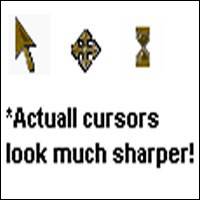
Moh Mouse Cursor Pack
Thank you for Downloading! This Medal of Honor theme pack was compiled by Ben Mora! To use these cursors, go to your computers Mouse Options, by going to your Control Panel then Mouse Options. Then select the pointers tab then the pointer you would like to replace, choose the Browse option, and locate the pointer you want, in the directory you installed it! Then click the "Save As" button and save the new mouse theme as, what ever you want! (example; Medal of Honor Theme) Hope you enjoy!
Push Laser
Credit to Mefy for his Freeze Tag laser, what I originally wrote worked, but I found out I was spawning the laser and trigger over and over and over, causing lots of lag and finally the "you've spawned way too much shit" error. After looking over his Laser I realised what I did wrong. Simply place the .pk3 of the version you want in your main file and add the following to your map.scr [quote]exec map_triggers/pushlazer.scr exec map_triggers/pushlazer.scr::messages[/quote] As stated in the script you DO NOT HAVE TO RUN THE MESSAGES, they are there for a little credit and for instructions mainly You can skip the messages and remove it and do your own/add to your own server messages. Push Laser Low Powered ------------------------ This one has a very short range, 250, and a very low speed, 500. This is what was seen in my youtube video, just a low range laser for moving people out of the way Push Laser High Powered ------------------------ This is the one I run on our *****MODS***** server, high range, 10,000 to reach anywhere, and high speed, 50,000 to launch players These lasers work on friends and foe This is version 1.0 of this mod, so there may or may not be bugs, as far as I can tell it runs perfect with no problems, both on our server and from my home server that I test/write with. If anyone discovers and bugs contact me on x-null.net -Gotcha
Medal of Honor: Allied Assault Mods (MOHAA) — Complete Community Archive
Welcome to the premier repository for Medal of Honor: Allied Assault mods. Since the game's groundbreaking release in 2002 by 2015, Inc. and EA, MOHAA has inspired one of the longest-standing modding communities in first-person shooter history. MOH-DB preserves, categorizes, and serves over 1,600 verified community modifications, custom enhancements, and competitive utilities for Allied Assault, Spearhead, and Breakthrough.
Explore MOHAA Mod Categories
Player Skins & Uniforms
Over 700 historically accurate and creative player uniforms for Allied and Axis factions. Equip authentic U.S. Army Rangers, 101st and 82nd Airborne paratroopers, British Commandos, Soviet Red Army conscripts, Wehrmacht Heer infantry, Fallschirmjäger, and Waffen-SS camouflage patterns, as well as classic community clan skins.
Weapon Models & Reskins
Enhance your WWII arsenal with ultra-detailed weapon replacements and high-resolution textures. Popular downloads include authentic wood-finish Kar98k sniper rifles, realistic metallic sheen M1 Garand models with classic "ping" animation refinements, Thompson submachine guns, MP40s, BAR 1918 rifles, and custom iron-sight alignments.
Soundpacks & Realism Audio
Transform the sonic atmosphere of Allied Assault. Replace compressed 2002 Quake-engine sound effects with cinema-grade gunfire recordings, authentic distant artillery rumblings, terrifying Stuka dive-bomber sirens, supersonic bullet cracks, metal ricochets, and remastered German and American voice callouts.
HUDs, Menus & Crosshairs
Modernize the in-game interface for 1080p, 1440p, and 4K widescreen displays. Download minimalist competitive heads-up displays, custom dot and crosshair overlays, cleaner compass indicators, redesigned main menus, and unobtrusive health and ammunition counters favored by competitive league players.
Server Utilities & Admin Scripts
Run resilient, modern multiplayer game servers with essential server-side utilities. Includes automated map rotators, anti-cheat detection tools, voting scripts, custom match timers, ping balancers, and administrative rcon managers designed for dedicated servers running 24/7.
MOHAA Reborn 1.12 Community Patch
The gold standard community patch for modern MOHAA servers and clients. The Reborn 1.12 patch resolves legacy buffer overflows, fixes client query exploits, expands internal script limits for complex mods, and provides a built-in server browser to replace the defunct GameSpy master server.
How to Install MOHAA Mods: Quick Guide
Identify Your Target Directory
MOHAA stores all game assets in subfolders inside the root installation directory:
- MOHAA (Base):
.../MOHAA/main/ - Spearhead:
.../MOHAA/mainta/ - Breakthrough:
.../MOHAA/maintt/
Paste Without Extracting
Download the mod archive from MOH-DB. If it is zipped (.zip or .rar), extract the enclosed .pk3 file. Place this .pk3 directly into your game's /main/ folder.
How to Remove or Troubleshoot
To remove any mod, simply delete its .pk3 file from the /main/ folder. The game will immediately return to stock behavior without reinstalling.
Frequently Asked Questions about MOHAA Mods
To install MOHAA mods, copy the downloaded .pk3 file directly into your Medal of Honor Allied Assault installation folder under /main/ (or /mainta/ for Spearhead, and /maintt/ for Breakthrough). You do not need to unpack or extract the .pk3 archive—the game engine loads it automatically upon launch.