
Medal of Honor: Allied Assault Mods (MOHAA)
Discover and download community-created modifications to enhance your Medal of Honor: Allied Assault experience.
103 Mods Found

Hunt Extreme
A modded version of the Hunt, which works in all gametypes (OBJ/FFA/TDM/RB/CT). This mod includes: - Minefields in the church yard - Rock to lift to church roof - Sniper platform church tower - Air Raid drops bombs along road - Axis Only teleport to sniper spot - Bombs on road - Truck on fire on the road - Flare goes off when allies breach - Extra ammo available around the map - Curtains on windows - MG42's in Church - Clan Tags (in the sky) can be toggled on/off with cvar
Crossroads Window Fix
================================================================== The Bridge window Fix by: @(...:.:...)@ / Hal 1st.regiment@gmail.com http://www.modtheater.com/forum/member.php?u=5281 ================================================================== This fix solves the problem with the windows in The Bridge with Spearhead and Breakthrough that prevents you from jumping through them, even though the windows are fully broken (unlike in AA, where the lead in the windows is still intact when it is broken). ================================================================== Side Effects ================================================================== None! The BSP was hex edited to allow the windows to be jumped through after they are smashed. THIS MOD IS 100% SERVER SIDE! ================================================================== Compatibility ================================================================== This mod will work with AA, SH and BT, however, as the windows in AA don't fully break when you smash them, it won't be very realistic to walk through the window lead, but whatever you want. :-) ================================================================== Install ================================================================== Place the pk3: "• Bridge window fix.pk3" in the following sub folder of your servers MOHAA folder, depending on your servers game: Allied Assault = main Spearhead = mainta Breakthrough = maintt eg: "program files/ea games/MOHAA/mainta" NOTE! The pk3 must have the "•" (solid round circle) character at the start to load properly. If for some reason the pk3 name has been changed, or your ftp client does not support these kind of characters, replace it with at least 4 'z'. Eg zzzz Bridge window fix.pk3. ================================================================== Uninstall ================================================================== Delete the pk3 and restart your server. (Full restart, NOT rcon restart). Use rcon quit if your server has an auto restart script (if it doesn't, complain to your server host).
AA Battle Server
In short, what you get: 1. Complete modified weapons pak 2. All multiplayer DM boards are modded with a combo of bot vehicles, bot planes, and dogs See readme for more details.
Blades Mod Maps Pack
========================= === Blade's Mod Maps ==== ========================= This is the Blade Mod Maps package, which contains multiple server-side mods. It includes the following mods: Mefy's Voodoo Dolls Mod V1.0 (=stalingrad only), adapted by Blade for all TDM Maps ---------------------------------------------------------------------------------- An Axis and an Allied Doll are spawned in each tdm map (looks like a normal player, but stands straight and doesn't move ;o) ). Objective is to find and to destroy the Enemy Doll before your own doll is destroyed. You can destroy the Dolls by activating the Bombs that are tied to their chests. The team that destroys the enemy doll first wins the round. If time runs out, the team with the highest amount of kills will win the round. Every Round (or each rcon restart) these doll's will be placed at a random location. NOTE: Gametype must be set to ROUND BASED MODE (= g_gametype 3) Difference with original Mod: - Added new doll models - Ported the mod for all tdm maps and not just stalingrad (stalingrad has not been changed) Mefy's Freeze Mod V1.0 (=stalingrad only), adapted by Blade for all TDM Maps ---------------------------------------------------------------------------- Objective of this mod is to freeze the enemy team. If you shoot(=kill) another player he will be unable to move (as in freeze ;o) ) untill he is freed by a teammember or untill the round is over. You can free a teammate by standing next to him/her (you can see a counter). When you are frozen you are able to spectate every teammember. The team that freezes the enemy team wins the round. NOTE: Gametype must be set to ROUND BASED MODE (= g_gametype 3) Difference with original Mod: - Entered correct Mapnames for Stalingrad (medal of honor map guides) - Ported the mod for all tdm maps WITH ORIGINAL MAPNAMES (new bspchecker) for all maps - No Free Spectating possible (you were able to open doors and shoot stuff in the original V1.0) Mefy's Capture The Flag Mod V1.0 (=stalingrad only), adapted by Blade for all TDM Maps -------------------------------------------------------------------------------------- Objective of this mod is to capture the enemy flag (set of team avators) and place it on your own base. You win when both flags are at one base for a number of seconds. You can carry both flags at the same time. The Flag Base is a doll (see VooDoo mod) which is spawned on a random location every round. You pick up the flag by touching it, but remember that you can't remove your team-flag from your own base. When you are shot you will drop the flag and it will stay on that location NOTE: Gametype must be set to ROUND BASED MODE (= g_gametype 3) Difference with original Mod: - Entered correct Mapnames for Stalingrad (medal of honor map guides) - Ported the mod for all tdm maps (objective maps are still the original and will not be updated) - The Use button doesn't drop the flag anymore (you need that one to open doors ;o) ) There are two ways You can drop the flag, the first is of course to place it at your team-base, the second one: get shot or commit suicide. Blade's Power Mod ----------------- This mod spawns triggers in the stock maps which are surrounded with beams of different colors. Meaning each color represents a different trigger with its corresponding action. By touching this trigger (you'll see a message when you touch it), you activate a "Power" Mod. Different "Powers": - Shrink: This will reduce your size while your point of view stays the same - Giant: This will increase your size while your point of view stays the same - Gravity: This will change your personal gravity settings (you will be able to jump higher and float in the air) - Teleport: When you touch this beam you will be teleported to another place on the map - Enlightment: This will light you up like a christmass tree, you will have a circle of light around yourself - Health: This will restore your health to 100 - Super: This will give you all the weapons that are present in Medal Of Honor Allied Assault, you will receive 3 pistols (axis, allies and silenced), 2 snipers, 2 rifles, ... - Normalize: When you tough this trigger everything will go back to normal, except for the Super Power (you can keep the weapons) Notes: - Some Powers like the Shrink and Giant will stay till you touch the normalize beam, even when you get killed and respawn. Others like the Gravity one, you will lose when you die. - The Health and Super Power are not quite as accesable as the other ones. Sometimes you will need the Gravity to be able to reach the Super Power. These Powers are also less visible than the other ones. - With the Gravity Power it's relatively easy to get under the map, keep that in mind if you have Landsharking/Under Map security active. It is possible to turn the Gravity Power Off if you don't want that to happen. - All Powers can be singularly activated/deactivated (see Activation below) - By Default all triggers are active, including a message which makes you say something when you have touched a trigger. This message can be activated/deactivated in the same way the triggers are (see Activation below) - The Teleport trigger can be hazardous to your health if you go in with multiple people at the same time or when you stand exactly at the teleport destination. Blade's Midget Mod ------------------ This mod will turn all players into midgets while the point of view stays the same. It gives a whole other perspective to the maps. Note that you can reach all places that you could when you were normal sized, nothing more, nothing less. Blade's Giant Mod ----------------- This mod will turn all players into giants while the point of view stays the same. Note that you can reach all places that you could when you were normal sized, nothing more, nothing less. This mod may cause the appearance that players are able to walking though solid objects. (which they of course can't) Blade's Gravity Mod ------------------- This mod will change the gravity for all players. Everybody will be able to jump high and float. Note that with this mod active, it's relatively easy to get under the map, keep that in mind if you have Landsharking/Under Map security active. Blade's Enlightment Mod ----------------------- This mod will create a circle of light around all players. When in Free For All mode, they will all be blue, in any other mode, the Allies will be green, the Axis will be red. Note: This is not a cheat in any way, you cannot see people through walls, think of it als a Laser Game with those crazy light-giving suits on ;o) Blade's All Weapons Mod ----------------------- This mod will give every player all possible Allied Assault weapons OTHER: Mefy's Original Mods -------------------- Mefy's Original Mods for tdm and objective maps are included in the package, they can be controlled by the menu. These include - Demolition & Freeze-Tag Demolition - Freeze Tag & Freeze Tag objective - Capture the Flag - Freeze-Tag Capture the Flag Cheech's Server Side Bot Maps ----------------------------- Cheech's server side bot maps for all objective stock maps are included in the package and can be activated by the menu. WARNING: Please only activate these after a server boot, the number of cvars in Allied Assault is limited to 1024. When exceeding this number of cvars, the engine will crash. This problem can occur when you run switch on the bot maps after running another mod first. Therefore it is advised to only start the bot maps after a server boot. This probably wont occur when using a remote server since it doesn't use as many cvars as when you host a game yourself. But just to be on the save side, only run the bot maps after a server quit. This mod requires jv_bot scripts which are included in the installer or downloadable at http://www.planetmedal.com/freebrief, and may not be backwards compatible with new scripts released by jv_map. If the clients connecting to the server don't have this pk3 in their main, they won't see the bots (invisible). So plz add it to your game message. The Bot maps require a lot of cpu time, plz check with your server host before installing and running these bot maps to avoid problems. This mod probably requires a map reload and may not be activated by restarting the map. Sticky Bomb Mod --------------- Made by Elgan (mods-r-us) Adapted by Blade: Throwing distance: when throwing a sticky bomb while running it sticks to the throwing player. By adding a variable named blade_sticky_distance everyone (with rcon) can change the throwing distance. Usage "rcon set blade_sticky_distance x" Set x to 3 to throw a bomb when running, the higher the number, the further the bomb will be thrown. Note: This is a multiplayer value: 3 = 3 times normal distance, 100 = 100 times normal distance Changing Mod settings by rcon and not hard coded The number of bombs now can be set by server admins via rcon without changing the code Usage: "rcon set stickybombs y" with y the number of bombs every player gets Usage: "rcon set sticky_stopwatch z" with z = 0 or 1, 1 showing the stopwatch, 0 not showing the stopwatch IMPORTANT: This mod is not activated by restarting the map, it requires a map reload !! Installation: ------------- FTP this file to your Clan/Public Server and restart (rcon quit) the server to initialise. You can also host these mods on your server @ home: just place them in your mohaa\main directory Activation: ----------- The Mods do not start automatically, they have to be activated via rcon (or some lines in your startup.cfg file) The Mod works with cvars, if you don't know what cvars are then you can download the latest version of the BladeMenu (www.urc-clan.com/bladepack) (Version 1.2 or Higher). The mods can be activated/deactivated int the "Advanced Rcon Commands" Menu. You can of course also download the BladeMenu if you do know what cvars are, but like the menu or like pressing buttons :oP How To Activate them with the menu: 0. Enter the rcon password (either from the remote server or press the Use At Home Button) 1. Change gametype if necessary (RMB for MOD 1-3) (FFA, TDM or RBM for MOD 3-8) 2. Select the Mod you want to play 3. Press the Activate Mod Button Note: If you want to use the rcon and advanced rcon menu on your own server @ home, first press the "Use At Home" button in the "Advanced Rcon Commands" Menu, this enters a fake rconpassword (exact command is "rconpassword fakerconpassword") and makes it possible that all rcon commands can be used when you are hosting your own server. Do not press this button when you are on a remote server because you will not be able to use the menu since the password is probably different then "fakerconpassword". If you do know what a cvar is, or just know how to set one, or don't want to use the BladeMenu, you can activate the mod's via Console: Type: rcon set BladeModMaps 0 To Disable All Mods (if you want to play normal FFA, TDM or RBM) rcon set BladeModMaps 1 for the Voodoo Mod rcon set BladeModMaps 2 for the Freeze Mod rcon set BladeModMaps 3 for the Capture The Flag Mod rcon set BladeModMaps 4 for Blade's Power Mod (for all stock maps tdm and objective) EXTRA SETTINGS: rcon set BladePowerModMessage (set to 1/0 to activate/deactivate the Messages) rcon set BladePowerModShrink (set to 1/0 to activate/deactivate the Shrink trigger) rcon set BladePowerModGiant (set to 1/0 to activate/deactivate the Giant trigger) rcon set BladePowerModGravity (set to 1/0 to activate/deactivate the Gravity trigger) rcon set BladePowerModNormalize (set to 1/0 to activate/deactivate the Normalize trigger) rcon set BladePowerModTeleport (set to 1/0 to activate/deactivate the Teleport trigger) rcon set BladePowerModLight (set to 1/0 to activate/deactivate the Light trigger) rcon set BladePowerModAllWeapons (set to 1/0 to activate/deactivate the Super trigger) rcon set BladePowerModHealth (set to 1/0 to activate/deactivate the Health trigger) rcon set BladeModMaps 5 for Blade's Shrink Mod (for all maps, (t)dm, objective and even custom maps) rcon set BladeModMaps 6 for Blade's Giant Mod (for all maps, (t)dm, objective and even custom maps) rcon set BladeModMaps 7 for Blade's Gravity Mod (for all maps, (t)dm, objective and even custom maps) rcon set BladeModMaps 8 for Blade's Enlightment Mod (for all maps, (t)dm, objective and even custom maps) rcon set BladeModMaps 9 for Mefy's Voodoo Dolls (Stalingrad Only) rcon set BladeModMaps 10 for Mefy's Freeze Tag rcon set g_ft_observe (set to 1/0 to enable/disable the Free Float Specation in ffa/tdm/rbm matches) rcon set g_ftobj_observe (set to 1/0 to enable/disable the Free Float Specation in objective matches) rcon set g_ft_meltgun (set to 1/0 to enable/disable the Melt-Laser-Gun) rcon set g_ft_allowjoin (set to 1/0 to enable/disable joining during match in ffa/tdm/rbm matches) rcon set g_ftobj_allowjoin (set to 1/0 to enable/disable joining during match in objective matches) rcon set BladeModMaps 11 for Mefy's Capture The Flag rcon set BladeModMaps 14 for Mefy's Freeze Tag Objective rcon set BladeModMaps 15 for Cheech's Bot Maps (All Stock Objective maps) rcon set BladeModMaps 16 for Elgan's sticky bomb mod rcon set BladeModMaps 17 for Mefy's Freeze-Tag Capture the Flag rcon set BladeModMaps 18 for Mefy's Freeze-Tag Demolition rcon set BladeModMaps 99 for Blade's All Weapons Mod After entering the BladeModMaps variable, type "rcon restart" to activate the mod. The Mod 1-3, 9-14 and 17-18 Automatically change gametype The Mods 4-8, 16 and 99 should work for all gametypes (FFA, TDM, RBM) but are only tested in FFA & TDM The Mod 15 only works for objective maps The Blade Power Mod (the mod with the colored beams and powerups) is available for all stock Maps. Every trigger (=Beam) can be turned on/off by the Server Admin via cvars or via the BladeMenu combined with a rcon restart. The Blade Global Power Mod's (Midgetland, Giantland, ...) can be played on every map (even custom maps, (t)dm as well as objective. Note that this only works on custom maps if the Moh_AdminMod.cfg is executed by your startup or server.cfg file or via the "rcon exec MohAdminMod.cfg" command (BladeSecurity). The Freeze and Freeze Objective also work for custom maps if the BladeSecurity files are installed and executed. You can disable the Anti-Cheat and Mapfixes if you want to (via the Menu or via rcon commands, see the included Blade's_Readme.txt for details on the menu and security) Important!!! ------------ When you use mapfixes or Mods that use the stock scr files and want to use the BladeModMaps, please rename the zzBladeModMaps.pk3 file so that it alphabetically comes behind the corresponding Mod. Remember that only one of them is loaded by Mohaa. NEW in Blade's Mod Maps: ------------------------ V2.5 - Demolition and Freeze-Tag Demolition Mods Added for all maps - Update of Menu - Blade Stargate added in Bladesecurity V2.4 - Voodoo dolls has been renamed to demolition - Freeze-Tag Demolition added - Mefy's Mod upgrade to V1.2 V2.3 Bugfixes: - Voodoo Dolls for Stalingrad fixed - Respawning in custom maps fixed - Double Domination Mod CPU power usage decreased to avoid lag - Fix for Objective Map Mods (Freeze Tag related) V2.2 No new Mods in V2.2 (w.r.t. V2.1), the menu on the other hand contains some detailed settings for the Mefy Mods. The actual cvars are not mentioned in the menu, in stead, a detailed (or simple) description is given. For details on the cvars and what they exactly do, plz check out this readme http://www.planetmedalofhonor.com/mefy/user-mefy-extgametypes-1_1_0-readme.txt Credits: -------- Credits go out to Mefy, who created the Voodoo/Freeze/CTF Mods. I (Blade) did NOT create these mods, I only ported them to work on all TDM maps and created a new bsp checker for the location-names. I left the original comment by Mefy in this mod as requested :oP Credits to Cheech and Jeroen (jv_map) for the Bot maps, these are also available in a separate download (see links) The other mods were already in the game, I just wrote the interface to bring them out... Thanks to all members of -=URC=- for trying out these mods with me on our Mod-Nights Domination and Double Domination Server side mods (with optional custom sounds) were created by me so no credits there :oP Also thanks to the guys who reported bugs (I can only solve bugs I am aware of ;o) ) Links: ------ http://www.planetmedalofhonor.com/mefy/ Link to the original mods (and maybe updates) http://www.steinhuder-meer.ws/ Cheech's Bot maps and a Medal Of Honor SP campaign (check it out!!) http://www.urc-clan.com/BladePack Link to my menu which can be used to activate these mods and many other things. http://www.thecheatpolice.com Because I don't like cheaters http://www.urc-clan.com -=URC=- Clan Website http://www.planetmedalofhonor.com/map Because I'm working on a map now :oP Contact: -------- Blade@urc-clan.com Greetingz... -=URC=-Blade 23/11/2004 More info: Blade's Mohaa Pack V2.4 ======================= Version 2.5 Date 23/11/2004 This Mohaa Pack Contains: - Blade's Menu - Rcon Menu (Standard and Advanced) (requires rconpassword and address) - Bot Menu (for controlling Jeroen Vrijkorte's Bot maps (NICE WORK M8! ;o) ) A Special Version of this bot script is available for URC Clanmembers - War Commands (Usefull commands for during a war, requires MAM & BladeSecurity.pk3 files) - Voting Menu (You Want It, you vote it) - Message Menu (for people who's taunts don't work and/or want to use my n00b scripts) (This is a workaround for the problem that Players with azerty keyboards have wrt the voice menu) - Client Commands (Connect to server, disconnect, video_restart, viewmodel ...) - Standard menu's: - Skin -and team select in one - Special Weapon Select Menu (with or without animation) - Video Settings (all -in one) NEW! Demo Recording menu - Audio Settings including a Mp3 - Player - Set Controls Menu (Special menu where you can set all old and new controls) - Recording menu: a menu to record demo's when you start mohaa with MOHAA_DemoMaker.exe (Standard -> Video -> Demo) - Demolition/Freeze-Tag/Capture The Flag detailed cvar settings menu All menu's contain a small description of the included commands/buttons/settings, you can use this menu to control your own server @ home, but this requires a rcon address and password in your local server.cfg file. Note: This menu does not replace the original menu's, they are all still available. With the Standard Menu's --> Set Controls Menu you can bind any key you want to the menu (and all other menu's/commands) so it automatically pop's up when pressing this key. It's advised to bind a couple of screenshots to a key so you can use them in full action (for example during a war) It's also advised to bind the menu's you use most to a key so you can open them immediatly. First Time Usage Check out the included document: First_Time_Usage.doc for a detailed guide on how to use the menu the first time and to see some screenshots of the menu itself. You can also just type exec BladeMenu.cfg in the console and the PageDown key wil open the menu. Then it's advised to bind a key to the menu using the Set Controls Menu (unless you want to keep Page Down of course) This only has to be done once and from then on you can permanently open the menu with the referred key (untill you change it). When playing wars you may want to temporarily move all pk3 - files with exception of the stock files to a backup dir. All binds to menu-independent commands will still work (you can still take ss with one key, still use the taunts with your bound keys,...). When the match is finished you can copy your pk3 files back to your mohaa\main and everything will work as before. For more info on approved mods and skins that are considered as a cheat, check out the cheat police's site. ==> This can now be done using the separate BladeTool executable. Make your mohaa DMW clean by deactivating the Bladepack using one simple executable. When you want to use the bladepack again, simply press the executable again to (re)Activate the Bladepack. (the Bladetool executable is located on your desktop and in your "EA Games\Medal of Honor Allied Assault" start menu folder ) - Blade's Security Mod All Security Settings Can be turned on/off via the menu All configs can be changed in BladeSecurity.cfg Map - fixes: Prevent people from getting under the map (only standard maps are protected) MG - fixes : Prevent people from using the MG-switch Trick Blade's Welcome Message (Create your own welcome message when a map is loaded) Blade's Owner Advertisement (Create your own advertisement message) Blade's Screenshot Security. Take Action, Model , Scores, Path, MiniPath, I-Bot, and Security screenshots off all/single/targeted players with only one button with the possibility to bind the commands to a button so you can use them in full battle. Set your own screenshot forced message. (message displayed when forcing a screenshot) Eye4Eye Mod integrated (Original by MPowell1944) Blade's Mixed Map Mod (use all types of maps in your maprotation and gametype will change automatically) (This doesn't change any of the original (custom) map scripts and works for all maps, even future ones) Blade's SecurityStuff for detection and disabling of default aimbots Installation ============ If you want to install the pack on a remote pc (for example a clan server),then FTP the following files to your server: - zzBlade_MoHAdmin.pk3 (MAM or Moh AdminMod Tool and Buzz Goodies all in one file) - zzBlade_Security.pk3 (the actual Blade Security file) - Moh_adminmod.cfg (the original moh_adminmod file for MAM configuration) - BladeSecurity.cfg (the configuration file for Blade's Security) - BuzzGoodies.cfg (the configuration file for Buzz Goodies) - zzBladeModMaps.pk3 (server side mods for Allied Assault, see the readme for all details) - zMod_-_JV_Bot01_Clients.pk3 (the server side bots file) - zMod_-_JV_Bot01_Update_Cheech_Server.pk3 (the server side farplane update for bots by cheech, bot upgrade) Add the following line to your server.cfg file exec moh_adminmod.cfg (That is the file which contains your server's settings, like default map rotation, friendly fire, password's ...) Known Bugs ========== - When taking the screenshots on a single target (or sometimes multiple targets) it's possible one of the commands is missed (by lag or who knows what) and the scores (or something else) stay on the screen. To avoid this, press the "More Info" button which wil perform an extra action to hide this IF it even occurs - The Bot scripts use a lot of cvars. The number of cvars in Allied Assault is limited to 1024. When exceeding this number of cvars, the engine will crash. This problem can occur when you run switch on the bot maps after running another mod first. Therefore it is advised to only start the bot maps after a server boot. This probably wont occur when using a remote server since it doesn't use as many cvars as when you host a game yourself. But just to be on the save side, only run the bot maps after a server quit. This mod requires jv_bot scripts which are included in the installer or downloadable at http://www.planetmedal.com/freebrief, and may not be backwards compatible with new scripts released by jv_map. If the clients connecting to the server don't have this pk3 in their main, they won't see the bots (invisible). So plz add it to your game message. The Bot maps require a lot of cpu time, plz check with your server host before installing and running these bot maps to avoid problems. - The Counter intelligence compact installer only works when a previous version of CI was installed. If you don't have a previous version it's possible that you have to install Visual Basic runtime components (http://www.microsoft.com) to get CI to work The custom files are no longer in the installation so you need to add these when you never installed CI. - When changing from one gametype to another by restarting, it's possible that the Hud of the previous mod is not removed, please do a reload of the map to clear the hud and get a correct one. MAM Update ========== New in MAM Extreme Bleeding Mode = Addition on the existing Bleeding mode when health is very low No Camping Mode = If you don't want camping on your server, you can use the no camping mode Soft Spawning = Players that have just spawned are given extra health to protect them Note that this won't protect players against direct hits from nades and rockets Spawning Tracking = Tells the players how long they have been alive after a new spawn Ported Eye4Eye Mode Health Box Size Name Fix Option Update's ======== V2.4 -> V2.5 - Demolition and Freeze-Tag Demolition now works for all maps - Small Menu update V2.3 -> V2.4 - Implementation of Mefy's Mods Version V1.2 with Freeze-Tag Demolition Mod (Voodoo Dolls has been renamed to Demolition) - The installer will automatically check for older versions and act accordingly - Counter Intelligence upgrade to Version 1.6.0.0 - Updated Moh_AdminMod to version 1.6.0.0 (CI compatible) which contains almost all Buzzgoodies stuff - Buzzgoodies that were missing in the new MAM are ported so they still work (eye 4 eye, namefix and healthbox mod) - Update of menu with new Demolition Mod parameters and new MAM cvars V2.2 -> V2.3: - Fixed issue with new voodoo/ft/ctf detail menu's (yellowish screen) when having installed the animated weapons menu - Fixed voodoo dolls mod - Fixed Respawning issues - Double Domination adaption, lag problem should be completely solved - Fixed Objective Freeze Tag issues V2.1 -> V2.2: - New submenu with important cvars to control the voodoo dolls/freeze tag/capture the flag detail settings (Plant time, defuse time, ...) - MOHAA_DemoMaker.exe added to the MoHAA directory, use this exe if you want to record demo's (these only play in game) - New submenu when mohaa was started with MOHAA_DemoMaker.exe to create demo's - A separate executable to make your Medal Of Honor installation clean, it moves all Bladepack files so you are DMW clean or Vice versa, when you are clean and want to use the Bladepack again, use the executable to place back all files. - Counter Intelligence reduced installer no longer overwrites txt files with banned ip's, skins, ... - Updated Moh_AdminMod to version 1.5.4.0 (CI compatible) - New Client and Server pk3's added for cheech's bot maps - Buzz Goodies added: Last Man Standing, Remove/Add Weapons, Blood Mode, Health Size changing, see the Buzzgoodies.cfg for all details - Menu to control Buzz Goodies added to the Rcon Advanced Menu (please do not use the Stamina Mode or Flagging Health mode, not yet released) - Update of Mefy's mods to latest version - Addition of Sticky Bombs mod (+ update: variables now changable by rcon, added distance multiplayer variable) - Menu update for new mods - Domination and Double Domination adaption (use less CPU power) - Addition of Freeze-Tag Capture the Flag mod V2.0 -> V2.1: - Clean up of BladeSecurity.pk3, delator no longer supported and lot less threads executed - Blade's Power Mod Update: All weapons trigger in Algiers shifted - Menu Updated (rcon advanced commands) with new options - Cheech's bot addition for stock objective maps added to the package (check out known bugs plz!!) V2.0: - Updated Bot Menu with development commands (showroutes and paths) - Updated Mod selection menu, everything can now be activated by selecting the mod (1 click) and restarting the map - New Server Side Mod Domination based on the UT-series (all stock maps, tdm and objective) - New Server Side Mod Double Domination based on the UT-series (all stock maps, tdm and objective) - Updated Moh_AdminMod to version 1.5.3.5 (CI compatible) - Reduced Mohaa CI installer version 1.5.3.5 added - New Server side Mod which gives all weapons to every player - Freeze tag and Freeze Tag objective for custom maps updated V1.3 -> v1.4: - Updated BladeModMaps with Latest Mefy Mods (version Alpha 9) Check www.urc-clan.com/bladepack for updates, when a new zzBladeModMaps.pk3 is available, it can be copied over the original one without having to download the full BladePack - Updated Menu with buttons to control the original Mefy Mods (g_ft_allowjoin and g_ftobj_allowjoin) - BladeSecurity can now handle Mixed Maps (you can now use a mixed gametype map-routation and gametype will change automatically) - New cvar added so stock Objective maps can be played with or without respawn according to admin settings (set BladeEnableRespawn 1) - Updated Moh_AdminMod to version 1.5.3.1 (CI compatible) - Freeze mod can now be enabled for all Custom DM and OBJ maps (Beta version, See Mod-Readme for details) - Added stuffsecurity to disable/detect default aimbots (seta Bladecheckforcheats "1") - Updated menu so that most mods can be activated with 1 click V1.2 -> v1.3: - Updated BladeModMaps with Latest Mefy Mods (version Alpha 8) - Updated Menu with buttons to control the original Mefy Mods (Meltgun, Free Spectate, ...) - Blade's Power Mods (Global midget, giant, gravity and enlightment mods work for all maps ( (t)dm &, obj = stock maps as well as custom maps) NOTE: These only work if the Moh_AdminMod.cfg is executed by your server.cfg file or rcon - Blade's Power Mod Also Working in Objective Maps (The Beam-trigger Mods) - Axis and Allies have different colors for triggered enlightment mod in tdm and obj, they have the same color for ffa - Added Mapfixes for Algiers, The Canal and Snowy Mountain V1.1 -> v1.2: - Added BladeModMaps Control Commands in the Rcon Advanced Menu - Added Button to use Menu At Home (when hosting a server) - Updated Moh_AdminMod to version 1.5.1.2 (CI compatible) V1.0 -> V1.1: - Added 2 mapfixes, one in Snowy Park to prevent people from getting under the map and one in Stalingrad to prevent people getting on the roof. - Also removed the MG-switch cheat check in Stalingrad since it prevented people from crouching in the Locker room and isn't really necessary for DM and TDM matches - Updated all screenshot functions, they now add a number on the screen and in the filename - Spread all in game messages a little more (a little less spam) Contact: ======== Blade@urc-clan.com Links: ====== -=URC=- Clan Website: www.urc-clan.com Bot Maps & Info: jv_map@planetmedalofhonor.com and http://www.planetmedal.com/freebrief MAM (Moh_AdminMod) Hammer and Buzz Litebeer The Cheat Police: www.thecheatpolice.com (you need to register to obtain access) Mefy's Mods (Voodoo/Freeze Tag/Capture The Flag) http://www.planetmedal.com/Mefy Cheech's Bot Addition Maps for stock objective maps http://www.steinhuder-meer.ws/
Axis SP Campaign (Deutscher Angriff)
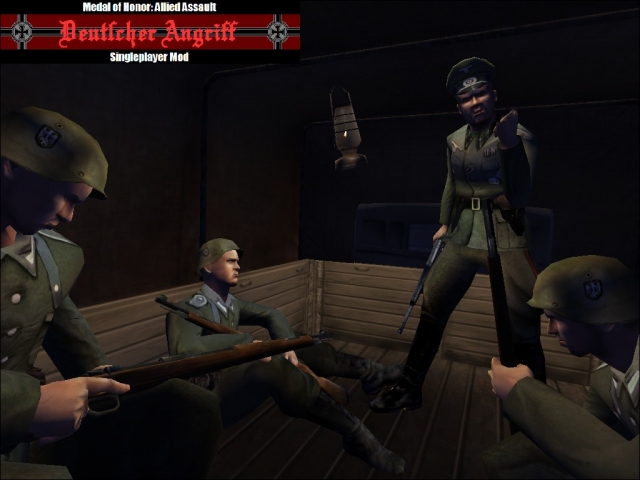
MOHI-KAN's German side singleplayer Mod "Deutscher Angriff" Version : 0.2 Release Date : 05-24-2011 Made By : MOHI-KAN Contact : Email: giretsu_airborne@hotmail.co.jp Language : Japanese ----------------------------------------------- This Mod changes the single player mode to be from the German side. This Mod can be used even in other singleplayer custom maps. Place the .pk3 file into the "main" folder in Medal of Honor Allied Assault. To remove the MOD, just delete the .pk3 file. ----------------------------------------------- * Disclaimer If you want to make new Mod by using Deutscher Angriff, Please put my name in credit. ----------------------------------------------- Enjoy! Tanoshindekudasai! ----------------------------------------------- * Japanese -> English Translation Website http://www.excite.co.jp/world/english/ * Medal of Honor Information @ MOH Matome WIKI (Only Japanese) http://www21.atwiki.jp/medalofhonor/
German Campaign
Who wanted to be a german and fights american? Finally,you can do it now You are a german and you fights americans For the moment,i working on mohaa spearhead. Have fun!
Minhs Map Mods
MoDeD my Minh. This file is copyrighted. You may not edited it unless you have permission. Any questions or comments, email me at nomqn92@yahoo.com I don't know if it work for Spearhead. But I know it work for Mohaab and Mohaa. ( You can try Mohaas) {This is server side mod only!} To install, put the pk3. file in your mohaa/maintt folder! I bet you will like my moDz!
Unclebobs Map Mods
by unclebob Milwaukee, WI Oct 18 2005 So just a basic MOD via map script for a few stock maps! These are desinged to work with MOH Allied Assault! This MOD adds some weapons, ammo & steps to get around the maps easier. No known glitches or errors. But as always this is a free MOD & I take no responsibility for any harm or damage that may occur due to this Modification or your use of it. unclebob@wiDOTrrDOTcom MODed map list MOHaa maps: Southern France, Destroyed Village, Remagen, Crossroads, Snowy Park, Stalingrad, Algiers.
Billys Map Mods
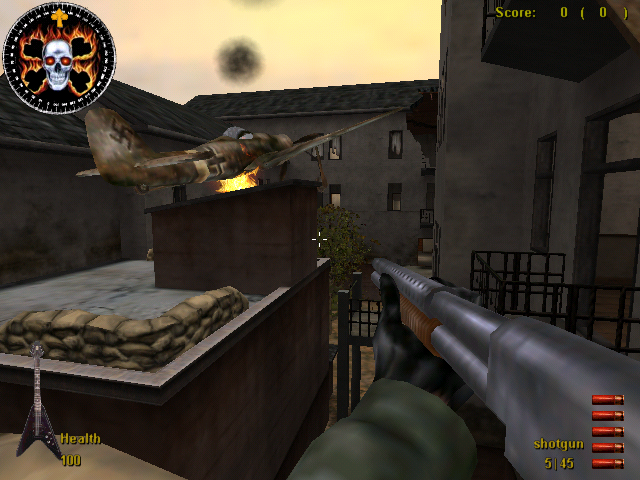
Map Mods By CplBilly RO.cplbilly@hotmail.com www.rock.clanservers.com come on forums modding section any questions Just put in mohaa/main maps 123467 our modded trucks tanks etc on all maps couple of surprizes map 1 sandbag city map 2 couple of trucks airplane Burning 1 tank map 3 tank trucks map 4 Trees and two trucks map 6 trees and airplane Burning Map 7 trucks tanks obj 1 trucks tank cars obj2 Fire buring under rocket

Opel Truck Windows Fix
This file fixes non-transparent windows of Opel trucks in single player maps and multiplayer maps in Spearhead. Install: copy pk3 file under Mohaa/mainta folder. / Uninstall: delete file. Leon / leonmohaa@hotmail.com My other MOH files are: [Copy files under Mohaa/mainta folder for Spearhead, copy files under Mohaa/main for Allied Assault. All files works with MOH Allied Assault except SH noted ones. My all files works with texture compression and works with all versions of patches.] Heavily Modified Weapons: -Biathlon 98 K Burst Fire -AK 47 Kalashnikov -Sten P MG42 [SH] -12 Shooter Webley [SH] -Colt Raging Bull -Sten Mk II SAS [SH] -Springfield Custom BB Gun -FAMAS Thompson 1946 -3 in 1 BB Guns Pack -Spearhead Riot Mk II -USA Riot Shotgun & Combat Gloves -Verbesserte HS 9mm -MP 70 -XtG 50 NSDAP -Soviet SMG -Ubersoldat Kar98 Sniper Mk II -MP 75 Ausf C -XMP 70 Mk II -Ubersoldat Kar98 Sniper -West Point Garand -Thompson Para 9mm -Spec Ops Springfield II -Tokarev -Colt ACP 14 -Karabiner 98 Biathlon -Spetznatz PPSH MG42 [SH] Weapon Skins Pack: -WW2 Rifle Collection Scope Mods: -ZNV Light Amplification Scopes -ZNV Zombie Light Amplification Scopes -ZNV Nazi Ghosts Light Amplification Scopes Others: -Blood Patch for Spearhead [SH] -Stalin vs Hitler [SH] -Hitler's DNA -Tracer Smoke for Bazookas -Black Smoke for Grenades [SH] -Menu Shooting Sounds -Wolfen Compass Pack -Weapons In Color -Verbesserte HS 9mm for Allies -Vehicle Add-Ons for Multiplayer maps -Spearhead Vehicle Add-On Pak [SH] -Spearhead Vehicle Add-On Pak II [SH] [Do not distribute my files without written permission.] --------------------------------------------------------------------------------------------------------------------------------------------
Cleaners Map Mods
MPSH modside map pak for Spearhead Server-side modded alliedassault maps for Spearhead. These and others were only available by request in the past but decided to make them available to the public. -these are modded alliedassault maps for a spearhead server. Maps included: (mohdm1) Southern France 1944 (mohdm2) Village of Breil (mohdm3) Remagen Rhineland 1945 (mohdm5) Finland:Soviet invasion 1940 (mohdm6) Stalingrad Southern Russia 1942 (mohdm7) Algiers North Africa 1942 (obj_team3) Omaha Beach:Charlie Sector maps were modded to increase play-action and to maximize enjoyment -fps & lag also went into consideration when modding these maps and key spawns have been protected but not infested (these maps do not contain 80 panzer tanks laid out all over the place as in some mods turning the maps into a unplayable scrapyard of military vehicles) These maps are modded to enhance battleplay in mind. NOTE: these set of maps are currently for spearhead only. Some of these maps will work in alliedassault- if you are running an alliedassault server you may contact me and I will send you the modside maps for AA. installation: unzip and upload/place the .pk3 file into your MAINTA directory, make sure to remove other server side map mods if they are dm/mohdm maps. contact: cleaner@75thabn.com The Firefight Arena - 66.151.132.167 www.75thabn.com/mpshmodz
Lamrons Map Mods V8
Map mods for stock SH Multiplayer maps (and for 2 AA maps, so those might work in AA as well). 2 Files present, 1 of them is only small and contains only 1 map so probably an update on the original one.
Stadt Ladder Fix
A ladder fix for the map Stadt. Not sure what ladder it actually fixes or what was wrong with it, haven't tested/checked it out myself.
Snow Mod
A mod that makes it snow in your maps. Please check the added readme and settings files to figure out how to set this up properly.
Fog Maker
Gotcha's Fog Maker script To use just drop it in your main and exec in your map script or dmprecache "exec global/FogMaker.scr" Explanation: I made this script so I can just sit back and watch it roll until I find the perfect fog for the level I'm working on, or set custom fog on the go until I get to something I wanted. It automatically cycles through infinite colors, one every 10 seconds. It displays the settings of the fog on the hud so you can easily set it in your script and see what you're looking at. Also added the ability to log it via cvar so it'll just pop into your logfile so you can copy and paste it into your map script, or fog/night script. It prints as seen below. With RFS loop | Without RFS loop //------------------------------------- | //------------------------------------- //--------Fog Settings-------------- | //--------Fog Settings-------------- $world farplane_color ( 1 1 1 ) | $world farplane_color ( 1 1 1 ) $world farplane 3500 | $world farplane 3500 while(1) { | //r_fastsky was OFF, no need for stufftext loop. local.player = parm.other | //---------End Fog Settings-------- if(local.player != NIL && local.player != NULL) { | //------------------------------------- local.player stufftext "r_fastsky 1" | wait 3 | } | waitframe | } | //---------End Fog Settings-------- | //------------------------------------- | | Cvars: This script also has other cvars to tweak your fog exactly as you want it, and displays your custom settings on the hud as well as print them. 1.) fogdist "xxxxx" - This sets the farplane, default is set at 3500 2.) rfs "x" - 0 or 1, off by default, this turns r_fastsky on and off 3.) fog "x x x" - This is used to set a custom color, if you see a color you like you can see the numbers on the hud and tweak the RGB values via entering them in here and making your changes, you must set this cvar back to "" in order to resume the auto changing fog you also must use quotations when you enter your fog color. 4.) log "x" - Off by default, just type log 1 in console, this will iprintln the current settings so you can see them in the log if you wish. 5.) stop "x" - 0 or 1, off by default, this will stop the fog when it's auto scrolling, so if you find a color you like you can stop on it and walk around. 6.) night "x" - 0 or 1, off by default, added this last second as an easier way to set color to 0 0 0 for night
Let It Snow V12
/*_/_/_/_/_/_/_/_/_/_/_/_/_/_/_/_/_/_/_/_/ \_| )) O (( * . * |_/ \_| ( ) |_/ \_| * / \ Let it snow v1.2 by Ric-hard |_/ \_| ( ) * |_/ \_| /'-' \ www.ric-hard.tk |_/ \_| ( ) . . |_/ \_| /'. _ .\ |_/ \_|( ) Released 2005-12-10 |_/ \_| .___ . * * |_/ \_| (____) . |_/ \_/_/_/_/_/_/_/_/_/_/_/_/_/_/_/_/_/_/_/_*/ ------------ Description: ------------ This is a serverside mod that makes it snow. ---------------- Supported Games: ---------------- Medal Of Honor Allied Assault & Spearhead. --------------- Supported Maps: --------------- Southern France Destroyed Village Remagen Crossroads Snowy Park Stalingrad Algiers The Hunt V2 FACILITY Omaha The Bridge --------------------------------------------------- How to turn the mod on and off? (its on by default) --------------------------------------------------- cvar "sv_snow" 1 = on 0 = off (Default = 1) ---------------- How to install ? ---------------- Unzip and put zzz-Let it snow v1.2 By Richard.pk3 into MAIN (Eagames/mohaa/>>MAIN
Storm Mod
*************************** THE SCRIPT IS A SERVER-SIDE SCRIPT *************************** •Filename: StormMod.zip •Installation: Place the ZzZ-Storm.pk3 in your Main, Mainta, MainTT, Demota or whatever you are usings folder lol, a simple way to know where to add it is put it in the same folder as the Pak.pk3 files. •Contact: You can contact me with any problems requests, or whatever you need at Miketothebell@yahoo.com •Description: This script adds a Storm to your server. Rain, Thunder, Lightning, Darksky(night). •Details: This script will make your server have a storm on it, it will rain, thunder and there will be lightning. It gives you a feeling of really being in a storm, on a map that doesnt usually storm that is... •Bugs: There are a few bugs, the one that stands out the most is that the rain will fall through buildings, therefore making it rain inside, Unless all the doors/shutters etc. are closed in that building lol. Very.. strange. •Troubleshooting: If this mod isnt working it has to be because either you installed it incorrectly, theres another mod interferring with it, or you simply are doing it wrong lol. If the case is that there is another mod interferring with it, send me all the mods you want combined and ill be happy to combine and resend it to you. •Again if you would like help in setting this on your server or any other things you may need to talk with me about. Please E-mail me. ALSO, PLEASE REPORT ALL BUGS OR MISTAKES TO ME. EVEN IF THERE VERY SIMPLE.(Besides the rain through the buildings). ALSO I WOULD LOVE TO GET COMMENTS ON MAKING THIS MOD BETTER. •Well thanks for downloading and i will be working on other usefull commands and other things to do via scripting. i would be releasing them as soon as i finish them. -GLø¢K¹º
Advanced Weather Mod
place the zzzzzzzzz-DUST-advanced-weather.pk3 & advanced_weather_settings text files in you server's main,mainta or maintt. before uploading to server. open the advanced_weather_settings text file and set the weather you wont on each map. save changes and upload them to the server. and play ! have fun,,,!,,,,,,test them all :).! read the advanced_weather_settings text file for the settings you can set !!! :).! ----------------------------------------------------------------------------------------------------- i will be making a updated ver of this with more settings for each map. keep a eye out on the website !!!!. pls keep these credits running for peeps to find this mod :) !!! always share !!! :) . thanks for downloading and useing the mod,mods :). links in messages are to http://www.mods-r-us.net/ http://www.esnips.com/web/dustmidlands-mods?docsPage=1#files change the number to what settings you wont :) v2_1/ v2_2 only not tested on AA but it should work on them all AA,SH,BT. ///////////////////////////////////////////////////////////////////////////////////////////////////////////////////////////// /////[][][][][][][][][][][][][][][][][][][][][][][][][][][][][][][][][][][][][][][][][][][][][][][][][][][][][][][][][][]//// ////[]/MODS BY DUST//////////////////////////////email me at=dustmidlands@hotmail.com///////////////////////////////////[]/// /////[][][][][][][][][][][][][][][][][][][][][][][][][][][][][][][][][][][][][][][][][][][][][][][][][][][][][][][][][][]//// ///////////////////////////////////////////////////////////////////////////////////////////////////////////////////////////// //=========================================================================================================================// ///////////////////////////////////////////////////////////////////////////////////////////////////////////////////////////// // ****** * * ******* ********* // // * * * * * * // // * * * * ******* * // // * * * * * * // // * * * * * * // // ***** **** ****** * // ///////////////////////////////////////////////////////////////////////////////////////////////////////////////////////////// //=========================================================================================================================// ///////////////////////////////////////////////////////////////////////////////////////////////////////////////////////////// // set each map with its own advanced_weather affects.these are exstreme weather scripts :) ///////////////////////////////// ///////////////////////////////////////////////////////////////////////////////////////////////////////////////////////////// // avalible setting are as follows // map being the map name (ie) hunt_1a: // // // // pls note that v2 has only 2 settings v2_1 & v2_2 and v2_0 // // map_0: //normal weather. // // // // v2_0 //normal. // // V2_1 //day-light,foggy. // // V2_2 //night-low-light,foggy. // // // // map_1a: //day-light,slightly more fog. // // map_1b: //day-light,foggy. // // map_1c: //day-light,very foggy. // // // // map_2a: //night,slightly-lower-lighting,more fog. // // map_2b: //night,more-lowered-lighting,foggy. // // map_2c: //night,very-low-lighting,very-foggy. // // // // map_3a: //day-light,more-foggy,rain. // // map_3b: //day-light,very-foggy,rain. // // // // map_4a: //night,less-light,foggy,rain. // // map_4b: //night,very-low-light,very-foggy,rain. // // // // map_5a: //day,more-foggy,rain, storm. // // map_5b: //day,very-foggy,rain, storm. // // // // map_6a: //night,low-light,foggy,rain, storm. // // map_6b: //night,very-low-light,very-foggy,rain, storm. // /////////////////////////////////////////////////////////////////////////////////////////////////////////////////////////////
Medal of Honor: Allied Assault Mods (MOHAA) — Complete Community Archive
Welcome to the premier repository for Medal of Honor: Allied Assault mods. Since the game's groundbreaking release in 2002 by 2015, Inc. and EA, MOHAA has inspired one of the longest-standing modding communities in first-person shooter history. MOH-DB preserves, categorizes, and serves over 1,600 verified community modifications, custom enhancements, and competitive utilities for Allied Assault, Spearhead, and Breakthrough.
Explore MOHAA Mod Categories
Player Skins & Uniforms
Over 700 historically accurate and creative player uniforms for Allied and Axis factions. Equip authentic U.S. Army Rangers, 101st and 82nd Airborne paratroopers, British Commandos, Soviet Red Army conscripts, Wehrmacht Heer infantry, Fallschirmjäger, and Waffen-SS camouflage patterns, as well as classic community clan skins.
Weapon Models & Reskins
Enhance your WWII arsenal with ultra-detailed weapon replacements and high-resolution textures. Popular downloads include authentic wood-finish Kar98k sniper rifles, realistic metallic sheen M1 Garand models with classic "ping" animation refinements, Thompson submachine guns, MP40s, BAR 1918 rifles, and custom iron-sight alignments.
Soundpacks & Realism Audio
Transform the sonic atmosphere of Allied Assault. Replace compressed 2002 Quake-engine sound effects with cinema-grade gunfire recordings, authentic distant artillery rumblings, terrifying Stuka dive-bomber sirens, supersonic bullet cracks, metal ricochets, and remastered German and American voice callouts.
HUDs, Menus & Crosshairs
Modernize the in-game interface for 1080p, 1440p, and 4K widescreen displays. Download minimalist competitive heads-up displays, custom dot and crosshair overlays, cleaner compass indicators, redesigned main menus, and unobtrusive health and ammunition counters favored by competitive league players.
Server Utilities & Admin Scripts
Run resilient, modern multiplayer game servers with essential server-side utilities. Includes automated map rotators, anti-cheat detection tools, voting scripts, custom match timers, ping balancers, and administrative rcon managers designed for dedicated servers running 24/7.
MOHAA Reborn 1.12 Community Patch
The gold standard community patch for modern MOHAA servers and clients. The Reborn 1.12 patch resolves legacy buffer overflows, fixes client query exploits, expands internal script limits for complex mods, and provides a built-in server browser to replace the defunct GameSpy master server.
How to Install MOHAA Mods: Quick Guide
Identify Your Target Directory
MOHAA stores all game assets in subfolders inside the root installation directory:
- MOHAA (Base):
.../MOHAA/main/ - Spearhead:
.../MOHAA/mainta/ - Breakthrough:
.../MOHAA/maintt/
Paste Without Extracting
Download the mod archive from MOH-DB. If it is zipped (.zip or .rar), extract the enclosed .pk3 file. Place this .pk3 directly into your game's /main/ folder.
How to Remove or Troubleshoot
To remove any mod, simply delete its .pk3 file from the /main/ folder. The game will immediately return to stock behavior without reinstalling.
Frequently Asked Questions about MOHAA Mods
To install MOHAA mods, copy the downloaded .pk3 file directly into your Medal of Honor Allied Assault installation folder under /main/ (or /mainta/ for Spearhead, and /maintt/ for Breakthrough). You do not need to unpack or extract the .pk3 archive—the game engine loads it automatically upon launch.