
Medal of Honor: Allied Assault Mods (MOHAA)
Discover and download community-created modifications to enhance your Medal of Honor: Allied Assault experience.
95 Mods Found

Scapp RCON Builder
A program that will help you add rcon commands to the list of scapp-host.

Scapp Host 0
The NEW 'Autokick' program for MOHAA/SH/BT!!! To administer your server create a "scapp-unit" (other word for Clan). Then add your server and assign it to the created "scapp-unit". (There is a field "scapp-unit ID" which you need to set). Multiple "scapp-units" can be created and servers attached to, each scapp-unit has its own banlist and annoucements. You can then access the list of Players and start adminning your server. If you want to use banning and kicking you need to change the default settings in the "kickconfig" of your server. Default settings are "no action" hence it migth look that its not working, change that to your liking like "kick and message" to have banning enabled. There are multiple reasons why a kick or ban is due, you need to change those you would like to take effect, e.g. if you have issued a IP range ban then you need to check the corresponding setting "IP range ban" in the kickconfig to see if it does the action you desire. The Button with the "S" in the player info window stands for "Search" and enables cross search on the collected data. Note: This version of scapp-host only works with Mohaa/Mohsh/MohBt. If you have a Mohsh/MohBt server you need to select Mohaa as game (selecting mohsh will crash scapp-host > bug)

Mohaasnet Tool
Download here: http://www.mohaas.net/download/ What is the Spearhead Tool? The Spearhead Tool is a program which runs on Windows XP, Vista, 7 and 8. It is written in C# .NET and allows users to browse our server list and join the servers directly. The second main feature is a chat integrated into the program. How do you get a server list if there is no GameSpy list anymore? We will show two lists in the tool: The primary list will be provided by our own community. We want to give our clans a special opportunity to advertise their servers. This means, every clan who joins our community will be listed there. The secondary list will be provided by external sources. Our admins have backed up the current GameSpy server list and will show all active servers from that list too. What is the difference to other tools available? Why a new one? With the current development, there is no doubt that there are already multiple existing tools. So you might wonder why we should do our own tool: We would like to build a European Spearhead community Our tool's primary games will be SH and BT We would like to offer our own server list in order to improve the visibility of our clan's servers Our tool should be the foundation of more advanced functionality: Community chat, anti cheat, etc!

Medal Honor Query Tool
Hi all GREAT news!! X-null have now released "MOHAA Reborn Query Tool" to enable users to connect to MOHAA once Gamespy shuts down on 31st May If you are not aware of Gamespy shut down and how it will effect the game of MOHAA (and additional games) are that users in game and on Xfire / Gametracker will not be able to see live server details such as if the server is online or who is online playing. We can not advise on full extent of impact to Xfire / Gametraker / Qtracker and a likes you should view their forums to see if they have addressed this.................. Main Info here -: http://www.poweredbygamespy.com/pricing/ and more discussion here http://www.x-null.net/forums/showthread.php?2090-GameSpy-Issue-IMPORTANT&highlight=gamespy The Tool supports many features - in order to support the loss of Gamespy the following is a brief summary. Once Released Server Admins can upgrade their Servers to support the new Reborn Master Server Query (Currently still in development) Watch this space for release - NOTE -: You DONT have to use all the Reborn features but you will need to update your server. This update will allow servers to be shown online as with this tool - Third parties can contact X-null for Developer pack to support other third Party tools This tool currently also supports legacy Gamespy servers so all available servers are listed (Once Gamespy goes down these servers can still be shown and connected to if available but they will show offline) The tool once installed auto updates - you can check for latest version by clicking on the "about" menu option Also checkout the "options" where you can customise the tool settings Features Supports all OS apart from MAC Add Favorites flag Country Flag for server location Sort and filter server List Join Server / Join Server with password CMD Line Parms can be added in options Auto refresh can be disabled in options to prevent lag Show Offline servers option Displays players in server Please feed back on X-null here http://www.x-null.net/forums/showthread.php?2095-Medal-of-Honor-Query-Launcher-Beta-Version any issues or suggestions, please note the tool is not a Server admin tool it is a game launch tool to support the loss of Gamespy How to install the tool -: You need .NET Framework 4.0 installed in order to use it. .NET 4.0 works on XP-Win8.1. Get it here and install it first if you don't have it: http://www.microsoft.com/en-us/downl....aspx?id=17718 Then, download and run the installer: http://www.dinofly.com/files/mohaa/MOHQueryInstaller.exe CREDITS Own3mall - Tool Creator Razor - Master Server Query Creator Beta Testers and Feature suggestions James Dax Heastinkbod Shadow skiTz Purple Elephant1au DustyBones Appelpitje Leyok bulldozer

Irfanview
You can open .tga files (extension for mohaa screenshots) very easily and smoothly with this software. Make sure you set the .tga files to open with IrfanView and you can easily look and scroll through all your screenshots. If you save the file it will be automatically saved as a .png file! (you can change this if you want ofc).
Musetips Text Filter
A Text Filter that can filter your documents and logs in an instant! It´s amazing to use for your server qconsole.log files but for every other doc/log as well! Type in the word(s) you want to look for and it will instantly show you the entire list of lines where that word or words are in. If you e.g. want to filter your qconsole.log for chat messages, you simply type in 'dmmessage' and you get the ENTIRE chat list of your server. You can type in player names to see what they've done throughout the game.. you can check playermodels.. everything you want. To exclude certain words just used the minus symbol ( - ) infront of the word. Sentences with that word will now be ignored. This will make your searches more accurate.

Mohaatools Mohradiant
If you want to build a MoH:AA map you will going to have to have this zip file. Tutorials on how to use them will be made available in the Tutorial/Guide list on the site.

MOHSH SDK
SDK stands for Software Development Kit. It's the tool needed to create Spearhead maps and more.

Adminini Editor
With the adminIniEditor you can generate or edit the admins.ini file that is used as a configuration file for sub-admins for the Mohaa Patch 1.12 at www.x-null.net Administrate the admins and rights on your patched mohaa game server with this tool. System Requirements: adminIniEditor needs the .NET Framework 2.0 or higher to run.

Thread Viewer
This thread viewer is a relatively simple script file that just loops continuously while all other scripts perform their tasks. The thread viewer reads the parm.previousthread value very rapidly, and uses this to determine when new threads start. Through console commands you can output the results to the console. With this information, you might be able to track down bugs in your scripts or just determine how many threads are running. The script even allows direct interaction with all threads. You can for example immediately terminate a thread of your choice. ~ jv_map

Bsp Viewer
BSP Viewer (a.k.a. MoHAA Tools) can view BSP files but also edit & generate TIK and SCR files. It can convert BSP files back to MAP files (though this does get really messy really quick).

Pakscape
A software to easily open, edit and create pk3 files (for mapping, modding, skinning, scripting etc.). No need for an installation, just unzip the pakscape.exe, double click it (open it) and you're ready to go.
MMDL Autodownloader
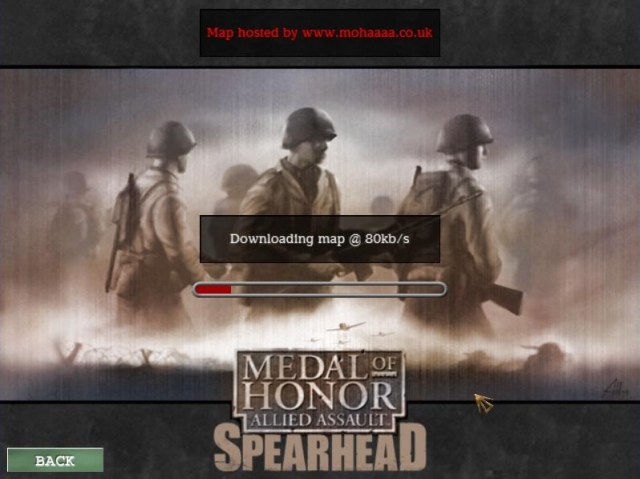
MMDL Auto map downloader for Spearhead / Breakthrough
scapp-watchdog 1.0.0.7
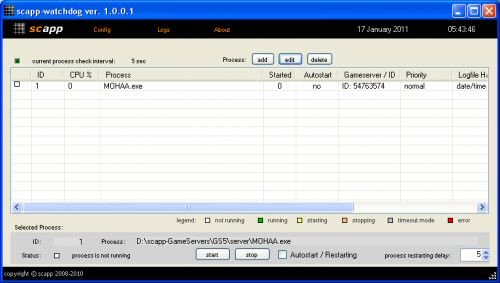
Dedicated Windows server control processes like game server process (e.g. mohaa.exe)
Medal of Honor: Allied Assault Mods (MOHAA) — Complete Community Archive
Welcome to the premier repository for Medal of Honor: Allied Assault mods. Since the game's groundbreaking release in 2002 by 2015, Inc. and EA, MOHAA has inspired one of the longest-standing modding communities in first-person shooter history. MOH-DB preserves, categorizes, and serves over 1,600 verified community modifications, custom enhancements, and competitive utilities for Allied Assault, Spearhead, and Breakthrough.
Explore MOHAA Mod Categories
Player Skins & Uniforms
Over 700 historically accurate and creative player uniforms for Allied and Axis factions. Equip authentic U.S. Army Rangers, 101st and 82nd Airborne paratroopers, British Commandos, Soviet Red Army conscripts, Wehrmacht Heer infantry, Fallschirmjäger, and Waffen-SS camouflage patterns, as well as classic community clan skins.
Weapon Models & Reskins
Enhance your WWII arsenal with ultra-detailed weapon replacements and high-resolution textures. Popular downloads include authentic wood-finish Kar98k sniper rifles, realistic metallic sheen M1 Garand models with classic "ping" animation refinements, Thompson submachine guns, MP40s, BAR 1918 rifles, and custom iron-sight alignments.
Soundpacks & Realism Audio
Transform the sonic atmosphere of Allied Assault. Replace compressed 2002 Quake-engine sound effects with cinema-grade gunfire recordings, authentic distant artillery rumblings, terrifying Stuka dive-bomber sirens, supersonic bullet cracks, metal ricochets, and remastered German and American voice callouts.
HUDs, Menus & Crosshairs
Modernize the in-game interface for 1080p, 1440p, and 4K widescreen displays. Download minimalist competitive heads-up displays, custom dot and crosshair overlays, cleaner compass indicators, redesigned main menus, and unobtrusive health and ammunition counters favored by competitive league players.
Server Utilities & Admin Scripts
Run resilient, modern multiplayer game servers with essential server-side utilities. Includes automated map rotators, anti-cheat detection tools, voting scripts, custom match timers, ping balancers, and administrative rcon managers designed for dedicated servers running 24/7.
MOHAA Reborn 1.12 Community Patch
The gold standard community patch for modern MOHAA servers and clients. The Reborn 1.12 patch resolves legacy buffer overflows, fixes client query exploits, expands internal script limits for complex mods, and provides a built-in server browser to replace the defunct GameSpy master server.
How to Install MOHAA Mods: Quick Guide
Identify Your Target Directory
MOHAA stores all game assets in subfolders inside the root installation directory:
- MOHAA (Base):
.../MOHAA/main/ - Spearhead:
.../MOHAA/mainta/ - Breakthrough:
.../MOHAA/maintt/
Paste Without Extracting
Download the mod archive from MOH-DB. If it is zipped (.zip or .rar), extract the enclosed .pk3 file. Place this .pk3 directly into your game's /main/ folder.
How to Remove or Troubleshoot
To remove any mod, simply delete its .pk3 file from the /main/ folder. The game will immediately return to stock behavior without reinstalling.
Frequently Asked Questions about MOHAA Mods
To install MOHAA mods, copy the downloaded .pk3 file directly into your Medal of Honor Allied Assault installation folder under /main/ (or /mainta/ for Spearhead, and /maintt/ for Breakthrough). You do not need to unpack or extract the .pk3 archive—the game engine loads it automatically upon launch.