Admin Tools
SwSRebornTool.pk3
Creator
SWS Merlin
Version
V2
Game Type
MOHAA
Reborn Compatible
All
Description
Another of our Contributions to you folks....
-|SwS|- Custom Reborn Rcon Tool © 2011 :www.specwarriors.com
^ ALL IN ONE PACKAGE ^
"Panel designed to Keep things simple and user friendly"
*English
*Spanish
*French
*Dutch
language support included in file.
//--------------------------------------------------------------------------------------
First and foremost:
a). Thank you for reading this.
b). Thanks to all contributors that have helped make Mohaa more enjoyable for all to play
c). Special thanks to creaper for his weapon control mod.
d). Special thanks to zero's {JH} Admin Menu for private chat script/pm chat/login/logut functions.
e). Special thanks to darksoul for his input with patch ver script.
f). Credit goes to all respected parties for making this all possible, Panel Design by SwS.
g). Panel supports latest Reborn release!
//--------------------------------------------------------------------------------------
Info:
***** ALLIED ASSAULTS LINUX SUPPORT ONLY *******
1). Your server must have the latest Reborn patch 1.12 installed! ( Latest Patch included )
2). The panel/server works best with Mefy's Mod! ( Mod included - to support mixed gametypes )
3). The panel works best with Single Player Maps! ( Mod included )
4). You must be placed on the admin.ini file for access!
5). Read the included .pdf file for more information on setting up your server with 1.12 patch!
6). View the help folder for more guidance
7). NO RCON PASSWORD NEEDED FOR SUB ADMINS = more secured!
//--------------------------------------------------------------------------------------
User Level:
Novice - Experience
//--------------------------------------------------------------------------------------
Installations (BACKUP YOUR SERVER FILES BEFORE STARTING!!):
a). Download file and save to desktop
b). Unzip folder to desktop
c). After unzipping, open folder and you SHOULD see 4 folders, if not then you improperly unzipped the folder ( re-download file ).
Patch Install ( Requires FTP access ):
*2.5b files included - If already patched, check for latest version: open console and type patchver*
Fresh patch install/upgrade:
a). open folder name: "Upload to Server Outside Main folder"
b). edit the admin.ini for authorization read below for example.
c). upload all contents to the outside of main folder!
d). No ftp access to outside of main folder, check with hosting company for further assistance.
//--------------------------------------------------------------------------------------
Server admin.ini quick Setup:
a). Read the included .pdf file
b). User value rights is based on whats available
c). Say you want me to have kick + ban rights only:
d). According to the .pdf file: kick value is: 32 and ban value is: 128
e). My rights added together: 32+128= 160
f). 160 will be added to the servers admin.ini file!
example via admin.ini:
// name= your gamer name( MUST BE USED!) ...password= generated password .. rights= their access rights
* If my gamer name does not match "name" then panel will not work!
** Example
name=johndoe2011 password=johndoe1 rights=160
//--------------------------------------------------------------------------------------
Server Main Folder Installation (LINUX ONLY):
* All files required for proper functioning of Reborn Panel *
* Have server offline during this process*
* BACKUP ALL FILES, PRIOR TO PATCHING/UPDATING!! *
a). open folder name: "Upload to Server Main folder"
b). open folder name: "global"
c). edit all .cfg's with your server credentials that say "EDIT THIS"
Default weapon is "sniper"
d). Save .cfg's and upload "global" folder to your Server Main folder via FTP.
e). in folder name: "Upload to Server Main folder" look for server.cfg
f). edit server.cfg and go to end of script to change rotation mix.
you can look inside global folder to see what mix to use.
obj1,obj2,obj3,obj4,"r" (.cfgs) = are all locked for scrims, rest for public usage.
(bogus) password you can change to another bogus password for better security.
g). save server.cfg and upload via ftp to your server Main folder.
h). edit weapon_settings.txt to your likeings.
i). upload the remaining 3 files: 2.pk3 and 1 .txt ( located inside "Upload to Server Main folder" )
> Once these steps have been completed, then and only then.. restart server properties> and make sure "read only" is unchecked.
d). Launch game, join your server and press "F11" key to launch panel!
* to bypass the golden rules and go straight to panel, add this rule to your unnamedsolder.cfg
code: togglemenu sws10
example: bind p "togglemenu sws10"
//--------------------------------------------------------------------------------------
LOGIN SETUP:
a). see included shot4.jpg file ( inside help folder )
b). click under "edit" red label "login" to edit your login credentials.
c). once you get the pop up as illustrated in shot4.jpg, read on.
d). after edit, save, and click on green label "login as admin"
e). if done correctly, you will get a message under compass.
f). if not, recheck these steps.
g). default file location is in your configs folder named: mylogin.cfg
//--------------------------------------------------------------------------------------
LOGOUT SETUP:
* must set this up, if not, join your server with bogus name and log back into your server *
a). see included shot4.jpg file ( inside help folder )
b). click under "edit" red label "logout" to edit your logout credentials.
c). once you get the pop up read on.
d). after edit, save, and click on red label "Admin logout"
e). if done correctly, check your name to see if it changed.
f). if not, recheck these steps.
g). default file location is in your configs folder named: mylogout.cfg
//--------------------------------------------------------------------------------------
Server Conflicts:
* package uses custom state/torso files ( see help folder )
* remove your server side weapon mods
* if you have a custom Mefy mod, should be good to go, if not remove them
Client Conflicts:
* None so far, if you have issues, check back forum and post your issues
* You can use multiple admin tools.
* RCON PASSWORD IS NO LONGER NEEDED FOR YOUR SUB ADMINS!!
//--------------------------------------------------------------------------------------
Download link:
http://www.specwarriors.com/reborn/R2CV2.zip
New Clientside Panel Only:
http://www.specwarriors.com/reborn/RbClientside.zip
Smaller version:
http://www.modtheater.com/forum/showthread.php?t=39313
Enjoy.
Screenies:
Installation Guide
To install and use:
Download the latest version of Reborn. Install the latest Reborn on your MOHAA server. Reborn_Admin_Tool_Version_3.zip contains all of the files you'll need for a new install of this mod. Upload the files accordingly to your server.
To update from a previous version:
Upgrade reborn to the latest version.
Make sure your admins.ini follows the new reborn format:
Sample Admins.ini:
Code:
//This is example:
//login=test password=test rights=16383
Download the attached zzzzz_SwSRebornTool.pk3, and replace the old SwSRebornTool.pk3 with the new one in your MOHAA/Main
Credits
SWS Merlin - updated by own3mall
Related MOHAA Mods
More Admin Tools →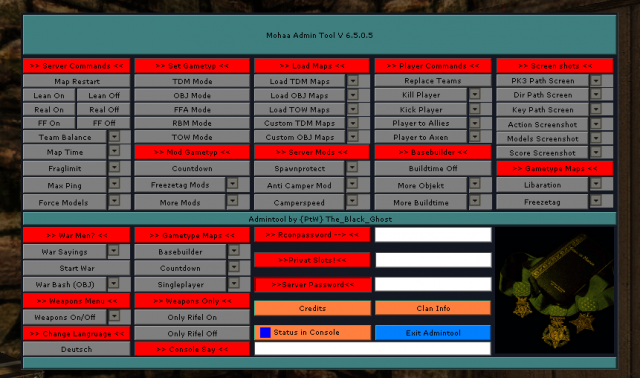



Engine & Patch Compatibility
Community-tested verification on official patches & Reborn
0.00 reviews
Community Rating & Discussions
Rate this mod and share feedback or installation tips with fellow players.
Your Rating:
Leave a Comment / ReviewLog in to join the discussion
Loading discussions...
Downloads
1,141
Total Downloads
Date Added
August 19, 2012
Download
Mod Information
Rating5.0/5
RebornAll
Requirements
Reborn 2.5 and above