Admin Tools
Ci Admin Menu
Creator
unclebob
Version
N/A
Game Type
MOHAA
Reborn Compatible
Unknown
Description
unclebob Milwaukee,WI 3/20/2006
Hay all unclebob with some more hopfully NOT useless stuff!
It is a server ADMIN Menu for those of you that use CI = Counter Intelligence
If at this point you are saying what is CI? Then you do not need this file, Move on to the next one!
As always I tried to make it easy to use for all.
INSTALLATION: Unzip the file you just D/L, wait I am in the Zip file ok scratch that.
In the folder UB CI SERVER MENU with this readme are TWO items a .pk3 file & a config file
each named UBmenu COPY both into YOUR (NOT the SERVER) games main folder
Main = MOHAA
MainTA = MOH SH
MainTT = BT
Now let’s set up a few things. Open the UBmenu.cfg with notepad or some text editor
You should see this:
**********************************************************************
// Sets up the menu Functions!!
bind F8 "togglemenu UB_menu_SH_BT"
rconAddress 00.00.00.00:12203
rconPassword ******
*********************************************************************
Ok you're there now. Don't do anything to this line: // Sets up the menu Functions!!
If you want you can change the button the menu is binded to by changing the two stars to the key you want:
bind ** "togglemenu UB_menu_SH_BT"
Otherwise just use F8
Now add your server's IP Address. This way you can use the Menu even if you’re in another MOH server:
rconAddress 00.00.00.00:12203
And finally your server's Rcon Pass: rconPassword ******
Now you don't need to type all that crap in each time right? Wrong! At this point if you were to start the game
none of this would work.
Because, we need to tell the game console to execute the config. There are two ways to do this.
1. Open the console each time you start MOH & type: exec ubmenu.cfg Then hit ENTER!!!
2. Right click on your Desktop icon for MOH then hit properties. Look for TARGET, in a box next to it is
"C:\Program Files\EA GAMES\MOHAA\moh_Breakthrough.exe"
Add this to the end +exec ubmenu.cfg
Be sure to keep the space so it looks like this
"C:\Program Files\EA GAMES\MOHAA\moh_Breakthrough.exe" +exec ubmenu.cfg
Ok then hit apply at the bottom of the window & Then OK. Now start MOH, well in the main lobby hit F8
(or what ever key you bound the menu to)
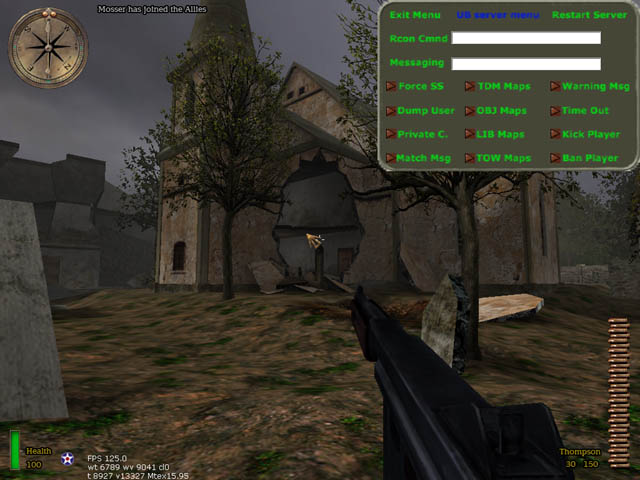
If all is well a bland Grey & Green Menu will pop down on the upper right corner of the screen & the rest will turn BLACK
That’s it. It’s all ready to go. So go in your server & try it out.
CAUTION: don’t hit 50 options in 30sec you will crash your server
WHAT ARE THE OPTIONS:
*********************************************************************************************
EXIT MENU UB Server Menu Restart Server
Rcon Cmnd ---------------------------------------------------------------
Messaging ---------------------------------------------------------------
Force SS TDM Map Warning Msg
Dump User OBJ Map Time Out
Private C. LIB Map Kick Player
Match Msg TOW Map Ban Player
*********************************************************************************************
Exit is obvious but Restart Server ONLY restarts the map! So if you change something via Rcon & it doesn’t take effect hit restart & it will reload the map & your command should then take effect!
RCON Cmnd = Just like the console just you don’t have to type RCON or hit the ~ key anymore
Messaging = Is used to play GOD OF THE SERVER or to just say stuff as the console so ppl may actually listen, Yeah RIGHT!
Force SS = Forces the standard anti cheat Screenshots on the player. Not that anyone ever sends them in!!
Dump User = Writes that users info to the CI events log.
Private C. = reset the servers private client slots so as to lock the server.
Match Msg = Perset console messages for scrimmages or even a tourney.
TDM, OBJ, LIB, & TOW Map are all the stock maps set to load with a click of a button
(DONT run maps for SH & BT in MOHaa or BT maps in SH it will CRASH your server)
Also OBJ maps run round based?? Working on it & when you end a map it goes back to the start of the map rotation BUT will stay
in the game type of the last map until you restart the map!
Warning Msg = Preset warning messages to the players via console.
Time Out = Forces that player to spectator for a set amount of time.
Kick Player = Like I need to explain!
Ban Player = Banns that players IP from the server!
**********************************************************************************************************************
As always! This is freeware so have fun but if it goes bad & the magic smoke comes out Don't even try to blame me.
after all I'm broke!
Related MOHAA Mods
More Admin Tools →



Engine & Patch Compatibility
Community-tested verification on official patches & Reborn
0.00 reviews
Community Rating & Discussions
Rate this mod and share feedback or installation tips with fellow players.
Your Rating:
Leave a Comment / ReviewLog in to join the discussion
Loading discussions...
Downloads
354
Total Downloads
Date Added
December 10, 2015
Download
Fileub_ci_server_menu.zip
Size111.28 KB