Tools
Q3e Minimizer V15
Creator
TiM (UberGames)
Version
N/A
Game Type
MOHAA
Reborn Compatible
Unknown
Description
=-=-=-=-=-=-=-=-=-=-=-=-=-=-=-=-=-=-=-=-=-=-=-=-=-=-=-=-=-=-=-=-=-=-=-=
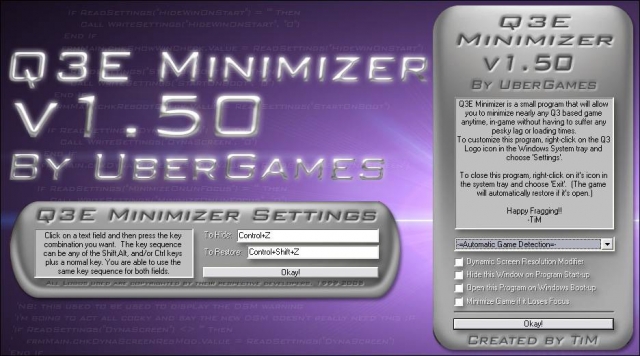
Q3E Minimizer v1.50 by UberGames
=-=-=-=-=-=-=-=-=-=-=-=-=-=-=-=-=-=-=-=-=-=-=-=-=-=-=-=-=-=-=-=-=-=-=-=
File Name: Q3E Minimizer v1.50
Version: 1.50
File Size: 272k
Developer: TiM
Date Created: 11/11/05 1:03AM
Creation Time: A few weeks (10% coding, 90% Debugging... gah!! ;P)
Programs Used: Visual Basic 6, Adobe Photoshop CS
Website: http://www.ubergames.info
=-=-=-=-=-=-=-=-=-=-=-=-=-=-=-=-=-=-=-=-=-=-=-=-=-=-=-=-=-=-=-=-=-=-=-=
About:
Q3E, or Quake 3 Engine Minimizer is a program that has been created to
give you the ability to quickly and easily minimize nearly every game
that has been coded using the Q3 engine as a base. The reason I made
this was because I was tired of having to spectate, or suffer being
killed over and over again as I used Alt-Enter to switch to my desktop
which took practically forever so I could answer MSN or ICQ.
The concept of the "un-Alt-Tab-able" game minimizer isn't mine.
This one is more of an extension to an idea that someone else had,
that I thought could be expanded furthur.
I was cruising JK2files.com one day, looking at the utilities section
(I had just sent in KT 101 and was looking to see if anyone had d/led
it yet) when I saw a file called "JK2 Minimizer" created by a very cool
d00d who goes by the name of Deathwish. Being interested,
I downloaded the file and found out how simple it was, yet at the same
time, so very very useful. Responding to people on MSN/ICQ, etc was
no longer a grueling task. Later on, I was playing STV: Elite Force online
and found that I greatly missed the ability to minimize it like I could
with JK2. So, I took it upon myself to create my own Minimizer. Using
snippets of VB code around the internet, I managed to create a similar
program I named "EF Minimizer", that I submitted to effiles.com. Many
people found it immensely useful, and I was extremely happy with the
feedback. ^_^
A few months later, I attended a LAN party (My first ever LAN party
actually :D ) where I got involved in a heated battle of Q3A with some
other people there. After a few minutes, I, by reflex, tried to minimize
Q3. When nothing happened, I said to myself at that point, "I'm going
to make a version of EF Minimizer that can minimize all Q3 based games".
After the LAN party, I clean forgot about doing that, so the half finished
"Uni Minimizer" (I hadn't thought of a good name then) sat on my hard
drive for a month.
After a month, I downloaded the new Jedi Knight: Jedi Academy demo (May
I point out, an AWESOME demo). Whilst I was playing it, someone on MSN
messaged me, and I realised that I was stuck in-game, having to alt-enter
out. At that point, I remembered Uni Minimizer, and decided to complete
work on it. So, after a few nights of working, I brought you version
1.0 of the new Quake 3 Engine Minimizer, or Q3E Minimizer, but now, I
bring you version 1.50 of Q3E Minimizer!
=-=-=-=-=-=-=-=-=-=-=-=-=-=-=-=-=-=-=-=-=-=-=-=-=-=-=-=-=-=-=-=-=-=-=-=
Features:
-=Features new to v1.50=-
-Now supports these games:
*Quake 4 (Same boat as Doom 3 -See Below ;) )
*American McGee's Alice
*Game Over in Machinimation
*Medal of Honour Allied Assault
*Medal of Honour Allied Assault Spearhead
*Medal of Honour Allied Assault Breakthrough
-Fraggin' Huge Codebase Revamp
Thanks to my programming work on the EF mod RPG-X, I've learnt a great deal
more about programming, which I was able to incorporate into Q3E Minimizer. :)
Through a LOT of recoding (very nearly re-wrote the whole thing!) and optimisation,
I managed to chop off about 50kb off of the size from the previous version! :D!
-Revamped Key Selection
I recoded how you select hotkeys, so it is now a lot more flexible. Not just
alphabetic characters, but nearly any key on your keyboard you can use now! :D
(NB: Although I didn't disable it, you may want to avoid F12 as some windows apps
need that one :P ).
Additional flexibilty include being able to assign the same key twice (so you can
just use the same keys to toggle in and out of game) and being able to set no
keys at all (Could be useful in some instances. I can think of a few)
-All New DSM
I COMPLETELY RECODED THE DYNAMIC SCREEN MODIFIER.
Having finally grasped the concept of API functions and how to use them right, I
found out how inefficient the DSM function was. It's now been totally redone
from scratch and I think it's safe to say, it's a lot faster and it'll leave
your icons alone now. ^_^!
-Remade Icons
I resized and optimized the games icons used, so they should look a lot more
crisp and less blocky in the system tray now.
-Minimize Game if it Loses Focus
A requested feature. When this is active, if the game loses focus (ie, the user switches
to another window or hits the windows key), it'll automatically minimize the game.
-Command Line Arguments
Not really a detailed feature, but it could prove useful. Basically,
as you start up this program, you can add the command line argument '-run "" ',
and when Q3E Minimizer runs, it'll start up that program too. :)
-More efficient registry settings
I went through and consolidated a few of the registry settings into single entries,
thereby saving a tad more memory lol. :)
-Subclass Message Support
This was another requested feature. I added support for external developers to be able
to send commands directly to the program from their own programs using the Windows SendMessage
API function. Supported commands include Toggle, Minimize, Maximize, SaveGameRes, GotoDesktopRes,
and GotoGameRes.
Unless you're a programmer, you probably won't be using this feature at all. ;) Any developers
interested in trying this out, e-mail me and I'll send you the necessary defines. :)
-=Features new to v1.45=-
-Minor UI Adjustments
I made a few changes to the interface background pictures. See if you can
spot the differences. ;)
-Screen DPI Adaption
It was pointed out to me that when a person's screen had it's DPI set
to anything other than the default 96, it would totally throw the program's
interface out of whack (The buttons wouldn't be in the right spot etc,).
That being the case, Q3E Minimizer now has the ability to detect this and
adjust the UI accordingly so everything still matches.
-Bug Fixes
*The HORRENDOUS (;P) bug in whereas the Dynamic Screen Modifier would crash
the program if you tried to turn it on has now been fixed. Not only that,
but I noticed that the modifier wasn't working correctly anyway, so I've recoded
most of it so it now does (Fully tested on my Desktop PC and laptop PC with
satisfactory results :D )
*If the Automatic Game Detector detected Jedi Academy Multiplayer, the program
would crash. This has been taken care of.
*More odds and ends have been tidied up. ;P
-=Features new to v1.40=-
-Revamped Codebase
It's been about a year since I released Q3E Minimizer 1.0. Since then,
I've graduated from high school, gone to uni, and formally studied programming.
So now that I understand programming methods much better, I've noticed that
the code for thisthing was in some cases quite in-efficient.
As a result, I've totally redone a large portion of the code, which
will definately let the program run more efficiently/quickly now. :)
-Minimzer has the option to open upon Windows startup.
-The main window (The one that pops up at the start) now has the option of not
appearing when Q3E Minimizer starts up.
-Reconfigured Hot Key Registration
I've found that when the Minimzer is open, even when not ingame, the active hotkeys
(Which disable that command for any other program) made working in other areas
more difficult (For example, ctrl-z is the 'undo' command
for many programs.)
As such, I've now made it that the hotkeys are now active only when an active game
is detected. This should make the presence of the minimzer less visible now. :D
-Now additionally supports these games:
*Call of Duty: United Offensive (SP)
*Call of Duty: United Offensive (MP)
*Doom 3
(NOTE: Doom 3 seems to override the hotkeys Q3E Minimizer assigns in-game,
meaning it doesn't work when directly in Doom 3. To get around this, press
alt-tab first, and then try the minimzer's hotkeys. Getting back into
Doom 3 is the same as any other game though)
(EXTRA NOTE: Okay Okay, I know that Doom 3 is TECHNICALLY not a Quake 3
based engine, but I still got several requests by people who wanted support
for it anyway. So uh here it is :)
Then again, Doom 3 WAS created by the same company, and they would have been
foolish to not recycle bits and pieces from Q3. So, theoretically, on a
remote scale, it could be considered Q3. ;P But I think I'll draw the line
here. No more deviations from Quake 3 games. ;) )
-=Features new to v1.30=-
-At the criticism of one of the admins at jk2files.com, I have now removed the
prompt you get when quitting Q3E Minimizer whilst a game is active.
-I also redid the offline icons for SoF2 SP and MP so they have much better quality.
-Now additionally supports these games:
* Call of Duty (SP)
* Call of Duty (MP)
* Heavy Metal: F.A.K.K²
(Thanks goes to Oomjan and Flying Fool for sending me the details to integrate these games!)
-=Features of v1.20=-
- If a game is active, and you choose to close Q3E Minimizer, it will now prompt you
to make sure you really have chosen to close it whilst a game is active.
- Major Overhaul on the Dynamic Screen Resolution Modifier. Now, when you quit the game,
it won't keep the screen at the same resolution as your game. If you quit Q3E Minimizer
whilst the game is still running though, it will keep it at the same resolution.
-Whilst a game is running under automatic detection, you can change the game while the
game is still running. (In 1.10, when the game was active, the menu was locked.)
The user will need to quit the game if they want to re-enable auto detection however
(But you had to do that anyway. ;) )
-Now supports these games:
* Soldier of Fortune II: Double Helix (SP)
* Soldier of Fortune II: Double Helix (MP)
* Return To Castle Wolfenstein: Enemy Territory
(Thanks goes to OomJan and coffee for the help in order to support these games)
-=Features of v1.10=-
-Auto Game Detetection
Users now have the abilitity to set the minimizer to automatically
scan for any active Q3 game, and then automatically set that game
as the target for minimization. This feature is optional, and users
may still manually choose which game they want the minimizer to target.
(The detector will only work right if only one Q3 based game is running.
If more than one is active, it will choose one itself)
Whilst the detector and game are running, the drop-down menu is locked
to prevent changing the game as it may cause errors.
-Dynamic Screen Resolution Modifier
A large number of gamers play their games at lower screen resolutuions,
usually to get better performance from their video card, or due to older
hardware. When a person normally minimizes the game, it will display
their desktop at the same resolution as the game, which is usally quite
ugly and quite difficult to operate with. At the request of several people,
v1.10, and 1.20 come with the feature to activate an option that will
automatically adjust the user's resolution upon minimization and restorization,
depending on what the resolutions are when the game is minimized and the game
is active.
- Version 1.10 supports these new games:
*Star Wars: Jedi Knight: Jedi Academy (SP)
*Star Wars: Jedi Knight: Jedi Academy (MP)
(If you still want to play the JKA demo, select the JKA SP choice as they are
both the same thing. :) )
-Updated Interface
-=Original, Primary Features=-
-Will Minimize/Restore a specified Q3 based game at the touch of a key
-Now has an all new graphical interface (Format is GIF to minimize size)
-Runs in the background so as not to take up many system resources,
leaving it all for fragging!
-Icon in the system tray changes depending what game is running
-Left-Clicking on the system tray icon will bring up the hot keys window,
If game is running, it will instead restore the game
-Right-Clicking the icon will access a simple menu to configure or quit
the minimizer.
-Quitting the minimizer will automatically restore the game.
-Version 1.0 Supports the following Q3-based games:
*Quake III Arena
*Star Trek Voyager: Elite Force (SP)
*Star Trek Voyager: Elite Force Holomatch (MP)
*Star Trek: Elite Force II
*Star Wars: Jedi Knight II: Jedi Outcast (SP)
*Star Wars: Jedi Knight II: Jedi Outcast (MP)
*Star Wars: Jedi Knight: Jedi Academy Demo (No longer in v1.10/1.20/1.30/1.40/1.50)
*Return to Castle Wolfenstein (SP + MP)
[Wolfenstein had the nifty feature of naming both MP and SP windows the
same thing, so I was able to put SP and MP into one option. ^_^]
=-=-=-=-=-=-=-=-=-=-=-=-=-=-=-=-=-=-=-=-=-=-=-=-=-=-=-=-=-=-=-=-=-=-=-=
Instructions for Use:
1. Open the Q3EMinimizerv150_Setup.exe and follow the instructions.
2. Once installed, and upon opening Q3E minimizer, the main window will appear.
In the drop-down menu located near the bottom of the window, choose which game
you would like the minimizer to currently focus on, or leave it at Auto Game Detection,
if you wish.
3. Start up that game as you would normally.
4. To minimize the game, press the default keys: Control-Z
5. To restore, press Shift-Control-Z
To configure the hot keys, right-click on your current game's icon in
the system tray, and choose "Settings...". From there, use the interface
to select your new keys.
=-=-=-=-=-=-=-=-=-=-=-=-=-=-=-=-=-=-=-=-=-=-=-=-=-=-=-=-=-=-=-=-=-=-=-=
Trouble-Shooting:
-=ARGH! WTF!? I'M AN ATI USER AND MY SCREEN GOES DARK IF I MINIMIZE!?!=-
This has been the number one mentioned glitch in this program. :(
From testing various settings, it appears to me that ATi did this on purpose
whenever windows were switched to keep each view at the native settings.
It is definately a feature inserted into the latest ATI Graphics drivers, and
as such, I don't think there's much I can really do. :(
Only prob is that when Q3 is restored, it doesn't actively update it's gamma,
so u get normal desktop gamma ingame. >.:( ). As a sort-of fix for this, there are three things you can do:
*In the Q3 console, type '/r_ignorehwgamma 1' and then '/vid_restart'. This
will work, but might require a bit of tweaking of the gamma setting after that
to get it look the same as it was before.
*Create a bind script that changes your gamma ('/r_gamma') to a different
value, and then changes it back. This is kind of hacky, but works well.
*Go out and buy an nVidia brand graphics card. This issue doesn't seem
apparent with them. >.
Related MOHAA Mods
More Tools →
Engine & Patch Compatibility
Community-tested verification on official patches & Reborn
0.00 reviews
Community Rating & Discussions
Rate this mod and share feedback or installation tips with fellow players.
Your Rating:
Leave a Comment / ReviewLog in to join the discussion
Loading discussions...
Downloads
330
Total Downloads
Date Added
September 1, 2016
Download
Fileq3e_minimizer_150.zip
Size471.84 KB