Tools
Ubs Ip List v30
Creator
unclebob
Version
N/A
Game Type
MOHAA
Reborn Compatible
Unknown
Description
by unclebob Milwaukee, WI 03/10/2007
Hello all UB here & I got a useful tool for you! It Slices It Dices ........
Yeah well ok maybe not but it works with MOH SH & could be adapted for BT & AA if needed
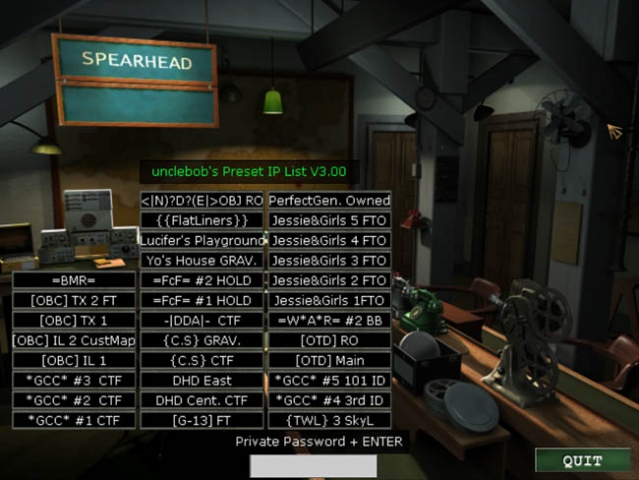
Huh you say, well check out the screenshots & check out the file if you still don’t get it.
=========================================================================================================
IP List 3.00 can list 32 server's for easy on the fly connection. Once you start MOH SH it will open to the main game lobby where you will see
the 32 new buttons I have added. If you have had my old IP Lists then you know they were designed off a pull down menu like the skin
selection in the multiplayer options room. This was limited to a compressed .pk3 file so players without the knowledge as to change &
recompress such files where unable to customize the old lists. Version 3.00 changes all that
Before anyone starts crying! The reconnect button is Slider_V's idea. He said it was ok fo me to use it.
After you have Downloaded this file & unzipped it you will find your self reading this I hope, If not you most likely don’t have a clue what your
looking at & will fumble around in the files till they are corrupted & you will need to re download the file. (be sure to save your self the headache
& erase the 1st one you corrupted) OK! So I have changed it up a bit for those that don’t know how to open or compress .pk3 files by giving
you the files in a referenced data file format. This means there is no more need to now how to extract or compress files, no more need to
remember a file structure.
HOW TO USE!!!!!
Put the "USER_UB_IPlist_V3.00.pk3" the UBmenu.cfg & "UBmenu" folder into your MainTA folder. (It is important that they go in the mainTA folder as this version is only meant for MOH SpearHead.)
The IP list has 32 stock servers from the Midwest & other regions of the United States already listed, all of which can easily be changed in a matter of minutes.
Now that you have moved the files start MOH SH. You will see that the main game lobby has changed a lot. I made it so the IP List is king of the page,
moving the single player load & save options to the single player map room through the first door on the right. through the second door you will see the
IP list as well, but slightly rearranged to fit.
HOW TO CHANGE IP ADDRESSES & BUTTON NAMES!!!!!!
To start copy the folder "UBmenu" to your desktop. THAT WAS COPY NOT CUT!
this folder contains the .cfg or config files that the IP List looks at for its information
In the folder you will find "serv1con.cfg" - "serv32con.cfg" & "IP_Listings_UB.cfg"
Each of the serv#con.cfg files has a IP address in it that is linked to one of the 32 buttons of the IP List
the IP_Listings_UB.cfg file is used to change the names shown in game on each button
I would suggest trying the stock settings before you attempt to change anything that way you know how it works!!!
TO REDIFINE A BUTTON!!!!!!
Step One: Chose the button you want to change. (easiest way is to go in game & pick one that is curently named.)
Step Two: Go into the IP_Listings_UB.cfg find the same name in that list & remember or write down what button number it corresponds to.
Step Three: Edit the listed server name to your new server name. (18 too 20 characters is the max)
Step Four: open the corresponding serv#con.cfg file & edit the IP address to the new server's (You can add a reference at the bottom of the file so you know what button the IP is for.)
******************************************************************** Example follows!
// unclebob's Advanced IP List Version 3.001
// Put the full IP address for the server that corisponds to the Name you added to the button. Should look like this when done
// connect "0.0.0.0:12203"
connect "213.244.180.35:12203"
// J. Girls 5
Related MOHAA Mods
More Tools →

Engine & Patch Compatibility
Community-tested verification on official patches & Reborn
0.00 reviews
Community Rating & Discussions
Rate this mod and share feedback or installation tips with fellow players.
Your Rating:
Leave a Comment / ReviewLog in to join the discussion
Loading discussions...
Downloads
102
Total Downloads
Date Added
December 3, 2016
Download
Fileub_ip_list_v3.zip
Size157.29 KB