
Medal of Honor: Allied Assault Mods (MOHAA)
Discover and download community-created modifications to enhance your Medal of Honor: Allied Assault experience.
68 Mods Found
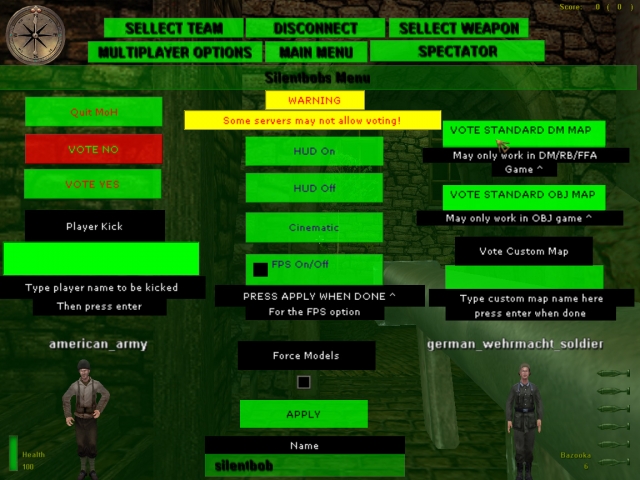
Vote Menu
SILENTBOBS VOTE MENU A simple vote menu, bring it up by pressing escape or whatever button you have dm_main binded to. This menu a monkey could work, big buttons BUT you may not be able to vote on some servers. Made this menu because most people dont know how to vote. ------------ To instal place the pk3 in your main folder _______ To uninstal delete the file from your main folder ________________________________________________________ Email= silent_bob_8@hotmail.com

Ghosts Admin Menu
***Ghost's Admin Menu*** ***Version 1*** -------- 1.Info This is my first menu :p There are 3 menu's inside the .pk3: -adminmenu -playermanu -serverlistmenu There are also sounds in the menu --------- 2.Install info 1* -Place ghost admin menu.pk3 in: C:\1_Games\EA GAMES\MOHAA\mainta if u play Medal of Honor Allied Assault(tm) Spearhead C:\1_Games\EA GAMES\MOHAA\maintt if u play Medal of Honor Allied Assault(tm) Breakthrough C:\1_Games\EA GAMES\MOHAA\main if u play Medal of Honor Allied Assault 2* Then go in your moh game 3* Now enter the following into the CONSOLE: bind x togglemenu ghostmenu (the x can by a letter of your choice , I have it on n). !!!Not tested at Medal of Honor Allied Assault!!! !!!The serverhost doesnt need the file!!! ---------- 3.uninstall info Delete the file ---------- 4.other info See the screenshots ---------- 5.credits Making menu's: -Ghost -server list menu wasnt made by me (doesnt know who made it) some help: -A tutorial to make menu's,doesnt know who made it crosshairs: -XKM -naked_snake -some others ---------- 6.Questions,bugs,contact me contact me: xfire:ghost0620 msn:story_matthias@hotmail.com ---------- Enjoy ...

Fanos RCON Menu
This Rconmod is made by FanoBliv. The ZzZzZ-RconUpdated mod is made by GlocK. Improvments : I fixed The Instant kill option. This option works for AA, SH and BT now ! I fixed the Drop Weapons option. This option works for AA, SH and BT now ! I fixed the Force allies option. This option works for AA, SH and BT now ! I fixed the Force axis option. This option works for AA, SH and BT now ! I fixed the Force Spectator option. This option works for AA, SH and BT now ! I added an option 2 SPIN the player. This option will spin the player for 10 seconds. I added an option to force a screenshot on a player. This gives the player a forced screenshot (he must send it in) I added (aa) and (sh) in front of the maps so you know whats an AA and whats an SH map. I deleted the option : Freeze. How to get this version work : Place the user-Fanosrconmenuorignial file in your main, mainta or maintt. Place the ZzZzZ-RconUpdated file in your FTP server. (If you dont do this the new things wont work the old things will still work.
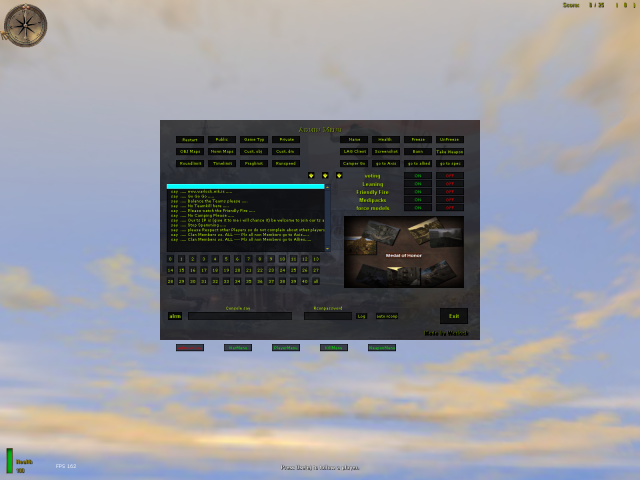
Spawnpoint Changer
in this mod are all the spawnpoint-coords for all stockmaps i made an example how to use it on the map dm/mohdm2 i hope u can figure it out for the other maps to. good luck!
Weapon Manager v20
==================================================================== ::::: [BR_MOB] Weapon Manager by NHACOMAPAMAFU V2.0::::: ==================================================================== .:English:. Description: This mod replace the weapons any time in-game, only need a rcon command to activate and alternate his modes. To add new weapon modes in future updates or report bugs get contact by email. Thanks to the mod theather for the mike_torso ideia. Changes: - New and better script no lag - New and complete weapons configurations - Add Silenced Pistol Features: - 100% Server Side - Works any time in-game (no need to change pk3 or load maps) - Different Weapons configurations with only a rcon command Instalation: - Extract the "zzzzz[BR_MOB]WeaponManagerV2.0.pk3" file to the MOHAA´s "main" folder. (ex: 'C:\Program Files\EA Games\MOHAA\main') Uso: Call by rcon command under console os add to your .cfg favorite file wmode 0 (mod disabled)(wpistol and wnade disabled) wmode 1 (mod enabled)(wpistol and wnade enabled) wmode 2 (no weapon allowed)(wpistol 1, wnade 1) wmode 3 (Only Sniper, Rifle, SMG and MG)(no bazooka, no shotgun) wmode 10 (Only Sniper)(choice another weapon give you Sniper) wmode 11 (Only Rifle)(choice another weapon give you Rifle) wmode 12 (Only SMG)(choice another weapon give you SMG) wmode 13 (Only MG)(choice another weapon give you MG) wmode 14 (Only Bazooka)(choice another weapon give you Bazooka) wmode 15 (Only 12)(choice another weapon give you 12) wmode 16 (Only Sniper e Mauser)(choice another weapon give you Mauser) wmode 17 (Only SMG and MG)(choice another weapon give you SMG) wmode 18 (Only Sniper, Mauser, SMG and MG)(choice another weapon give you Mauser) wmode 19 (Only Sniper, Rifle, SMG and MG)(choice another weapon give you Mauser) wmode 20 (Only Springfield)(choice another weapon give you Springfield) wmode 21 (Only KAR98sniper)(choice another weapon give you KAR98sniper) wmode 22 (Only M1 Garand)(choice another weapon give you M1 Garand) wmode 23 (Only Mauser)(choice another weapon give you Mauser) wmode 24 (Only Thompson)(choice another weapon give you Thompson) wmode 25 (Only MP40)(choice another weapon give you MP40) wmode 26 (Only BAR)(choice another weapon give you BAR) wmode 27 (Only STG44)(choice another weapon give you STG44) wmode 28 (Only Allied Bazooka)(choice another weapon give you Allied Bazooka) wmode 29 (Only Panzerschreck)(choice another weapon give you Panzerschreck) wpistol 0 (pistol allowed) wpistol 1 (no pistol) wpistol 2 (choice another weapon give you Colt 45) wpistol 3 (choice another weapon give you Walther P38) wpistol 4 (choice another weapon give you Pistola Silenciadora) wnade 0 (grenade allowed) wnade 1 (no grenade) wnade 2 (choice another weapon give you Granada Aliada) wnade 3 (choice another weapon give you Granada Axis) ==================================================================== .:Português:. Descrição: Este mod substitui as armas a qualquer momento do jogo bastando somente um comando rcon para ativá-lo e alternar seus modos. Para adicionar novos modos de arma em futuras atualizações e reportar bugs entre em contato via email. Agradecendo o pessoal do mod theather pela ideia do mike_torso. Mudanças: - Novo script melhorado muito mais leve - Novas configurações de armas muito mais completas - Adicionado Pistola com Silenciador Características: - 100% Server Side (este mod somente é necessario no servidor) - Funciona a qualquer momento do jogo (não é necessario tocar pk3 ou carregar mapas) - Diferentes configurações de armas com somente um comando rcon Instalação: - Extraía o arquivo "zzzzz[BR_MOB]WeaponManagerV2.0.pk3" para a pasta "main" do MOHAA. (ex: 'C:\Program Files\EA Games\MOHAA\main') Uso: chame via comando rcon ou adicione no seu arquivo .cfg favorito wmode 0 (mod desativado)(wpistol e wnade desativados) wmode 1 (mod ativado)(wpistol e wnade ativados) wmode 2 (nenhuma arma permitida)(wpistol 1, wnade 1) wmode 3 (somente Sniper, Rifle, SMG e MG)(sem bazooka e sem shotgun) wmode 10 (somente Sniper)(escolher outra arma lhe da Sniper) wmode 11 (somente Rifle)(escolher outra arma lhe da Rifle) wmode 12 (somente SMG)(escolher outra arma lhe da SMG) wmode 13 (somente MG)(escolher outra arma lhe da MG) wmode 14 (somente Bazooka)(escolher outra arma lhe da Bazooka) wmode 15 (somente 12)(escolher outra arma lhe da 12) wmode 16 (somente Sniper e Mauser)(escolher outra arma lhe da Mauser) wmode 17 (somente SMG e MG)(escolher outra arma lhe da SMG) wmode 18 (somente Sniper, Mauser, SMG e MG)(escolher outra arma lhe da Mauser) wmode 19 (somente Sniper, Rifle, SMG e MG)(escolher outra arma lhe da Mauser) wmode 20 (somente Springfield)(escolher outra arma lhe da Springfield) wmode 21 (somente KAR98sniper)(escolher outra arma lhe da KAR98sniper) wmode 22 (somente M1 Garand)(escolher outra arma lhe da M1 Garand) wmode 23 (somente Mauser)(escolher outra arma lhe da Mauser) wmode 24 (somente Thompson)(escolher outra arma lhe da Thompson) wmode 25 (somente MP40)(escolher outra arma lhe da MP40) wmode 26 (somente BAR)(escolher outra arma lhe da BAR) wmode 27 (somente STG44)(escolher outra arma lhe da STG44) wmode 28 (somente Bazooka aliada)(escolher outra arma lhe da Bazooka aliada) wmode 29 (somente Panzerschreck)(escolher outra arma lhe da Panzerschreck) wpistol 0 (pistola permitida) wpistol 1 (sem pistola) wpistol 2 (escolher pistola lhe da Colt 45) wpistol 3 (escolher pistola lhe da Walther P38) wpistol 4 (escolher pistola lhe da Pistola Silenciadora) wnade 0 (granada permitida) wnade 1 (sem granada) wnade 2 (escolher granada lhe da Granada Aliada) wnade 3 (escolher granada lhe da Granada Axis) ==================================================================== .:English:. Description: This mod replace the weapons any time in-game, only need a rcon command to activate and alternate his modes. To add new weapon modes in future updates or report bugs get contact by email. Thanks to the mod theather for the mike_torso ideia. Changes: - New and better script no lag - New and complete weapons configurations - Add Silenced Pistol Features: - 100% Server Side - Works any time in-game (no need to change pk3 or load maps) - Different Weapons configurations with only a rcon command Instalation: - Extract the "zzzzz[BR_MOB]WeaponManagerV2.0.pk3" file to the MOHAA´s "main" folder. (ex: 'C:\Program Files\EA Games\MOHAA\main') Uso: Call by rcon command under console os add to your .cfg favorite file wmode 0 (mod disabled)(wpistol and wnade disabled) wmode 1 (mod enabled)(wpistol and wnade enabled) wmode 2 (no weapon allowed)(wpistol 1, wnade 1) wmode 3 (Only Sniper, Rifle, SMG and MG)(no bazooka, no shotgun) wmode 10 (Only Sniper)(choice another weapon give you Sniper) wmode 11 (Only Rifle)(choice another weapon give you Rifle) wmode 12 (Only SMG)(choice another weapon give you SMG) wmode 13 (Only MG)(choice another weapon give you MG) wmode 14 (Only Bazooka)(choice another weapon give you Bazooka) wmode 15 (Only 12)(choice another weapon give you 12) wmode 16 (Only Sniper e Mauser)(choice another weapon give you Mauser) wmode 17 (Only SMG and MG)(choice another weapon give you SMG) wmode 18 (Only Sniper, Mauser, SMG and MG)(choice another weapon give you Mauser) wmode 19 (Only Sniper, Rifle, SMG and MG)(choice another weapon give you Mauser) wmode 20 (Only Springfield)(choice another weapon give you Springfield) wmode 21 (Only KAR98sniper)(choice another weapon give you KAR98sniper) wmode 22 (Only M1 Garand)(choice another weapon give you M1 Garand) wmode 23 (Only Mauser)(choice another weapon give you Mauser) wmode 24 (Only Thompson)(choice another weapon give you Thompson) wmode 25 (Only MP40)(choice another weapon give you MP40) wmode 26 (Only BAR)(choice another weapon give you BAR) wmode 27 (Only STG44)(choice another weapon give you STG44) wmode 28 (Only Allied Bazooka)(choice another weapon give you Allied Bazooka) wmode 29 (Only Panzerschreck)(choice another weapon give you Panzerschreck) wpistol 0 (pistol allowed) wpistol 1 (no pistol) wpistol 2 (choice another weapon give you Colt 45) wpistol 3 (choice another weapon give you Walther P38) wpistol 4 (choice another weapon give you Pistola Silenciadora) wnade 0 (grenade allowed) wnade 1 (no grenade) wnade 2 (choice another weapon give you Granada Aliada) wnade 3 (choice another weapon give you Granada Axis) ==================================================================== Mod by: NHACOMAPAMAFU Mail: nhacomapamafu@brasilmob.net WebSite: www.brasilmob.net
Themed Commands Mam
/* ================================================================================ Rindogs UberMenu and Rindogs_ThemedCommands_MAM_Addon for Medal Of Honor: Version 1.0 (10/10/04) Copyright (c) 2003-2004 Ron Schacht email: mods@rindog.com Permission is hereby granted, free of charge, to any person obtaining a copy of this software and associated documentation files (the "Software"), to deal in the Software without restriction, including without limitation the rights to use, copy, modify, merge, publish, distribute, sublicense, and/or sell copies of the Software, and to permit persons to whom the Software is furnished to do so, subject to the following conditions: The above copyright notice and this permission notice shall be included in all copies or substantial portions of the Software. THE SOFTWARE IS PROVIDED "AS IS", WITHOUT WARRANTY OF ANY KIND, EXPRESS OR IMPLIED, INCLUDING BUT NOT LIMITED TO THE WARRANTIES OF MERCHANTABILITY, FITNESS FOR A PARTICULAR PURPOSE AND NONINFRINGEMENT. IN NO EVENT SHALL THE AUTHORS OR COPYRIGHT HOLDERS BE LIABLE FOR ANY CLAIM, DAMAGES OR OTHER LIABILITY, WHETHER IN AN ACTION OF CONTRACT, TORT OR OTHERWISE, ARISING FROM, OUT OF OR IN CONNECTION WITH THE SOFTWARE OR THE USE OR OTHER DEALINGS IN THE SOFTWARE. ================================================================================ */ ******************************************************************************** ******************************************************************************** Credit to Buzz_LightBeer for MAM(Mohaa Admin Mod). ******************************************************************************** Credit to TMT(modtheater.com) for publishing a superior site that has proven to be an excellent resource for mods. ******************************************************************************** Credit to .Map(http://dynamic4.gamespy.com/%7Emap/mohaa/index.php) for publishing a superior site that has proven to be an excellent resource for mods. ******************************************************************************** Credit to MohAdmin.com for publishing a superior site that has proven to be an excellent resource for server admins. ******************************************************************************** Credit to members of the community for voluntarily posting helpful info to make this mod possible ******************************************************************************** ******************************************************************************** Special Thanks to: Jv_Map - for his countless little tricks that have made their way into this mod in so many ways. Mefy - for his extended gametype mods and continued support for the community. tltrude - for his many examples and input in the forums. bdbodger - for his dogs and continued support in the forums. ******************************************************************************** To integrate with MAM: 1. Place zzzzz-ThemedCommands.pk3 in the corresponding folder for each game: maintt for Breakthrough mainta for Spearhead 2. Register the mod with MAM by adding this line to ci.cfg or custom.cfg depending on your MAM setup. append mam_register_mod "global/Rindogs_Themedcommands.scr" Users of the menu only need to do step 1. Step 2 is for setting the commands up on the server. [b]Big[/b] - [i]Change Axis/Allies/or All to giants[/i] [b]Bigpoppa[/b] - [i]turns the client into a giant/disables gun/spams client[/i] [b]Crusher[/b] - [i]client is crushed by piano[/i] [b]Disarm[/b] - [i]takes away all weapons of the client[/i] [b]Flip[/b] - [i]clients view is flipped by a given angle[/i] [b]Fugitive[/b] - [i]the target half of the Sheriff command[/i] [b]Ghost[/b] - [i]client is bashed to death by a ghost[/i] [b]Greystone[/b] -[i]client is turned to stone and weapon shoots blanks[/i] [b]Inferno[/b] - [i]burns the client to death[/i] [b]Jumpglitch[/b] - [i]makes client jump[/i] [b]Kickwarn[/b] - [i]client gets a message and must hit escape to remove the message[/i] [b]Myst[/b] - [i]vaporizes the client to death[/i] [b]Normal[/b] - [i]Change Axis/Allies/or All to normal size[/i] [b]OTD[/b] - [i]client is attacked by a dog[/i] ([b]O[/b]ur[b]T[/b]eam [b]D[/b]og) [b]Rindog[/b] - [i]client is attacked by a dog[/i] [b]Rinspin[/b] - [i]spins the client[/i] [b]Rocket_mod[/b] - [i]rapid fire rockets with scope[/i] [b]Rocket_ammo[/b] - [i]gives client unlimited ammo[/i] [b]Rocket_dud[/b] - [i]causes clients rocket to shoot duds[/i] [b]Rocket_smoke[/b] - [i]causes clients rocket to shoot smoke[/i] [b]Runt[/b] - [i]turns the client into a Midget/disables gun/spams client[/i] [b]Sheriff[/b] - [i]Allows an Admin to fly a plane and target problem players...2 part command along with Fugitive[/i] [b]Shortstack[/b] - [i]turns the client into a Midget/disables gun/spams client[/i] [b]Small[/b] - [i]Change Axis/Allies/or All to midgets[/i] [b]Snype[/b] - [i]client is sniped and then kicked[/i] [b]Sparks[/b] - [i]client is electrocuted to death[/i] [b]Stackem[/b] -[i]client is killed by a stack of bombs[/i] [b]Stonecold[/b] -[i]client is turned to winter stone and weapon shoots blanks[/i] [b]Storm[/b] -[i]Rain cloud above client/client struck by lightning[/i] [b]Striker[/b] -[i]client is struck to death[/i] [b]Thrasher[/b] -[i]client is attacked by Thrasher[/i] [b]Twister[/b] -[i]client viewangle gets twisted[/i] [b]Wolfpack[/b] -[i]client hears a pack of dogs while being attacked[/i] (not working properly because of sound error...still delivers damage to client) [b]Yo_mama[/b] -[i]client sees flowers/slowy killed with kindness[/i] Ghost and Striker are the same, and Runt and Shortstack are the same also. Inferno, Myst, and Sparks deliver the same damage, but use different effects. Ghost and Striker deliver more damage quicker than Inferno, Myst or Sparks. All commands are no longer case sensitive, so "Rinspin" is the same as "rinspin". Bigdaddy,Runt, and Shortstack won't change the clients point of view. Only other players see them as a midget or giant. And it causes their weapon to shoot blanks, but they can still bash. And it spams the client with a message. All commands, except Snype, Jumpglitch, Kickwarn, Big, Small and Normal can be turned on and off by entering the same command again. e.g. [b]rcon set command "Rinspin 0"[/b] e.g. [b]rcon set command "rinspin 0"[/b] Just replace "Rinspin" with the command of your choice and change the "0" to the correct client number Big, Small and Normal take one of three parameters. (axis, allies, all). These commands do not affect the players health or weapons. I also added code to change the bounding box of the player depending on his size, but it's not working properly yet. e.g. [b]rcon set command "big axis"[/b] turns all axis into giants e.g. [b]rcon set command "small allies"[/b] turns all allies into midgets e.g. [b]rcon set command "normal all"[/b] returns all players to normal size Flip takes two parameters. The client number and an angle. The code is a little choppy, but it works for now. If you use my menu for the command, the angle is automatically set to 180. You must use the console if you want to use a different angle. Enter the command once to flip the client to the desired angle. Enter it again to return the client to a normal view. The second time the command is entered, regardless of the angle, the player will be returned to a normal view. e.g. [b]rcon set command "flip 0 180"[/b] flips the given client 180 degrees e.g. [b]rcon set command "flip 0 90"[/b] flips the given client to the right 90 degrees e.g. [b]rcon set command "flip 0 -90"[/b] flips the given client to the left 90 degrees Jumpglitch is designed so that when your jump is disabled(game glitch that causes the player to not be able to jump) you can apply it to yourself. Alls it does is moves the players origin up 2 feet, which fixes the glitch. Kickwarn is an example of messaging a client so that they can't say they never saw the message. It forces a dialog box on them that they must hit escape to get out of. We can add more messages if we want.
Modside Pro Ubersound Fix
This fixes the ubersound issues in Spearhead (and the sounds from SinglePlayer maps (converted to MultiPlayer), might also fix Dog sounds). Might be needed Client & Server- side, but not sure, haven't tested it.
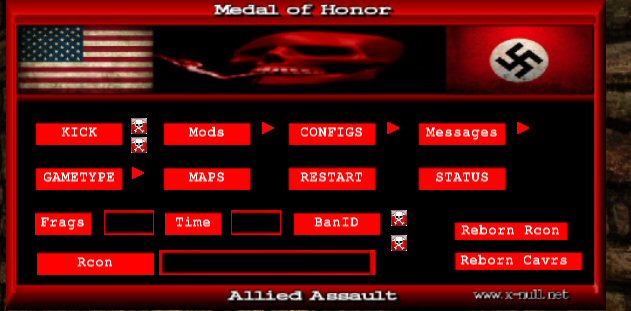
Ezm Admin Menu
This is an admin menu that works with Reborn as well (it also uses some Reborn commands). There is a mod list as well, although you might need the full EZM Mods package on the server in order to use them. You can find the full package of mods (& menu) here: http://www.mohaaaa.co.uk/AAAAMOHAA/content/ezm-mods-admin-menu There's a ReadMe file included that shows you how to edit the menu. Install Menu: This is a full reborn admin menu, some sections you will need the mods, cfg's etc in order for it to work, Mefy's freeze-Tag...Elgbots...custom maps etc. Also if you wnat to exec different cfg's from menu you will need to make sure the cfg folder is on server. SEE EDITING READ ME !! 1.) Put the zzzzzzzzzz_weapons_Rcon_Menu.pk3 in your mohaa/main folder ( NOT ON SERVER.) 2.) Bind a key to open menu. ( open console type in bind ( pick a key) hit enter. ) Menu Note: You don't need to use the menu, you can change everything through the console, you must restart the map after changeing settings. If you have it set to snipers only and change it to rifles only you must first turn off snipers only ( set snipers 0) then turn on rifles only ( set rifles 1) This is why I made the mod menu it will do all that for you.
HUD Messenger 2
More info can be found here: http://www.modtheater.com/threads/jims-hud-messenger-2.23898/ a easy and effective way of clearly displaying server messages in style. All server side so does not require a program to run externally to provide the messages and does not print the messages either in the player chat area or compass area, preventing these areas from being clogged and pissing off players on your server. features- unlimited message length- you can now make your main body of each message unlimited in length (if you wished to). Script will parse a message cvar into the ammount of lines that will then fit into the HUD messenger display area. fancy looking fade and scroll- for messages longer than 3 lines, the messages will scroll upwards to reveal the next line of the message. Top line scrolls upwards and fades out and bottom line scrolls upwards and fades in (see pic 3). Random message function- set m_random to 0 or 1 to enable the random display of all message cvars. The same message will never be broadcast twice in a row Obj text- same as before, allows you to display custom messages in the alliedobjtext and axisobjtext (visible on the scoreboard, bellow the map picture and name) show next map function- can display what map is next on the HUD. Can either parse the sv_maplist to find the next map or if you use a mixed gametype config, will use "nextmap" to find out the nextmap. nextmap must be set to use this feature if you dont use sv_maplist to hold your rotations. can be disabled (see pic 2). teams unbalanced messages- can display messages on the HUD if teams are unbalanced. Frequency of these messages can be changed or disabled totaly (see pic 1). Text color- can select the color of the title message text and the main message text using RGB values. (use a program like paint and its color picker to determine RGB values- see any pic for an example of the text colours.) Top/ Bottom display- the messages can either be displayed in the top right hand corner or the bottom left hand corner. installation- just drop the user-Jims_HUD_messaging-2.pk3 into your main/ta/tt folder and then call the jmc.cfg file via your server config (exec jmc.cfg) by the way..... lots of changes so the potential for lots of bugs arrises :***: let me know if (or when) they do so i can give em a fix. This mod has been fully tested by me on various settings but that doesnt guarente it will work for everyone. If you have issues try installing the remove_dm_precache.pk3- if dmprechache is called twice it could screw up the running of the mod. Tested on SH and should work for AA and BT without a hitch.

Map Info
The mod will print message about current map and next map in the top right corner
Message Center
Standalone version of the message center in Admin Pro (and edited). [i]Ok i know Elgan will probs have a heart attack at how i did this, but its done and i cbf doing it the proper way, i just got asked to do it that many times i decided to get it over and down with..[/i] [i]A few changes had to be made to get it to work,[/i] [i]Firstly it is executed from dmprecache.scr by the line [b]exec global/server_messages.scr[/b][/i] [i]THEN turned on via cvar [b]message_center "1"[/b][/i] [i]Messages and Settings are located in global/messages.txt file, ( was going to use Admin pros Settings folder, but might conflict ) It is set out very similar to how it was in Admin Pro, only different being that the 'Settings' are set directly into level variables and not into an array and processed later.[/i] [i]Also added Compass messages ( yellow and white )[/i]
Pain Animation Patch SH
Spearhead Pain-Animation Patch (version 1.0) Compiled by MPowell1944 Description : This patch fixes the funky pain animations in MOH:Spearhead. That would be the buttscooting, sliding, and flailing of the arms when a person gets hurt. Usually this occurs when a person falls or gets shot. This patch is a server-side only patch. If you are an admin, just add this .pk3 file to your server's /mainta folder, and restart your server. For those of you wanting to know if this can work client-side, all I can say is you can try it out but I cannot promise any results. Disclaimer : Because I have spent many hairpulling hours trying to get this patch finished, I nicely ask of you not to duplicate or make any small changes and release it as your own. If you decide to do so, the credit to you will not be valid. Bugs : The only known bug is as follows. If you are holding either a RIFLE, ROCKETLAUNCHER, allied SMG or a BAR, and you get hurt, you will be almost floating on your feet in a semi-walk animation, but is not very noticeable. As I said, this only occurs with the above^ weapons and only while the person is getting hurt. But even with this minor bug, it is still 10x better than the default animations. Check out this bug for yourself and you will see what I mean. Updates : I will be working on fixing the above bug for the next version. Hopefully this can be quite soon. SideNotes : If you would like to see the mod in action, please stop by the Stripes Spearhead clan server at 66.230.149.84. If you have any bugs to report, please send them to the email below as you find them. The more bugs to fix for the next version, the better. Contacts : Email : MikePowell1944@aol.com AIM : MikePowell1944 MSN : MPowell1944@hotmail.com Thanks for downloading this patch. Hopefully this can bring a better playing experience to all of the Spearhead players on your server.


Client Crash Map Change Fix
Fixes random player crash fix on map change for Stock maps
Auto Team Balancer
=========================== Auto Team Balancer Version 0.3.2.1 27 July 2006 =========================== Description: -------------- The main idea of this mod is to even the teams automatically without the need of the players doing anything. You can set the script to only dead players are moved meaning you will never be moved whilst beingin a fire-fight. The config file allows you to be able to personalise the mod. Install: -------------- Place the pk3 (server-auto_team_balancer_v0321_b.pk3) into the Main folder. Place the config (urm_tb_config.txt) into the Main folder. Edit the config file to your specification. Uninstall: -------------- Remove the pk3 (server-auto_team_balancer_v0321_b.pk3) from the Main folder. Remove the config (urm_tb_config.txt) from the Main folder. Comments/Suggestions: -------------- Send all comments to "demon@unrealmod.co.uk", OR Register at The Modding Theater (TMT) "http://www.modtheater.com", THEN Reply at "http://www.modtheater.com/forum/showthread.php?t=29001". Thanks for downloading, Unreal_Demon Unrealmod.co.uk
Headshot Animations
Title: Moh:AA Server Side Headshot Animations Date: 06:05 25/12/2007 by: Elgan Sayer Youtube Example: http://uk.youtube.com/watch?v=RajMd970JX0 Forums: www.mods-r-us.net www.motheater.com http://map.planetmedalofhonor.gamespy.com/mohaa/ Modders info: ---------------------------- SH is possible, You have to first create a state for each head death animation. See mike_torso.st. Then you must set its entrycommands to exec global/headshot.scr with the animation name. Then you must edit the shared anims folder and add whatever blood effects you want to the anims client section. Then you must add all the helmet and hat surfaces to be hidden in headshot.scr. Go through all the characters with helmets. Find their surfacs. Where it says: (using hat as an example surface) surface hat blue_one hat is your surface. So, add it to the list how the others are hidden in headshot.scr Any problems just ask, im sure you can work it out if your trying tho. In order to test. I setup myself a loop when use is pressed, play a death state from above using forcetorsostate. Then it will play the anim i want. Remove the cam douse and self.origin setting in the headshot.scr so u can view yourself. ---------------------------- How it works: It works by hiding the head of a spawned actor and then thet actor plays your death. While your body is hidden below the map. A camera is spawned to replace your view. When you spawn, your body moves, so the cam releases. It is possible to make the actors never fade away by removing the commanddelay line in the global/headshot.scr About: This mod will make the head of the player, when shot in the head.Explode! It works by hiding the head of a spawned actor and then thet actor plays your death. While your body is hidden. This mod also contains state file fixes from AdminPro. * MG42 Team Swap fix * Ladder Team Swap fix * MG42 Crouching Fix * Land Shark Fix * Grenade Drop Fix * Fps crash fix Before Install: This mod will conflict with Both state files and also uses an editied anims_shared.txt file. If you have conflicts, Please visit one of the forums above. It is likely to conflict with mods such as Admin pro, Foresight, Other admin mods. Mods that edit player animations, or weapon select mods, If its foresight, just delete foresight and u will be fine :P Install: 1. Place the pk3 in your main dir. 2. Boot game. Uninstall: 1. Delete it. 2. Boot game. Thank to cobra for help test:P
Player Speccing
2\14\12 - Updated and packaged by armageddon To make this work, you must be logged in as Admin using the Reborn admins.ini file, and using Reborn 2.5 Gamma+ Then, in the game, if you want to watch player number 7 for example. type in console : keyp 1007 if you want to watch player number 14 for example. type in console : keyp 1014 ,etc... It would be easier to put this command in an admin menu. For client 7, stuffcommand keyp 1007 or client 14 stuffcommand keyp 1014, etc... To stop watching a player, press the Use key or Mouse button. I made the keyp 1000-1031 for a 32 slot server in global/keypresshandler.scr If you are using global/dmprecache.scr for other mods, then add this line to it. Code: local.result = registerev "keypress" global/keypresshandler.scr //This will let Reborn know to execute that .scr file whenever a client sends a keyp command. 2\13\12 This is Elgan's work (Nice job Elg), with the help from the team for brainstorming... Here we go.. @Elgan, if you need me to update this post, just let me know! ----------------------------------------------------------------------- NOW THIS.... should give the admin a message when the spectated , suspected player is looking / aiming/ firing at a player...and through a wall.. "aiming at playername through wall" "firing at playername through wall" or just "aiming at playername" "firing at playername" ...now this I did through on my bros moh to quickly test..it sort is ok but a bit crude...not brilliant detection.
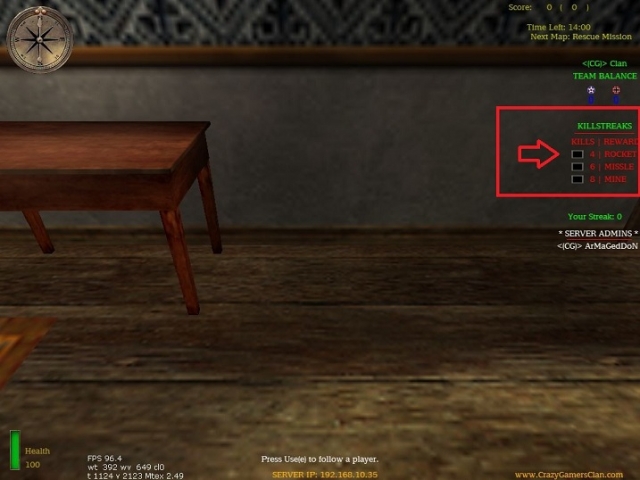
Medal of Honor: Allied Assault Mods (MOHAA) — Complete Community Archive
Welcome to the premier repository for Medal of Honor: Allied Assault mods. Since the game's groundbreaking release in 2002 by 2015, Inc. and EA, MOHAA has inspired one of the longest-standing modding communities in first-person shooter history. MOH-DB preserves, categorizes, and serves over 1,600 verified community modifications, custom enhancements, and competitive utilities for Allied Assault, Spearhead, and Breakthrough.
Explore MOHAA Mod Categories
Player Skins & Uniforms
Over 700 historically accurate and creative player uniforms for Allied and Axis factions. Equip authentic U.S. Army Rangers, 101st and 82nd Airborne paratroopers, British Commandos, Soviet Red Army conscripts, Wehrmacht Heer infantry, Fallschirmjäger, and Waffen-SS camouflage patterns, as well as classic community clan skins.
Weapon Models & Reskins
Enhance your WWII arsenal with ultra-detailed weapon replacements and high-resolution textures. Popular downloads include authentic wood-finish Kar98k sniper rifles, realistic metallic sheen M1 Garand models with classic "ping" animation refinements, Thompson submachine guns, MP40s, BAR 1918 rifles, and custom iron-sight alignments.
Soundpacks & Realism Audio
Transform the sonic atmosphere of Allied Assault. Replace compressed 2002 Quake-engine sound effects with cinema-grade gunfire recordings, authentic distant artillery rumblings, terrifying Stuka dive-bomber sirens, supersonic bullet cracks, metal ricochets, and remastered German and American voice callouts.
HUDs, Menus & Crosshairs
Modernize the in-game interface for 1080p, 1440p, and 4K widescreen displays. Download minimalist competitive heads-up displays, custom dot and crosshair overlays, cleaner compass indicators, redesigned main menus, and unobtrusive health and ammunition counters favored by competitive league players.
Server Utilities & Admin Scripts
Run resilient, modern multiplayer game servers with essential server-side utilities. Includes automated map rotators, anti-cheat detection tools, voting scripts, custom match timers, ping balancers, and administrative rcon managers designed for dedicated servers running 24/7.
MOHAA Reborn 1.12 Community Patch
The gold standard community patch for modern MOHAA servers and clients. The Reborn 1.12 patch resolves legacy buffer overflows, fixes client query exploits, expands internal script limits for complex mods, and provides a built-in server browser to replace the defunct GameSpy master server.
How to Install MOHAA Mods: Quick Guide
Identify Your Target Directory
MOHAA stores all game assets in subfolders inside the root installation directory:
- MOHAA (Base):
.../MOHAA/main/ - Spearhead:
.../MOHAA/mainta/ - Breakthrough:
.../MOHAA/maintt/
Paste Without Extracting
Download the mod archive from MOH-DB. If it is zipped (.zip or .rar), extract the enclosed .pk3 file. Place this .pk3 directly into your game's /main/ folder.
How to Remove or Troubleshoot
To remove any mod, simply delete its .pk3 file from the /main/ folder. The game will immediately return to stock behavior without reinstalling.
Frequently Asked Questions about MOHAA Mods
To install MOHAA mods, copy the downloaded .pk3 file directly into your Medal of Honor Allied Assault installation folder under /main/ (or /mainta/ for Spearhead, and /maintt/ for Breakthrough). You do not need to unpack or extract the .pk3 archive—the game engine loads it automatically upon launch.