
Medal of Honor: Allied Assault Mods (MOHAA)
Discover and download community-created modifications to enhance your Medal of Honor: Allied Assault experience.
68 Mods Found
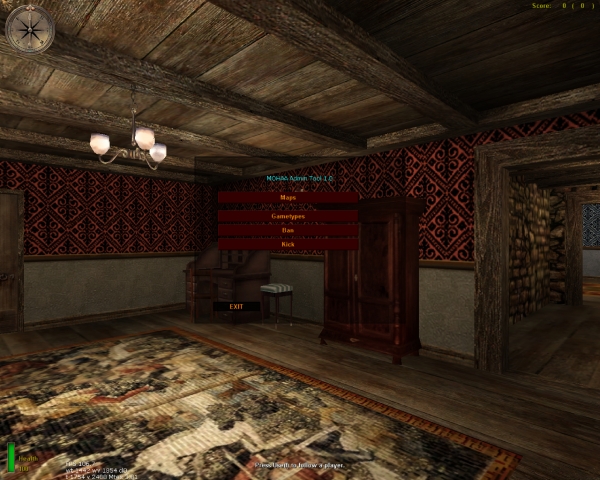
MOHAA Admin Tool 1.0
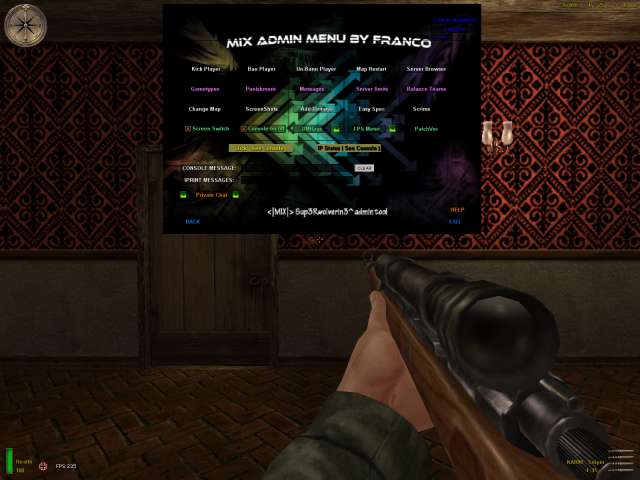
This is a simple client side admin tool where you can change maps and gametypes. And you can kick and ban people. The reborn login you need to set on the reborn.cfg file so you can ban. The normal rcon password you set on the autoexec.cfg file The key to open the tool you set on the controlls menu.
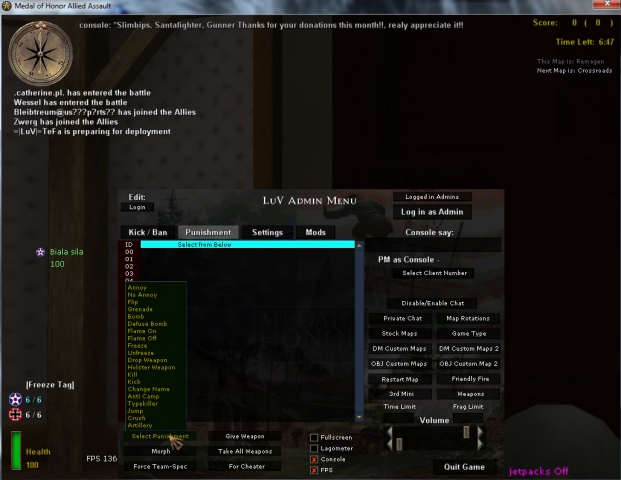
Jh Admin Punishment Mod Menu
An edited version of the JH Admin Tool/Menu, now also including a menu (integrated) for Jim's Punishment 2 Mod.
Script Framework
Admittedly, I've been all talk lately, so I thought it's time to come out with some results. I've spent the last few weeks rewriting what I've had so far. At first, I thought the framework ought to provide common mods and all the features most modders would want. Things like a teambalancer, spawn protection.. and an event handler, maths library etc... Before long, the low-level stuff for the basic libraries like array, string, maths... was going slowly. It's tedious, boring stuff and it made me realize that I hadn't been programming all those years, I had been scripting. Luckily, I have started a programming course at college this year and I really got into programming! I've been researching a lot on datastructures, algorithms and design patterns in my free time. Also, the ongoing tedious work and screw-up gained me a lot of experience I rewrote a majority of what I had and completely finished it. It went pretty smoothly. If it weren't for the blanks it'd be a finished product. Concretely The framework will simply be a set of libraries and available functionality. It, by itself, doesn't do anything. You have to use it. It's structured as a hierarchy of classes. The lower you go, the more specific the functionality. A 'class' is simply an object with function pointers and/or properties. There are also 'enums', there not much different from classes except that they only contain properties (camelCase) and constants (CAPCASE). Classes on the other hand primarily consist of function pointers. All pointers point to threads in the source file that the class represents. Usage The entire framework will be initialized before the map's script file is executed by the engine. The class objects and their structural hierarchy are kept globally in a game variable. To access their functionality, you can consult a property or execute a function (PascalCase): Code: local.words = waitthread game.System.String.Split "hello world" println (local.words[1] + " " + local.words[2]) //prints 'hello world' That's a lot of typing! In addition, there are some classes that may not be fully initialized yet. Such classes may perform background work or need to utilize framework resources in order to allow the user access to all its functionality. At the moment there are none such classes. Include system To 'finalize' their initialization or access the class via a shorthand, you have to 'include' them. It's like C or C++'s 'include' or C#'s 'using' but with a twist. The twist essentially boils down to "if you include a class, you also include all of its children classes and their children class and..." Thus, by that logic, including the root class 'System', should include each class and make the framework fully functional. Overlapping includes (from multiple mods, for instance,) are handled. Code: main: thread game.Include game.System //or, alternatively: //game.System thread game.Include level waittill prespawn local.words = waitthread $String.Split "hello world" println (local.words[1] + " " + local.words[2]) //prints 'hello world' //.. end You should be able to include classes as soon as the map script is executed. If you include a class before 'level waittill prespawn' however, the inclusion won't take effect until after prespawn. In this case, though, the function will return early with a boolean that indicates whether or not the inclusion will take place. If called at any other time, it should be called with 'waitthread' as the class won't be included until after Include() returns. Code: main: level waittill spawn local.arr = "pears"::"oranges"::"plums"::"grapes"::"apples"::"peaches"::"lemons"::"apricots" waitthread game.Include game.System.Array waitthread $Array.Sort local.arr 1 waitthread $Array.Print local.arr /* prints "[1] = plums [2] = pears [3] = peaches [4] = oranges [5] = lemons [6] = grapes [7] = apricots [8] = apples" */ end In order to view the structure of the entire framework, just do: Code: waitthread game.System.Ls // or // waitthread $System.Ls and check out the console. If you see an asterisk next to a component's name, that means it is an enum and not a class. Classes & Enums At the moment we have - 5 finished classes: 'Maths', 'String', 'Char', 'Array', 'Time'; - 5 enums: 'Int', 'Float', 'SystemObject', 'VarType', 'ArrayType' - and classes 'Common' and 'Map' which have working functionality I will incrementally update the framework with finished classes and fixed bugs only. All scripts written with it now will have 100% forward compatibility so any compatibility problem is simply a matter of updating to the latest version. I haven't had time to write user-friendly and extensive documentation but the source codes of the aforementioned classes and enums have all functions sufficiently and concisely documented. If, by any chance, a function fails for you, try setting level.DEBUG to 1. It is a global variable that allows most framework functions to intercept and/or print debug on common errors. Future Thanks to the very near exam period (sorry, used bold to remind myself of that fact), expect the next update near end of June or early July. I except the entire IO part to be finished, being the Path, File, Directory and IO classes, and the much wanted 'standard event handler' as the Event class which will be particularly flexible. I know the juicy stuff is missing, but apart from the i/o, all the boring stuff is done and over now while laying a solid groundwork for the things I'm well-versed at: the mohaa stuff. Things will start going more quickly, though, I suspect the HUD and map location logic will be an annoying pain but no real problem. When the framework is in its final state, it will be included, with other fixes and content to the reborn_pak8.pk3 file and released officially. This released file should override all previous framework versions installed unless the file name has gained a few more z's (obviously). Download Just pop the pk3 in the main/ directory. This doesn't interfere with dmprecache or anything else. zzzzzzzzzzzzz_ScriptFramework_0822BETA.pk3 The latest reborn path must be installed, i.e. Reborn RC3.5.116 (yes, the test version). If you have any question feel free to ask! P.S.: Git bash and I aren't getting along right now, so I'm not able to update the repository with the source code.
Weapon Control Center v4
this mod will allow server admins to set cvars to limit weapons for there server all you will need to do is set a cvar in your server.cfg and this mod added all single player map to mutiplayer and all weapon sounds serverside (no client fix needed) also all single player maps will run in freeze tag gametype the cvars are: set sniper 1 // this will make your server sniper only set rifle 1 // this will make your server rifle only set sprinfield 1 // this will make your server springfield only set kar98sniper 1 // this will make your server kar98sniper only set m1grand 1 // this will make your server m1 only set kar98 1 // this will make your server kar98 only set shotgun 1 // this will make your server shotgun only set rocket 1 // this will make your server bazzoka only set all_weapons 1 // this will make your server all weapons set smg 1 // this will make your server smg only set mg 1 // this will make your server mg only set pistol 1 // this will make your server pistol only set dual_sniper 1 // this will make your server dual sniper only no lean set no_lean 1 relistic aiming set breath 1 spawn protect set spawn 1 force rate on clients 30000 set rate 1 you also can change the cvar on the fly ***NOTE*** if you have lets say sniper only on you will need to set (set sniper 1) to (set sniper 0) then set (set rifle 1) then do a rcon restart then the server will be rifles only this mod uses mikes st files so if you use a custom st file you can add this to the state STAND { states { PLAYER_SPAWNED : NEW_WEAPON } } state PLAYER_SPAWNED { movetype legs entrycommands { exec global/player_spawned.scr // execute script on spawned player } states { STAND_REAL : default } } to install place in mohaa/main folder on the server then pick 1 on the cvars you want for your server and add it to your server.cfg
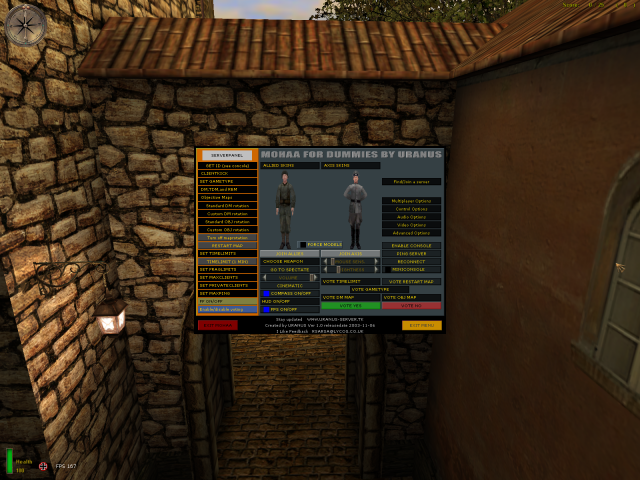
MOHAA Dummies v10
**NOT THE ORIGINAL READ ME, CREATED AS READ ME WAS NOT INCLUDED FOR MOD BY ORIGINAL AUTHOR** MOHAA FOR DUMMIES CREATED BY URANUS PLACE z_MOHAA_FOR_DUMMIES_V1_(Use_By_Pressing_F10.pk3) INTO MOHAA/MAIN AT ANY POINT WHILE IN-GAME PRESS F10 TO BRING UP MENU . SELECT EITHER CLIENT OR 1 (OF 2 TYPES) SERVER . THE MOD ALSO INCLUDES 18 CUSTOM MAPS . MOHAA FOR DUMMIES CREATED BY URANUS DM MAPS AFTERMATH2 AFTERMATH REVISED DESERT ASSAULT DM ARENA ESCHER FAILURELAND LANDHAUS MOHDUST OSIEDLE SMALLCITY SNIPERVALLEY STS-SNIPERSTURM TITLEIST DM1 TRAINING CENTER OBJ EF2 AXIS STATION HANGER SE RENAN THE LOST VILLAGE CLIENT OPTIONS CONNECT TO IP FIND/JOIN A SERVER CONTROL OPTIONS AUDIO OPTIONS VIDEO OPTIONS ADVANCED OPTIONS ENABLE CONSOLE PING SERVER RECONNECT CHOOSE SKIN FORCE MODELS CHOOSE WEAPON JOIN TEAM SPECTATE VOLUME ADJUST VOLUME (CINEMATIC) MOUSE SENSITIVITY BRIGHTNESS COMPASS ON/OFF HUD ON/OFF FPS ON/OFF SERVER OPTIONS GET ID CLIENT KICK SET GAMETYPE RESTART MAP SET TIMELIMITS SET MAXPING FF ON/OFF ENABLE/DISABLE VOTING **NOT THE ORIGINAL READ ME, CREATED AS READ ME WAS NOT INCLUDED FOR MOD BY ORIGINAL AUTHOR**
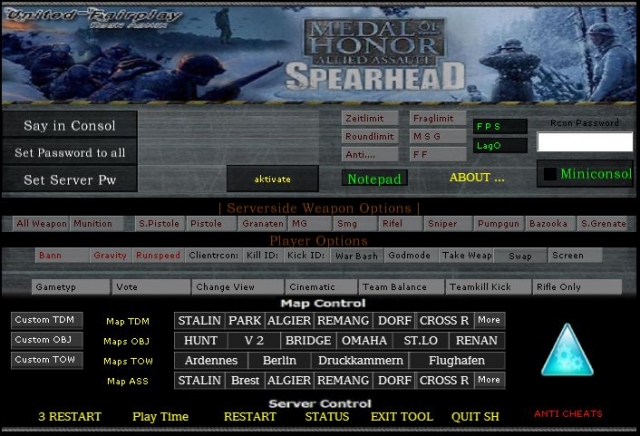
United Fairplay Spearhead Admin Menu
This is a new Rcon Admin for Medal of Honor Spearhead! It is avable in English and German! The Original Downloadside of this tool is: http://www.united-fairplay.de The_Black_Ghost

Ug43sh Console
FRENCH - FRANÇAIS ***** ug43shConsole ***** ug43shConsole ***** FRENCH - FRANÇAIS --------------------------------------------------------------------------------------------- version 2.2 2004/10/20 --------------------------------------------------------------------------------------------- 1.INSTALLATION Installer tout le contenu du fichier zip dans C:\Program Files\EA GAMES\MOHAA\mainta. 2.ACTIVATION DE LA CONSOLE Ouvrir Spearhead et taper la commande suivante dans la console : exec setupshc.cfg Ceci aura pour effet de lier la console à la touche F6 de votre clavier. 3.RCON = R(emote)CON(trol) Il ne vous reste plus qu'a saisir votre rcon password pour faire fonctionner les commandes. 4. MODIFIER LES MESSAGES Vous pouvez toujours *modifier les messages généré par MESSAGES ABOUT à partir du fichier setupshc.cfg du répertoire main. *NE MODIFIER RIEN D'AUTRE QUE LE MESSAGE. ///////////////////////////////////////////////////////////////////////////////////////////// Pour me joindre: chumillionnaire@hotmail.com // J. Bartley (***Flingueur(Qc)***) ///////////////////////////////////////////////////////////////////////////////////////////// ********************************************************************************************* ENGLISH - ANGLAIS ***** ug43shConsole ***** ug43shConsole ***** ENGLISH - ANGLAIS --------------------------------------------------------------------------------------------- version 2.2 2004/10/20 --------------------------------------------------------------------------------------------- 1.INSTALLATION Unzip the content in C:\Program Files\EA GAMES\MOHAA\mainta. 2.CONSOLE ACTIVATION Run Spearhead and type the next command in the console : exec setupshc.cfg This will bind the ug43shConsole to the F6 key of your keyboard. 3.RCON = R(emote)CON(trol) To execute the console's command you must first enter your rcon password. 4.CHANGING MESSAGES You can *change the messages generated in the MESSAGES ABOUT list since the setupshc.cfg file located in the main directory. *DO NOT CHANGE ANYTHING ELSE THAN THE MESSAGE ITSELF. ///////////////////////////////////////////////////////////////////////////////////////////// To contact me : chumillionnaire@hotmail.com // J. Bartley (***Flingueur(Qc)***) /////////////////////////////////////////////////////////////////////////////////////////////
Squadmaker
======================================== Squadmaker 1.0 by jv_map ======================================== A Server-Side Weapons Limiter For Medal Of Honor: Allied Assault Copyright (c) 2006 Jeroen Vrijkorte All rights reserved. This modification is FREE and not for any commercial use. I cannot accept responsibility for damage to equipment or lack of funds arising out of the use of this modification. Use at own risk. Not certified for use in nuclear facilities. Not airworthy. Not seaworthy. Don't eat. -------------------------------------- Contents -------------------------------------- 1. Introduction 2. Installation 3. Configuration 4. Customisation 5. Squadmaker Configuration Profiles 6. Supportgun Configuration Profiles 7. Technical Information 8. Thanks 9. Contact -------------------------------------- 1. Introduction =============== Overview -------- Squadmaker is an advanced weapons limiter with some extra features. Players are grouped into squads. You cannot freely choose a weapon, but instead indicate a preference with the weapon selection menu. Whether you get your preferred weapon depends on how many are currently in use in your squad. If your preferred weapon is unavailable, you're forced to use another weapon that is available. Your preferred weapon may again become available when a squad member dies or when a new squad is initiated. Squadmaker also comes with a support gun mod. Each squad can have a single support gunner, who carries the MG42 or M1919 (.30cal) machinegun. These weapons are extremely deadly, but the gunner needs to holster the gun to quickly move to a different location. This leaves him/her defenseless so protection by teammates is a necessity. Finally Squadmaker is designed to be extremely customisable, and every aspect of it can easily be modified. See Sections 3-6 for more information. Short Summary of Features ------------------------- - Automatic weapon assignments leading to balanced matches. - Carryable MG42 and M1919 support weapons. - A hud system with useful information about the mod. - Authentic grouping in squads from various divisions. - Automatic skin assignment based on your division. - Fully server-side, players don't have to download anything. - Extreme moddability. 2. Installation =============== To install Squadmaker on a server, please follow the below instructions: 1) Place squadmaker.pk3 in your server's 'main' folder. 2) Place user-squadmaker_maps.pk3 in your server's 'main' folder. (*) 3) Open your server.cfg (or main/configs/unnamedsoldier.cfg) and add the line: sets sqdmk "" This allows server browsers like ase and hlsw to check if your server runs Squadmaker. 4) On many servers the number of grenades your start with is modified (normally you get 6). If this is the case on your server, add another line to your server.cfg: seta sqdmk_grenade_startammo 3 Where '3' would be the number of grenades you *normally* get on your server. If this value is not set correctly, you may get too many or too few grenades, possibly even a negative number of grenades. Hence it is very important this setting is right. 5) To allow making quick modifications to Squadmaker's configuration, you may wish to upload the squadmaker_config and supportgun_config folders to your server's main folder (i.e. main/squadmaker_config and main/supportgun_config). (*) If your server runs a combination of mods, user-squadmaker_maps.pk3 is likely to conflict with other mods on your server. The best solution to this problem differs from server to server, but I recommend the following procedure: Do NOT upload user-squadmaker_maps.pk3, at all. For each map you want Squadmaker to run on, edit the map script. The map script can normally be found in pak5.pk3 (dm maps) and pak6.pk3 (obj maps), but other mods you have on the server may override these scripts. Either way use the map script from the pk3 with highest search order (alphabetically), or from the main/maps/ folder if present (always highest search order). Edit the .scr file (example mohdm6.scr) with a text editor, and add the following lines: (do this very carefully) ABOVE 'level waittill prespawn', add the line: waitthread global/support/support.scr::soundcache BELOW 'level waittill spawn' (for obj maps, BELOW 'level waittill roundstart'), add: level.squadmaker_areaname = "in Stalingrad" // (optional map location name) exec global/squadmaker/squadmaker.scr Save the modified .scr file and upload to your server. Squadmaker should now run on this map. 3. Configuration ================ To make sure Squadmaker meets your needs, virtually every aspect of the mod can itself be modded. The easiest way to do this is via console variables (cvars), which can be set in a .cfg file (server.cfg) or on-the-fly via the server console or rcon. The following settings are available: (best disable word-wrapping to view this list) sqdmk : Set to 0 to disable squadmaker globally (default 1) sqdmk_msgecho : Whether to echo server console (error) messages to all clients (default 0) sqdmk_force_skins : Force all members of squad to use the same skin (and use officer skin for squad leader) (default 1) sqdmk_show_command_level : Shows command level to squad members (commanding, 2i/c, 3i/c etc) (default 0) sqdmk_show_unit : Shows divisional unit of squad to squad members (default 1) sqdmk_grenade_startammo : dmstartammo setting for grenades (set to 3 for ckr 1.1) (default 6) sqdmk_subconfig : Set custom configs in below-level priority, seperate configs by commas (example: 'art_of_war,winterwar'). Later configs gain priority. May be overridden by level config. (default "") (*) sqdmk_superconfig : Set custom configs in super-level priority, seperate configs by commas (example: 'art_of_war,winterwar'). Later configs gain priority. May override level config. (default "") (*) sqdmk_enable_preference : Whether to let players use their preferred weapon (if available). If set to 0, a weapon will be assigned regardless of player preference. (default 1) sqdmk_verbose : Enables extra debugging info when using a custom configuration (default 0) sqdmk_showinfo : Whether to show additional game info on hud during play (default 1) sqdmk_huddraw_element : Which huddraw element to use for Squadmaker, only change if conflicts with other mods occur (default 83, must be in range 1-255) sqdmk_huddraw_nudge_x : Shift hud horizontally by this many pixels (default 0) sqdmk_huddraw_nudge_y : Shift hud vertically by this many pixels (positive is up) (default 0) support_droppable_dm : Whether support guns can be dropped in respawning matches (default 0) support_droppable_obj : Whether support guns can be dropped in roundbased matches (default 1) support_showammobelt : Whether to show an ammobelt on machinegunners (default 1) support_config : Support gun configuration, can be 'default', 'realism', 'equal' or a custom config (default default) (**) All of these console variables can be set and changed in the following way: 'seta sqdmk_showinfo 1' (in .cfg file or server console), or: 'rcon seta sqdmk_showinfo 1' (via remote console). (*) See: 5. Squadmaker Configuration Profiles for more information. (**) See: 6. Supportgun Configuration Profiles for more information. 4. Customisation ================ Another way to customise Squadmaker is by modifying its configuration files. This requires you to upload the squadmaker_config and/or supportgun_config folders to your server's 'main' folder. In the main/squadmaker_config/default folder, you will find 9 files: config_info.txt Configuration information file. Do not modify this file. divisions_allied.txt Allied division names and skins. divisions_axis.txt Axis division names and skins. hudmessages.txt Hud messages. loadout.scr Weapon loadout script, this requires some more scripting skills to edit. Edit this if you want to change which classes receive a pistol or other items; or if you wish to add more classes. squadnames_allied.txt Allied squad names. squadnames_axis.txt Axis squad names. squad_allied.txt Allied squad buildup. squad_axis.txt Axis squad buildup. All .txt files contain additional information on how to edit them. When changes are made, simply save the modified files on the server and any changes will take effect on the next map transition. Rebooting the server is not necessary. In the main/supportgun_config/default folder, you will find 2 files, gun_allied.scr and gun_axis.scr. Both files may be modified to change weapon properties of the MG42 and .30cal machineguns. Changes take effect without the need to reboot the server. 5. Squadmaker Configuration Profiles ==================================== Even more customisation is possible using 'Configuration Profiles'. These profiles let you define different Squadmaker configurations on a per-map basis, switch between different configurations on-the-fly via rcon, or combine several configurations. For example, you could have 1 profile defining the squad buildup, another defining the divisions and skins, and a 3rd with the hudmessages. You could choose a different combination for each map in rotation. How to make a new profile ------------------------- Create a new folder in squadmaker_config/ , for example squadmaker_config/example/. Then copy those files you wish to modify with this profile over from squadmaker_config/default/. So suppose you only want to modify hudmessages.txt, then only copy hudmessages.txt. Make changes to the copied files as needed. Finally, edit the config_info.txt file in the custom directory. Change the configuration name into some nice, identifiable name. How to remove a profile ----------------------- You can at any time remove a profile by removing the squadmaker_config/example folder. It doesn't matter if the profile is currently in use, Squadmaker will automatically stop using it after the next map transition. How to use a profile -------------------- There are 3 ways to tell Squadmaker to use one or more profiles: - sqdmk_subconfig console variable - sqdmk_superconfig console variable - level.squadmaker_config level variable (set in map script) Each of these variables can specify one or more config directories, seperated by commas (','). For example you could rcon: 'set sqdmk_subconfig example' ; or 'set sqdmk_subconfig example1,example2'. Do not type a space after the comma. What happens is Squadmaker combines all 3 in a configuration list of the form: default>>sqdmk_subconfig>>level.squadmaker_config>>sqdmk_superconfig Where anything later in the configuration list (more to the right) takes priority over anything more to the left. This means that if a file is present in more than 1 configuration, the file from the configuration farthest to the right will be used. Clearly, any custom configuration will override the default configuration, and a superconfig will override everything else. The level.squadmaker_config can be used to specify a different configuration for certain maps in rotation. You can set this variable in the map script, above the line 'exec global/squadmaker/squadmaker.scr' but below 'level waittill spawn'. //------------------------------------------------ Script Example: (...) waitthread global/support/support.scr::soundcache level waittill prespawn (...) level waittill spawn (...) (level waittill roundstart) (only for obj) level.squadmaker_config = "example1,example2,example3" level.squadmaker_areaname = "in this example" exec global/squadmaker/squadmaker.scr //------------------------------------------------ Squadmaker comes standard with the Art-of-War profile, which changes squads to a much more authentic and challenging setup. Most players are forced to use rifles and consequently squads heavily rely on clever use of the support weapons. To enable Art-of-War: (rcon) seta sqdmk_superconfig art_of_war 6. Supportgun Configuration Profiles ==================================== Similar to Squadmaker profiles, profiles are available for the support weapons seperately. Contrary to Squadmaker profiles, only 1 Supportgun profile can be active at a time. All maps use the same Supportgun profile, too. A Supportgun profile merely specifies a set of weapon properties to use for the support guns. Squadmaker comes with 3 preset profiles, 'default', 'realism' and 'equal'. default : Standard, great for stock play. realism : 25% more damage, better for servers running realism like CKR. equal : Allied and Axis guns are exactly equal, damage is similar to default. In addition, you can add any number of profiles by simply adding more folders to the supportgun_config/ directory. Simply copy the files from an existing config and modify some values. You can select which profile is used via the support_config console variable. It can be set in the server.cfg or via rcon. You can also change it at any time via rcon, changes take effect at the next map transition. Set the value of the console variable to the directory name of the desired config. Example: rcon seta support_config realism 7. Technical Information ======================== Squadmaker uses custom state (.st) files. This may cause it to conflict with other mods using custom statefiles, the only solution being to combine the statefile sets (a major effort). Unfortunately this cannot be avoided. Squadmaker's statefiles contain the usual fixes for most well known game bugs and exploits: - landsharking - team switch on ladder - grenade bug This means you don't have to worry about your server becoming vulnerable to these exploits with Squadmaker installed. Squadmaker's statefiles do not contain fixes for bugs related to static turrets. If these pose a problem on your server, I recommended just removing them altogether using: removeclass TurretGun Below 'level waittill spawn' in the map script. This version of Squadmaker is tested on Medal Of Honor: Allied Assault v1.11. It may or may not work on other versions of the game. 8. Thanks ========= Special thanks to two groups who've helped me greatly in the early testing of the mod: {SFX} team, in particular Cobra and Elgan. http://www.mods-r-us.net 1stSSF clan, in particular Floyd and Joey. http://1stssf.com Thanks also to everyone who playtested the mod and gave me feedback on it. Much appreciated! 9. Contact ========== If you have any further questions, run into technical difficulties or simply want to get in touch, please e-mail me at: jv_map@planetmedalofhonor.com My site: http://freebrief.planetmedalofhonor.gamespy.com/ My fav moh sites: http://map.planetmedalofhonor.gamespy.com/ http://modtheater.com http://mods-r-us.com ----------------------------------------- OMG you made it to the end of the readme! Time to enjoy Squadmaker now... Have fun! -----------------------------------------
Last Man Standing Team Balance HUD
///////////////////////////////////////////////////////// Last Standing MOHAA MOD / Team Balance Notifier Mod \\\\\\\\\\\\\\\\\\\\\\\\\\\\\\\\\\\\\\\\\\\\\\\\\\\\\\\\\ By OwN-3m-All (http://www.own3mall.com) Xfire: own3mall --------------------------------------------------------- ********* * About * ********* The Last Standing MOHAA MOD prints the name of the last player on each team. It can also count the number of players that are alive on each team and display this to all players. The Team Balance mod shows the number of players on each team (whether alive or dead) and notifies everyone in the server when teams should be balanced. ********* *Install* ********* Place the mod into your server's MOHAA Main directory. ********* * Usage * ********* In your server.cfg, add the following line to turn the mod ON: ********************* * Last Man Standing * ********************* set lastManStanding 1 // Turns on the last standing mod set showPlayerCount 1 // Shows how many players are on each team to the left of the team icon ********************* * Team Balance Mod * ********************* set teamBalance 1 // Shows team balance notifictions Turn the mods OFF: set lastManStanding 0 // Turns off the last standing mod set teamBalance 0
Next Map Message
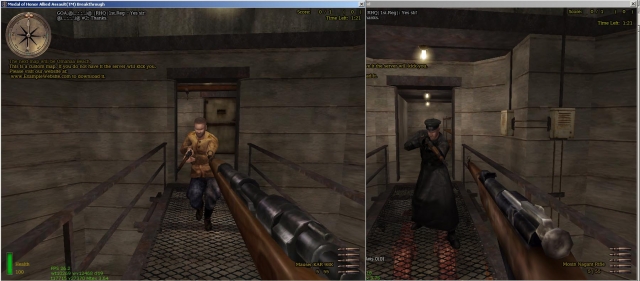
This mod will show what the next map will be, below the compass (on the left) for all players in the server. View the Readme below for all info on how to use it and modify it (readme also included within the zip file). /*******************************************************************************\ Readme.txt "Next Map is..." message script Readme by: @(...:.:...)@ / Hal Email: 1st.regiment [at] gmail [dot] com TMT member: http://www.modtheater.com/forum/member.php?u=5281 14/8/2005 ------------------------------------- If you have any questions or problems, post in this thread: http://www.modtheater.com/forum/showthread.php?p=219912#post219912 or email me at the address above. ------------------------------------- It is best to view this document WITHOUT word wrap on, otherwise it may become very hard to read and understand the vstr aliases. Also I have already put in line breaks to keep the width down, so it may look odd if you have word wrap. :S \*******************************************************************************/ Description: This script will display a message telling players what the next map in your rotation will be. It does this by extracting information from a few new cvars that are added to your servers .cfg file. See the 2 screenshots included in the zip. Instillation: This depends on your current server mod setup. If you have other mods which use DMprecache.scr, start at step 1. If you are SURE that you are not using any custom DMprecache.scr files, proceed to step 2. 1. - Combining DMprecache's I will write this description pretty much so that anyone can make this mod work. If you have any scripting experience, i'm sure you know what to do anyway. ;) Ok, first up get all of the CUSTOM pk3 files you have on your server. If you don't have it already, get Pakscape. You can download it from here: http://users.1st.net/kimberly/Tutorial/down.htm Open up the pk3 files one by one with pakscape. In pakscape, browse to the "global" folder (if there isn't a global folder, just close the pk3 and move on to the next). You are looking for a file called DMprecache.scr. If you find one, leave it's window open in pakscape, and finish looking through all of your servers custom pk3s. Hopefully there is only one DMprecache.scr. Copy it and paste it to a folder on your harddrive so that you can work on it. If there is more than one, put them all in the same folder. Rename them DMprecache2.scr, DMprecache3.scr etc. Open up as many windows of notepad or WordPad as you have dmprecache files. In notepad or WordPad, do file>open and select "all files" or "all documents" from the drop down menu below the folder browsing area. Browse to the folder you placed your dmprecache files in, and open each one in a different WordPad/notepad window. Now check through the files for any line which starts with "exec" then a path and filename. Eg: exec global/nameofscripthere.scr If you only have one dmprecache file, skip this bit. If you have more than one dmprecache, you need to combine the exec... lines into one file. Just copy all of the exec lines from all the dmprecache files, and paste them into one file. Delete any duplicate lines. (you don't want it to exec the file twice.) When you have combined them into one file, paste the following line into your dmprecache file with the other exec lines, or at the bottom if there are no others: exec global/maprotationmessage.hal Then file>save and close all of the WordPad/notepad windows. Paste your newly edited dmprecache back into any pk3's which contained one, and save the pk3s in pakscape (file>save). Upload any pk3's you changed, and zzz_Next-Map-Is-[no precache].pk3 2. - editing cfg's If you skipped part 1 because you don't have any edited dmprecache files, upload zzz_Next-Map-Is.pk3 to your server. Obtain a copy of the .cfg file your server starts from (normally server.cfg) If your vstr rotation is in another file, just get that file. Copy & paste it to a folder on your HDD to work on. Copy and paste this text into your .cfg file ABOVE your vstr rotation code. Copy the text between the star lines, but NOT the star lines themselves: ************************* From Here (but not this line) //_____________________________________________________________________________________________________________________________ //Map Rotation Messages cvar section // The download URL for any custom maps on the server. Usually your clan/group's website address, or could be some other website which hosts the custom map. set website "http://www.examplewebsite.com" //If the script should print a message about the download URL of custom maps to the console of clients with developer on. set printtoconsole "1" //The time delay between messages in seconds. Default and minimum is 20 seconds. //If it is not set, or set to less than 20, it will be reset to 20 seconds to prevent flooding. set mapmessage_waittime "60" //The delay from the start of the round, to the first message. For example, //if it is 20, the first next map message will appear 20 seconds after the "time left" timer //start's to count down. In Objective/round based matches, this is 20 seconds after each round starts. //For All other, gametypes, the timer starts when the server finishes loading the map (before clients have finished loading) //so take into account the time it takes a player to load the map on his pc. set startup_waittime "30" //set nextmapname & iscustom to "" to initiate them, so that the vstr rotation can use them. set nextmapname "" //DO NOT EDIT OR REMOVE THIS LINE set iscustom "" //DO NOT EDIT OR REMOVE THIS LINE //_____________________________________________________________________________________________________________________________ ************************* To here (but not this line) Edit the cvars to your liking. Now you just need to add the "nextmapname" and "iscustom" cvars to your vstr aliases. Eg - set x1 "nextmapname la_patrouille_2; iscustom 1; g_gametype 4; fraglimit 5; timelimit 0; roundlimit 6; map obj/objlol_v2_13; set nextmap vstr x2" set x2 "nextmapname vsuk_abbey_beta; iscustom 1; g_gametype 4; fraglimit 5; timelimit 0; roundlimit 5; map obj/obj_la_patrouille_2; set nextmap vstr x3" set x3 "nextmapname V2_Rocket_Facility; iscustom 0; g_gametype 4; fraglimit 5; timelimit 0; roundlimit 5; map obj/vsuk-abbeybeta; set nextmap vstr x4" set x4 "nextmapname St_Renan_Bridge; iscustom 1; g_gametype 4; fraglimit 5; timelimit 0; roundlimit 5; map obj/obj_team2; set nextmap vstr x5" set x5 "nextmapname The_Bridge; iscustom 0; g_gametype 4; fraglimit 5; timelimit 0; roundlimit 5; map obj/renan; set nextmap vstr x6" set x6 "nextmapname Neuville; iscustom 1; g_gametype 4; fraglimit 5; timelimit 0; roundlimit 5; map obj/obj_team4; set nextmap vstr x7" set x7 "nextmapname The_Hunt; iscustom 0; g_gametype 4; fraglimit 5; timelimit 0; roundlimit 5; map obj/obj_neuville; set nextmap vstr x8" set x8 "nextmapname St_Lo; iscustom 1; g_gametype 4; fraglimit 5; timelimit 0; roundlimit 5; map obj/obj_team1; set nextmap vstr x9" set x9 "nextmapname lol_v2_13; iscustom 1; g_gametype 4; fraglimit 5; timelimit 0; roundlimit 5; map obj/stlo; set nextmap vstr x1" The nextmapname is the name of the map on the next line. The iscustom is 1 if the map on the next line is a custom map. Otherwise it should be 0. Split words with a "_" (underscore) when setting names for the nextmapname cvar. The script will replace the underscores with blank spaces before it prints the messages in the game. Eg: nextmapname St_Renan_Bridge will print in the game as: St Renan Bridge Now just save the cfg, and upload it to your server. Restart the server. Remember, the messages only start after the round timer starts to count down, so in objective matches the round has to start before the messages will begin (eg. you need one person on each team). Uninstall: Delete the zzz_Next-Map-Is.pk3 or zzz_Next-Map-Is-[no precache].pk3 and if you like edit dmprecache to remove the exec line for this script. Enjoy :-) (sorry about the lengh :S )
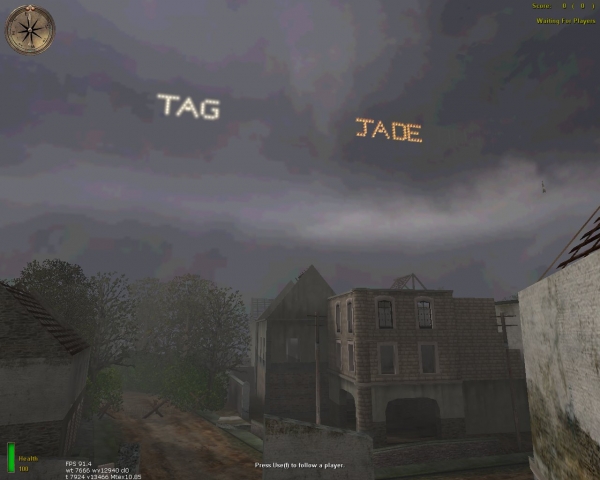
Clan Tags
*************************************************JADE & DUST clan tag mod**************************************************** before uploading to server setup your clantags_settings text file . place the z-user-DUSTS-CLAN-TAGS.pk3 & clantags_settings into ether your main mainta maintt folder . i have setup the clan tag mod by JADE DUST in the clantags_settings text file for example :) . pls leave in game messages running !!! its not a great deal to ask for the use of the mods :) :) :) . >>>>>>>>>>>>>>>>>>>>>>>>>>>>>>>>>>>>>>>>>>>>>>>>>>>>>>>>>>>>>>>>>>>>>>>>>>>>>>>>>>>>>>>>>>>>>>>>>>>>>>>>>>>>>>>>>>>>>>>>>>>>> examples :). <<<<<<<<<<<<<<<<<<<<<<<<<<<<<<<<<<<<<<<<<<<<<<<<<<<<<<<<<<<<<<<<<<<<<<<<<<<<<<<<<<<<<<<<<<<<<<<<<<<<<<<<<<<<<<<<<<<<<<<<<<<<< exec LETTERS/ALWAYS_SHOW_LETTERS/A1.scr::main ( 5530 2700 1300 ) ( 0 0 0 ) 1 //red exec LETTERS/ALWAYS_SHOW_LETTERS/A1 // the A at the end is the letter and the 1 is the colour . A1 white 1 A2 red 1 A3 orange 1 A4 green 1 main ( 5530 2700 1300 ) = this is were you set the cords for the letter . main ( 5530 2700 1300 ) ( 0 0 0 ) 1 = the is for the angles when i get them working :) and the 1 is set so its = ON . A5,6,7,8,9 are some test emitters ((((((((((((((((((((((((((((((((((((((((((((((((((((((((((((((((((((((((((((((((((((((((((((((((((((((((((((((((((((((((((((( also if you wont a firework rocket to shot and set off a fire work use these settings exec global/fworks.scr::prepare exec global/fworks.scr ( 2600 2700 1000 ) ( 2600 2700 1000 ) ( 2600 2700 1000 ) // for firework,shoot the red-orb ------------------------cords to set from-------same-------------respawn----set them all the same . do not exceed 1000 for the max height or it will explode out side the map . ))))))))))))))))))))))))))))))))))))))))))))))))))))))))))))))))))))))))))))))))))))))))))))))))))))))))))))))))))))))))))))) there is also the option to have black sky :) just to make it look better :) . pls leave in game messages running !!! its not a great deal to ask for the use of the mods :) :) :) . ============================================================================================================================= also if you don't wont the tag to be there all the time . change to this and the letters will show up for 10 seconds then go away and reaper every 3mins throughout the round . exec LETTERS/FLASHING_LETTERS/A1.scr::main ( 5150 2700 1300 ) ( 0 0 0 ) 1 ----------------------------------------------------------------------------------------------------------------------------- -----------------------------------------------------------pls note---------------------------------------------------------- pls leave in game messages running !!! its not a great deal to ask for the use of the mods :) :) :) . -----------------------------------------------------------pls note---------------------------------------------------------- pls leave in game messages running !!! its not a great deal to ask for the use of the mods :) :) :) . -----------------------------------------------------------pls note---------------------------------------------------------- you can only use each letter 1s in each colour !!!!! so if you have A1 you can not re-use it , you will have to change to A2 or 3,4 . !!!!!!!!!!!!!!!!!!!!!!!!!!!!!!!!!!!!!!!!!!!!!!!!!!!!!!!!!!!!!!!!!!!!!!!!!!!!!!!!!!!!!!!!!!!!!!!!!!!!!!!!!!!!!!!!!!!!!!!!!!!!! i will try updateing it when i have time and get every part working . :) i will try updateing it when i have time and get every part working . :)
Mixing Gametypes
HOw to use this file ===================== Put it in your MoHAA\main directory. Once this is done, you can mix your game types for maps in your server's maplist. For example, you could have "dm/mohdm1 obj/obj_team1" as your maplist. Notes ===== The file includes the glitch fixes by DogMeat for the stock maps that shipped with the game. Some popular maps are not included due to the fact that they do no include a map script. Maps Included in File ===================== Stock maps that came with game A Village Of Despair.zip ArnhemBeta1_1_DM_TDM.zip bastogne99.zip BattleoftheBulge -Ardennesforest V 1.0.zip BEACH.zip Belgas74.zip bunkerhill_teamDm.zip complex.zip courtdmv1_1.zip Courtyard Battlev1.zip courtyardobjv1_1.zip CrossfireCourtyard2v2.zip dasboot.zip DIGIMA Doomed City.zip frozenfortress.zip g3mini_compound.zip Hegensdorf.zip hide-and-seek2.zip Hitler'sFarm.zip lastcastle_1.zip LastcastleSeries.zip lol_v2_new_3.zip MAP-Fourth_Village_Release_v1.1.zip MoonlightRadioOV.zip mountainvillagedmb.zip nazi_estate_2.zip NaziFort.zip NormandyBirdge_V1.zip NormandyBridge_obj.zip obj_lastcastle.zip obj_rustinpeace.zip Operation_FUBAR.zip push_cityhall.zip Sahara!.zip Sherman Hunt - Beta.zip SmallCity.zip StorageFacility111.zip Sub_Fight.zip TheBank.zip TheFacilityDM.zip thefarmv1_6.zip ThunderSeries.zip train-station.zip Trench Wars Beta V 1.0.zip tunisian_fe.zip UGComplex.zip urbansprawl.zip User - Fubars Damned.zip User_astro_dmworldcup.zip User_Prado1_Obj.zip user-canaltown.zip User-dmwolfcastle.zip User-G3mInI_Riverside.zip User-MOHDust.zip User-obj_maromg.zip user-Snow_Camp.zip User-tank battle v3-1.zip utahbeta.zip walkinthepark.zip wdcobj1.zip Adding Other Maps =============== If there's a map you want to use that isn't in the file, just place it in your server's rotation to follow a map of the same game type. That's the simple way. If you're anal and you want to add the map to this file, just copy the map's script file from the maps\dm or maps\obj directory into the corresponding directory in this file. Then, edit the script you just copied and add set g_gametype "2" - or - set g_gametype "4" just after the "main:" section at the top of the script. Look at the other scripts if you're confused about what to add. Info / Help ============ Go the forums at alliedassault.com Thanks to DogMeat (http://tfo.servebeer.com) for the map fixes he does so well. Crow King CrowKing@comcast.net Play on the "biggest MoH server of them all" - Crow King's Forlorn Hope 7/27/02
Swear Filter V11
Redsoccerdevil & Bazooka Joe's MOH Swear Filter V1.1 Hello, and thanks for downloading our mod for Allied Assault! Hopefully, you are a server administrator, and already have a good concept on how to alter files on your server. This README is going to be brief, and straight to the point. If you have any problems running this script properly, please feel free to drop an email to: fogbazookajoe@aol.com with "Swear Filter Help" as the subject. Here's what this script does. Red and I discovered that the localization.txt file can carry out commands as basic as chat in game. So we figured why not built a filter database that will block all "naughty" words that don't belong in a game? We've made this file, consisting of over 750 expletives that should and WILL be blocked in your server game. Among these words, are also variations, including words in all caps, with exclamation points, question marks, etc. INSTALLATION/UNISTALLATION In this .ZIP file is this README that you are viewing right now, and a folder called "global", with a file named "localization.txt inside of it. Extract the folder "global" into your MOH\main directory. (EXAMPLE: C:\Program Files\EA Games\Allied Assault\Main ) MAKE SURE the "global" folder is placed in Main, and NOT the MOH folder. Now, simply start Medal of Honor. THAT'S IT! The script will be detected by MOH, and will run the filter from there. For any reason you decide you should not need this mod, just simply delete the global folder from your MOH\Main folder. CREDITS This mod was brought to you by: Bazooka Joe Redsoccerdevil Thanks to: Ktog (for suggestions) AA.COM server members (for testing) FAQ • I can't add my Message Of The Day to the file. How do I do this? – Send me an email at fogbazookajoe@aol.com, along with the MOTD you wish to add, and I will add it for you. • How come a death message mod I have will not work with the chat filter? – The chat filter overrides any other files that modify the localization.txt file, so if you want custom death messages, you must please send us the file that contains the custom messages, and we will modify it for you. • You missed a word! Can I add it? – You probably can't. Send us the word in an email, and we'll add it to the next release! • When Medal Of Honor first boots up, it takes longer than usual. Is this because of your mod? – Yes. Medal Of Honor must read and identify all of the swear words before it can load them to your game. This, unfortunately, takes a few extra minutes, so don't think that you game has froze, it's just loading the filter. Did we miss any words? Suggestions? Please, LET US KNOW!!! We can make this script better with YOUR feedback! Email us at fogbazookajoe@aol.com
Team Counter HUD
Install: Place in MAIN folder Uninstall: Remove from MAIN folder Usage: **REQUIRES REBORN PATCH (Not Included) AND EVENT HANDLER (Included)** Displays a HUD in the lower right of the screen that shows the number of players alive and the total number of players on a team for each team. Useful for gametypes that do not include a HUD with MEFY's gametypes. Uses dmprecache to execute eventhandler.scr and teamb.scr. Add the lines to the bottom of your dmprecache if necessary: exec global/eventhandler.scr exec global/teamb.scr Thanks to Purple Elephant for the Reborn Event Handler. Thanks to Own3mAll for the team counting script from his Last Man Standing mod. For any support with this mod, visit www.clanbrats.org, or email me: darren@clanbrats.org.

RCON Player Menu
Older versions are included as well. Updated as of March 18th 2009! ~ Version 1.06 ~ Mod Edited by ~ Ghost ~ A.K.A {PC}{²/¹/¹}Sgt.PPCLI © 2009 Credit!!! Please do not remove this File!! Thank You This Menu was original designed as an Rcon Menu, The original Author is unknown as far as I know admintool_goldenduck The following is a link to the original mod http://medalofhonor.filefront.com/file/Admin_tool_Goldenduck;79930 ______________________________________________________________________ I also took User-EasyPicKCross and placed his mod into this one User-EasyPicKCross.pk3 Created By: BaTtOuSaI Date: 5.10.05 Email: nomqn92@yahoo.com Version: 1.0 The following is a link to the original mod http://medalofhonor.filefront.com/file/Crosshair_Chooser;41795 _____________________________________________________________________ Project Raptor 46 Crosshair Chooser F11 Created By: *>DM
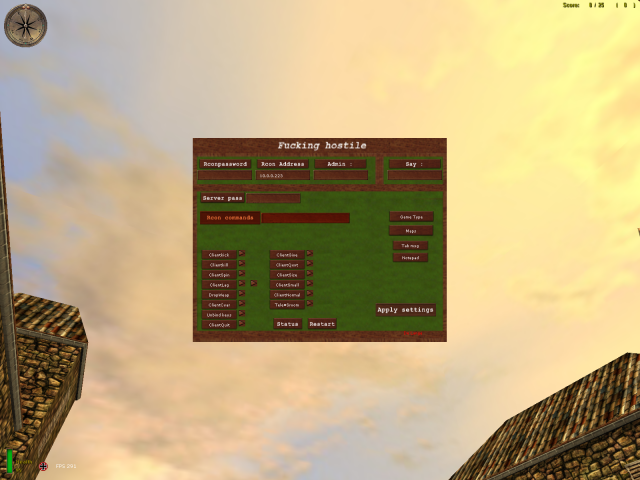
RCON Menu MOHAA Style Final
------------------------------------------------------------------ ------------------------------------------------------------------ ***INSTAL: Place everything in your C:\Program files\EAgames\MOHAA\main *Fill in your rconpassword in rconpassword.cfg -Banlist *Press on the notepad button on the menu. A little text editor will show up. Press file/open then select banlist.txt and change the ip's of your choice. When your done press file again and save. The rest should be verry easy to understand =) If you have any questions\requests you can add me on xfire : delangste ------------------------------------------------------------------- ------------------------------------------------------------------- ***uninstal Remove the files in your MOHAA/main Enjoy !! WWW.FYCCREATIONZ.COM We do not support hacking anymore!!!!!!!!!!!!!!
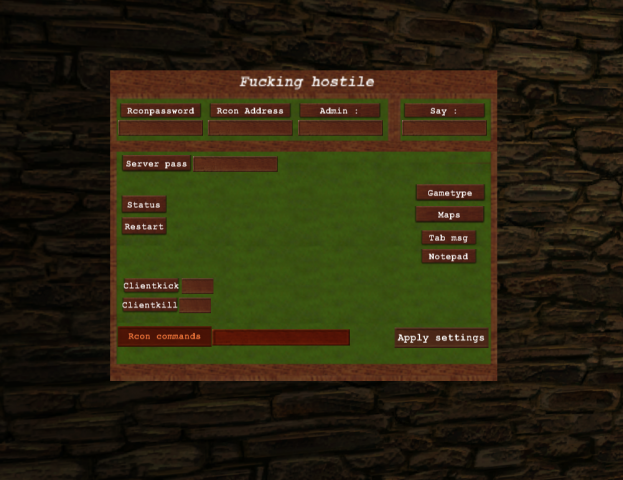
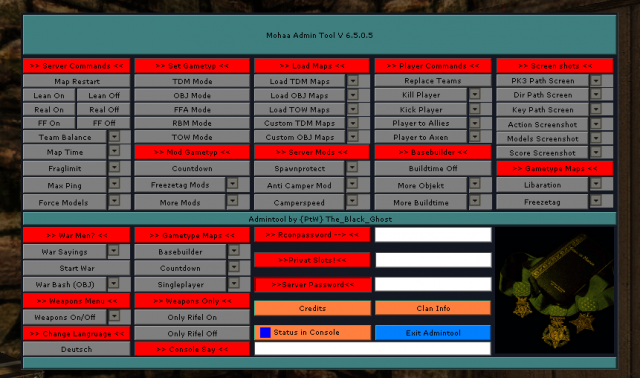
Ptw Admin Menu
Readmy {P†W} Admin Client V 6.5.0.1 Installation: - Put the two fils ({PtW} Admin Client and {PtW} Adminbefehle) in your Main/Mainta or Maintt folder! - Now you can open the Admintool over the "n" Key (English version) Reamamber this Mod will only work correctly withe the {PtW} Adminmod Server! The following features can you aktivate or disable over the Tool: - Map Restart - During the running backs on or off - Real mode on or off - Frendly Fire on or off - Time Limit and Fraglimit can change - You can load all stock Gametype modes and maps - Many Costume Maps are in the tool (all the maps you get on www.ptw-fun.de) - Anti Campermod - Kill / kick function - Rifel only on and off - Weapons can also be banned and allowed - Many Gametyp mods (for example Freezetag, countdown or Basebuilder) can be loaded - Singleplayer maps can be loaded And more..... For the change of the gametype mods (for example, from FFA to Freezetag) is the {PtW}Adminmod Server tool on your server needed!!!!!!!!!!!!!!!!!!!!!!!!!!!!!!!!!!!!!!!!!!!!!!!!!!!!!!!!!!!!!!!!!!!!!!!!!! and Admin menu: Readmy English Installation: 1 Find the right tool for the Admin Server you out! 2 Carrying Info.cfg please in your Clandatas! 3 Now the ortner Gametyp.cfg open each file and in the Startmap and the map rotation list according to their own desires set! You can also stuff like Fraglimit timeout and default are to! 4 now all the data from the folders of the Servermod to it and want to use All config dadeien aud Gametyp.cfg folder on the server eirem Upload! 5 Now you need to your Server.cfg as follows: -very top-writes her: exec ci.cfg this is important so that the Tool Server is loaded correctly! -further below, then insert the following: seta countdown 0 so the countdown mod is not always on -To also from the beginning to the right game you need to start now following: name of the exec server.cfg you want to start (e.g. ffa.cfg exec staret the Free For All mode! 6 Server re-start and have fun! 7 Lock at the server.cfg exec ci.cfg // You need this to start the admin server mod! set cheats "0" set g_gravity "800" set g_speed "320" set sv_maxRate "8000" set sv_cheats "0" set sv_hostname "Servername" set sv_maxclients "16" set g_gametype "1" set sv_pure "0" set rconpassword "test" set sv_privateclients "0" set sv_privatepassword "0" set sv_maxping "200" set sv_floodprotect "1" set flood_persecond "4" set sv_gamespy "1" set fraglimit "50" set timelimit "0" set g_warmup "0" set g_inactivekick "600" set g_inactivespectate "600" set g_teamforcebalance "0" set g_teamdamage "0" seta g_motd "Welcome to Server" set g_log "logs/games.log" set sv_team_spawn_interval "0" set g_forceteamspectate "0" set g_allowvote "0" set sv_allowdownload "0" set dmflags "262144" // allow lean seta countdown 0 // This must be set or Countdown will run every time!! // Game Config´s //exec capture_the_flag.cfg // Capture The Flag //exec countdown.cfg // Countdown //exec demolation.cfg // Demolation //exec freezetag_ctf.cgj // Freezetag-Capture The Flag //exec freezetag_demolation.cfg // Freezetag-Demolation //exec freezetag_obj.cfg // Freezetag-Objective //exec freezetag_tdm.cfg // Freezetag-Team //exec freezetag_tow.cfg // Freezetag-Tug Of War //exec liberation.cfg // Liberationexec ffa.cfg // Free for all //exec tdm.cfg // Team //exec obj.cfg // Objective //exec rbm.cfg // Round based //exec tow.cfg // Tug Of War seta sv_master1 "mohmaster.2015.com" seta sv_master2 "master0.gamespy.com" seta sv_master3 "master1.gamespy.com" seta sv_master4 "clanservers.net"
Medal of Honor: Allied Assault Mods (MOHAA) — Complete Community Archive
Welcome to the premier repository for Medal of Honor: Allied Assault mods. Since the game's groundbreaking release in 2002 by 2015, Inc. and EA, MOHAA has inspired one of the longest-standing modding communities in first-person shooter history. MOH-DB preserves, categorizes, and serves over 1,600 verified community modifications, custom enhancements, and competitive utilities for Allied Assault, Spearhead, and Breakthrough.
Explore MOHAA Mod Categories
Player Skins & Uniforms
Over 700 historically accurate and creative player uniforms for Allied and Axis factions. Equip authentic U.S. Army Rangers, 101st and 82nd Airborne paratroopers, British Commandos, Soviet Red Army conscripts, Wehrmacht Heer infantry, Fallschirmjäger, and Waffen-SS camouflage patterns, as well as classic community clan skins.
Weapon Models & Reskins
Enhance your WWII arsenal with ultra-detailed weapon replacements and high-resolution textures. Popular downloads include authentic wood-finish Kar98k sniper rifles, realistic metallic sheen M1 Garand models with classic "ping" animation refinements, Thompson submachine guns, MP40s, BAR 1918 rifles, and custom iron-sight alignments.
Soundpacks & Realism Audio
Transform the sonic atmosphere of Allied Assault. Replace compressed 2002 Quake-engine sound effects with cinema-grade gunfire recordings, authentic distant artillery rumblings, terrifying Stuka dive-bomber sirens, supersonic bullet cracks, metal ricochets, and remastered German and American voice callouts.
HUDs, Menus & Crosshairs
Modernize the in-game interface for 1080p, 1440p, and 4K widescreen displays. Download minimalist competitive heads-up displays, custom dot and crosshair overlays, cleaner compass indicators, redesigned main menus, and unobtrusive health and ammunition counters favored by competitive league players.
Server Utilities & Admin Scripts
Run resilient, modern multiplayer game servers with essential server-side utilities. Includes automated map rotators, anti-cheat detection tools, voting scripts, custom match timers, ping balancers, and administrative rcon managers designed for dedicated servers running 24/7.
MOHAA Reborn 1.12 Community Patch
The gold standard community patch for modern MOHAA servers and clients. The Reborn 1.12 patch resolves legacy buffer overflows, fixes client query exploits, expands internal script limits for complex mods, and provides a built-in server browser to replace the defunct GameSpy master server.
How to Install MOHAA Mods: Quick Guide
Identify Your Target Directory
MOHAA stores all game assets in subfolders inside the root installation directory:
- MOHAA (Base):
.../MOHAA/main/ - Spearhead:
.../MOHAA/mainta/ - Breakthrough:
.../MOHAA/maintt/
Paste Without Extracting
Download the mod archive from MOH-DB. If it is zipped (.zip or .rar), extract the enclosed .pk3 file. Place this .pk3 directly into your game's /main/ folder.
How to Remove or Troubleshoot
To remove any mod, simply delete its .pk3 file from the /main/ folder. The game will immediately return to stock behavior without reinstalling.
Frequently Asked Questions about MOHAA Mods
To install MOHAA mods, copy the downloaded .pk3 file directly into your Medal of Honor Allied Assault installation folder under /main/ (or /mainta/ for Spearhead, and /maintt/ for Breakthrough). You do not need to unpack or extract the .pk3 archive—the game engine loads it automatically upon launch.