
Medal of Honor: Allied Assault Mods (MOHAA)
Discover and download community-created modifications to enhance your Medal of Honor: Allied Assault experience.
103 Mods Found
Global Plane Strafe Script
//--------------------------------------------------------------------------------------------------- // // Plane/strafeing system created by bdbodger ( bdbodger@hotmail.com ) ©2004 // // You are free to use this script for noncommercial use as long as you do not remove this message // // and if you edit the script you indicate in the script the changes you have made . // // This script is offered as is and author is not responsible for improper use . // //--------------------------------------------------------------------------------------------------- // // example: // // main: // // level waittill spawn // // exec global/strafe.scr // // // thread global/strafe.scr::strafe # [optional plane sound] // // end // //---------------------------------------------------------------------------------------------------
Play Tank
(Basically a mod that spawns tanks in 4 of the stock maps, also bazookas have only 1 shell and no shotguns allowed). This is a server side mod No shotggun 1 shell in panzershrek or bazooka mohdm2=2 play- tanks mohdm3=2 play- tanks mohdm4=2 play- tanks mohdm7=1 play- tanks This mod was made by MCP2000 mcp2000@hotmail.de Have fun to play unzipped in mohaa/main dirctory and start your server
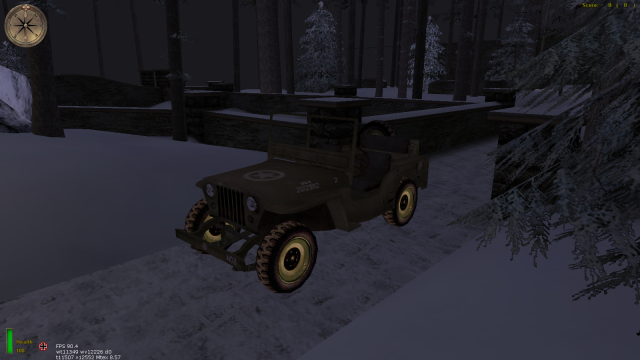
Vkoh Truck Driver
A mod for Snowy Park map where you can drive jeeps and an Opel truck through the map. You can also look behind you while driving by clicking on either of your mouse buttons.
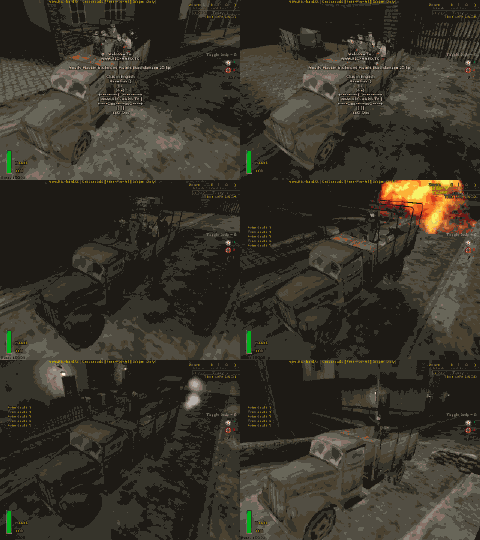
Driveby Shooting
/*_/_/_/_/_/_/_/_/_/_/_/_/_/_/_/_/_/_/_/_/_/_/_/_/_/_/_/_/_/_/__/_/_/_/_/_/_/_/_/_/_/_/_/_/_/_/_/_/_/_/___/_/_/_/_/_/_/__/_/_/_//_/_/__/_/ \_| |_/ \_| /////////////////////////////////////////////////| |_/ \_| ///// DriveByShooting v1.0 by Richard ///////////| |_/ \_| /////////////////////////////////////////////////| |_/ \_| |_/ \_| Description: |_/ \_| Adds a truck that drives around... it can hold 6 players... players enters the truck simply |_/ \_| by running into it... to exit... press USE-key, (They can still rotate and shoot). |_/ \_| |_/ \_| Supported Games: |_/ \_| Medal Of Honor: Allied Assault, (havent tested it in Spearhead & Breakthrough.) |_/ \_| |_/ \_| Supported Maps: |_/ \_| Destroyed Village, Remagen & Crossroads. |_/ \_| |_/ \_| How to install: |_/ \_| Place the pk3 inside your mohaa main dir, usualy found at c:\program files\ea games\mohaa\main |_/ \_| |_/ \_| *** NOTE *** |_/ \_| *** The mod is executed via DMprecache.scr which Ive bundled, (if the mod doesnt work = your MOH aint loading the) |_/ \_| *** the DMprecache.scr in this mod, what to do? well..u can add exec global/counter.scr to the DMprecache.scr that your |_/ \_| *** MOH loads *** |_/ \_| |_/ \_| Cvars that u can tweak this mod with: |_/ \_| drivebyshooting 0 or 1 // Turns the mod on and off (default = 1) |_/ \_| trucktype 0 or 1 // Truck with or without canopy. (default = 0) |_/ \_| truck_lights 0 or 1 // Truck with or without lights. (default = 0) |_/ \_| |_/ \_/_/_/_/_/_/_/_/_/_/_/_/__/_/_/_/_/_/_/_/_/_/_/_/_/__/_/_/_/_/_/_/_/_/_/_/_/_/_/_/_/_/_/_/_/_/__/_/_/_/_/_/_/_/_/_/_/_/__/_/_/_/__/_/*/ ########################################### #Email : ric_hard_a@hotmail.com # #Mod home page : www.ric-hard.tk # #Release date : 2007-04-03 # ########################################### )|( (o o) +------(_)------+ |www.ric-hard.tk| +--Ooo-----ooO--+ || || ooO Ooo /Richard
Drivable Tanks Bridge
2 Drivable Tanks (original script by Scorpio, changes by Cobra) have been added to The Bridge (obj/obj_team4). One on the Allied side and one on the Axis side. Could make things a bit more interesting.
Drivable Tanks 1
This is how you add a tank: 1.Put the User-K3v1n's Drivable Tanks ( AA ).pk3 in your main folder. 2.Put the User-K3v1n's Drivable Tanks ( SH & BT ).pk3 in your mainta and/or maintt folder.¦ 3.Type in your script exec global/playertank.scr Please post errors on kevinmarien_810@hotmail.com if you find one. (this playertank.scr is a modified version of other tank scripts, credit goes to the original author/s) ¦SH‚ÆBT—p‚̃tƒ@ƒCƒ‹‚Í‚ ‚è‚Ü‚¹‚ñB
Drivable Tanks
{SFX} Drivable Tanks (V1) (Cobra {SFX} made V2 in the {SFX} BattleZone Creator) USAGE: exec global/ARMOUR.scr::MAKE after level waittill spawn. IE: map m1l3b: exec global/ARMOUR.scr::MAKE "models/vehicles/panzer_tank_europe.tik" "vehicles/panzer_cannon_europe.tik" "vehicles/panzer_iv_d.tik" "allies" ( -678.99 1316.11 -23.88 ) ( 0 90 0 ) 0.5 "-67 -37 0" "67 37 39" 250 600 0 1 NOTE: Most stock mp map terrains are unsuitable for these tanks!
Drivable Cars
//mod by Creaper //do what you wish with the mod This mod adds drivable cars to medal of honor allied assault there is one map setup to run the mod m1l3b the air field (single player map) to install the mod upload the pk3 to your servers main folder then in your server.cfg add the map to your rotation like this //maplist set sv_maplist "dm/mohdm1 m1l3b dm/mohdm2 dm/mohdm3 dm/mohdm4 dm/mohdm5 dm/mohdm6 dm/mohdm7" //start the first map map m1l3b or in console type rcon map m1l3b you press your use key (e) to get in and out of the cars you can add the cars to any map but remember vehicles can be buggy so most maps will have problems to add them to more maps you get the coords you want for what ever map and add them like so under level wattill prespawn in the maps scr exec global/playervehicle.scr vehicles/jeep_bench.tik vehicles/vehicle_car_burnt-notstatic.tik (your coords) ( 0 90 0 ) 2500 500 exec global/playervehicle.scr vehicles/european_delivery_truck_grey.tik static/vehicle_car_burnt-notstatic.tik ( your coords ) ( 0 30 0 ) 2500 500 exec global/playervehicle.scr vehicles/m3.tik vehicles/sdkfz_green_d.tik ( your coords ) ( 0 80 0 ) 2500 500 exec global/playervehicle.scr vehicles/bmwbike.tik vehicles/bmwbike_d.tik ( your coords ) ( 0 66 0 ) 2500 500 exec exec global/playervehicle.scr vehicles/european_delivery_truck_green.tik vehicles/vehicle_car_burnt-notstatic.tik ( your coords ) ( 0 180 0 ) 2500 500 exec global/playervehicle.scr vehicles/mercedes.tik vehicles/vehicle_car_burnt-notstatic.tik ( your coords ) ( 0 180 0 ) 2500 500 exec global/playervehicle.scr vehicles/opeltruck.tik static/opeltruck_d.tik ( your coords ) ( 0 0 0 ) 2500 500 exec global/playervehicle.scr vehicles/sdkfz.tik vehicles/sdkfz_green_d.tik ( your coords ) ( 0 -177 0 ) 2500 500
Drivable Vehicles
How do I add a vehicle: Add a vehicle by typing in your script exec global/playervehicle.scr W A R N I N G: DON'T ADD TANKS, ONLY HALFTRACKS, JEEPS, TRUCKS, ... Can I watch backwards while reversing: Sure, when in the vehicle hold fire. Is there a destroyed model for the jeep or the m3: No, but just take as destroyed model fx/dummy.tik This MOD has a bug or error: No problem just tell me. How can I reach you: You can reach me via - msn: kevinmarien_810@hotmail.com - xfire: k3v1n1991
Boiler Room Weapon Select Mod
// ********************************************************************** // Stalingrad: Weapon Select Boiler Room // Version 1.0 (01-07-12) // By Darren Reeves (SplatterGuts) // web: www.clanbrats.org // email: dr143655@gmail.com // You are free to modify and redistribute as long as you keep these // credits. // ********************************************************************** // Read Me: // This mod adds triggers to Stalingrad (mohdm6) in MOHAA (Has not been // tested with SH or BT) that when activated switch the players weapons // to the weapon that has been set. After touching the trigger, you can // turn on a "Weapon Change Protection" that will protect the player // for two seconds to get out his/her new weapon. Should the player // exit the Boiler Room, they will walk over another trigger to restore // their original weapons. To set what weapons they will recieve after // touching the second trigger, edit the "BR-Settings.txt" file. You // can toggle on and off the "Weapon Change Protection" as well as the // option of showing the players the triggers (shown by fx/carona // models on the ground at each trigger) in the map. These settings are // either 1 for on, or 0 for off. Set them in the "BR-Settings.txt" // // To Install: Place "zzzzz_BoilerRoomWeaponSelect-SP2.pk3" and // "BR-Settings.txt" into your mohaa/main folder on the server. // // To Uninstall: Remove the files from your mohaa/main folder. // // Completed 01-07-12. SplatterGuts. // ********************************************************************** // If you have any questions or comments about this mod, please email me // at the email listed above. Thank you! // ********************************************************************** main: waitexec BR-settings.txt::cvars if (int(getcvar(Show)) == 1) thread Show_In_and_Out thread stali_boiler_triggers end stali_boiler_triggers: //IN Back door Trigger (North Side) local.trig11 = spawn trigger_multiple local.trig11.origin = ( 728 18 -151 ) local.trig11.angles = ( 0 180 0 ) local.trig11 setsize ( -40 -40 -10 ) ( 40 40 10 ) local.trig11 targetname in_trig_stali_1 local.trig11 setthread BR_loadout local.trig11 delay 0 //IN Front door Trigger (South Side) local.trig12 = spawn trigger_multiple local.trig12.origin = ( 550 112 -151 ) local.trig12.angles = ( 0 0 0 ) local.trig12 setsize ( -40 -40 -10 ) ( 40 40 10 ) local.trig12 targetname in_trig_stali_2 local.trig12 setthread BR_loadout local.trig12 delay 0 //IN Side door Trigger (East Side) local.trig13 = spawn trigger_multiple local.trig13.origin = ( 97 -546 -151 ) local.trig13.angles = ( 0 0 0 ) local.trig13 setsize ( -40 -40 -10 ) ( 40 40 10 ) local.trig13 targetname in_trig_stali_3 local.trig13 setthread BR_loadout local.trig13 delay 0 //IN Top door Trigger (Top North Side, Locker room) local.trig14 = spawn trigger_multiple local.trig14.origin = ( 539 111 32 ) local.trig14.angles = ( 0 0 0 ) local.trig14 setsize ( -40 -40 -10 ) ( 40 40 10 ) local.trig14 targetname in_trig_stali_4 local.trig14 setthread BR_loadout local.trig14 delay 0 // or make the setthread exec my weapons mod??? //OUT Back door Trigger (North Side) local.trig1 = spawn trigger_multiple local.trig1.origin = ( 828 18 -151 ) local.trig1.angles = ( 0 180 0 ) local.trig1 setsize ( -40 -40 -10 ) ( 40 40 10 ) local.trig1 targetname out_trig_stali_1 local.trig1 setthread normal_loadout local.trig1 delay 0 //OUT Front door Trigger (South Side) local.trig2 = spawn trigger_multiple local.trig2.origin = ( 450 112 -151 ) local.trig2.angles = ( 0 0 0 ) local.trig2 setsize ( -40 -40 -10 ) ( 40 40 10 ) local.trig2 targetname out_trig_stali_2 local.trig2 setthread normal_loadout local.trig2 delay 0 //OUT Side door Trigger (East Side) local.trig3 = spawn trigger_multiple local.trig3.origin = ( -7 -548 -151 ) local.trig3.angles = ( 0 0 0 ) local.trig3 setsize ( -40 -40 -10 ) ( 40 40 10 ) local.trig3 targetname out_trig_stali_3 local.trig3 setthread normal_loadout local.trig3 delay 0 //OUT Top door Trigger (Top North Side, Locker room) local.trig4 = spawn trigger_multiple local.trig4.origin = ( 439 111 32 ) local.trig4.angles = ( 0 0 0 ) local.trig4 setsize ( -40 -40 -10 ) ( 40 40 10 ) local.trig4 targetname out_trig_stali_1 local.trig4 setthread normal_loadout local.trig4 delay 0 end Show_In_and_Out: //IN-OUT Back (North Door) local.orb = spawn script_model local.orb model "fx/corona_red.tik" local.orb.origin = ( 728 18 -151 ) local.orb notsolid local.orb = spawn script_model local.orb model "static/corona_orange.tik" local.orb.origin = ( 828 18 -151 ) local.orb notsolid //IN-OUT Front (South Door) local.orb = spawn script_model local.orb model "fx/corona_red.tik" local.orb.origin = ( 550 112 -151 ) local.orb notsolid local.orb = spawn script_model local.orb model "static/corona_orange.tik" local.orb.origin = ( 450 112 -151 ) local.orb notsolid //IN-OUT Side (East Door) local.orb = spawn script_model local.orb model "fx/corona_red.tik" local.orb.origin = ( 97 -546 -151 ) local.orb notsolid local.orb = spawn script_model local.orb model "static/corona_orange.tik" local.orb.origin = ( -7 -546 -151 ) local.orb notsolid //IN-OUT Top (Top Door) local.orb = spawn script_model local.orb model "fx/corona_red.tik" local.orb.origin = ( 539 111 32 ) local.orb notsolid local.orb = spawn script_model local.orb model "static/corona_orange.tik" local.orb.origin = ( 439 111 32 ) local.orb notsolid end BR_loadout: local.player=parm.other if(local.player.sniper!=1) { local.player.sniper=1 local.player waitexec BR-settings.txt::boiler_weapons if (int(getcvar(change_protect)) == 1) thread change_protect } end normal_loadout: local.player=parm.other if(local.player.sniper==1) { local.player.sniper=0 local.player waitexec BR-settings.txt::normal_weapons if (int(getcvar(change_protect)) == 1) thread change_protect } end change_protect: local.player = parm.other local.player nodamage wait 2 local.player takedamage local.player stufftext "locationprint 500 50 Protection-Off"// end
Fire Effect Mod
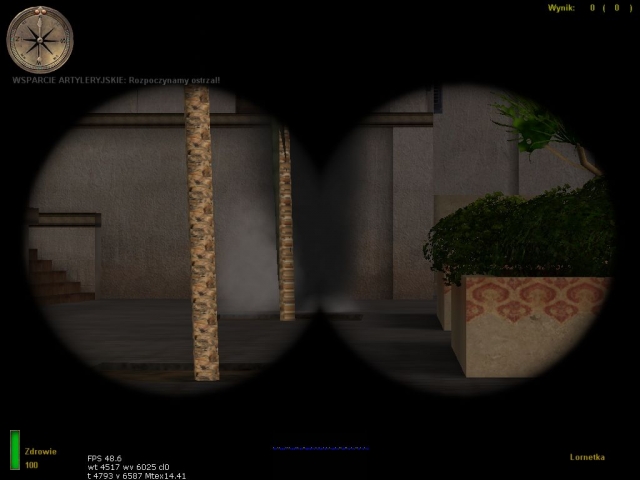
This mod adds Wolfenstein: Enemy Territory-style fire support to MoHAA! Just aim somewhere with your binoculars and click fire or throw a smoke grenade. Fire-For-Effect! support tutorial by Rookie One ================================= So you think you're tough enough to implement FFE support in some non-stock map? :) Good. Let's get going! I'm going to show you how to create a preset for a map. This is needed only the map's skybox is not a box (e.g. on V2 and Algiers stock maps) or when the skybox touches one or more buildings' roof (practically it means that you can call fire support inside buildings). In such case you need to either change the shape of the skybox or use an alternative method of height tracing. I'll show you how to fix it the second way. First of all, create a text file, name it just like the map but give it a .scr extension and place it in global/fire_for_effect/map_presets/ with the same path as the map (e.g. if the map is dm/dm_mymap, the file should be saved as MoHAA/main/global/fire_for_effect/map_presets/dm/dm_mymap.scr). Insert these lines in it: level.ffe_method = "skybox" // can be skybox, zones (bounds of zones where fire support cannot be called) or xzones (bounds of the only zones where fire support can be called) or a number for tracing the specified number of units up from the call location level.ffe_artillery = 1 // enables artillery strikes on the map level.ffe_airstrike = 1 // enables airstrikes on the map end 1 // this is to indicate that the preset ran OK The comments describe each of the lines. I implemented 4 methods of height tracing in FFE. The first, skybox, traces the highest solid surface (which is in most cases the skybox) and then traces down from that surface to the next solid one. This method works perfectly on all maps that have a regular, cubic skybox that doesn't touch any building's roof. The second method is zones. There are predefined zones in the map script and if some player tries to call fire support inside one of these zones, the call fails with a "cannot see target" message. This method is used in the Algiers map. The third one is xzones. It's very similar to zones, but it works the other way around - they are the only zones you can call fire support in. If a call occurs beyond them, it fails with a "cannot see target" message. This method is used in V2 rocket facility where there is less outdoor areas than indoors and it was much less work this way. :) The last, but not least, is a nameless method. :) Just type some number and the script will try to trace from the given number units up from the call location. It's just left in case it would suit some custom map. However, I recommend using the skybox method instead. If you've decided to use the zones or xzones method, read on. If not, you should have enough information to cope without a step-by-step tutorial. ;) Now you need to get the bounds of the zones. The bounds are just origins. There are several ways to do this - you can either decompile the map and get the origins in Radiant or get ingame and find them out with the coord command. When you get the zones bounds, you can either write a preset for a map and send it to me (:P) or just include the information in the map script. These is the preset for V2 rocket facility: level.ffe_method = "xzones" // can be skybox, zones (bounds of zones where fire support cannot be called) or xzones (bounds of the only zones where fire support can be called) or a number for tracing the specified number of units up from the call location. // zone definitions level.ffe_zones[1] = ( -943 1504 0 )::( -1135 1328 0 ) level.ffe_zones[2] = ( -3263 1328 0 )::( -975 -1528 0 ) level.ffe_zones[3] = ( 1097 -1656 0 )::( 5176 320 0 ) level.ffe_zones[4] = ( 5176 320 0 )::( 1648 2256 0 ) level.ffe_zones[5] = ( 1648 2256 0 )::( 1552 2256 0 ) level.ffe_zones[6] = ( 1552 2240 0 )::( 1656 1936 0 ) level.ffe_zones[7] = ( 1656 1936 0 )::( 1560 1240 0 ) level.ffe_zones[8] = ( 3360 2363 0 )::( 5184 2939 0 ) end 1 // this is to indicate that the preset ran OK I came up with the presets thingy for better organisation and more map-independence. You should be able to add FFE-support to your map now. See you on the battlefield, soldier, and better take cover if you see me with binoculars! ]:-> Rookie One
Binocular Aistrike
I "PHIL {SFX} FISHER" reserve the right to develop this script further and request that people wishing to use any part of this script within their own custom Code seek my permission first. USAGE: exec global/BINOCULAR_AIRSTRIKE.scr::BINOCULAR_AIRSTRIKE after level waittill spawn. IE: map dm/mohdm1: exec global/BINOCULAR_AIRSTRIKE.scr::BINOCULAR_AIRSTRIKE ( 298.64 475.75 384.13 ) ( 0 0 0 ) To use press use on static Binocular's, then anywhere in map select binoculars and hold fire on a target to call a airstrike on that target ! NOTE: if you experience any problems with bombs not hitting there targets, it is because of clipping,skybox or entities that dont react or interfere with the targeting system.
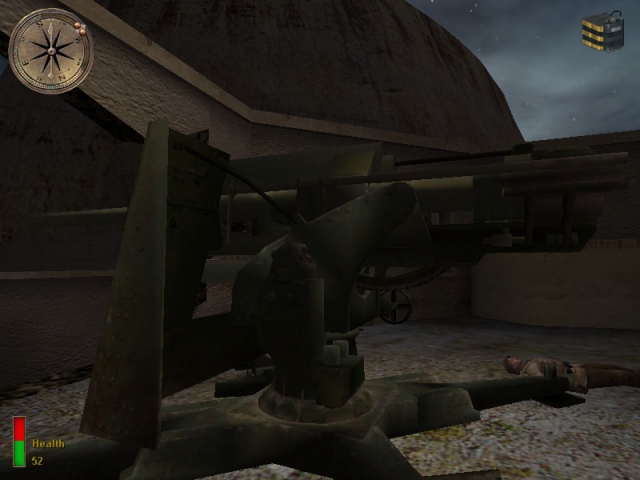
Sfx Usable Flak88 Script
//*****************************************************************\\ // Player Usable Flak-88 A.T. Gun from the SFX Mod Menu \\ // Usable Flak88 Script by Cobra {sfx} & PacRac {sfx} \\ // www.Mods-R-us.net \\ //*************************************************************************\\ *************************************************************************** How to spawn the flak88 model: Execute the flakfire.scr from any map .scr file after level waittill spawn exec global/SFX_Flak88.scr ( ORIGIN ) ( ANGLE ) ------------------------------------------------------------- **EXAMPLE:** level waittill spawn exec global/SFX_Flak88.scr ( -1270 -2950 0 ) ( 0 180 0 ) ------------------------------------------------------------- *************************************************************************** {SFX} Team www.Mods-R-us.net
Remote Detonators
You place explosives anywhere in the map - usually somewhere you can see it from, then place the plunger in front of you, press use on it to blow up those explosives you planted - Remote Detonation Idea.
Radio Airstrike Script
Video of script executed: https://www.youtube.com/watch?v=gbhyqSHvKZ0 [u]Quote from Cobra {sfx}:[/u] [i]Right this type is a scripted Airstrike, the Radio you just get Coords on the ground where you want someone to find the Radio, Start Coord Mid Coord and End Coord are for the plane to cross the sky, so in spectate you could get coords for start say out at sea on Omaha, Mid set would be over the Beach, End set for where it goes out of the map behind Omaha and vanishes.[/i] [i]Somewhere below the Mid Coord is where it will release the Bombs (it has a timer you can adjust) so you will need the Target Coords for where you want the 2 Bombs to hit.[/i] [i]exec global/Cobra_Airstrike.scr::Radio_Airstrike [/i] [i]EG in DM2[/i] [i]exec global/Cobra_Airstrike.scr::Radio_Airstrike ( -3779 -3333 189 ) ( 0 0 -20 ) ( -4393 -8905 2166 ) ( -4223 -3419 944 ) ( -4170 4961 3274 ) ( 0 88 0 ) "7" ( -4204 -129 378 ) ( -4242 522 426 ) "6.4"[/i] [i]You would use it as an added FX script, it will just bomb the same place all the time so best used once say to drop 2 bombs on Omahas Bunkers.[/i] [b][u]What Is It?:[/u][/b] This is a Simple Walkie Talkie Called in Air-Strike, you can use as many as needed, just add more. ****************************************************************************************** features: Simple Plane Bombing Script - Plane just needs 3 coords across the map Plane will drop 2 Bombs towards your target Bomb release Timer for Fine Adjustment Plane Wait Timer (how long before it will show) Default Plane is Allied P47-ThunderBolt - can change that in this line ... $("bomber" + local.random_num) model "models/vehicles/p47fly.tik" ****************************************************************************************** Place Cobra_Airstrike.scr in your mod pk3`s global folder. Explanation: exec global/Cobra_Airstrike.scr::Radio_Airstrike (It needs the above information placed into each Map Script like in the example below) ... ******************************************************************************************* Example-(eg mohdm2.scr): main: level waitill prespawn level waittill spawn exec global/Cobra_Airstrike.scr::Radio_Airstrike ( -3779 -3333 189 ) ( 0 0 -20 ) ( -4393 -8905 2166 ) ( -4223 -3419 944 ) ( -4170 4961 3274 ) ( 0 88 0 ) "7" ( -4204 -129 378 ) ( -4242 522 426 ) "6.4" end *******************************************************************************************

Spectate Camera
_______________ Intall: _______________ Put the .pk3 into your main, mainta or maintt folder ________________ Setup: ________________ Take the map file and exec the .scr from the global file aove level waittill prespawn like so exec global/cam.scr ( origin ) x_angle y_angle_min y_angle_max z_angle so for example exec global/cam.scr ( -629 452 532 ) 38 -64 0 0 to make a still camera that does not rotate between angles simply set the y_angle_min and y_angle_max to the same value. so for example exec global/cam.scr ( 777 -425 -24 ) 25 114 114 0 also provided is a sample map file if your lost simply take a look (mohdm6) ________________ Bugs: ________________ None i am aware of so far To report any simply PM me on Mod Theater or email me i__am__canadain@hotmail.com or catch me on aol at habsey89

zzzzzzzxBobzilla_nofog_spearhead-v4.pk3
Spearhead only NO-FOG mod (server side)
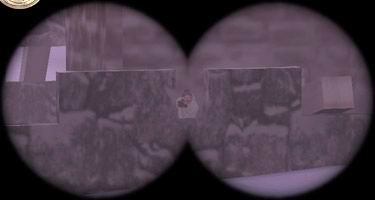
Scout Mod
Also added within this file is: rjukanproject_scout_stock_map_modified_scripts.zip (Map scripts for all standard maps, to make them run the scout mod). MOH:AA Scout modification -------------------------------------------------------------- >>>>>>>>>>>>>>>>>>>>>>>>> ABSTRACT >>>>>>>>>>>>>>>>>>>>>>>>> INDEX >>>>>>>>>>>>>>>>>>> MODIFICATION DATA >>>>>>>>>>>>>>>>>>>>>> INSTALLATION /main folder. 2) Insert this line in your main method(before roudstart): exec global/rjukanproject_scout.scr 3) Insert this method last in your script(outside of main): clickitem_fail: exec global/rjukanproject_scout.scr::binocular_fire end 4) Done! Lets scout them out! - By default an instructional message is written on the players screens about every 15:th time the map runs(not very often). This can be changed by adding a number to the execution statement of stage 2) above. Like this: exec global/rjukanproject_scout.scr If you want the message to be more frequent, replace with a number less than 15 (Ex: The value 5 will print the message every 5:th time the map runs). The message can't be disabled completely, but using a value of, say 1000 will make the message rather infrequent. - Use the scout mod Logo in your loading screen if you want to inform the players that the mod is included. The file 'scout_mod.tga' is a 32 bit 290*160 targa image. It is rather large to allow resizing to fit your particular needs. >>>>>>>>>>>>>>>>>>>>>>>> HOW TO SCOUT >>>>>>> I FOUND AN ERROR, WHAT SHOULD I DO WITH IT? >>>>>>>>>>>>>>> KNOWN ERRORS IN VERSION 1.2 >>>>>>>>>>>>>>>>>> CHANGES IN VERSION 1.2 >>>>>>>>>>>>>>>>>> CHANGES IN VERSION 1.1 >>>>>>>>>>>>>>>>>> CHANGES IN VERSION 1.0 >>>>>>>>>>>>>>>>>> CHANGES IN VERSION BETA >>>>>>>>>>>>>>>>>>>>>>> THANX >>>>>>>>>>>>>>>>>>>>>> CONCTACT >>>>>>>>>>>>>>>>>>> NEED TO KNOW MORE? >>>>>>>>>>>>>>>>>>>>>>>>> GOODBYE
Medal of Honor: Allied Assault Mods (MOHAA) — Complete Community Archive
Welcome to the premier repository for Medal of Honor: Allied Assault mods. Since the game's groundbreaking release in 2002 by 2015, Inc. and EA, MOHAA has inspired one of the longest-standing modding communities in first-person shooter history. MOH-DB preserves, categorizes, and serves over 1,600 verified community modifications, custom enhancements, and competitive utilities for Allied Assault, Spearhead, and Breakthrough.
Explore MOHAA Mod Categories
Player Skins & Uniforms
Over 700 historically accurate and creative player uniforms for Allied and Axis factions. Equip authentic U.S. Army Rangers, 101st and 82nd Airborne paratroopers, British Commandos, Soviet Red Army conscripts, Wehrmacht Heer infantry, Fallschirmjäger, and Waffen-SS camouflage patterns, as well as classic community clan skins.
Weapon Models & Reskins
Enhance your WWII arsenal with ultra-detailed weapon replacements and high-resolution textures. Popular downloads include authentic wood-finish Kar98k sniper rifles, realistic metallic sheen M1 Garand models with classic "ping" animation refinements, Thompson submachine guns, MP40s, BAR 1918 rifles, and custom iron-sight alignments.
Soundpacks & Realism Audio
Transform the sonic atmosphere of Allied Assault. Replace compressed 2002 Quake-engine sound effects with cinema-grade gunfire recordings, authentic distant artillery rumblings, terrifying Stuka dive-bomber sirens, supersonic bullet cracks, metal ricochets, and remastered German and American voice callouts.
HUDs, Menus & Crosshairs
Modernize the in-game interface for 1080p, 1440p, and 4K widescreen displays. Download minimalist competitive heads-up displays, custom dot and crosshair overlays, cleaner compass indicators, redesigned main menus, and unobtrusive health and ammunition counters favored by competitive league players.
Server Utilities & Admin Scripts
Run resilient, modern multiplayer game servers with essential server-side utilities. Includes automated map rotators, anti-cheat detection tools, voting scripts, custom match timers, ping balancers, and administrative rcon managers designed for dedicated servers running 24/7.
MOHAA Reborn 1.12 Community Patch
The gold standard community patch for modern MOHAA servers and clients. The Reborn 1.12 patch resolves legacy buffer overflows, fixes client query exploits, expands internal script limits for complex mods, and provides a built-in server browser to replace the defunct GameSpy master server.
How to Install MOHAA Mods: Quick Guide
Identify Your Target Directory
MOHAA stores all game assets in subfolders inside the root installation directory:
- MOHAA (Base):
.../MOHAA/main/ - Spearhead:
.../MOHAA/mainta/ - Breakthrough:
.../MOHAA/maintt/
Paste Without Extracting
Download the mod archive from MOH-DB. If it is zipped (.zip or .rar), extract the enclosed .pk3 file. Place this .pk3 directly into your game's /main/ folder.
How to Remove or Troubleshoot
To remove any mod, simply delete its .pk3 file from the /main/ folder. The game will immediately return to stock behavior without reinstalling.
Frequently Asked Questions about MOHAA Mods
To install MOHAA mods, copy the downloaded .pk3 file directly into your Medal of Honor Allied Assault installation folder under /main/ (or /mainta/ for Spearhead, and /maintt/ for Breakthrough). You do not need to unpack or extract the .pk3 archive—the game engine loads it automatically upon launch.