
Medal of Honor: Allied Assault Mods (MOHAA)
Discover and download community-created modifications to enhance your Medal of Honor: Allied Assault experience.
23 Mods Found
Metal Map Textures
New METAL textures for MoHAA mapping! Game Textures: METAL © 2002 Idigicon Limited Date Created: March, Saturday, 5th, 2011, 8:22 P.M Use: Useful map textures License: You use, you take all credit!| ;-)| Textures ripped by: Heinrieck Enjoy! Questions or comments? E-Mail me at: Heinrickmohfiles@gmail.com Note: Most textures can not be edited because they are in old color formats!
Eye of the Beholder - Doom Mod - Texture Pack
Dungeon textures for mappers or modders. These are textures from the DOS game Eye of the Beholder 1 2 & 3 Dungeon type textures include walls, keys, floors, liquids, doors, items... etc
Sky Textures
viperskyshader.pk3 inside of viperskyshader.rar is needed in order for the sky textures to work. (It's included within the zip file.)

Ryzzos Explosion Mod
This is abou' 2 months old, i just never published it:D its an explosion thingy. the explosion is pretty good, i like the brighter flash texture and there's like fragments flying:D the white stuff:P "RYANRYZZO"
Alcohol Glass Textures
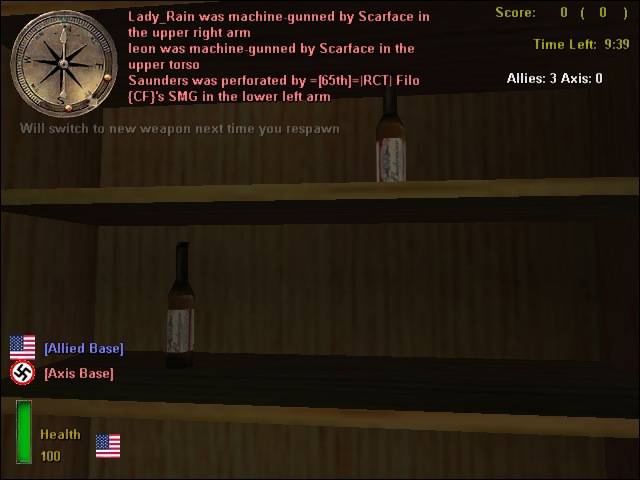
Vdog77's Jack daniel's Whiskey,Budweiser beer, Smirnoff Ice, Heinieken and Glasses mod Textures by Vdog77 //////////////////////////////////////////////////////////////////////////////////////////////// **Description- This is a mod in which the Default beer,whiskey,vodka, and green bottles have been fitted with a Jack Daniels logo,a budweiser label, a Heinieken label and a Smirnoff label. The glasses also have a brown liquid inside of them. //////////////////////////////////////////////////////////////////////////////////////////////// **Installation- Place pk3 in MOHAA/Main and ur good to go! WARNING: This file has not been tested in Spearhead or Breakthrough so it might no work for them! If you have any questions contact me at: sp0rtdude101@yahoo.com (sp0rtdude101 AT YAHOO DOT COM) or at MOHAA filefront forums"Vdog77" Thanks!
Green Plastic Men v2
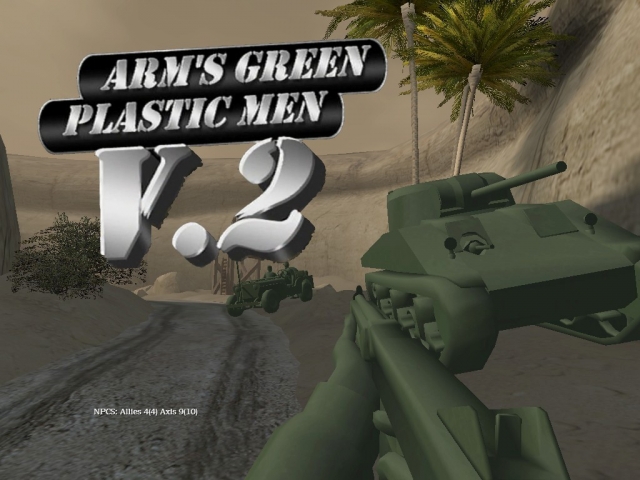
-=GPMv2 README=- -INSTALLATION- To install Green Plastic Men V.2 extract the corresponding .pk3 to your main, mainta and/or maintt folders. Allied Assault - Main Spearhead - Mainta Breakthrough - Maintt -COMPATABILITY- Works with all versions of the game but applying the latest patches is recommended. Delete any previous versions of the mod from your folder. This mod is not compatible with certain weapon mods. (ie. Reskins, new models etc...) or Singleplayer mods (ie. new tiki files or reskinned soldiers) However, this mod is completely compatible with player skins as it does not overwrite any stock textures that may be used for custom skins. -CREDIT- This mod was made entirely by armdude. Contact me at (armdude101@gmail.com) before using any or all parts of this conversion in your own mod and I will gladly oblige to your usage of this mod as long as you leave credit. -KNOWN BUGS- 1. Quite a bit if not all of the static models in singleplayer and multiplayer maps are not edited. 2. Certain things on vehicles are not edited. 3. Sprites may appear very bright or are off color. 4. Edited models in certain lighting appear extremely dark. 5. Enemy weapons being used by Allies will stay tan or gray. (I have no idea how to fix this) Most of these will be fixed a 2.1 release later on. If you've found a bug, leave a comment on the file telling me where and what it is. Or you can email me (see above address) -AFFILIATION- This version of Green Plastic Men is in partnership with Joshua Garrett's Plastic Warfare Mod for Team Fortress 2. -SPECIAL THANKS- To Christian Busch for inspiring me to restart this mod and providing insightful ideas through the whole making of this second version. Not to mention testing and giving me very useful feedback the whole time. Thanks man! ------------------------------------------------------------------------------------ Enjoy!
MOHAA MP Texture Conversion v20
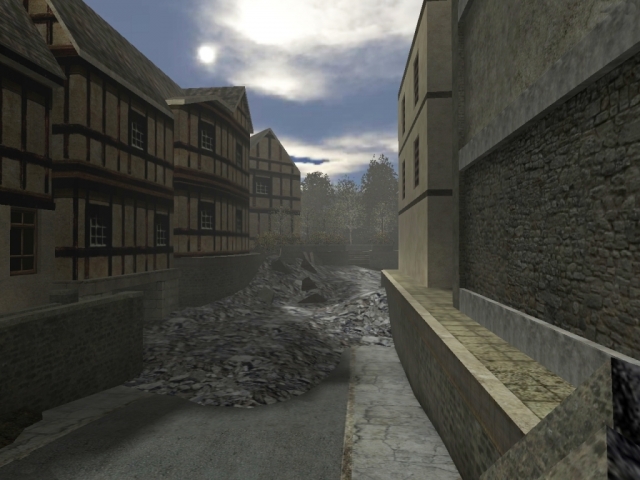
ReadMe: ========================================= Title: MoHAA Multiplayer Texture Conversion (add-on) for Medal of Honor Allied Assault. ========================================= DESCRIPTION: This mod includes minor texture changes for various stock maps. Please see the specifications and screenshots for more information. "NOTE" This modification was developed for mp only! Some textures may not blend correctly in single player mode. I hope you enjoy it. ========================================= CONSTRUCTION: Buildtime: 1 month Editor: PakScape, Photoshop, Sound Forge 9 Map Known Bugs: None Gametype Known Bugs: None New Textures: Skybox - Various MP Maps New Sounds: P-38 ========================================= INSTALLATION: To install: ---------------- Unzip the .pk3 files, then drag and drop or copy and paste the files into the main folder for MoHAA. Main folder path: (example: C:\Program Files\EA GAMES\MOHAA\main) To uninstall: ---------------- Delete the .pk3 files from your main MoHAA folder. ========================================= FILES INCLUDED: (3) Map Textures: (zzzzzz_mp_texture_conversion(addition) - .pk3) Sounds: (zzzz_weapon_sounds - .pk3) Weapon Skins: (zzzzzz_skybox - .pk3) ========================================= PLAY INFORMATION: Game : MOH:AA Type : all Supported Modes : all Requires : MOH:AA ========================================= MAP TEXTURES CONVERTED: Team Death Match: New skybox textures for various maps. 1. Southern France 2. Destroyed Village 3. Remagen 4. The Crossroads 5.Stalingrad 6. Algiers ---------------- Objective: 1. The Hunt 2. V2 Rocket Facility 3. Omaha Beach 4. The Bridge ========================================= CUSTOM SOUNDS: P38 50cal - CoD4 ========================================= ADDITIONAL MODIFICATIONS: Realistic Blood - separate .pk3 file ========================================= CREDITS: Electronic Arts Inc. and Infinity Ward ========================================= PLAY INFORMATION: Game : MOH:AA Type : all Supported Modes : Multi-player Requires : MOH:AA Contact Information: Chalkpit@gmail.com ========================================= PERMISSIONS: All original and composed textures or assets in this level remain property of the sources respective owners. You MAY distribute this ZIP,PK3 in any not-for-profit electronic format (BBS, Internet,CD, etc) as long as you contact me first, and include all files, including this readme, intact in the original archive. ========================================= "WARNING" - Must Read and Understand Before Use The author of this file accepts no responsibility for damage to data, or physical damage to hardware caused by the appropriate or inappropriate use of this file. It is deemed that users who run this file, automatically are considered as having read and understood this liability clause before using the said file.

Dorkusgrates Items Textures
Dorkusgrate's items textures for MOHAA and MOHAASH. Place the .pk3 file in your MOHAA/main folder. Look around for the new textures. Don't like it, simply delete the textures .pk3 file. I have tested this on my system and it works great. Nice change of pace. The enclosed pic is not all the mod's included , just a few. Questions , comments email me at dorkusgrate@aol.com with the subject title "New Textures". Dorkusgrate
Dorkusgrates Walls Bricks Textures
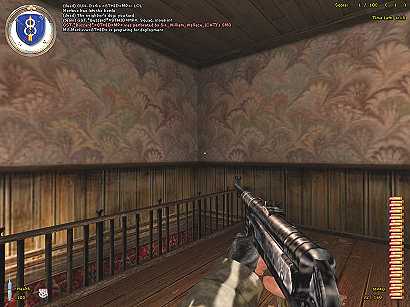
Dorkusgrate's walls and bricks textures for MOHAA and MOHAASH. Place the .pk3 file in your MOHAA/main folder. Look around for the new textures. Don't like it, simply delete the textures .pk3 file. I have tested this on my system and it works great. Nice change of pace. Questions , comments email me at dorkusgrate@aol.com with the subject title "New Textures". Dorkusgrate
Wood Railing Texture
CUSTOM TEXTURE WOOD RAILING CREATED BY: 2015 EDITED BY: RUNGSI I took the original railing texture, which was shinny and metal. Converted them over to a dull wooden texture. place the .shader files into your main/scripts folder then place the .tga file into your textures/custom folder I prefer to place all my custom textures into a one folder named "custom". If you dont have a folder... make 1 or if you prefer a differant folder. you will need to edit the .shader file with new location. Enjoy

Dorkusgrates Wood Textures
Dorkusgrate's wood textures for MOHAA and MOHAASH. Place the .pk3 file in your MOHAA/main folder. Look around for the new textures. Don't like it, simply delete the textures .pk3 file. I have tested this on my system and it works great. Nice change of pace. Questions , comments email me at dorkusgrate@aol.com with the subject title "New Textures". Dorkusgrate
Animated Bullets Mod
-------------------------------------------------------- East's Bullet mod. -------------------------------------------------------- This mod makes the guns in mohaa fire bullets, sounds stange so ill explain, what i did is made a bullet model to put in every gun exept the shotty. then i animated it so when you fire, a bullet model comes out of the gun wich you can see flying arround, The bullets dont point exactly to the middle but they go exactley where the barrel points to.and EA simply didnt point the guns to the middle of the screen. For the rifles the bullet is hard to see, because its low caliber and small size. Overall seeing them is hard wich is realistic, but theyre really there ;) thats all i have to say, screenshots explain it all, Have Fun! Models - East Anims - East Bullet skin - MOHAA (m1clip.tga) ------------------------------------------------------- Install Paste the zzzzEasts_bullet_mod.pk3 in your main folder ------------------------------------------------------- Deinstall Delete the zzzzEasts_bullet_mod.pk3 from your main folder ------------------------------------------------------- Credits ------------------------------------------------------- Do not alter this mod without my permission or reproduce it as your own ------------------------------------------------------- Comments, Questions, Reqeusts, matseast92(AT)msn(DOT)com
Total Bullet Holes Pack
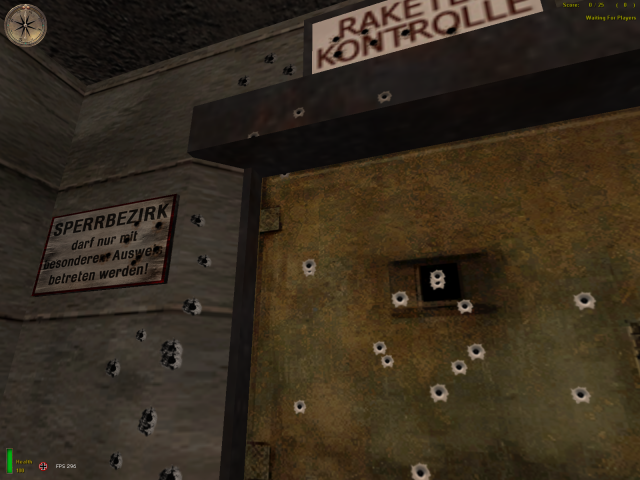
Changes the bullet holes on glass, metal, mud, plaster, stone & wood. Also changes the blastmarks. Hi again! Many people told me it could have been sweet to compile all my bullet holes texture in one bigger file: here it is!!! This file contains the bullet holes collection on every surfaces (metal, wood, glass, stone, mud, plaster) plus a new skin for the bazooka blastmarks Install: place the .pk3 file in your mohaa/main folder and/or mohaa/mainta folder Uninstall: simply delete this file or move it away The file works on Medal af honor and on spearhead as well See ya P.s. I'M OUT OF IDEAS ABOUT THE MODS.......PLEASE, SOMEONE LAUNCH ANY ORIGINAL DIFFERENT IDEAS!!!!! DON'T LET THIS GAME BECOME OUTDATED!!!
Real Bullet Holes Ii Final
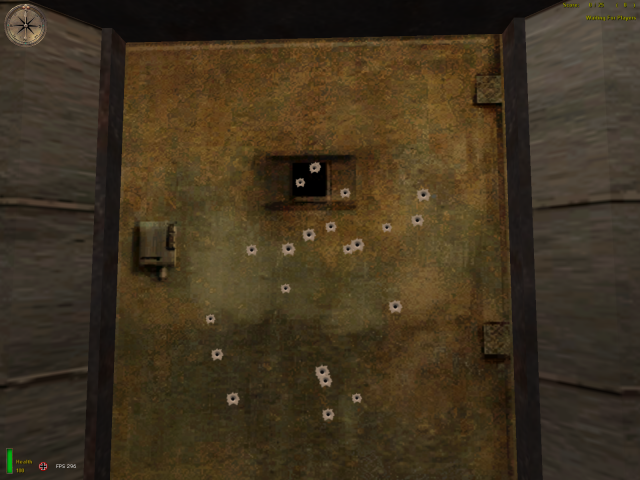
Changes the bullet holes on metal & wood. Hey guys! This is only the final version of my last bulletholes mod, fixed in size. I heard many advices from many people in mohfiles comunity about the size of the bullet holes: they're right, i think in this new way the mod can be more realistic: let me know what do u think:-) To install put the pk3 file onto your mohaa/main uninstall: simply delete this file or move it away from main dir Thanks everybody! Challenge everything! MetroWebMilano a.dellatorre@email.it
Bullet Holes
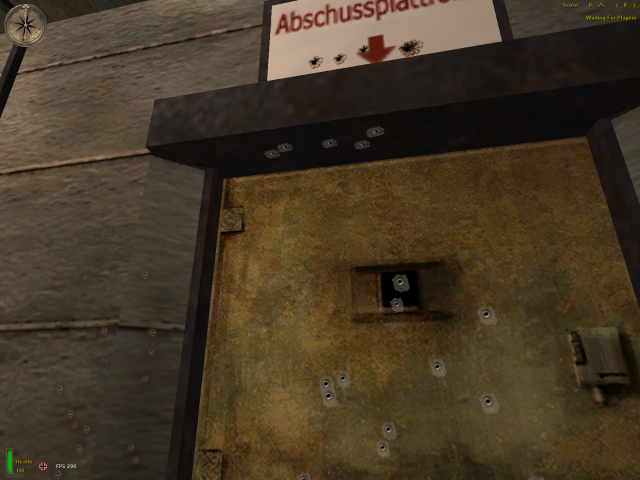
Changes the bullet holes on glass, metal, stone & wood. ***** R || F ***** Release Date: 03-27-03 ReCoil || Factor Bullet Holes Decided to publish my personal bullet hole mod because I saw some work that looked a lot like mine so I decided to release the originals....Included are new bullet holes for metal, wood, stone, glass, and a better wood splinters effect as well. For SpearHead and MOHAA! I have tested this in both games and it works fine for me... I keep a copy in both the main and mainta folders... Thanks goes to Hobbs and Captain Kick your Ass who tested it with me... :) Skin not wroking? Try unchecking the box "Texture Compression" in SpearHead - Options - Video. :) *************************************************************************************************** Place the .pk3 file into the MOHAA main and/or mainta folder in Medal of Honor SpearHead. To remove the Mod, just delete the .pk3 file. Enjoy :) tcfool@attbi.com ******************************************************************************************************* Disclaimer: All images were either created, modified, improved upon and/or because I have no real talent of my own, blatantly ripped off by ReCoil || Factor. So if you see some graphical rendition in my work that you think is yours "Well Thanks" and please remember one thing --- There is a Very Fine Line Between "Hobby" and "Mental Illness"
Bullet Hole Mod
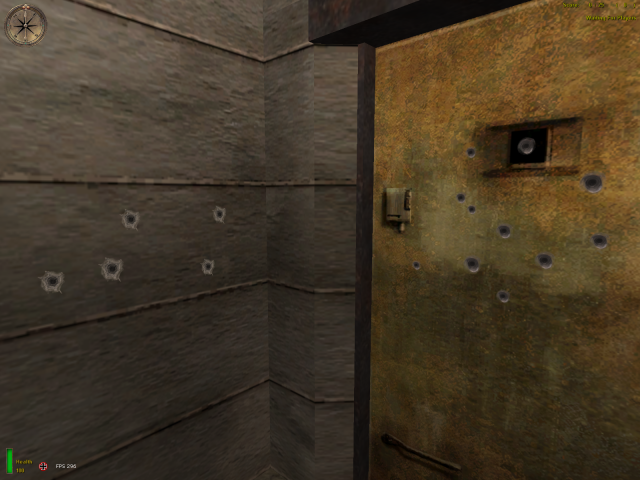
Changes the bullet holes in carpet, glass, metal, mud, plaster, stone & wood. This mod is for those who hate the crappy looking bullet holes created by you, the person who missed soo much (haha) The Screenshots say it all Install: Place the .pk3 file into your moh/main folder (should be compatable with SH & BH) *remember you MUST have "Wall Decals" in x'ed (checked, marked, watever u wanna call it) to see the holes* Uninstall: jus delete it E-mail: kavon89 AT gmail DOT com **BY USING THE FILE YOU AGREE TO NOT SCREW WITH THE FILE OR STEAL THE COPYRIGHTED MATERAL**
Weathered Sandbags
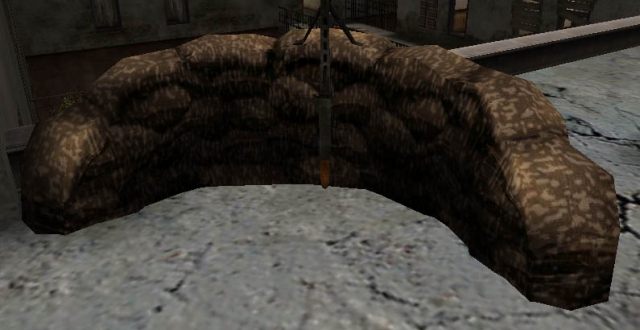
Weathered Sandbags Skinned by : MPowell1944 Description : Both sets of sandbags (normal and winter) have been re-skinned to simulate a weathered look. *Works with or without Texture Compression* Email : MikePowell1944@aol.com Thanks for download this sandbag skin. More to come. Enjoy!
Black Sunshine AA Gun
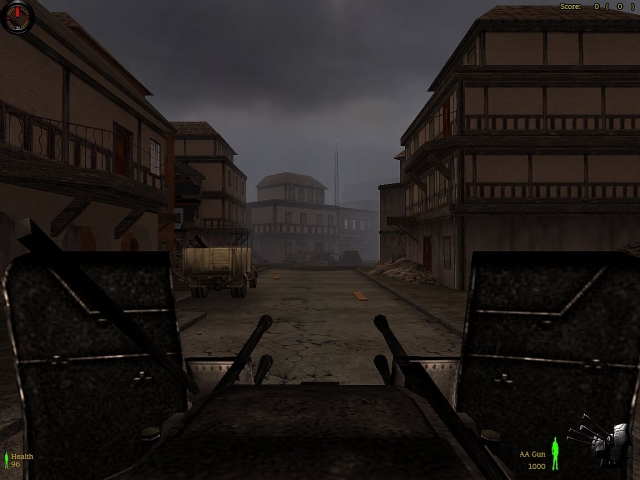
1-1-03 Happy New Year Fubah AA Gun Black Sunshine A silver Black Skin with the Hud piece made to match Install to mainta Enjoy Fubah lamaddog2001@yahoo.com
Mortar Blast
Hiya all, This is a MOD I did of a Dirt Morter Hit that I did. It does effect some of the grenade blast as well. I like it better than just some dirt flying with some smoke. This puts fire to it and I think makes it look like a real expotion is going on. install Just put this pak3 file in your "main" folder for MOH:AA or "mainta" folder for MOH:SH Uninstall Delete the file from the folder you put it in. I hope you enjoy it and fight well!! Stubar. Harry Balzac
Snake Skin Gloves
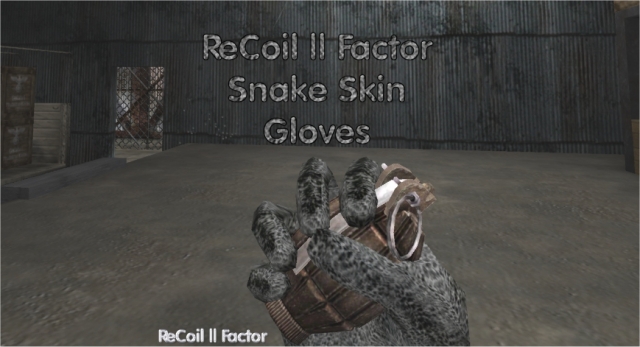
***** R || F ***** Release Date: 12-02-02 ReCoil || Factor Snake Skin Gloves I have to have my gloves... enjoy! For SpearHead Only! Skin not wroking? Try unchecking the box "Texture Compression" in SpearHead Options-Video... :) **************************************************************************************************** Place the .pk3 file into the MOHAA/mainta folder in Medal of Honor SpearHead. To remove the skin, just delete the .pk3 file. Enjoy :) tcfool@attbi.com
Medal of Honor: Allied Assault Mods (MOHAA) — Complete Community Archive
Welcome to the premier repository for Medal of Honor: Allied Assault mods. Since the game's groundbreaking release in 2002 by 2015, Inc. and EA, MOHAA has inspired one of the longest-standing modding communities in first-person shooter history. MOH-DB preserves, categorizes, and serves over 1,600 verified community modifications, custom enhancements, and competitive utilities for Allied Assault, Spearhead, and Breakthrough.
Explore MOHAA Mod Categories
Player Skins & Uniforms
Over 700 historically accurate and creative player uniforms for Allied and Axis factions. Equip authentic U.S. Army Rangers, 101st and 82nd Airborne paratroopers, British Commandos, Soviet Red Army conscripts, Wehrmacht Heer infantry, Fallschirmjäger, and Waffen-SS camouflage patterns, as well as classic community clan skins.
Weapon Models & Reskins
Enhance your WWII arsenal with ultra-detailed weapon replacements and high-resolution textures. Popular downloads include authentic wood-finish Kar98k sniper rifles, realistic metallic sheen M1 Garand models with classic "ping" animation refinements, Thompson submachine guns, MP40s, BAR 1918 rifles, and custom iron-sight alignments.
Soundpacks & Realism Audio
Transform the sonic atmosphere of Allied Assault. Replace compressed 2002 Quake-engine sound effects with cinema-grade gunfire recordings, authentic distant artillery rumblings, terrifying Stuka dive-bomber sirens, supersonic bullet cracks, metal ricochets, and remastered German and American voice callouts.
HUDs, Menus & Crosshairs
Modernize the in-game interface for 1080p, 1440p, and 4K widescreen displays. Download minimalist competitive heads-up displays, custom dot and crosshair overlays, cleaner compass indicators, redesigned main menus, and unobtrusive health and ammunition counters favored by competitive league players.
Server Utilities & Admin Scripts
Run resilient, modern multiplayer game servers with essential server-side utilities. Includes automated map rotators, anti-cheat detection tools, voting scripts, custom match timers, ping balancers, and administrative rcon managers designed for dedicated servers running 24/7.
MOHAA Reborn 1.12 Community Patch
The gold standard community patch for modern MOHAA servers and clients. The Reborn 1.12 patch resolves legacy buffer overflows, fixes client query exploits, expands internal script limits for complex mods, and provides a built-in server browser to replace the defunct GameSpy master server.
How to Install MOHAA Mods: Quick Guide
Identify Your Target Directory
MOHAA stores all game assets in subfolders inside the root installation directory:
- MOHAA (Base):
.../MOHAA/main/ - Spearhead:
.../MOHAA/mainta/ - Breakthrough:
.../MOHAA/maintt/
Paste Without Extracting
Download the mod archive from MOH-DB. If it is zipped (.zip or .rar), extract the enclosed .pk3 file. Place this .pk3 directly into your game's /main/ folder.
How to Remove or Troubleshoot
To remove any mod, simply delete its .pk3 file from the /main/ folder. The game will immediately return to stock behavior without reinstalling.
Frequently Asked Questions about MOHAA Mods
To install MOHAA mods, copy the downloaded .pk3 file directly into your Medal of Honor Allied Assault installation folder under /main/ (or /mainta/ for Spearhead, and /maintt/ for Breakthrough). You do not need to unpack or extract the .pk3 archive—the game engine loads it automatically upon launch.