
Medal of Honor: Allied Assault Mods (MOHAA)
Discover and download community-created modifications to enhance your Medal of Honor: Allied Assault experience.
68 Mods Found
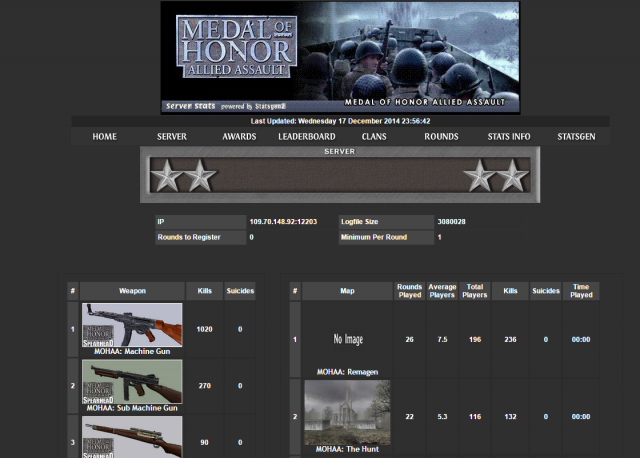
Statsgen
Statsgen 2 ========== Copyright (c)Shaun Jackson nazarine666@hotmail.com www.statsgen.co.uk No one is allowed to distribute this file without prior permission from the copyright holder ****** ***********************AAAA have emailed nazarine666@hotmail.com to request permission no reply yet - Its a great shame as there site is down and many still use it as no one has created anything near as good (Heatsinkbod)******************************************** This program is supplied with no warranties or guarantees. The copyright holder is not responsible for any damage to your computers through the usage of this program. This program could not be possible without the following applications wxWidgets - www.wxwidgets.org sqlite - www.sqlite.org A big thankyou to Omega of www.ssrangers.ca for his help on the templates and the creation of a lot of the images used. Also to Odin who produces lots of high quality images Also to Elric from SNL - a constant supporter of statsgen and helps me a lot with testing Other useful programs Examining the database SQLITE Administrator www.orbmu2k.de Installation ============ make a directory for statsgen2 and unzip contents Contents should include statsgen2.exe help.zip libmySQL.dll - This is a library used to connect to MySQL databases statsgen2.ini readme.txt upgrade.ini - If prompted to upgrade - this is the file it is after statsgen2.exe can now be run - various files / directories will be created including the default templates. Perform the Run / First Time Configuration - DO NOT CANCEL THIS OR INSTALLATION WILL NOT COMPLETE After a stats run is complete you can click on the buttons (tick, cross) to see what errors have been generated with each stage. A tick indicates all ok. Anything else is error / warning. You may get some initial X symbols in the General progress bar indicating alias / droplist files not available - this is not a problem and will go away once you have edited any of these items. Image Packs (new statsgen 2 awards are there) see www.statsgen.co.uk To remove the statsgen banner at the top of each stats paeg and the link to the statsgen homepage Edit the Template Config (homepage stuff) (Mandatory Configuration). You can set it to your home page details or set them blank to remove altogether. bug reporting - improvement suggestions Go to www.statgens.co.uk and post on statsgen2 forum Version History =============== 1.8.8 12th March 2009 --------------------- Added ability to read COD5 1.3 Activities (bomb plants) Added ability to read COD5 1.3 Team Wins and Team Losses Corrected a slight mistake in the default template in regards to activity display on rounds Made it so database field widths can be fixed width - this is governed by contents of statsgen2.ini file - you will see it if you look because i have not written gui edit screen for this yet. If you completely delete the database (statsgen2.db) i.e. completely delete the file the next time statsgen re-creates it it will be using fixed width fields. Advantages - smaller database - faster processing (30% or 40% faster) Disadvantages - some data may not fit into the fixed width fields (but i think i have made em all big enough) 1.8.7 5th March 2009 --------------------- Updated to cope with new format of COD5 time stamps To come ... adding ability to capture COD5 activities (bomb plants etc) 1.8.6 2nd February 2009 --------------------- Upgraded config file with some more cod5 weapons and maps FTP Downloads can now restart where they left off (default is to do this - can be switched off in the advanced server editor window) FTP Downloads now take account of Max Log File Usage and only download the required amount A silly green progress bar on various Processing Steps Lines - I know it looks a bit cack and i will tidy it up but i only coded it 3 hours ago because i wanted to watch a film and see from a distance how far statsgen was progressing Too Many COD5 Team Kills - If you run a cracked server then GUID's for cod5 will often be the same as each other - this causes the team name guessing to go astray and assign everybody the same team (and therefore lots of teamkills) - there is an option on the server editor (advanced) screen to be able to switch this behaviour off - you will not be able to identify teams but no more teamkills will be generated. The default behaviour is to have the team guessing switched ON Upload Template Facility - Updated to allow for the usage of a configuration file as well - this means i can host Omega's rather stunning COD5 template 1.8.5 22nd November 2008 --------------------- Upgraded config file with some more cod5 weapons and maps 1.8.4 12th November 2008 --------------------- Upgraded config file with some more cod5 weapons and maps Added ability to get new templates from statsgen website 1.8.3 2nd November 2008 --------------------- Upgraded default template again to do awards properly so that it does not include dropped players (oops) Added a skill and score weighting possibility dependent on the gametype Added a new award for ww2 assault guns (not sure how i forgot that one) Added a few more cod5 weapons as well as all the cod5 gametypes and maps i have been able to decode from the beta fastfiles (10 maps in total for mp i think) 1.8.2 30th October 2008 --------------------- Added COD5 World At War capability 1.8.1 28th October 2008 --------------------- Fixed a screw up 1.8 28th October 2008 --------------------- Updated template processing routing, error checking is better and it is a little faster Updated bug regarding teamkills Updated so COD4 has a good stab at working out teamkills Updated GUIS to allow for Configuration Wizards or standard guis for several sections Updated Initial installation to use First Time Configuration Wizard - should make life easier on installation Updated default template to be like the Omega template slightly modified to be more statsgen friendly Provided a Image Pack configuration gui - this gives you a suggested choice of imagepacks on the statsgen site and uploads them automatically to your website Probably a few more issues that i can't remember 1.7.8 Beta 27th Jan 2008 --------------------------- Fixed the last of the alias issues NOTE: Please delete the aliaslist.dat file as it is likely that aliases have been corrupted Fixed issue with server messaging where it would stop after a statsgen run 1.7.7 Beta --------------------------- Fixed lots of issues with aliases Player Data (avatar, real name, mugshot) - this should now work properly 1.7.6 Beta Release 21st January 2008 --------------------------- Player Data (avatar, real name, mugshot) - this should now work properly Cheaters list should keep updating rather than keep deleting the old values (oops) Award Names can contain ' symbols now. Some other stuff i can't remember 1.7.5 Beta Release 6th January 2008 --------------------------- Changes / Fixes COD4 PAM MOD support - PAM MOD was most annoying in that is logged things in completely the wrong format, logged some things twice, logs players with only partial guid's - the list goes on - but anyway, I've adapted statsgen to cope with PAM mod now (hopefully) Upgrading re-worked - I can now supply database upgrade configuration files - if ever i need to supply a "database contents" patch. 1.7 Full Release 3rd December 2007 --------------------------- Changes / Fixes BIG change - backup your old statsgen2.exe and templates folder in case of problems Persistant Database Statsgen now uses a persistant database. What this means is that it will continue from where it left off each time it runs - This massively speeds up Logfile Processing, Database Writing, Score Calculation and Template Processing. If you are upgrading it will remove your old db and switch it to a file based version if necessary Memory usage is drastically reduced On a first run through you will not notice any speed ups as it has to run through the template processing at least once fully - from then on it will be a lot faster - only updating players that have changed. Alias Editing - once a player has been combined together you cannot unjoin them in the existing db (only for new rounds will the separation start) Existing rounds - if you change the minimum players / round to register then existing rounds in the db will not be changed (this may come later if i work out how to do it efficiently) Quick Template ability removed (redundant with persistant db) 1.6 Full Release 11th November 2007 --------------------------- Changes / Fixes Addition of COD4 Processing Coming soon(ish) statsgen acting as a web server - allow you to configure it using web pages statsgen console only - no need for gui - can configure using web server capability statsgen linux - soon as I get the above stuff working 1.5 Full Release 10th September 2007 --------------------------- Changes / Fixes Addition of Quake Wars Processing (see later for how to configure for Quake Wars) Better handling of Archive / Active files Updated default template to cope with Quake Wars Handled "xxxx already exists" database errors (i.e. I've ignored em - they don't matter - just scare people) Dropped Indexes prior to database writing (should speed things up on larger databases) Re-created indexes after database writing Added extra xp tables (used with Quake Wars) Added ability to have XP as part of an award Added ability to have Team Kills as part of Awards GUI's hide / disable options that are not appropriate (e.g. remote directories hidden if ftp is disabled) Quake Wars ---------- Firstly - Quakewars logfiles are a complete t**t. The kill files contain hardly any info, they don't log activities such as bomb plants, kill locations (head shots), bridge building etc. Player names are logged without the colour codes. If a player has their clan tag set then the kill logs don't include the tag. But .... worst of all ... the logs are split into multiple files - kills are logged in an optional kill file, but map, game type details and xp points are logged in an objective file. You need to configure your quakewars server to store the kill file with the following config entries logfile "1" logtimestamps "1" logfilename "kills.log" The actual kill file (on windows - i have no idea for linux servers) will be stored in your "My Documents\Id Software\Enemy Territory - QUAKE Wars Beta\base\kills.log" file on your server This file needs to be selected for your Remote Active Logfile on your server editor screen The objective file is stored in your "Quake Wars Server installation folder\base\objective.log" This file needs to be selected for your Secondary Active Logfile on your server editor screen You must configure both logfiles within statsgen for Quake Wars kills to be processed properly in Statsgen 1.4.4 Unreleased Full Release 7th July 2007 --------------------------- Changes / Fixes Fix in default template 1.4.3 Unreleased Full Release 7th July 2007 --------------------------- Changes / Fixes Fix in default template recognises no team loglines for cod 2 1.4.2 Unreleased Full Release 29th June 2007 --------------------------- Changes / Fixes Speed ups - Lots of optimizations - upto 70% faster logfile processing Auto Aliasing - now ignores WOLFENSTEIN and MOHAA automatically cheaters database table - all players found in the logfile who are marked as cheaters are added to the cheaters table (new table) Default Template - updated to show list of found cheaters 1.4.1 Unreleased --------------------------- Changes / Fixes Crash when round was empty in an unusual way 1.4.0 Full Release 9th June 2007 --------------------------- Changes / Fixes Sometimes ban files would not download properly. I don't know why they were failing but i have put some code in to work around it. Some more tidying up of the "Time To Go" text Added ability to Automatically Alias players during logfile processing. Basically it uses the GUID to work out which players are really the same person, adding them to the alias list - any existing aliases are kept as is. You can now add the command line argument -runonce e.g. statsgen2.exe -runonce This will cause statsgen to start, perform a stats run, then exit. This is designed to be used by people who want to run statsgen on the Windows Scheduler system. 1.3.3 Full Release 9th April 2007 --------------------------- Changes / Fixes Message Center - Punkbuster Messaging now works, I made a several mistakes in this area :-p. Editor Screens - Image/Score/Skill editor screens now show the original code key as part of their display Thread Safe - The program is now (I hope) thread safe Screen Updates - The screen udpates properly now during processing Screen Updates - Fixed some issues where negative "Time To Go" info could be displayed Screen Updates - Fixed some issues when multiple logfiles caused "Time To Go" to be miscalculated Speed Ups - Massively sped up processing if large drop lists were used (e.g. if you used punkbuster bans) Speed Ups - Added a few more indexes to speed up the BF2 template Logfile Processing - Extreme MOD activities (ctfb_capture) now decoded 1.3.2 Full Release 15th March 2007 --------------------------- Changes / Fixes oops - I made a mistake and managed to disable website transfer in the last release, and, to cap it off, I managed to include a bad default database config - I'm an idiot. 1.3.1 Full Release 10th March 2007 --------------------------- Changes / Fixes File menu renamed to Run You now have the ability to change the Run Priority of the quick and full templates. This should help anybody who is running the program on a dedi box and is experiencing lag on the server as statsgen steals the cpu. The lower priority setting the less statsgen will steal cpu. 1.3 Full Release 3rd March 2007 --------------------------- Changes / Fixes Fixed some issues with the MySQL uploading Added speech time to the speech log Added some more database indexes to speed up some of the templates 1.2 Full Release 13th February 2007 --------------------------- Changes / Fixes Changed the default config to be the No Rounds version - This is a much leaner template which takes less processing time Awards can now be "weighted" in conjunction with the template Skill can now optionally have the negative component caused by deaths switched off Default template now has score, skill and award details information page MySQL support. Statsgen can now optionally upload it's internal database to a remote (webserver) MySQL database I will be developing dynamic versions of the current templates which make use of this feature When in place this MASSIVELY speeds up processing as transfer loads and template processing will be significantly reduced. Some extra awards added to use some Admiral Mod features and the associated images also added to the image pack Thanks again to Omega for doing these - awesome job mate. 1.1.2 Full Release 4th February 2007 --------------------------- Changes / Fixes Fixed an issue where award components could not be deleted in the config file 1.1.1 Full Release 3rd February 2007 --------------------------- Changes / Fixes Made a slight mistake in the automatic installation detection. Upgraders from 1.1.0 only need replace the executable. 1.1.0 Full Release 28th January 2007 --------------------------- Changes / Fixes Extended character sets (Cyrillics etc) now read properly from the logfile Skill Calculation - Can now be configured to not allow negative skill (no loss from death) Added Free For All as MOHAA Deathmatch Mode to INI File Upgrade File & Procedure now supplied Database Structure Updated Rounds / View Rounds (updated with server index round created in) Award Definition (Award ID added) This affects the Message Centre Key used during stats production (no longer changes when name changes) Default Templates - Various Updates / Fixes File Downloading Multiple Files - Better handling of weird servers that don't give me a wild card directory listing Admiral Mod - Healing activity now detected COD1/COD2 Banfile - These are now read and used Speech File Output - You can now configure statsgen to write out all the speech in the logs in the Mandatory/Output Config Error Boxes - The Save Button is now hooked up so you can save descriptions of errors - this is useful to me if you get problems - you can send me the error details instead of posting images on the forum 1.0.2 Full Release 18th January 2007 --------------------------- Fixes Some FTP Servers dont seem to like getting a directory listing with a wildcard and this prevented download of log files. I have made it so that if it encounters this problem it tries to blunder past it anyway - you will see a caution symbol on the download logs entry to warn you this is happening. 1.0.1 Full Release 6th January 2007 --------------------------- Fixes I chumped up the initial release. The "Quick Template" extracted upon install was and invalid testing one. - I was hungover alright - it was new years day :-) 1.0 Full Release 1st January 2007 --------------------------- Fixes Server Updates did not get reflected until statsgen restarted Website Updates did not get reflected until statsgen restarted Message Center Updates did not get reflected until statsgen restarted Better "file not found" handling HTML Safe if template codes passed through ColouredText2HTML() function Additions Schedule Editor Better transfer failure error logging Negative durations on round corruption fixed Banned Speech Editor MOHAA Support Enemy Territory Support Omega's Updated Templates Help Files 0.2 Alpha 17th November 2006 --------------------------- Fixes Remote File Browser fixed (doh!) Negative durations on round corruption fixed Team Swap Suicides (team balance) now separate from normal suicides Various bugfixes to default templates Message Centre GUI tidied up Additions Punkbuster Messaging Added Default Templates More configurable options for Colours Homepage Homepage banner Avatars Player Profiles (mugshots, clan position, xfire address etc) Ratio's of Kill / Deaths Player Data Player Data are personalised player options including Avatars Player Real Name Clan Position (War Arranger etc) Personal Picture (mugshot) Xfire address Personal Homepage Things still to do Help Pages Schedule Config MOHAA support 0.1 Alpha 1st November 2006 --------------------------- Default Templates not 100% perfect. - Need help people No help files yet. No Avatars yet. No Speech Filter yet. Speedups possible. More award images necessary. - Need help people Only COD1 and COD2 supported.
EZM Mods
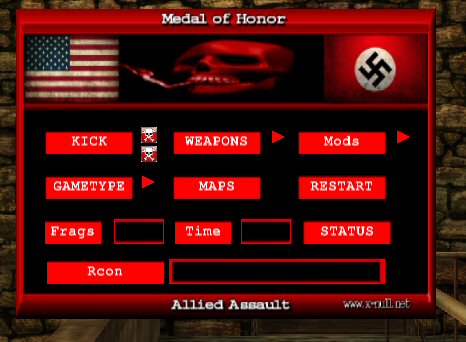
Easy Meat Mods First let me just say up front, I did not make all of the mods in here, I just edited some of them to do what I wanted. Any mod used here still has the modders name in the script file, if he put it there to start with. And then some I made, with a lot of help from the guys at X-Null. Now let me explain just what this thing is, it's a few mods I put together, with a simple way to turn them on or off. 1.) Random teleporters What this does is place random teleporters in all the maps, both the starting points and the ending points are random. They can be anywhere on the map, you might teleport to the Objective so you can set bomb, or you might end up in a mine field, you just never know. Or on a TDM map you mat end up on a roof, other teams spawn, anywhere at all, may teleport 30 feet in the air. 2.) V2 Anti Axis Rush Mod There is a teleporter in vent room, noob door and at begining of long hall, if a axis player crosses the orb he gets teleported back to spawn and all his weapons are taken away, except for the p38 wth no ammo, he has to bash the rest of the map. ( note: You need Reborn for the bash only to work. Without reborn player will have the ammo amount your pistol settings are set to. ) 3.) V2 No Spawn Camp Allies This is the no camp allies mod, that bombs allied spawn after so many seconds. 4.) Kick Grenades V 1.0 Lets you kick the grenades away from you. 5.) Weapons Switch Mod Lets you switch weapon class, example from any weapons to snipers only etc. Pistols and grenades are not removed, they remain how you have them set. Weapons Options: Snipers Only (Team Snipers) Rifles Only (Team Rifles) Bolt Action Rifles Only ( Team Snipers All Others Kar98 ) Springfield Only Kar98 Sniper Only Kar98 Only M1 Garand Only Shotgun Only No Rockets (Rockets Are Shotgun) SMG Only MG Only Pistol Only All Weapons Sniper and Shotgun Only No Rockets or Shotguns ( Rockets and Shotguns Are Team Rifles ) Team Weapons (all Team Weapons) 6.) Spawn Protection To install Mod : 1.) Put the zzzzz_Em_mods-reborn.pk3 ( Reborn Servers Only) or the zzzzz_Em_mods_nr.pk3 ( No Reborn note: should work on AA, SH, BT ) depending on which version you downloaded, in mohaa/main folder. ( On Server) 2.) Edit the mod.cfg and put it in mohaa/main folder. ( On Server) 3.) Add exec mod.cfg to your server.cfg. Install Menu: 1.) Put the zzzzzz_em_mod_menu.pk3 or the zzzZ_em_mods_Reborn_menu.pk3 in your mohaa/main folder ( NOT ON SERVER.) 2.) Bind a key to open menu. ( open console type in bind ( pick a key) hit enter. ) Menu Note: You don't need to use the menu, you can change everything through the console, you must restart the map after changeing settings. If you have it set to snipers only and change it to rifles only you must first turn off snipers only ( set snipers 0) then turn on rifles only ( set rifles 1) This is why I made the mod menu it will do all that for you. set mods "1" ( turn on or off all mods ) set tele "0" ( turn on or off teleporters ) set rush "0" ( turn on or off v2 anti spawn rush ) set camp "0" ( turn on or off v2 anti spawn camp ) set guns "1" ( turn on or off weapons mod ) IMPORTANT ONLY ONE WEAPON CAN BE ON AT A TIME !! set norockets "0" set shotgun "0" set bolt "0" set m1 "0" set rifles "0" set sniper "0" set sniperrifles "0" set pistols "0" seta kick "1" ( turn on or off grenade kick )
Auto Rates
///////////////////////////////////// // Auto Rates v1.2 by Richard ////// /////////////////////////////////// /////// www.Ric-hard.tk ////////// ///////////////////////////////// ////////// 2006-04-10 ////////// /////////////////////////////// main: if (level.auto_rates_already_running == 1) { end } level.auto_rates_already_running = 1 level waittill spawn /*_/_/_/_/_/_/_/_/_/_/_/_/_/_/_/_/_/_/_/_/_/_/_/_/_/_/_/_/_/_/__/_/_/_/_/_/_/ \_| \_| /////////////////////////////////////////////////| \_| ///// Auto Rates v1.2 by Richard ////////////////| \_| /////////////////////////////////////////////////| \_| \_| Description: \_| This mod changes the servers sv_maxrate setting on the fly [uploadspeed / playeramount = maxrate]. \_| It can also adjust the clients rate to match the servers maxrate. \_| \_| Cvars: \_| sv_auto_rates 1 or 0 // Turns the mod on and off (its on by default). \_| sv_uploadspeed_in_bytes xxxxxx // xxxxxx = the servers UploadSpeedCapacity in bytes. \_| sv_adjust_clientrates 1 or 0 // Adjusts the clients rate (its off by default). \_| sv_max_maxrate xxxxxx // Default is 25000 [XDSL 25000] \_| sv_min_maxrate xxxxxx // Default is 5000 [ISDN 5000] \_| \_| Usefull Links: \_| www.dslreports.com/stest // SpeedTest \_| www.userbase.be/forum/portal.php?show=speed // SpeedTest \_| www.testmy.net/u_load.php // SpeedTest \_| www.digitaldutch.com/unitconverter/index.htm // Unitconverter \_| http://members.lycos.co.uk/userver/Sv_maxclientsCalculatorForMohaa.htm // MaxclientsCalculator etc.. \_| \_| Tip-of-the-Day: \_| 1 kbit = 128 bytes \_| \_/_/_/__/_/_/_/_/_/_/_/_/_/_/_/_/__/_/_/_/_/_/_/_/_/_/_/_/_/_/_/_/_/_/_/*/
Visitor Counter
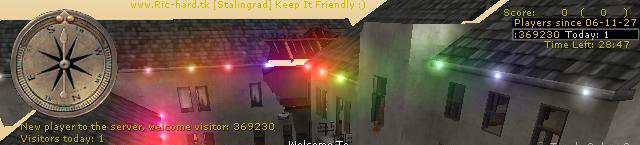
/*_/_/_/_/_/_/_/_/_/_/_/_/_/_/_/_/_/_/_/_/_/_/_/_/_/_/_/_/_/_/__/_/_/_/_/_/_/_/_/_/_/_/_/_/_/_/_/_/_/_/___/_/_/_/_/_/_/__/_/_/_//_/_/__/_/ \_| |_/ \_| /////////////////////////////////////////////////| |_/ \_| ///// VisitorCounter v1.0 by Richard ////////////| |_/ \_| /////////////////////////////////////////////////| |_/ \_| |_/ \_| Description: |_/ \_| Counts your clients (totals and todays) and displays this via a huddrawing in the top right corner, |_/ \_| its transparency is 0.2 while no new players have joined, when a new player |_/ \_| enters your server the huddrawtransparency changes to 1.0 during 2 seconds. |_/ \_| A yellow message is also displayed to the left of the screen when a new player joins that welcomes him/her. |_/ \_| |_/ \_| Supported Games: |_/ \_| Medal Of Honor: Allied Assault, Spearhead & Breakthrough. |_/ \_| |_/ \_| Supported Maps: |_/ \_| All stock-maps and all custom-maps that loads global/DMprecache.scr |_/ \_| |_/ \_| How to install: |_/ \_| 1. place the pk3 inside your mohaa main dir, usualy found at c:\program files\ea games\mohaa\main |_/ \_| 2. You must add this to your "server-cfg"-> seta counter_total_visitors amount (I think u only need to do this once, ty Hal:) |_/ \_| |_/ \_| *** NOTE *** |_/ \_| *** The mod is executed via DMprecache.scr which Ive bundled, (if the mod doesnt work = your MOH aint loading the) |_/ \_| *** the DMprecache.scr in this mod, what to do? well..u can add exec global/counter.scr to the DMprecache.scr that your |_/ \_| *** MOH loads *** |_/ \_| *** Btw, the counting isnt 100% accurate, more like 99,9 :P, anyways it gives u a good overview over your servertraffic *** |_/ \_| |_/ \_| Additional Cvars that u can tweak this mod with, add these to your server cfg the first time u run this mod (use seta): |_/ \_| counter_startdate YY-MM-DD // Default = "06-11-27" |_/ \_| counter_total_visitors amount |_/ \_| counter_reset_todays_visitors // Default = 0, set it to 1, to set it to the current playeramount (u can do this 1 via console). |_/ \_| |_/ \_/_/_/_/_/_/_/_/_/_/_/_/__/_/_/_/_/_/_/_/_/_/_/_/_/__/_/_/_/_/_/_/_/_/_/_/_/_/_/_/_/_/_/_/_/_/__/_/_/_/_/_/_/_/_/_/_/_/__/_/_/_/__/_/*/ ########################################### #Email : ric_hard_a@hotmail.com # #Mod home page : www.ric-hard.tk # #Release date : 2006-11-27 # ########################################### )|( (o o) +------(_)------+ |www.ric-hard.tk| +--Ooo-----ooO--+ || || ooO Ooo /Richard

adminpro 1.22+jims_ver2
compilation of mods for admin use to enhance and admin his server


OwN-3m-All’s Ubermod V2
Collection of mods, configs, and scripts all-in-one!

Medal of Honor: Allied Assault Mods (MOHAA) — Complete Community Archive
Welcome to the premier repository for Medal of Honor: Allied Assault mods. Since the game's groundbreaking release in 2002 by 2015, Inc. and EA, MOHAA has inspired one of the longest-standing modding communities in first-person shooter history. MOH-DB preserves, categorizes, and serves over 1,600 verified community modifications, custom enhancements, and competitive utilities for Allied Assault, Spearhead, and Breakthrough.
Explore MOHAA Mod Categories
Player Skins & Uniforms
Over 700 historically accurate and creative player uniforms for Allied and Axis factions. Equip authentic U.S. Army Rangers, 101st and 82nd Airborne paratroopers, British Commandos, Soviet Red Army conscripts, Wehrmacht Heer infantry, Fallschirmjäger, and Waffen-SS camouflage patterns, as well as classic community clan skins.
Weapon Models & Reskins
Enhance your WWII arsenal with ultra-detailed weapon replacements and high-resolution textures. Popular downloads include authentic wood-finish Kar98k sniper rifles, realistic metallic sheen M1 Garand models with classic "ping" animation refinements, Thompson submachine guns, MP40s, BAR 1918 rifles, and custom iron-sight alignments.
Soundpacks & Realism Audio
Transform the sonic atmosphere of Allied Assault. Replace compressed 2002 Quake-engine sound effects with cinema-grade gunfire recordings, authentic distant artillery rumblings, terrifying Stuka dive-bomber sirens, supersonic bullet cracks, metal ricochets, and remastered German and American voice callouts.
HUDs, Menus & Crosshairs
Modernize the in-game interface for 1080p, 1440p, and 4K widescreen displays. Download minimalist competitive heads-up displays, custom dot and crosshair overlays, cleaner compass indicators, redesigned main menus, and unobtrusive health and ammunition counters favored by competitive league players.
Server Utilities & Admin Scripts
Run resilient, modern multiplayer game servers with essential server-side utilities. Includes automated map rotators, anti-cheat detection tools, voting scripts, custom match timers, ping balancers, and administrative rcon managers designed for dedicated servers running 24/7.
MOHAA Reborn 1.12 Community Patch
The gold standard community patch for modern MOHAA servers and clients. The Reborn 1.12 patch resolves legacy buffer overflows, fixes client query exploits, expands internal script limits for complex mods, and provides a built-in server browser to replace the defunct GameSpy master server.
How to Install MOHAA Mods: Quick Guide
Identify Your Target Directory
MOHAA stores all game assets in subfolders inside the root installation directory:
- MOHAA (Base):
.../MOHAA/main/ - Spearhead:
.../MOHAA/mainta/ - Breakthrough:
.../MOHAA/maintt/
Paste Without Extracting
Download the mod archive from MOH-DB. If it is zipped (.zip or .rar), extract the enclosed .pk3 file. Place this .pk3 directly into your game's /main/ folder.
How to Remove or Troubleshoot
To remove any mod, simply delete its .pk3 file from the /main/ folder. The game will immediately return to stock behavior without reinstalling.
Frequently Asked Questions about MOHAA Mods
To install MOHAA mods, copy the downloaded .pk3 file directly into your Medal of Honor Allied Assault installation folder under /main/ (or /mainta/ for Spearhead, and /maintt/ for Breakthrough). You do not need to unpack or extract the .pk3 archive—the game engine loads it automatically upon launch.