
Medal of Honor: Allied Assault Mods (MOHAA)
Discover and download community-created modifications to enhance your Medal of Honor: Allied Assault experience.
95 Mods Found
Ubs Ip List v30
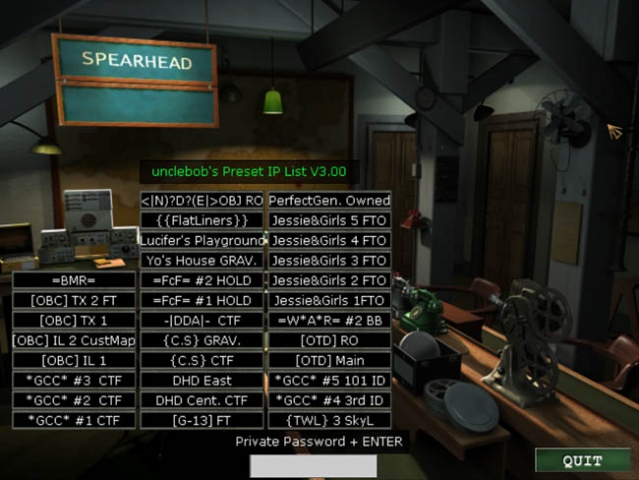
by unclebob Milwaukee, WI 03/10/2007 Hello all UB here & I got a useful tool for you! It Slices It Dices ........ Yeah well ok maybe not but it works with MOH SH & could be adapted for BT & AA if needed Huh you say, well check out the screenshots & check out the file if you still don’t get it. ========================================================================================================= IP List 3.00 can list 32 server's for easy on the fly connection. Once you start MOH SH it will open to the main game lobby where you will see the 32 new buttons I have added. If you have had my old IP Lists then you know they were designed off a pull down menu like the skin selection in the multiplayer options room. This was limited to a compressed .pk3 file so players without the knowledge as to change & recompress such files where unable to customize the old lists. Version 3.00 changes all that Before anyone starts crying! The reconnect button is Slider_V's idea. He said it was ok fo me to use it. After you have Downloaded this file & unzipped it you will find your self reading this I hope, If not you most likely don’t have a clue what your looking at & will fumble around in the files till they are corrupted & you will need to re download the file. (be sure to save your self the headache & erase the 1st one you corrupted) OK! So I have changed it up a bit for those that don’t know how to open or compress .pk3 files by giving you the files in a referenced data file format. This means there is no more need to now how to extract or compress files, no more need to remember a file structure. HOW TO USE!!!!! Put the "USER_UB_IPlist_V3.00.pk3" the UBmenu.cfg & "UBmenu" folder into your MainTA folder. (It is important that they go in the mainTA folder as this version is only meant for MOH SpearHead.) The IP list has 32 stock servers from the Midwest & other regions of the United States already listed, all of which can easily be changed in a matter of minutes. Now that you have moved the files start MOH SH. You will see that the main game lobby has changed a lot. I made it so the IP List is king of the page, moving the single player load & save options to the single player map room through the first door on the right. through the second door you will see the IP list as well, but slightly rearranged to fit. HOW TO CHANGE IP ADDRESSES & BUTTON NAMES!!!!!! To start copy the folder "UBmenu" to your desktop. THAT WAS COPY NOT CUT! this folder contains the .cfg or config files that the IP List looks at for its information In the folder you will find "serv1con.cfg" - "serv32con.cfg" & "IP_Listings_UB.cfg" Each of the serv#con.cfg files has a IP address in it that is linked to one of the 32 buttons of the IP List the IP_Listings_UB.cfg file is used to change the names shown in game on each button I would suggest trying the stock settings before you attempt to change anything that way you know how it works!!! TO REDIFINE A BUTTON!!!!!! Step One: Chose the button you want to change. (easiest way is to go in game & pick one that is curently named.) Step Two: Go into the IP_Listings_UB.cfg find the same name in that list & remember or write down what button number it corresponds to. Step Three: Edit the listed server name to your new server name. (18 too 20 characters is the max) Step Four: open the corresponding serv#con.cfg file & edit the IP address to the new server's (You can add a reference at the bottom of the file so you know what button the IP is for.) ******************************************************************** Example follows! // unclebob's Advanced IP List Version 3.001 // Put the full IP address for the server that corisponds to the Name you added to the button. Should look like this when done // connect "0.0.0.0:12203" connect "213.244.180.35:12203" // J. Girls 5

Milkshape MOHAA Plugin
Beta version for ya. As i've had to rush, part of it is still hard coded !!! 1. Download the 2 files, stick them in your milk folder. 2. Create a folder c:\games\mohaa Run milk. load a model export MOH SKL ... follow prompts. *NOTES: exported files will be in the folders created under c:\games\mohaa, this includes textures, shader, tik, skd and skc files. If your exporting a model with animations, make sure that every keyframe is set. If it gives a warning, then just goto frame 1, set the frame, frame 2 set the frame etc all the way through the number of frames you have. Once the model is exported, the standard tik and shader, will let u view it in Radiant, or spawn them into a map. Of course you can alter the tik to your own liking (but remember if you re-export it will overwite the tik ). Anyway, it's only a beta, have fun and let me know your thoughts. Heres the 2 files: SKL_2_SKX.EXE MOH SKL Plugin (scorpiomidget)
Urc Editor
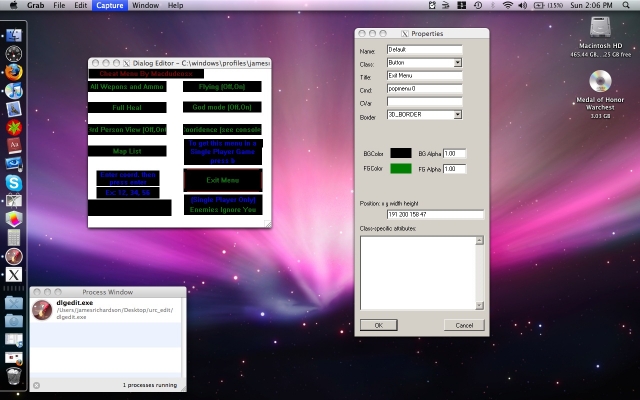
This program visually edits the .urc menu files so you can make your own custom menus for medal of honor. Windows User: Just unzip and run the program. Mac users (Intel only): Make sure you have X11 installed (v10.5 and above, you dont need to worry about this) and download this http://www.kronenberg.org/darwine/ Install it, then double click the program and it will run. All credit goes to the creator of this program. I do not know who it is because the version I downloaded does not have a readme file with the author's information. I am redistributing this because this file is extinct on the internet, I cannot find it anywhere (except my hard drive) Questions? macdudeosx@hotmail.com
MOHAA Server Launcher v10
Metal Of Honor Server Launcher v1 ========================== (C)2003 Zeppelin Design - Zeppelin ========================== Just a simple program to avoid having to edit a batch file to run a dedicated server, nothing too complicated. :) Have any problems feel free to email me . Zeppelin - zeppelin_fnr@hotmail.com
Moh Batch v10
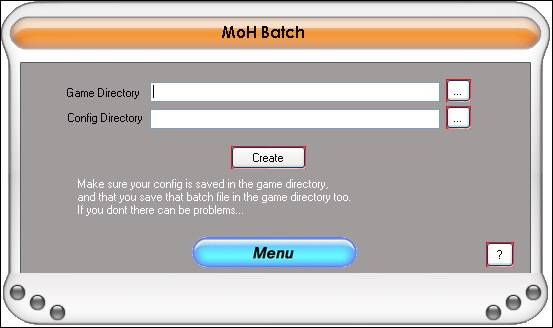
---------------------------------------------------------------------------------------------------------------------------------- -------PLEASE SCAN THE FILES WITH YOUR ANTIVIRUS AS A SAFETY PRECAUTION!!!------- ---------------------------------------------------------------------------------------------------------------------------------- Thankyou for downloading MoH Batch v 1.0 Installation InStructions: If you already have installed another program written by MoH Mods, then you can simply run the MoH Batch.exe file and it should work, although this may not work and will not install the program to your start menu! If you would like to install the program properly, just click on the setup file and wait for it to install! URGENT: DO NOT BY ANY MEANS MOVE ANY FILE INSIDE THIS .ZIP! UNZIP THE FILE AND LEAVE THE FILES AS THEY ARE ARRANGED! 1 FILE MOVED OR EDITED COULD COMPLETELY CORRUPT THE PROGRAM! JUST UNZIP THE FILE AND RUN THE SETUP FILE! TAKES A WHLE TO INSTALL BUT PLEASE BE PATIENT! Please Note: This program is designed for Windows® XP. I have thoroughly tested it for Windows ® XP but have not tested it on any other operating system! Please do not try to use it on an earlier version of Windows ® or a new version if you have downloaded this when another version is released! You are installing this at your own risk! I have thoroughly tested this program and have edited any bugs i found. Please remember that I cannot find every single bug in the prgram! It has not caused me any problems. I cannot be held responsible if anything does go wrong with your machine! Please just inform me of what is wrong so i can prevent it from happening again! If you find any bugs, please email them to smudger712@hotmail.com with instructions on how the bug became apparent and anyway to reproduce the bug or, go to the 'Menu' button in MoH Batch and click on 'Report A Bug' and fill out the form that will appear on your screen! ------------------------------------------------------------------------------------ This program was designed as a sort of brother for MoH Config. You create the config on MoH Config and create the run file on MoH Batch. It as easy as that. simply select the two required files, follow the instructions that appear on screen and then compile it! Updates from v 1.0: This is 1.0! Future updates: Maybe inprove the functionality of the program such as make it so you dont need to remove a bit of the filename. Not sure lol Thankyou Zac Howard - Smith Your Mum
Moh Cfg Maker V130
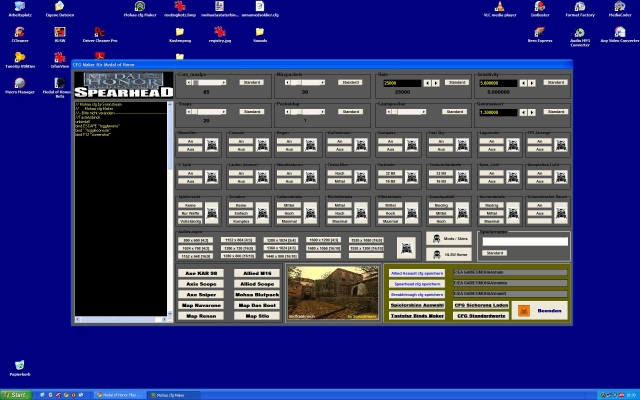
Made by Sonicstream Mohaaplayer at the first Time E-Mail: tommops@t-online.de Have fun with this CFG Maker Fixed the MWHEELDOWN and UP Funktion Version 1.30
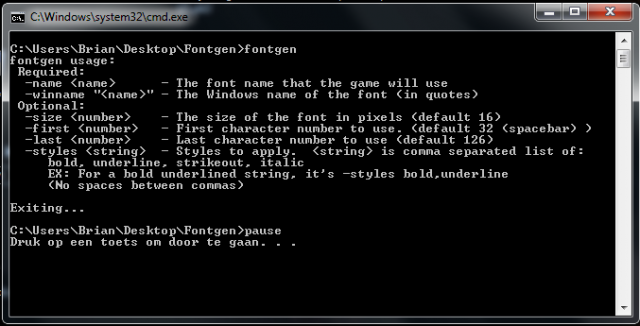
Fontgen
An application made to create your own fonts for in-game. Some info pictures are included within the zip file (taken from posts on forums). Some more links for help: http://www.ritualistic.com/forums/showthread.php?t=16857&highlight=fontgen http://www.modtheater.com/threads/font-problem.9520/ http://www.ritualistic.com/forums/showthread.php?t=13331&highlight=fontgen http://www.ritualistic.com/forums/showthread.php?t=14058&highlight=fontgen http://www.ritualistic.com/forums/showthread.php?t=16692&highlight=fontgen http://www.ritualistic.com/forums/showthread.php?t=15900&highlight=fontgen
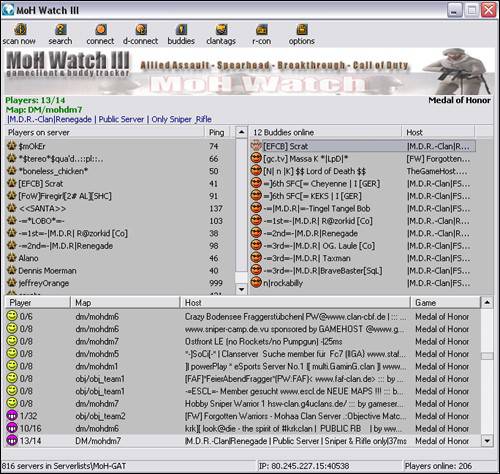
Moh Watch 310
By: Phil Description: This is the upgrade for MoH Watch. Please read the readme for full upgrade information on this tool. Readme: Description: ------------ Version 3.10 gameclient & buddy tracker for + Allied Assault + Spearhead + Breakthrough + Call of Duty Features: -> find playing friends or clan-members -> import, export HLSW or ASE serverlists -> serverlist editor -> serverlist auto-update via Internet -> WatchWeb Browser -> search for servers, maps or ip's -> seperate server and rcon passwords for each server -> connect with rconpassword -> see if you own the servermap -> see map-cycle, ping and more... -> default _rcon server -> sort output by map, server, players or game -> admin your server with -advanced remote console- -> Mapchanges incl. editable maplist (MoH default) -> Kick and ban players. Ban by CLANTAG, NAME or IP! (incl. editable banlist) -> improved cheatskin-check incl. editable cheatskin-list (MoH: AA/SH/BT only!) -> and more... Homepage: www.moh-tools.de.vu
Match Watch
MatchWatch, is a program specifically designed for monitoring matches. It checks and records all server settings, displaying the information to players in the game. It checks and records players names, IP’s, pings, and skins used, reporting any changes that either should not occur or could affect the match outcome. Used in conjunction with MAM, MatchWatch can utilize the game’s screenshot function by forcing this action on players in games. Can be used to monitor and maintain the integrity of a Clan match. Author: Anex
Mod Manager
This application lets you activate or DeActivate Modification in MOHAA. In the next versions you will get a script editor and some tutorials. Author: MrChichi
MOHAA Launch Manager
Launch MOHAA with ease. Store multiple MOHAA servers. Launch into the game easily. Some features: Change your game name. Add your own parameters for launching the game. Check your ping on the currently selected server. Store and launch a clan web site. Add comments about the server. Enter the server password (if you know it). Automatically be notified of updates within the software. Written for Windows 98/ME/2000XP. Author: -=|7th Rangers|= Thor
MOHAA Mod Manager
Very simple interface mod manager for MOHAA Author: Snow

Mbuilder
When you've created a map in Radiant, you can actually build/compile it with this program to make it playable.
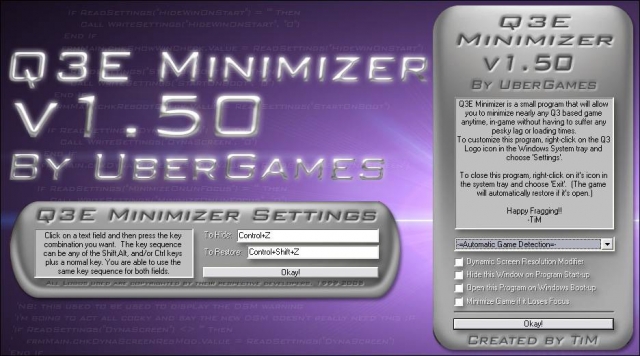
Q3e Minimizer V15
=-=-=-=-=-=-=-=-=-=-=-=-=-=-=-=-=-=-=-=-=-=-=-=-=-=-=-=-=-=-=-=-=-=-=-= Q3E Minimizer v1.50 by UberGames =-=-=-=-=-=-=-=-=-=-=-=-=-=-=-=-=-=-=-=-=-=-=-=-=-=-=-=-=-=-=-=-=-=-=-= File Name: Q3E Minimizer v1.50 Version: 1.50 File Size: 272k Developer: TiM Date Created: 11/11/05 1:03AM Creation Time: A few weeks (10% coding, 90% Debugging... gah!! ;P) Programs Used: Visual Basic 6, Adobe Photoshop CS Website: http://www.ubergames.info =-=-=-=-=-=-=-=-=-=-=-=-=-=-=-=-=-=-=-=-=-=-=-=-=-=-=-=-=-=-=-=-=-=-=-= About: Q3E, or Quake 3 Engine Minimizer is a program that has been created to give you the ability to quickly and easily minimize nearly every game that has been coded using the Q3 engine as a base. The reason I made this was because I was tired of having to spectate, or suffer being killed over and over again as I used Alt-Enter to switch to my desktop which took practically forever so I could answer MSN or ICQ. The concept of the "un-Alt-Tab-able" game minimizer isn't mine. This one is more of an extension to an idea that someone else had, that I thought could be expanded furthur. I was cruising JK2files.com one day, looking at the utilities section (I had just sent in KT 101 and was looking to see if anyone had d/led it yet) when I saw a file called "JK2 Minimizer" created by a very cool d00d who goes by the name of Deathwish. Being interested, I downloaded the file and found out how simple it was, yet at the same time, so very very useful. Responding to people on MSN/ICQ, etc was no longer a grueling task. Later on, I was playing STV: Elite Force online and found that I greatly missed the ability to minimize it like I could with JK2. So, I took it upon myself to create my own Minimizer. Using snippets of VB code around the internet, I managed to create a similar program I named "EF Minimizer", that I submitted to effiles.com. Many people found it immensely useful, and I was extremely happy with the feedback. ^_^ A few months later, I attended a LAN party (My first ever LAN party actually :D ) where I got involved in a heated battle of Q3A with some other people there. After a few minutes, I, by reflex, tried to minimize Q3. When nothing happened, I said to myself at that point, "I'm going to make a version of EF Minimizer that can minimize all Q3 based games". After the LAN party, I clean forgot about doing that, so the half finished "Uni Minimizer" (I hadn't thought of a good name then) sat on my hard drive for a month. After a month, I downloaded the new Jedi Knight: Jedi Academy demo (May I point out, an AWESOME demo). Whilst I was playing it, someone on MSN messaged me, and I realised that I was stuck in-game, having to alt-enter out. At that point, I remembered Uni Minimizer, and decided to complete work on it. So, after a few nights of working, I brought you version 1.0 of the new Quake 3 Engine Minimizer, or Q3E Minimizer, but now, I bring you version 1.50 of Q3E Minimizer! =-=-=-=-=-=-=-=-=-=-=-=-=-=-=-=-=-=-=-=-=-=-=-=-=-=-=-=-=-=-=-=-=-=-=-= Features: -=Features new to v1.50=- -Now supports these games: *Quake 4 (Same boat as Doom 3 -See Below ;) ) *American McGee's Alice *Game Over in Machinimation *Medal of Honour Allied Assault *Medal of Honour Allied Assault Spearhead *Medal of Honour Allied Assault Breakthrough -Fraggin' Huge Codebase Revamp Thanks to my programming work on the EF mod RPG-X, I've learnt a great deal more about programming, which I was able to incorporate into Q3E Minimizer. :) Through a LOT of recoding (very nearly re-wrote the whole thing!) and optimisation, I managed to chop off about 50kb off of the size from the previous version! :D! -Revamped Key Selection I recoded how you select hotkeys, so it is now a lot more flexible. Not just alphabetic characters, but nearly any key on your keyboard you can use now! :D (NB: Although I didn't disable it, you may want to avoid F12 as some windows apps need that one :P ). Additional flexibilty include being able to assign the same key twice (so you can just use the same keys to toggle in and out of game) and being able to set no keys at all (Could be useful in some instances. I can think of a few) -All New DSM I COMPLETELY RECODED THE DYNAMIC SCREEN MODIFIER. Having finally grasped the concept of API functions and how to use them right, I found out how inefficient the DSM function was. It's now been totally redone from scratch and I think it's safe to say, it's a lot faster and it'll leave your icons alone now. ^_^! -Remade Icons I resized and optimized the games icons used, so they should look a lot more crisp and less blocky in the system tray now. -Minimize Game if it Loses Focus A requested feature. When this is active, if the game loses focus (ie, the user switches to another window or hits the windows key), it'll automatically minimize the game. -Command Line Arguments Not really a detailed feature, but it could prove useful. Basically, as you start up this program, you can add the command line argument '-run "" ', and when Q3E Minimizer runs, it'll start up that program too. :) -More efficient registry settings I went through and consolidated a few of the registry settings into single entries, thereby saving a tad more memory lol. :) -Subclass Message Support This was another requested feature. I added support for external developers to be able to send commands directly to the program from their own programs using the Windows SendMessage API function. Supported commands include Toggle, Minimize, Maximize, SaveGameRes, GotoDesktopRes, and GotoGameRes. Unless you're a programmer, you probably won't be using this feature at all. ;) Any developers interested in trying this out, e-mail me and I'll send you the necessary defines. :) -=Features new to v1.45=- -Minor UI Adjustments I made a few changes to the interface background pictures. See if you can spot the differences. ;) -Screen DPI Adaption It was pointed out to me that when a person's screen had it's DPI set to anything other than the default 96, it would totally throw the program's interface out of whack (The buttons wouldn't be in the right spot etc,). That being the case, Q3E Minimizer now has the ability to detect this and adjust the UI accordingly so everything still matches. -Bug Fixes *The HORRENDOUS (;P) bug in whereas the Dynamic Screen Modifier would crash the program if you tried to turn it on has now been fixed. Not only that, but I noticed that the modifier wasn't working correctly anyway, so I've recoded most of it so it now does (Fully tested on my Desktop PC and laptop PC with satisfactory results :D ) *If the Automatic Game Detector detected Jedi Academy Multiplayer, the program would crash. This has been taken care of. *More odds and ends have been tidied up. ;P -=Features new to v1.40=- -Revamped Codebase It's been about a year since I released Q3E Minimizer 1.0. Since then, I've graduated from high school, gone to uni, and formally studied programming. So now that I understand programming methods much better, I've noticed that the code for thisthing was in some cases quite in-efficient. As a result, I've totally redone a large portion of the code, which will definately let the program run more efficiently/quickly now. :) -Minimzer has the option to open upon Windows startup. -The main window (The one that pops up at the start) now has the option of not appearing when Q3E Minimizer starts up. -Reconfigured Hot Key Registration I've found that when the Minimzer is open, even when not ingame, the active hotkeys (Which disable that command for any other program) made working in other areas more difficult (For example, ctrl-z is the 'undo' command for many programs.) As such, I've now made it that the hotkeys are now active only when an active game is detected. This should make the presence of the minimzer less visible now. :D -Now additionally supports these games: *Call of Duty: United Offensive (SP) *Call of Duty: United Offensive (MP) *Doom 3 (NOTE: Doom 3 seems to override the hotkeys Q3E Minimizer assigns in-game, meaning it doesn't work when directly in Doom 3. To get around this, press alt-tab first, and then try the minimzer's hotkeys. Getting back into Doom 3 is the same as any other game though) (EXTRA NOTE: Okay Okay, I know that Doom 3 is TECHNICALLY not a Quake 3 based engine, but I still got several requests by people who wanted support for it anyway. So uh here it is :) Then again, Doom 3 WAS created by the same company, and they would have been foolish to not recycle bits and pieces from Q3. So, theoretically, on a remote scale, it could be considered Q3. ;P But I think I'll draw the line here. No more deviations from Quake 3 games. ;) ) -=Features new to v1.30=- -At the criticism of one of the admins at jk2files.com, I have now removed the prompt you get when quitting Q3E Minimizer whilst a game is active. -I also redid the offline icons for SoF2 SP and MP so they have much better quality. -Now additionally supports these games: * Call of Duty (SP) * Call of Duty (MP) * Heavy Metal: F.A.K.K² (Thanks goes to Oomjan and Flying Fool for sending me the details to integrate these games!) -=Features of v1.20=- - If a game is active, and you choose to close Q3E Minimizer, it will now prompt you to make sure you really have chosen to close it whilst a game is active. - Major Overhaul on the Dynamic Screen Resolution Modifier. Now, when you quit the game, it won't keep the screen at the same resolution as your game. If you quit Q3E Minimizer whilst the game is still running though, it will keep it at the same resolution. -Whilst a game is running under automatic detection, you can change the game while the game is still running. (In 1.10, when the game was active, the menu was locked.) The user will need to quit the game if they want to re-enable auto detection however (But you had to do that anyway. ;) ) -Now supports these games: * Soldier of Fortune II: Double Helix (SP) * Soldier of Fortune II: Double Helix (MP) * Return To Castle Wolfenstein: Enemy Territory (Thanks goes to OomJan and coffee for the help in order to support these games) -=Features of v1.10=- -Auto Game Detetection Users now have the abilitity to set the minimizer to automatically scan for any active Q3 game, and then automatically set that game as the target for minimization. This feature is optional, and users may still manually choose which game they want the minimizer to target. (The detector will only work right if only one Q3 based game is running. If more than one is active, it will choose one itself) Whilst the detector and game are running, the drop-down menu is locked to prevent changing the game as it may cause errors. -Dynamic Screen Resolution Modifier A large number of gamers play their games at lower screen resolutuions, usually to get better performance from their video card, or due to older hardware. When a person normally minimizes the game, it will display their desktop at the same resolution as the game, which is usally quite ugly and quite difficult to operate with. At the request of several people, v1.10, and 1.20 come with the feature to activate an option that will automatically adjust the user's resolution upon minimization and restorization, depending on what the resolutions are when the game is minimized and the game is active. - Version 1.10 supports these new games: *Star Wars: Jedi Knight: Jedi Academy (SP) *Star Wars: Jedi Knight: Jedi Academy (MP) (If you still want to play the JKA demo, select the JKA SP choice as they are both the same thing. :) ) -Updated Interface -=Original, Primary Features=- -Will Minimize/Restore a specified Q3 based game at the touch of a key -Now has an all new graphical interface (Format is GIF to minimize size) -Runs in the background so as not to take up many system resources, leaving it all for fragging! -Icon in the system tray changes depending what game is running -Left-Clicking on the system tray icon will bring up the hot keys window, If game is running, it will instead restore the game -Right-Clicking the icon will access a simple menu to configure or quit the minimizer. -Quitting the minimizer will automatically restore the game. -Version 1.0 Supports the following Q3-based games: *Quake III Arena *Star Trek Voyager: Elite Force (SP) *Star Trek Voyager: Elite Force Holomatch (MP) *Star Trek: Elite Force II *Star Wars: Jedi Knight II: Jedi Outcast (SP) *Star Wars: Jedi Knight II: Jedi Outcast (MP) *Star Wars: Jedi Knight: Jedi Academy Demo (No longer in v1.10/1.20/1.30/1.40/1.50) *Return to Castle Wolfenstein (SP + MP) [Wolfenstein had the nifty feature of naming both MP and SP windows the same thing, so I was able to put SP and MP into one option. ^_^] =-=-=-=-=-=-=-=-=-=-=-=-=-=-=-=-=-=-=-=-=-=-=-=-=-=-=-=-=-=-=-=-=-=-=-= Instructions for Use: 1. Open the Q3EMinimizerv150_Setup.exe and follow the instructions. 2. Once installed, and upon opening Q3E minimizer, the main window will appear. In the drop-down menu located near the bottom of the window, choose which game you would like the minimizer to currently focus on, or leave it at Auto Game Detection, if you wish. 3. Start up that game as you would normally. 4. To minimize the game, press the default keys: Control-Z 5. To restore, press Shift-Control-Z To configure the hot keys, right-click on your current game's icon in the system tray, and choose "Settings...". From there, use the interface to select your new keys. =-=-=-=-=-=-=-=-=-=-=-=-=-=-=-=-=-=-=-=-=-=-=-=-=-=-=-=-=-=-=-=-=-=-=-= Trouble-Shooting: -=ARGH! WTF!? I'M AN ATI USER AND MY SCREEN GOES DARK IF I MINIMIZE!?!=- This has been the number one mentioned glitch in this program. :( From testing various settings, it appears to me that ATi did this on purpose whenever windows were switched to keep each view at the native settings. It is definately a feature inserted into the latest ATI Graphics drivers, and as such, I don't think there's much I can really do. :( Only prob is that when Q3 is restored, it doesn't actively update it's gamma, so u get normal desktop gamma ingame. >.:( ). As a sort-of fix for this, there are three things you can do: *In the Q3 console, type '/r_ignorehwgamma 1' and then '/vid_restart'. This will work, but might require a bit of tweaking of the gamma setting after that to get it look the same as it was before. *Create a bind script that changes your gamma ('/r_gamma') to a different value, and then changes it back. This is kind of hacky, but works well. *Go out and buy an nVidia brand graphics card. This issue doesn't seem apparent with them. >.
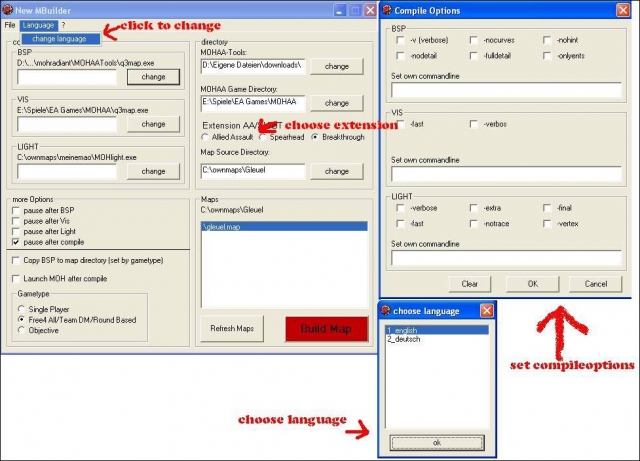
New Map Builder
Here is the New Map Builder Install: Extract NMBuilder.zip were ever u want and start NMBuilder.exe Description: NMBuilder is a mapbuilder(converter) for MOH:AA, MOH:AA SH and MOH:AA BT NMBuilder based on the old MBuilder written by Sotilas Jane. NMBuilder fixes many bugs the old version had and modified some options. Functions: - Convert *.map files to *.bsp files - Pause after every compile step - Copy *.bsp to the Mapdirectory of AA SH or BT after compile _ Starts MOH:AA, SH or BT after compile - language can be chosen but for now just english and german if u have time and speek an other language u can write a new language file u can find it in the folder /lang
Mod Manager Editor
Pk3/Mod-Manager/Editor (v. 3.2.0) if you have Pk3/Mod-Manager/Editor (v. 3.1.7 and below) you need to uninstall it. to uninstall goto Control Panel and click add or remove programs 1. This will let you turn on and off your pk3 files 2. edit them 3. and now edit bsp map files!!! What Version 3.1.7 Fixed 1."ocx" being out-of-date What version 3.2.0 Fixed 1.the "Run-Time error '76' path not fond" on start up 2.When you click "Extract" there is no name 3.The "Fix !!" button on the bsp editor 4.Fixes it so i can make a patch so there is no need to unistall each time 5.A "Errors and Bugs" Page To add a file in side a pk3 file or out side of you! Double-click the pk3 file in the Mod on list or Mod off list or click view Projects Now click new project type in the name of the project then select the project in the dropdown list Look at the files in the treeview or click add file if you selected a file in the treeview(pk3 file) then click add to project. after adding all the files to your project you can now click view project now you can change the name or edit the file or bsp file and change the path and make your project in to a pk3 file

Easygen
Software to help build terrains for a map. Tutorial is included in the package. -------------------------- EasyGen 1.2 03/03/2002 -------------------------- Author: Francesco Bancalà bancaf@libero.it http://digilander.iol.it/ilbanca/ +----------------+ 0. About EasyGen 1. Installation 2. Features 3. Knwon bugs 4. Credits 5. FAQ & Troubleshooting +------------------------+ 0. About EasyGen ---------------- EasyGen is free. With EasyGen you build up terrains and export them as Quake3 source map (including alphamap and metahsaders). Bitmap import/export is also supported but EasyGen can do all the job by itself. Supported games: - Quake3 - Return To Castle Wolfenstein - generally all games based on Q3 engine, who need a source map(.map), an alphamap(.pcx) and a metashader script(.shader) to compile a terrain entity. (if you want to to learn more about this process read the Official Terrain Manual written by Paul Jaquays contained in the latest GTK installations) 1. Installation --------------- Make sure to extract all files contained in the zip in the same folder. After you've extracted the zip, EasyGen folder should looks something like this: EasyGen\modifiers\*.* - modifiers EasyGen\save\sample.egn - sample terrain EasyGen\tutorial\*.* - tutorial stuff EasyGen\EasyGen.exe - executable EasyGen\btnexgenipl32.dll - a dll EasyGen\readme.txt - this readme.txt EasyGen will not run if 'btnexgenipl32.dll' is not in the same folder. Also EasyGen needs to know your work mod folder under root folder (ie baseq3\, missionpack\, main\ etc etc), you will be prompted to browse for that asa you start EasyGen. I repeat for the last time, you need to browse for a MOD folder, not for the root folder. 2. Features ----------- > Terrain shape manipulation through several modifiers (Hill,Cone etc etc). > Program your own modifiers with an easy asm like language. read 'custom_modifier.txt' to learn how to do that. > Direct exportsource map plus alphamap and metashader script. > Alphamap import/export. > Bitmap import/export. > Models (md3) are loaded automatically from //models/ folder PS: this version DOES NOT support loading from previous beta versions of EasyGen. If you want to load a terrain that you made with EasyGen0.8 or earlier, you must do it through a bitmap that you have exported with the past version. 3. Known Bugs ------------- - Resizing the width(x|y) of the grid when lock is OFFdoes not resize the alphamap. (altering divisions does it). - I don't know what could happen if you use textures of different sizes, if you don't want get in troubles use textures of all the same sizes (all 256x256 or all 128x128, ...) - I think you'll find other bugs, please let me know :) 4. Credits ---------- Tnx to: .idSoftware for the game .NeHe for his OpenGL tutorials - http://nehe.gamedev.net/ .http://www.codeguru.com/ for his kick ass programming forum .guys of http://www.quake3world.com/ level editing forum .Binary Technologies for his powerfull image library Binary Technologies http://www.binary-technologies.de info@binary-technologies.de .KitCarson for breaking my balls to implement texture support :) Special thanks to: .RKone: for helping me solving an export bug. .^Lord Squart^: for some useful suggestions. .Hubas: he had to face an advanced version of the export bug and still give me useful suggestions He also wrote the tutorial .djbob: for telling me the way to fix the texture render bug .snickelfritz: for his alphamap tutorials .me 5. FAQ & Troubleshooting ------------------- Q: What the hell is this gray and white grid? A: you can get the damned grid for several reasons: 1. the width of each division along X and/or Y axis is not a power of 2. Use 128 or 192 or 256(most used). You set these values from the Grid TAB, 'Div.Width.', enter two values (one along X and other along Y, generally the same), then press Apply on the right. 2. You have played with the keys of the terrain entity from GTK, or renamed and/or edited the alphamap and shader files generated by EasyGen. To do this you ust know exactly what are you doing because there are linked references by names in that stuff. (filename and names inside text files) 3. Corrupted shaders? Try moving out custom pk3 from you mod folder. Q: Why do the textures look fine from EasyGen and from Quake3 are all shifted along a direction? A: This seems to be a bug of some q3map versions. To fix this edit your alphamap(PCX) exported by EasyGen with a 2D graphic program such as PaintShopPro and remove the first vertical line of pixels. If the original alphamap was 33x33 the final one must 32x33. Sounds strange but it works. Q: Mmm what are the various xxx_vxinfo.txt files under my EasyGen directory ? A: mapname_vxinfo.txt is generated when you insert the terrain into an existing map. When you insert the terrain EasyGen simply append the terrain entity to the end of your map. Vertexremapshader information is not inserted because it must be inserted into worldspawn entity that somewhere inside the map file, and I had no time to program a complete map parser. So you must insert it manually with a text editor, inside the worldspawn. This is a critical operation for someone, I know. Back up first. 6. Final Stuff ------------- Programming is an hobby for me, so I take no responsability if your pc blows up while running EasyGen ! Feedback, bug report, suggestions, are appreciated :P If you'd like to have EasyGen as a plugin for GTK/Q3R, write me and I'll think about it, btw I think it works better standalone. Quake3Arena and RTCW are registered trademark of 'id Software' ! > http://www.quake3arena.com > http://www.idsoftware.com
Pakradar
PakRadar, the autodownload tool (custom maps etc.) for servers and clients. There is an Installer included but also a NoInstaller (in which you have to install everything manually). You can choose which one you want yourself.


GS Protector v4
Gameserver Protector: ********Attention: Version 4.0 isn't working, a new version is not in the making but is available on sourceforge https://sourceforge.net/projects/gsprotector/ if you are able to fix issues please update here ********* GsProtector is a firewall working on the application level for gameservers. It filters between good and bad traffic and passes only the good traffic to the gameservers. Clients that send frequently bad traffic are automatically IP banned. If a server is under attack legit players will still be able to play. Beside this core functionality it also provides admin capabilities such as IP and IP range banning and subadmin system accessible through the rcon interface of the gameserver. Other feature are detailed logs about traffic and connections, QoS and traffic shaping and various features to protect the gameserver from remote attacs. Features: Protection against query flood attacs (eg. getstatus flood) Protection against rcon flooding Protection against remote crashing Protection against attacs with spoofed IP's Protection against attacs with bogus data Autoban System for Attackers Anti Lag IP Banning IP Range Banning Firewall Banning Immunelist Rconlocker: Prevents changing of rcon password via console Bad Rcon blocker, rejects rcon requests with wrong rcon password Whitelists for Queries, Rcon, Joining Shield Mode. Only registered players can join or administer the server. (Players register prior with the register password via. rcon) Detailed Information about Packets and Traffic Detailed Logs. Rcon activity is logged with timestamp and IP. Trafficshaping and QoS Easy to use Sub-Admin System, Sub Admins get their own rcon password so they can use any other rcon tool e.g. scapp-host, hlsw, ingame menu or ingame console - you define which commands they are allowed to use It is possible to use single ban and immune lists for multiple servers (SharedGspFolder) ( Fully configurable via config file or rcon, features can be toggled on/off High Performant, as effectively as a firewall but especially tailored for game servers Works independently from other patches or tools If your server is being attacked you will still be able to join and play Comes shipped with a comfortable and easy to use Editor. The Editor allows easy management of settings and banlists. Please check the Documentation here: http://www.scapp.net/forum/index.php/topic,127.0.html about details. Important: Installation: Run the .msi GsProtector setup file. This will install the GsProtector Editor on your computer. With the editor you can install and manage your GsProtector installation on your server. The installation will create folders to manage and held local copies of GsP settings and log files in your personal data folder. Search for folder "scapp" if you need to locate. You need a ftp connection to your gameserver. Download and installation will most probably issue warnings "unknown publisher" coming from your browser or Windows OS. The software is developed with no intention to harm your computer in any way, you may want to grab the source-code, check and compile yourself. In any case you should only download and install GsP from this site or the sourceforge site. Deinstallation: Use the remove function in the editor if you want to remove GsProtector from the server. Or alternativly remove manually the GsProtector folder and then the files: myproxocket.dll, ws2_32.dll, wsock32.dll. Use the "uninstall a program" function of your windows to uninstall the GsProtector Editor. Please note - The GsProtector is only for Windows systems. - This version of GsProtector (4.0) is in an early beta stage. - This version of GsProtector (4.0) is not compatible to previous version (except for banlists) - Full features only available with mohaa/sh/bt games Known Bugs early beta stage, contains bugs for sure. Open Source GsProtector is open source 8) licenced with GpL v.2 licence, source code is hosted on sourceforge.net: https://sourceforge.net/projects/gsprotector/ Sourcecode is located in the source folder on sourceforge.net.
Medal of Honor: Allied Assault Mods (MOHAA) — Complete Community Archive
Welcome to the premier repository for Medal of Honor: Allied Assault mods. Since the game's groundbreaking release in 2002 by 2015, Inc. and EA, MOHAA has inspired one of the longest-standing modding communities in first-person shooter history. MOH-DB preserves, categorizes, and serves over 1,600 verified community modifications, custom enhancements, and competitive utilities for Allied Assault, Spearhead, and Breakthrough.
Explore MOHAA Mod Categories
Player Skins & Uniforms
Over 700 historically accurate and creative player uniforms for Allied and Axis factions. Equip authentic U.S. Army Rangers, 101st and 82nd Airborne paratroopers, British Commandos, Soviet Red Army conscripts, Wehrmacht Heer infantry, Fallschirmjäger, and Waffen-SS camouflage patterns, as well as classic community clan skins.
Weapon Models & Reskins
Enhance your WWII arsenal with ultra-detailed weapon replacements and high-resolution textures. Popular downloads include authentic wood-finish Kar98k sniper rifles, realistic metallic sheen M1 Garand models with classic "ping" animation refinements, Thompson submachine guns, MP40s, BAR 1918 rifles, and custom iron-sight alignments.
Soundpacks & Realism Audio
Transform the sonic atmosphere of Allied Assault. Replace compressed 2002 Quake-engine sound effects with cinema-grade gunfire recordings, authentic distant artillery rumblings, terrifying Stuka dive-bomber sirens, supersonic bullet cracks, metal ricochets, and remastered German and American voice callouts.
HUDs, Menus & Crosshairs
Modernize the in-game interface for 1080p, 1440p, and 4K widescreen displays. Download minimalist competitive heads-up displays, custom dot and crosshair overlays, cleaner compass indicators, redesigned main menus, and unobtrusive health and ammunition counters favored by competitive league players.
Server Utilities & Admin Scripts
Run resilient, modern multiplayer game servers with essential server-side utilities. Includes automated map rotators, anti-cheat detection tools, voting scripts, custom match timers, ping balancers, and administrative rcon managers designed for dedicated servers running 24/7.
MOHAA Reborn 1.12 Community Patch
The gold standard community patch for modern MOHAA servers and clients. The Reborn 1.12 patch resolves legacy buffer overflows, fixes client query exploits, expands internal script limits for complex mods, and provides a built-in server browser to replace the defunct GameSpy master server.
How to Install MOHAA Mods: Quick Guide
Identify Your Target Directory
MOHAA stores all game assets in subfolders inside the root installation directory:
- MOHAA (Base):
.../MOHAA/main/ - Spearhead:
.../MOHAA/mainta/ - Breakthrough:
.../MOHAA/maintt/
Paste Without Extracting
Download the mod archive from MOH-DB. If it is zipped (.zip or .rar), extract the enclosed .pk3 file. Place this .pk3 directly into your game's /main/ folder.
How to Remove or Troubleshoot
To remove any mod, simply delete its .pk3 file from the /main/ folder. The game will immediately return to stock behavior without reinstalling.
Frequently Asked Questions about MOHAA Mods
To install MOHAA mods, copy the downloaded .pk3 file directly into your Medal of Honor Allied Assault installation folder under /main/ (or /mainta/ for Spearhead, and /maintt/ for Breakthrough). You do not need to unpack or extract the .pk3 archive—the game engine loads it automatically upon launch.