
Medal of Honor: Allied Assault Mods (MOHAA)
Discover and download community-created modifications to enhance your Medal of Honor: Allied Assault experience.
1676 Mods Found
Tools MOHAA V16b
A package with Tools for MOHAA (mapping). Some of the things included: mohaatools.exe tik editor script editor BSP viewer 3D ___________ ___________ ___________ ___________ Last revision to this document: 20 Nov 2002 ------------------------------------------- (c) 2002 Duncan Weir (Aka Scorpio, Aka ScorpioMidget) Find him on TMT (The Modding Theater) www.modtheater.com **************************************************************************************************************************************** This software is for personal use only, before converting a BSP file please check the copyright of such. Also before redistributing or using extracted parts of BSP's in your own work - check the original's copyright. This software is intended as a tool for Mohaa mappers to aid them in THERE work, not as a tool to copy/extract parts of maps/BSP's and include them in your own work. Please do not abuse the (c) of maps that are not your own. **************************************************************************************************************************************** This document contains basic help, including installation and useof instructions and also a revision history*. * The revision history is at the end of the document. BSP Viewer Help: ============= (this is only very basic help !) INSTALLATION: ----------------------- 1.Install the software. 2.In the TOOLS section (top right hand side), select PK3LOOK. 2. a) Browse to your mohaa/main folder (where the pk3 files are, you could browse elsewhere if needed). Select 1 of the pk3's (does not matter which one). 2. b) Click OK (if you didn't double click the pk3 file). 2. c) Highlight the required pk3's from the list on the left. (For Mohaa main standard pk3's ** here are the important pk3's for auto scanning: pak0.pk3 has global scripts, pak1.pk3 has textures. pak2.pk3 has textures. pak5.pk3 has maps and map scripts. pak6.pk3 has textures, maps and map scripts. ** So really you only need to select pak1, pak2, pak5 and pak6) 2. d) Click the SCAN 4 TEXTURES/BSP button below the list. Wait for the software to extract all the Textures/BSP's/Scripts, click OK to popup progress messages. *** NOTE: You can repeat the scan routine for multiple folders, if you have other folders that contain custom maps ! USE OF THE S/WARE ---------------------------------- Now that u have extracted the textures and bsp's you can use the software :-) Main program BSP Viewer - Use to browse for a BSP, and then either look at the extracted info in the tree views, or run one of the tools as below: 3D Viewer - As it says view a bsp in 3D WITHOUT loading Mohaa, and the bsp's don't even need VIS to be viewed. PK3Look - Use to browse your pk3's, extract files, view files contained within. Script Generator - Create a basic script for your BSP by clicking a few options. (not implemented yet). Make from entities etc - extract the info from the tree view on left into a .map file so you can load into MohRadiant. Recreate Original - Yes create a .map file from all the info in the BSP, then view it in MohRadiant. ~~~~~~~~~~~~~~~~~~~~~~~~~~~~~~~~~~~~~~~~~~~~~~ BSP Viewer - Things to do: ==================== Turn on LOD and Patch light mapping. Export patches to map file. Correctly map textures in export routine. TIK model loader Static model draw in 3D viewer Static model export to .map files Enable collision detection. Enable door opening/closing. Enable climbing ladders. Improve hidden brush export code. ~~~~~~~~~~~~~~~~~~~~~~~~~~~~~~~~~~~~~~~~~~~~~~ MohaaTools Revision History V1.6b ===== Map exporter disabled in main menu - use 3D BSP Viewer instead. 3D BSP Viewer .map export now includes LOD terrain and Patches. V1.5b ===== Added support for V21 bsp files (MOH:Spearhead), Mohaa is V19 Lots of new keys, pree F1 to check them out. A Laracroft model has been included so you can run around the level in 1st person mode. (c) info for the Laracroft model is in the Lara folder. Various other tweaks have been made, which i forgot to document ! lol If your using this for spearhead, dont forget to extract the new BSPS's and Textures. V1.4b ===== 3D BSP Viewer improved. Export to map is now assigned to the M key. Lod is exported to map files Texures are better mapped in export, scale is correct but offsets are wrong. Shaders are correctly parsed now to show all textures. Hidden brushes, like ladders, triggers etc are now drawn and exported. FOV can be altered using . , and / Triangles can be overlayed over textures in rendering mode use "6" Various draw modes have been corrected and linedrawing/lightmapping now works correctly. Suggest you recheck the HELP press F1 for new key assignments. V1.3b ===== Auto Extract in PK3Look now extracts all the SHADERS ! Important that you run this util again, or you'll not get all the textures in the 3D Viewer. 3D Viewer has again been improved. Patches now render (that means pipes, barrles, arches etc). Patches ARE NOT exported. Lod Terrain now renders (and it is also exported to the .map). Missing textures that previously were solid white, are now extracted from the shaders (see above) and render correctly. V1.2b ===== 3D Viewer has been improved, it now partialy converts triggers etc. It does not currently always give correct shape, because it builds a brush based on the maximum bounding box size. But most of the time the bounding box is the same as the brush shape. 3D Viewer can run at 640x480 (default) or 800x600 (user choice). Some popup messages have been removed. Executable is around half the size ! V1.1b ===== Link added in the Tools section (MohEd) to start the MohRadiant map editor Bug (no keyword error) in Script File Search has been fixed :) Script file search was doing CASE-SENSITIVE searches, now it does CASE-INSENSITIVE searches :) much better. Fixed the textures missing the 3D bsp viewer. Max output brushes for bsp->map converter increased from 60000 to 120000. Max sides per face for bsp->map converter increased from 32 to 64. V1.0b ===== BSP Viewer has ceased to be, but has resurfaced as MohaaTools. Because BSP Viewer has grown into more than just a VIEWER it was decided to rebrand the software, under a better title. All functionality of V2.0b of the BSP Viewer has been ported to MohaaTools, and now the tools will be expanded. Planned expansion includes a TIK editor, Loader Screen Editor/Previewer, Hud Editor/Previewer, Scripting language help program with command/variable list and explanations of when/how to use them. *NOTES: If you have previously use BSP Viewer, then u need to MOVE the following subfolders of c:\program files\BSP Viewer into the c:\program files\MohaaTools folder: map files bsp files scr files textures Then u need to uninstall BSP Viewer, because MohaaTools makes it redundant. BSP Viewer Revision History: ===================== V2.0b ===== Script Generator 1st version is now working ... will add more as time goes on :-) Minor updates to commmands recognised by the script editor. V1.9b ===== V1 of the Script editor has been added. Click on Script Editor in the Tools area of the main program. Include syntax/command colouring, and opening of multiple scripts at same time. V1.8b ===== Cursor changes to the WAIT CURSOR at parts of program that take several mintues to process. Scan 4 Textures ... correctly shows the number of BSP's, SCR's and Textures extracted. also it gives option to abort the scanning process. Option to auto display this document on software startup. Converts faces that have upto 32 sides. Added more progress messages to the 3D viewer. Fixed the Model Move routine, maps now look better without parts of objects moved incorrectly. Recreate map button working - ported code from the 3D viewer. V1.7b ===== Only converts faces with a maximum of 6 sides. The previous version would convert around 50 faces .... well this one will do several thousand !!! I just converted the last level of the SP maps and it looks cool :-) V1.6b ===== When you run the 3D viewer it gives the option to convert the BSP file. Please read the popup messages they ARE IMPORTANT !. Bear in mind this is the first version, and there is still much work to be done, but at least a start has been made. I successfully converted some test maps i did with around 20 - 50 burhes in, i also ran my tank map and the last sp map through it :-) V1.5b ===== Minor changes to the main viewer. 3D viewer has lots of new stuff :-) You spawn at the info_player_start postion. You can use O/P to cycle through all the spawnpoints in the map +/- alter the farplane value script->object brushes are now in correct positions, looks great with all the doors and windows drawn correctly. Would be nice to get a tik loader (but that's going to be a lot of work). V1.4b ===== Now includes export options for map files (am still working on the full .map file export, but making good progress). PK3Look has been improved. Double click a file in the pk3 file list, and if it's a tga or jpeg it will preview it, or if its a scr, shader, tik, urc, txt file it will auotload it into Wordpad/Notepad for you. Also WAV files are now supported. Also new in the tools section is "3D BSP Viewer" , just browse for your bsp, then click this button, and you can then walk around the BSP without loading Mohaa. The 3D viewer is also still being developed ... currently it doesn't load patch's and any brushes that are part of entities like script->objects are loaded, but appear at the coordinate 0,0,0 ... hope to have them fixed in next version. You can view the bsp in Wireframe or Full rendered mode, turn on/off textures and lightmaps. You can also press ENTER to view a texture name for the surface under the crosshair, or H to hide the surface, or J to redisplay the surface ... great for figuring out which textures they used for Omaha beach, and in which order !!! I am also working on a new tool for script editing, a bit like wordpad but with syntax/command highlights in colour :-) V1.3b ===== Not released, for internal use only. Now includes export options for map files (am still working on the full .map file export, but making good progress). PK3Look has been improved. Double click a file in the pk3 file list, and if it's a tga or jpeg it will preview it, or if its a scr, shader, tik, urc, txt file it will auotload it into Wordpad/Notepad for you. Also new in the tools section is "3D BSP Viewer" , just browse for your bsp, then click this button, and you can then walk around the BSP without loading Mohaa. The 3D viewer is also still being developed ... currently it doesn't load patch's and any brushes that are part of entities like script->objects are loaded, but appear at the coordinate 0,0,0 ... hope to have them fixed in next version. V1.2b ===== Now has a PK3 Viewer built in called PK3Look Use to auto extract textures and bsp files for this software. Also use it to view your pk3 files, either one at a time, or group select them and see ALL the files at the same time, great idea :-) You can extract selected files, and also double click an image file to preview it onscreen. Also you'll see a button next to PK3Loop called Script Generator ... V1.1b ===== Screen can now be maximised/minimised and resized. Textures can be previewed full screen in seperate window. Static Entities are now extracted from the BSP file. V1.0b ===== 1st version, and doesn't do much yet ... really it's just the screen layouts. ~~~~~~~~~~~~~~~~~~~~~~~~~~~~~~~~~~~~~~~~~~~~~~
MOHAA Squad Manager
Start the program from your start menu. If a 'MOHAA Squad Manager.exe' appears on the desktop delete it, or copy it into the MOHAA Squad Manager Folder. New Features include.. 1)Picture and summary when adding an allied weapon. 2)PLayer Attributes (-Accuracy -Agility -SKill -Teamwork) These attributes are enterred into the program and MOHAA Squad Manager automically genertaes a player score based on these details , and their weapon/position. 3)Search Function. you can now search for players by their name, or by their rank. Send Any questions to m.colesy@ntlworld.com.
Jks Map Fix
MAPFIX version 1.0 ********************* __________________ * -=GfP=- * *Ground force Patrol* www.groundforcepatrol.net * -=GfP=-*SSI^J.K * _________________________ ********************* Installation ************ Unzip the PK3 file into your mohaa/main folder ********************************************** ************************************************************************************************** * Description of the mod: This is my first "Mapfix". I have added some objects in the following's* * maps dm/mohdm1,dm/mohdm2,dm/mohdm3,dm/mohdm4dm/mohdm6,dm/mohdm7. * * This mod is server side only so client's will not need this in their * * mohaa/main folders... * ************************************************************************************************** *********************************************** * Find more of my mods on http://jk.spruz.com * *********************************************** **************************************** * Mod By -=GfP=-*SSI^J.K * * * * Email And MSN: bibo_jk@hotmail.com * * * * My Website---> http://jk.spruz.com * ****************************************
Anti Camper V6
Welcome to anti camper version 6! to install it copy both camper.txt and zzz_anti_camperv6.pk3 into your main dir. the camper.txt wich goes directly in main controls all the settings off the mod. once this is tweaked to how you iwsh it (see camper.txt for help) and mohaa it loaded these settings will be used on all maps what are included. new stuff! 1. map array! ht mod does not run on maps not in this array. Simple add and remove map names. 2. Camper mod changin in console stay and do not reset each map. 3. many new types not just bomb explode and camper dies type. bomb = blows up fire - set on fire light - turn into a light bleed - start bleeding. giant - make a biigger size. takeall - takes all the campers weapons away 4. fire and bleed can be set to not go off until they die. 5.rile and sniper cna be immune 6. message to campers can be tunred on and off and changed 7. a help cmd 8. cool say sound 9. each type has its own settings new camper types www.mods-r-us.net elgan.sayer@gmail.com
Anti Camper v2
mohaa Anti Camper Mod To use: just put it inside your main folder and it should wokr with all maps (maybe not some maps with edited movement) Developed by Elgan Sayer e-mail : Elgansayer@hotmail.com why?..because virus said it would be cool ------------------- this is free to use and pass arround. ---- What it does?: After waiting 30 seconds if you are still near where you were standing before or crouching you will have a bom attached to your arm then a timer will count down to 0 from 10 and bang! --------------------------- Console cmds --------------------------- cvar "camper_silent" 1 - on / 0 off. makes the ticking not heard cvar "camper_box" set the size of the box that detects the player: camper_box "( -10 -10 -10 ) ( 10 10 10 )" tcvar "camper_time" Set the time it waits before spawning a bomb.: Camper_time 30 -default cvar "camper_ticktime" Set how long it ticks down for before it explodes: Camper_ticktime 10 -default cvar "camper_inform" 1-on, 0 -off. -------------------
Star Wars Sounds
Slightly added by me (Shadow), removed the included skins, only the sounds and some effects remain (skins are still available in the Database, the Darth Maul skin, Night Vision Binoculars (1) and Futuristic Scopes). Changes the sounds for shooting, reloading, explosions, bashing etc. into Star Wars sounds. Some visual effects (muzzleflash, explosions..) are also more in a Star Wars style now. Original Read-Me file is below. ******************************************************************************************************* Disclaimer: All images were either created, modified, improved upon and/or because I have no real talent of my own, blatantly ripped off by :=:2hi2play:=: So if you see some graphical rendition in my work that you think is yours "Well Thanks" and please remember one thing --- There is a Very Fine Line Between "Hobby" and "Mental Illness" INSTALL: Put the .pk3 where .pk3's go. UNINSTALL: Take it out. I made this mod ALOOOOOOOOOOONG time ago n just found it cleaning out old program files. I don't even play MOH any more. Turns all sounds to starwars crap. enjoy
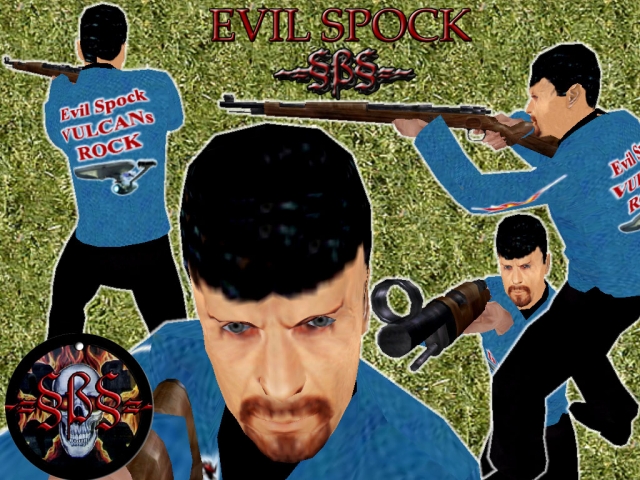
allied_evil_spock
Skins included in this file (all the same looks): allied_evil_spock allied_british_evil_spock allied_russian_evil_spock german_evil_spock --------- --------- --------- This skin was made by MARBLEZILLA, currently a member of the SBS (sandboxsoldiers) gaming clan. I've made about 25 custom skins so far for fellow clan members and some just for fun. I run MOHAA with the Breakthrough expansion pack. I never installed Spearhead, although I'm sure many of the maps and skins I browse through have many Spearhead aspects. ------------------------------------------------------------------------------------ Our clan's website is www.sandboxsoldiers.com. My website is www.geocities.com/marblezilla. My E-mail is marblezilla AT hotmail DOT com. --------------------------------------------------------------------------------------- I used a spock skin I've seen many times on different server's skin-packs. I re-did the face from a spock pic I downloaded. In a alternate dimension, bad vulcans have goatees, heh. I added some goodies to the shirt. ------------------------------------------------------------------------------------------ Each skin has 4 sets of TIK files. One german pair and 3 allied ones. A allied (US), allied_british & allied_russian. This is so you can use all the weapons from each nationality. They are located in the Models/Player folder in the PK3. Each skin has a shader file located in the Scripts folder in the PK3. Each skin has TGA images with custom, unique names located in the Textures/(Skin Name) folder in the PK3. I don't include any of the standard SKD skeletal files as you should already have them. All skin image editing done with Adobe Photoshop CS2. All PK3s made with PakScape. My thanks to all that helped me in various ways, including SBS Trinity, SBS Bullrtproof, SBS Charmed Vixen & many others. Tutorials include the Nemesis skinning/modding site, Wolfman's site and quite a few others. To test the skins, I remove all my custom skin PK3s and check out the skins in the multiplayer select mode and use them in a lan game with 2 CPUs at my house. ------------------------------------------------------------------------------------------ Install: If your running Spearhead, open up the zip file and copy the skin PK3 to your EA Games/MOHAA/Mainta folder. if your running Breakthrough, open up the zip file and copy the skin PK3 to your EA Games/MOHAA/Maintt folder. -------------------------------------------------------------------------------------------- Legal disclaimer: Have fun with them. Mod them. Use them on your clan's server. The only thing I ask is remember who made them. Haaaa, not me. I only got creative and modified them. Oh yea ... Freeze-Tag RULES !!!!!!!!, haaaaaaa.
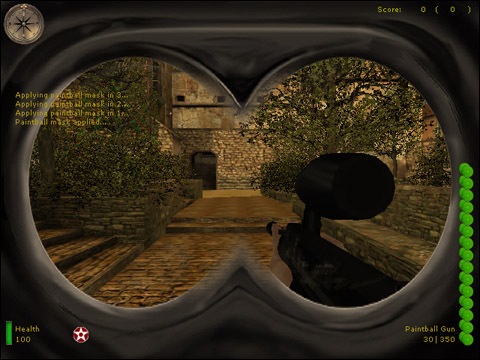
Paintball Mask
PLEASE REPORT ANY BUGS TO WAKESKATER@YAHOO.com!!! PLEASE REPORT ANY BUGS TO WAKESKATER@YAHOO.com!!! PLEASE REPORT ANY BUGS TO WAKESKATER@YAHOO.com!!! ---------------------------- MOHAA Paintball Mask Version 0.5 Scripting: 7th.DeltaAssassin (www.geocities.com/wakeskater21/mohaa.htm) ---------------------------- To insure better performance, please remove any mods currently installed. Although this mod should not affect regular gameplay, things happen. ---------------------------- ***Install: -Place "ZzZzZz-PaintballMask.pk3" in your mohaa/main directory. ***Un-Install: -Remove "ZzZzZz-PaintballMask.pk3" from your mohaa/main directory. ---------------------------- MOHAA Paintball Mask Version 0.5 Features: Adds a paintball mask overlay to your game. ---------------------------- TO ADD THE MASK TO CUSTOM MAPS USE THE FOLLOWING: //ADD THIS AFTER THE "level waittill spawn" IN YOUR MAP SCRIPT!!! thread paintballmask_start end roundbasedthread: // Can specify different scoreboard messages for round based games here. level waitTill prespawn level waittill spawn // set the parameters for this round based match level.dmrespawning = 0 // 1 or 0 level.dmroundlimit = 5 // round time limit in minutes level.clockside = kills // set to axis, allies, kills, or draw level waittill roundstart end paintballmask_start: wait 1 $player thread paintmask end paintmask: iprintln ("Applying paintball mask in 3...") wait 1 iprintln ("Applying paintball mask in 2...") wait 1 iprintln ("Applying paintball mask in 1...") wait 1 fadein 1 huddraw_shader 200 "textures/hud/gasmask_overlay" huddraw_align 200 left top huddraw_rect 200 0 0 640 480 huddraw_virtualsize 200 1 huddraw_color 200 1 1 1 huddraw_alpha 200 1 iprintln ("Paintball mask applied...") end ---------------------------- Contact: wakeskater21@yahoo.com Contact me if you would like to join the team.... we are looking for a modler with experience in creating animations.
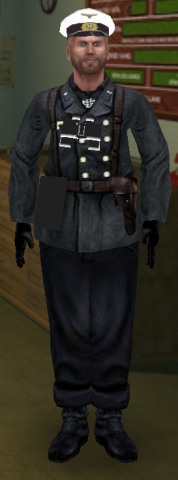
german_U_boat_officer
Skin for MoH AA and SH( german_U_boat_officer) A really realistic skin of an German U_Boat officer. Including Binoculars and mapcase. By doggowitz (binoculars and mapcase might not have the correct textures in AA).
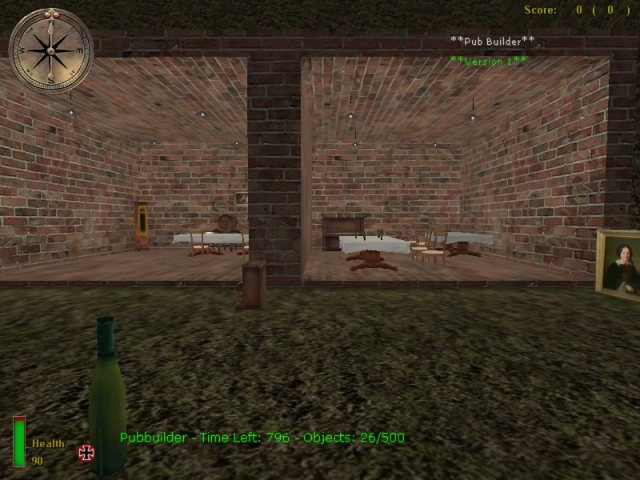
Pub Builder v1
** Pub Builder Readme File: ** First i want to say is; Sorry for my language, i'm Dutch and my english is not perfect. Second: Thanks for downloading Pub Builder Version 1. Pub builder is a basebuilder but only with stuff to make a pub/bar/restaurant/ect. I have make this because lots of players make only pubs when its basebuilder. This pub builder works only on the map i have made for the mod. And the map, well eergh, its my second map i have made, so its just ..... Its a small map and have 5 buildings to make your pub/restaurant/ect. Players: around the 8/10/15 player Objects: 22 Rcon commands: pb_pubbuild 0 (quit building en start the game) pb_timeboost # (fill bij the # a number like 10 to add 10 extra seconds) pb_objectboost # (fill bij the # a number like 10 to add 10 extra objects) map dm/pb (this put the map on) Install Server: Put the zz-pubbuilder.pk3 on your server main/mainta Put the zz-pubbuilder-map.pk3 on your server main/mainta Install client: Put the zz-pubbuilder-map.pk3 on your server main/mainta Uninstall: Remove zz-pubbuilder.pk3 & zz-pubbuilder-map.pk3 from your server/computer Created By: Goldenduck Special thanks: The guys who make basebuilder! good Job ;) Extra: -Knowing bug; There is a object that is not visible, just plant it somewhere and no one got problems with it ;) And one of the wall's doing crazy. -Version 2 wil come soon -I made this whole thing alone (appect the scrips of basebuilder) -for contact; msn; Sniper__jackson@hotmail.com
Walther Ppk
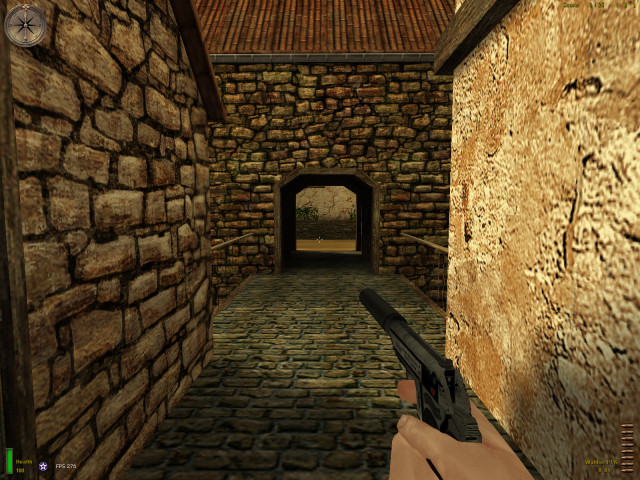
Readme File: East's Walther PPK =================================================== Title : East's Walther PPK Description : Very nice model of a walther PPK, replaces the Colt45 pistol. Probably the most advanced single weapon modification on the site. Started of as my most detailed weapon ever, These details had to be removed to be MOHAA compible This mod include's: - Ubersound Edit, the last shot you fire will result a fireing shot + a slide sound locking in place - v2 Ilde/fire/reload mod, ( soon availibe ) Which replaces every animation for the pistol. (in this mod Colt45 only) - Call of Duty 4 Silenced sound. ( last shot Call of Duty 4 sound + Edit by East ) - Muzzle Flash removed due addition of a silencer, smoke puff only. - Very detailed and well skinned model of the Walther PPK, very detailed animations. ( When fireing trigger moves, hammer moves and slide moves exactly like the real thing ) - HUD name edited - Clip model is also used when reloading Release Date : 06 - 11 - 2008 Version : Version 1 Filename : East's Walther PPK Author : East Email : Matseast92--( AT )-- msn--( DOT )-- com =================================================== * Construction * Buildtime : 1 week Compile Time : done in the same week Base : - Editor : East Map Known Bugs : - Gametype Known Bugs : - Features : Shown above Secret : - New Textures? : Yes New Sounds? : Yes Custom Soundtrack? : No Compile Machine : HP Pavilion DV6000 ( laptop where the mod is made on and tested with, in case your interested ) =================================================== * Play Information * Game : MOHAA Type : All Supported Modes : All Requires : MOHAA Players : - =================================================== * Installation * INSTALL zzzzZZZZ_user_East's_JB_PPK_Silenced.pk3 DIRECTLY IN MAIN FOLDER!! UNZIP IT TO MOHAA/MAIN (example: C:/programfiles/EAgames/mohaa/main) ---------------------------------------------------------------------------------------------------------------------------- *PLAYERS* Select works from the multiplayer server list. =================================================== * Credits * Electronic Arts Inc - MOHAA East - Walther PPK + skins + anims + scripts ect. COD4 - sounds =================================================== * Permissions* You may NOT use any of the files contained in this ZIP file for any modification with exception of the sounds. if you're going to use the sounds, do remember to credit COD4 =================================================== * Warning - Must Read and Understand Before Use* The author of this file accepts no responsibility for damage to data, or physical damage to hardware, caused by the appropriate or inappropriate use of this file. It is deemed that users who run this file, automatically are considered as having read and understood this liability clause before using the said file. ===================================================
MOHAA Paintball V11
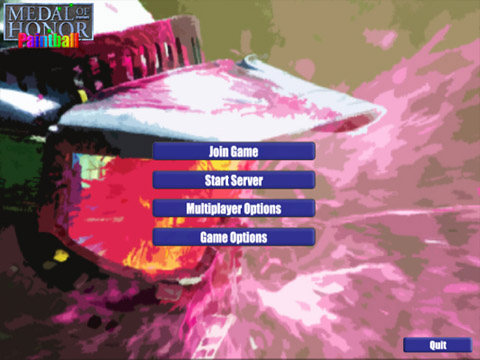
(Older versions are included within the .zip file as well, just in case) PLEASE REPORT ANY BUGS TO WAKESKATER@YAHOO.com!!! PLEASE REPORT ANY BUGS TO WAKESKATER@YAHOO.com!!! PLEASE REPORT ANY BUGS TO WAKESKATER@YAHOO.com!!! ---------------------------- MOHAA Paintball Version 1.0 Scripting: 7th.DeltaAssassin Mapping: 7th.DeltaAssassin Skinning: 7th.DeltaAssassin Moddling: 7th.DeltaAssassin & Weeyin Paint Grenades Created By MPowel1944 (www.geocities.com/wakeskater21/mohaa.htm) ---------------------------- To insure better performance, please remove any mods currently installed. Although this mod should not affect regular gameplay, things happen. ---------------------------- ***Install: -Run "Install.exe". If this does not work look at the "TROUBLESHOOTING" section. ***Un-Install: -Run "Un-Intall.exe". If this does not work look at the "TROUBLESHOOTING" section. ---------------------------- MOHAA Paintball Version 1.0 Features: *New Main Menu *New In-Game Menu *New "Spawning" Menu *New Main Menu Music *1 New (Blue Team) "Paintballer" Skin *1 New (Red Team) "Paintballer" Skin *New Level Loading Textures *Smaller Font *Small Hud *Paintball Textured Clip *Adjusted Weapon Names *New Tippman '98 Weapon Model/Skin *Paint Grenades *New Paintball Map *New Shooting Sound *Adjusted Reload Sounds *Adjusted "localization.txt" *New Team Icons *Paintball Splatter Effects *Visible Paintballs *Paintball Mask Option Included ---------------------------- *******TROUBLESHOOTING****** If regular installation does not work you can always open the "Source" folder in the .zip and extract ZzZzZzZ-Paintball.pk3 to the "mohaa/main" directory. To install, simply remove ZzZzZzZ-Paintball.pk3 from the "mohaa/main" directory. ---------------------------- Contact: wakeskater21@yahoo.com Contact me if you would like to join the team.... we are looking for a modler with experience in creating animations.
Super Soaker 50 Water Rifle
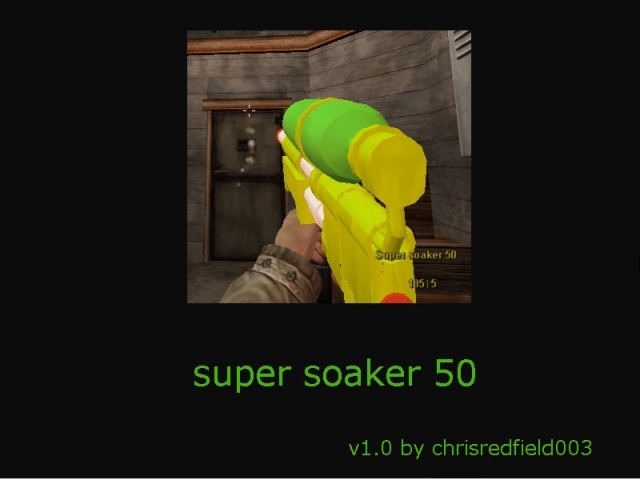
(Works on both the MP40 & Thompson) name chrisredfields Water rifles 1.0 creator chris redfield003 description Here is a weapon replacement for the smg on axis and allied side water rifle with water effect spray server side clientside still needs more to add to it so any comments will be taken into consideration twoards the second version. origonally by sopersoaker and finally im at chrisredfield003@yahoo.com Usualy im at http://www.freepowerboards.com/tntsamurai/tntsamurai-about2.html back up forum http://tntsamurai.freeforums.org/index.php
Holy Hand Grenade v2
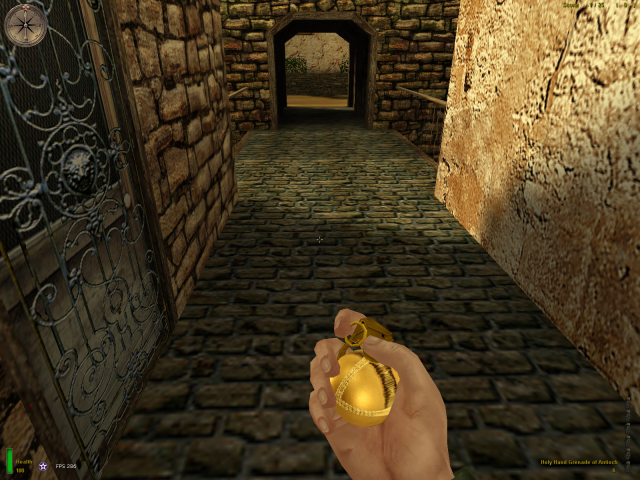
The Holy Hand Grenade Made by Spruce_Goose ============================================ The title says it all. it is a miniature version of the holy hand grenade from monty python. INSTALL ------- ~ Place the .pk3 file into C:\Program Files\EA GAMES\MOHAA\main UNINSTALL --------- ~ Remove the .pk3 file. CREDIT ------ Dr. Deleto of the city nights team.(M67 Frg grenade model) TERMS OF USE ------------ Go ahead and use it but give me credit!!!!!!! for any questions go to Sprucegoose74@gmail.com
United Defense Model 42
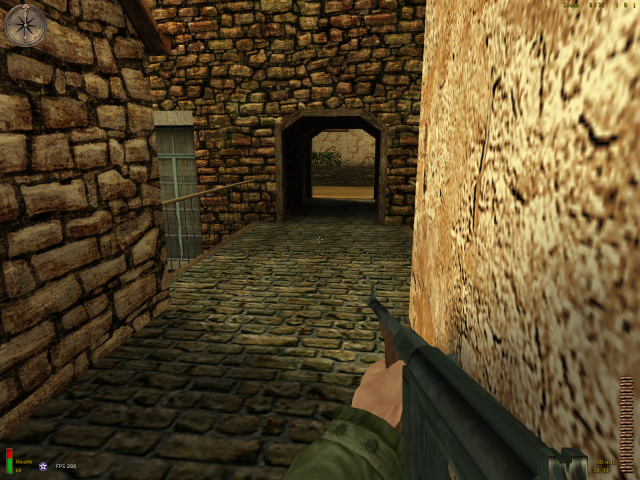
***************************************************************** .East's United Defense Model 42. ***************************************************************** This mod is the UDm-42, Its a weapon used by the OSS, Office of Strategic Services. Have Fun! :) ***************************************************************** Model : East Anims : East Text : East + CoD2 (edited) Sound : East + MOHAAS (edited) ***************************************************************** Credit Do not alter this mod without my permission or reproduce it as your own. ***************************************************************** Installation ; Paste the [ ZZZZZEast'sUDm42.pk3 ] in your main folder. Deinstallation ; Delete the [ ZZZZZEast'sUDm42.pk3 ] from your main folder. ***************************************************************** Copyright © 2007 East ***************************************************************** Questions?, Comments?, Requests?, [ matseast92{AT}msn{DOT}com ] *****************************************************************
Atomic Grenades v2
(Use secondary attack on grenade to use the atomic grenade, it takes 10 seconds before it explodes so you can still get out of there. You can use it again after 60 seconds, you can't use secondary attack within that time. You're only safe behind walls, the blast radius is huge). --- --- --- *QuiksilveR's Atomic Grenades 2 README* This is a server-sided mod which makes all grenades's secondary attack an REAL atomic bomb. it kills any thing in it's path (unless u hide behind a wall) and has a 10 second fuse, a 60 second delay is on the secondary attack of a nade (which is atomic). if this is overkill in ur opinion and want a more pratical version for using on everyday servers try the previous version, QuiksilveR's Atomic Grenades. if u wanna have sum fun with real atomic nades, this is ur mod this mod doesn't change the primary attack ofgrenades at all. i thought of this idea cause no one uses the short toss, it's basicly just a primary toss thrown at the ground. Install: Place the .pk3 file into your server's /main folder, client's donot need the mod + im not sure if it works in SH or BT servers Uninstall: move out of /main folder and restart server Happy Fragging ;-) Capt_QuiksilveR Kavon89 AT gmail DOT com *QuiksilveR's Atomic Grenades 2 README*
Lethal Smoke Grenade
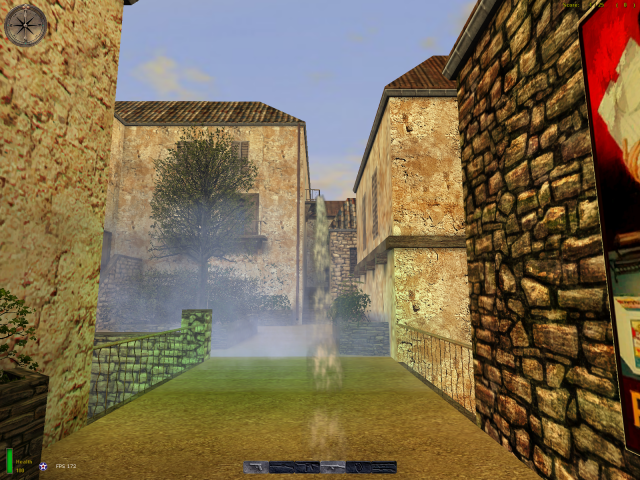
(Works for both allied + axis nades) Spawnprotect is included but switched off.. to switch on by default, open the file in pakscape go to global\spawnkill_origins.scr and change the following settings back to their default: setcvar "spawnkill" "0" // default was 1 setcvar "spawnlight" "0" // default was 1 setcvar "immune_time" "0" // default was 15 (seconds) --- --- --- ** [Terminators] Clan Serverside Lethal Smoke Gernades Readme File** Thanks for downloading the our Lethal Smoke Gernade Mod Features: - Lethal Smoke Nades For AA - No Client DL Needed - 2 Lethal Smoke Nades Per Team - Support On All Custom Stock Maps - Anti Spawn Protech Script Built In (15 Second Immunity) Install: - Simply drop the zzzzz-terminators-lethalsmokenades.pk3 in your servers MOHAA/MAIN Uninstall: - Remove or delete the zzzzz-terminators-lethalsmokenades.pk3 from your servers MOHAA/MAIN Created By: Turok www.t-mods.eghservers.com Contact Info: Any problems/glitches/bugs/install/remove help please send an email to trmn8zclan@hotmail.com Advertisement: Vist www.eghservers.com for low costing game servers starting at $2.00 a slot for all games! Hosting on MOHAA, MOHSH, COD, CODUO, COD2, QUAKE3, QUAKE4, WET. FREE Webhosting and HALF OFF on Teamspeak or Ventrillo Servers!
Star Wars Blaster Sounds
This mods change the pistols sounds to blaster sounds from star wars, pistols swings sounds like light saber and bash hits sound like two light sabers colliding.
Futuristic Scopes
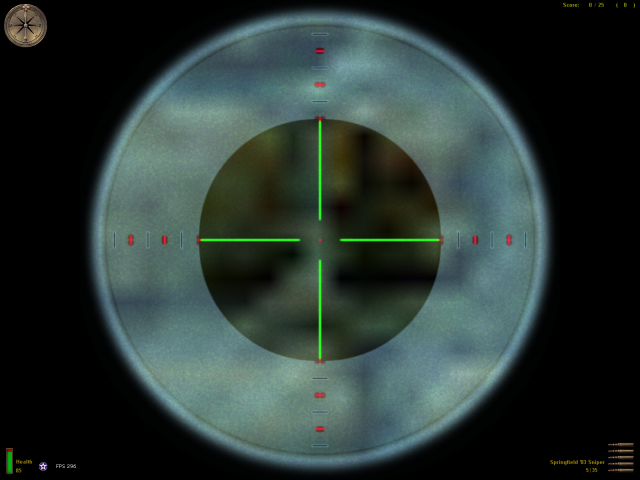
Two scopes (allied & axis are a bit different) with a bit of a futuristic look (at least way more futuristic for WW2). So scope for the Springfield and a different one for the KAR98K Sniper. The binocular is also custom, with nightvision.. unfortunately I couldn't separate the binocs from the scopes.. otherwise the stock binoc wouldn't work anymore. These scopes were taken from the "2hi2play_starwars_beta.zip" which is a mod that changes most sounds to Star Wars style.
Night Vision Binoculars 1
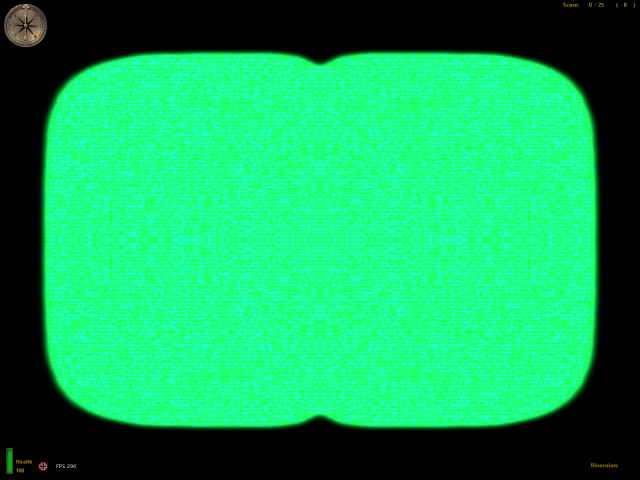
These binoculars were taken from the "2hi2play_starwars_beta.zip" which is a mod that changes most sounds to Star Wars style.
Medal of Honor: Allied Assault Mods (MOHAA) — Complete Community Archive
Welcome to the premier repository for Medal of Honor: Allied Assault mods. Since the game's groundbreaking release in 2002 by 2015, Inc. and EA, MOHAA has inspired one of the longest-standing modding communities in first-person shooter history. MOH-DB preserves, categorizes, and serves over 1,600 verified community modifications, custom enhancements, and competitive utilities for Allied Assault, Spearhead, and Breakthrough.
Explore MOHAA Mod Categories
Player Skins & Uniforms
Over 700 historically accurate and creative player uniforms for Allied and Axis factions. Equip authentic U.S. Army Rangers, 101st and 82nd Airborne paratroopers, British Commandos, Soviet Red Army conscripts, Wehrmacht Heer infantry, Fallschirmjäger, and Waffen-SS camouflage patterns, as well as classic community clan skins.
Weapon Models & Reskins
Enhance your WWII arsenal with ultra-detailed weapon replacements and high-resolution textures. Popular downloads include authentic wood-finish Kar98k sniper rifles, realistic metallic sheen M1 Garand models with classic "ping" animation refinements, Thompson submachine guns, MP40s, BAR 1918 rifles, and custom iron-sight alignments.
Soundpacks & Realism Audio
Transform the sonic atmosphere of Allied Assault. Replace compressed 2002 Quake-engine sound effects with cinema-grade gunfire recordings, authentic distant artillery rumblings, terrifying Stuka dive-bomber sirens, supersonic bullet cracks, metal ricochets, and remastered German and American voice callouts.
HUDs, Menus & Crosshairs
Modernize the in-game interface for 1080p, 1440p, and 4K widescreen displays. Download minimalist competitive heads-up displays, custom dot and crosshair overlays, cleaner compass indicators, redesigned main menus, and unobtrusive health and ammunition counters favored by competitive league players.
Server Utilities & Admin Scripts
Run resilient, modern multiplayer game servers with essential server-side utilities. Includes automated map rotators, anti-cheat detection tools, voting scripts, custom match timers, ping balancers, and administrative rcon managers designed for dedicated servers running 24/7.
MOHAA Reborn 1.12 Community Patch
The gold standard community patch for modern MOHAA servers and clients. The Reborn 1.12 patch resolves legacy buffer overflows, fixes client query exploits, expands internal script limits for complex mods, and provides a built-in server browser to replace the defunct GameSpy master server.
How to Install MOHAA Mods: Quick Guide
Identify Your Target Directory
MOHAA stores all game assets in subfolders inside the root installation directory:
- MOHAA (Base):
.../MOHAA/main/ - Spearhead:
.../MOHAA/mainta/ - Breakthrough:
.../MOHAA/maintt/
Paste Without Extracting
Download the mod archive from MOH-DB. If it is zipped (.zip or .rar), extract the enclosed .pk3 file. Place this .pk3 directly into your game's /main/ folder.
How to Remove or Troubleshoot
To remove any mod, simply delete its .pk3 file from the /main/ folder. The game will immediately return to stock behavior without reinstalling.
Frequently Asked Questions about MOHAA Mods
To install MOHAA mods, copy the downloaded .pk3 file directly into your Medal of Honor Allied Assault installation folder under /main/ (or /mainta/ for Spearhead, and /maintt/ for Breakthrough). You do not need to unpack or extract the .pk3 archive—the game engine loads it automatically upon launch.