
Medal of Honor: Allied Assault Mods (MOHAA)
Discover and download community-created modifications to enhance your Medal of Honor: Allied Assault experience.
1676 Mods Found
Foresight Scanner Vistawin7 Fix
This is a fix that lets users run the Foresight Scanner on your Vista/Windows 7 machine. So far, it has been tested, with success, by various members here with: Vista Home SP1, Vista "Home Premium" 64 bit SP2, Vista Ultimate 32-bit, Vista Business 64-bit and Windows 7. Official MohForesight file approval date: 1/12/2009 Machines tested on: Vista Home SP1 32-bit, Vista "Home Premium" 64 bit SP2, Vista Ultimate 32-bit, Vista Business 64-bit, Windows 7. If you install this file and it works on an Operating System not listed here, please post in the forums and let us know about it. The more tested OS's, the better. Instructions for Foresight Scanner use on Vista and Windows 7 machines. 1.) Uninstall previous versions of the Foresight Scanner if you have it already installed on your computer. a.) Remember to "Export" your Foresight banlist (.txt file) somewhere on your computer, preferrably on your desktop so it's easy to find. There have been some claims that when Foresight is deleted, it also deletes all Foresight folders, including the banlist and there's no getting it back. 2.) Run the file (msvbvm50.exe). 3.) Re-install the Foresight Scanner. 4.) *OPTIONAL* Restart your computer. (It is always good practice to restart your computer after installing any program.) 5.) Run the Foresight Scanner and it should now be working without any errors. You can now "Import" your banlist back into Foresight. Note: If you happen to run into any errors, please post in the forums and someone there will help resolve your problem, if it can be. Information about the file: Msvbvm50.exe installs Visual Basic 5.0 Run-Time Files. Msvbvm50.exe is a self-extracting file that installs the latest versions of the Microsoft Visual Basic run-time files that all applications created with Visual Basic 5.0 need in order to run. Disclaimer: This is an official Microsoft download file, though MohForesight takes no responsibility for any harm done to your computer created by this file. Always backup or create a "System Restore" point in case anything wrong should happen. Even though this has been tested with several versions of Windows Vista and Windows 7, it may not work in your case.
Foresight 16 Updated PK3
MohForesight 1.6 Updated File 01/12/09 Instructions: 1) Remove the OLD zzzzzzzzzzzzz_Foresight-160.pk3 (13.53 KB) from the main folder on the server; 2) Upload the NEW zzzzzzzzzzzzz_Foresight-160.pk3 (16.6 KB) to the main folder on the server; 3) Restart the server. The 13.53 KB size file is the original file from the 1.6 release. The 16.6 KB size file came later as an update to fix some of the errors.
Foresight 16 Client
Foresight 1.6 Client-side. Only need the Client file? Download this one.
Foresight 16 Server Scanner
Upgrade from version 1.5. Only need the Server-side file? Download this one.
Foresight 15
Foresight Anti-Cheat is an all-in-one tool for all your administration needs. Every function of Foresight has been thought out and tailored for the easiest and best solution for administering your Medal Of Honor Server(s). From allowing custom maps and mods on ANY client to a user-friendly interface, Foresight will be the ultimate tool for controlling your gaming experience. Tested and works on Moh:AA, Moh:SH and Moh:BT. The main reason I developed this utility was the lack of decent docs, poor support and inadequate features in the current anti-cheat/admin tools. From the start I noticed that the current anti-cheat tools available were extremely limiting and hindering the expansion of the Medal of Honor series, by way of requiring ‘verified’ mods and maps. This in my opinion is not friendly to the community and mod/map makers. By limiting the mods and maps that people use on any given server you effectively stop any growth of the community based on your own standards. Foresight is here to change that. Foresight Anti-Cheat is an all-in-one tool for all your administration needs. Every function of Foresight has been thought out and tailored for the easiest and best solution for administering your Medal Of Honor Servers. From allowing custom maps and mods on ANY client to a user-friendly interface, Foresight will be the ultimate tool for controlling your gaming experience. I have always believed you do not need to ‘limit’ the mods and maps on the client-side to detect dishonest players. With the proper detection routines I have developed, Foresight will be able to detect ALL illegal cheats and hacks that the seedy players seem to find on the net, even cheats that have not been created yet. I hope you enjoy Foresight as much as I have enjoyed developing it.
-=Fortress=-
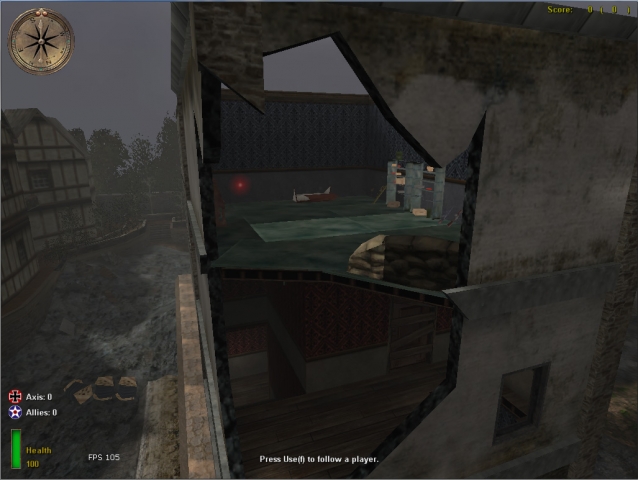
1) putt the file zzzz_Fortress.pk3 in main u can add one of these cvars in your server.cfg set customalarms 1 //<--- this adds a little bit stuff in the map set customalarms 2 //<--- this adds a little bit stuff in the map + a little bit extra set customalarms 3 //<--- this adds a little bit stuff in the map + a little bit extra + a bit more set customalarms 4 //<--- this adds a little bit stuff in the map + a little bit extra + a bit more and some other things have fun!!! p.s be sure this mod has the most zzzzzzz in his name (so it will load as last and it will not bug) greets slimbips!
Sfx Battlezone Creator
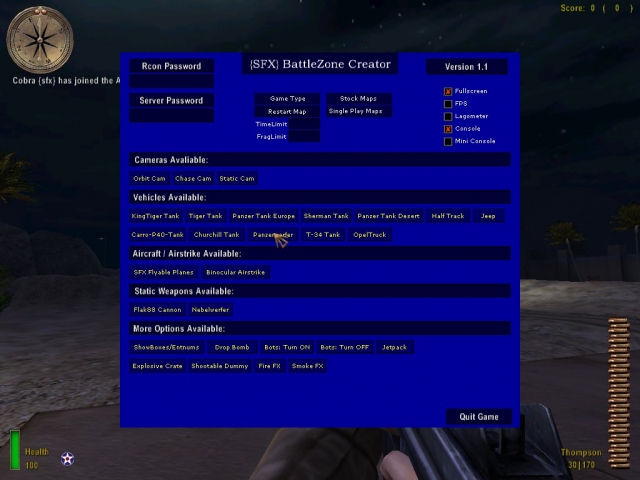
*** SFX BattleZone Creator *** *** by Cobra {sfx} *** *** Some useful and Fun Scripts to play with while you mod *** :) Well originally it was just for us modders to have some fun with while you mod and have some extra useful stuff, yeh it could go Multiplayer, could be issues there tho. Its much better with your URC Menu tho and a lot easier to use, good {sfx} team effort mate ;) Hope peeps find it useful or amusing and fun :) Some quick instructions ... put in main, load Moh, load a Single Player or TDM/OBJ map and ingame press F1 to access the menu. Would be interesting to see your comments on this :) I guess some are wondering why its called BattleZone Creator ... when you spawn any vehicles it will print onscreen the coords where it places them ... which will be added to your Qconsole log ... you could copy and paste the coords into your own map script then if your happy with where you placed a tank in your map and wanted a static model added based on your placement of the one in BattleZone Creator. (As an example). You can type logfile 1 to record the information to your Qconsole log if it isnt already set to 1 and then spawn a tank and retrieve the info from the log, here is the info from the log for the Panzer Tank Europe - i spawned one in Mohdm4 ... [Press USE and LET GO to Position the Laser.] [Panzer Tank Europe] [Targetname]: Panzer-Tank-E_#8264 [Type]: = models/vehicles/panzer_tank_europe.tik [Turret]: = models/vehicles/panzer_cannon_europe.tik [Destroyed Model]: = models/vehicles/panzer_iv_eud.tik [Health]: = 1000.000 [MaxSpeed]: = 320 [Target]: = (No Collision Targetted) [Origin]: = (42.220196, 1945.709351, 238.625000) You would just need to add the angle you want it to face. [b][u]Readme File Info[/u][/b] OrbitCam = This gives you an Orbiting Cam with music for 15 seconds - auto switches off. ChaseCam = This gives you a Chase Cam for 15 seconds - change perspective with your mouse - auto switches off. StaticCam = This gives you a Static Cam for 15 seconds - auto switches off. Tank 1 = KingTiger Tank. Tank 2 = Tiger Tank. Tank 3 = Panzer Tank Europe. Tank 4 = Sherman Tank. Tank 5 = Panzer Tank Desert. Tank 6 = Carro-P40-Tank. Tank 7 = Churchill Tank (issues with it firing correctly). Tank 8 = Panzerwerfer. Tank 9 = T-34 Tank. Driveable HalfTrack Winter Driveable Opel Truck Driveable Jeep Destroyed Vehicles are removed automatically on a timer to save on FPS :) You can Destroy them with the Admin Bomb if needed. SFX Planes = This spawns the SFX Flyable Planes Trigger and you start flying. Jetpack = Gives you 30 seconds of Low Gravity. Fire fx = Spawns some Fire. Smoke fx = Spawns some Smoke.// Shader/image issue ShowBBoxes/Entnums = runs for 30 seconds. Shootable Dummy = Spawns a Target Dummy you can shoot Explosive Crate - Toms BoomCrates Drop Bomb = spawns an admin bomb above you which drops - good fun dropping on Bots - can also use in spectate. ;) Bots ON - Adds JVs Bots Bots OFF - removes them Bot Info: Bots use script_origins targetnamed $alliesspawn and $axisspawn as their spawn points ... if you already have $alliesspawn and $axisspawn script_origins in your map type morebots 1 in console to add more Bots ingame. You can add more spawnpoints via script in your map script before prespawn. If your playing in a Single Player map the Bots will automatically use the path_nodes ... just add some $alliesspawn and $axisspawn script_origins. In MP they wont move very far as they have no pathnodes unless you add some via script. Cobs www.Mods-R-us.net Update - The Console typing is superceded by the Pacrac {sfx} URC Menu - Just press F1 ingame :) The Menu works in ALL stock maps and ALL Single Player Maps (included), just put the PK3 in your MohAA/main folder. Scripting by Cobra {sfx} URC Menu by Pacrac {sfx} Model Conversions by Cobra {sfx + Gold {sfx} This is a WIP - more to add yet :)
Bsp Stripper
usage: BSPstripper.exe example: BSPstripper.exe t1m3 t1m3stripped It will add the ".bsp" for you. HOW TO USE??? This is a command line application. THe easiest way is to open start-run.type "cmd" and open up command prompt. From here type cd (path to BSPstripper folder). for example. place bspstripper in c:\. Then open cmd.exe and type "cd c:\" then to run bspstripper just type "BSPstripper.exe " Removes currently: info_null ProjectileGenerator addon_playerweapon item_health trigger_once addon_ai item_ammobox info_pathnode ai_ trigger_hurt trigger_save info_aispawnpoint trigger_nodamage Also auto hexes the version number to 19 to load in MOHAA.
Scr File Opening Changer Win 8
This tool will easily change the default program to open .scr files within Win 8. More information about this tool can be found at the following links: http://www.tewoshien.com/cache/Open a .scr file with a text editor of your own choice.html http://www.tewoshien.com/cache/Update for OpenSCR_with.exe.html
Ez Modder Updated
>>>>>>>>>>>>>>>>>>>>>>>>>> INDEX >>>>> INSTALLATION AND UN-INSTALLATION INSTRUCTIONS >>>>>>>>>>>>>>>>>>>>>>>> MOD DATA >>>>>>>>>>>>>>>>>>>>> HISTORY OF MOD >>>>>>>>>> OTHER STUFF YOU NEED TO TO KNOW local.fix1 = spawn script_model model models/static/indycrate.tik origin ( -393.812 188.573 -143.921 ) angle ( 340.329 ) local.fix1 = spawn script_model model models/static/indycrate.tik origin ( 193.781 202.211 248.129 ) angle ( 179.044 ) local.fix1 = spawn script_model model models/static/indycrate.tik origin ( 82.942 204.061 248.129 ) angle ( 179.044 ) local.fix1 = spawn script_model model models/static/indycrate.tik origin ( -46.019 206.212 248.129 ) angle ( 179.044 ) local.fix1 = spawn script_model model models/static/indycrate.tik origin ( -160.562 208.123 248.129 ) angle ( 179.044 ) local.fix1 = spawn script_model model models/static/indycrate.tik origin ( -254.584 210.621 248.129 ) angle ( 178.478 ) local.fix1 = spawn script_model model models/static/indycrate.tik origin ( -340.846 212.912 248.129 ) angle ( 178.478 ) local.fix1 = spawn script_model model models/static/indycrate.tik origin ( -429.527 215.268 248.129 ) angle ( 178.478 ) local.fix1 = spawn script_model model models/static/indycrate.tik origin ( -521.838 217.720 248.129 ) angle ( 178.478 ) local.fix1 = spawn script_model model models/static/indycrate.tik origin ( -619.515 220.314 248.129 ) angle ( 178.478 ) local.fix1 = spawn script_model model models/static/indycrate.tik origin ( -682.666 221.992 248.129 ) angle ( 178.478 ) local.fix1 = spawn script_model model models/static/indycrate.tik origin ( -755.143 223.917 248.129 ) angle ( 178.478 ) // >>>>>>>>>>>>>>> KNOWN ERRORS IN VERSION 1.1 >>>>>>>>>>>>>>>>> REPORTING AN ERROR <<<<<<<<<<<<<<<<<<<<<<<< - To report errors in this mod (something I would like a lot), make a screenshot by pressing F12 and send it to me with a description of the error, mmecreaper@hotmail.com
Spearhead Font Sound
Spearhead Font/Sound Mod by Noctis doclabsinc@hotmail.com www.203rdairborne.com All this mod does is take the font from Spearhead and replace the one from Allied Assault. I also managed to dig up the sound made when a chat line pops up. Simple, but it saves you the trouble of doing it yourself.
Major_A's Project Raptor 46 Crosshair Chooser F11
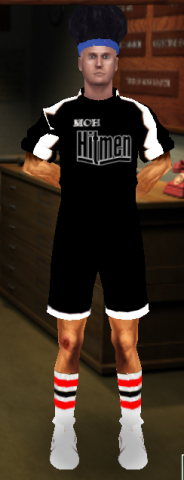
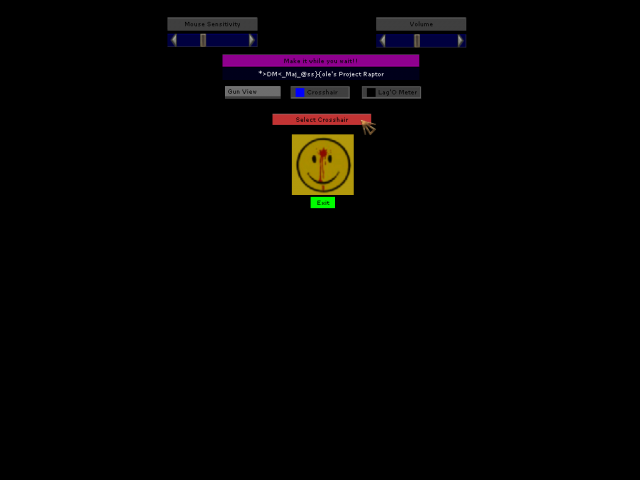
unbind F11 bind F11 togglemenu major44 autoexec.cfg in mod should do it automatically for you. ///////////////////////Made by *>DM<_Major_A 2008/////////////////// My first mod On the fly in game crosshair changer. I picked out an assortment of the neatest crosshairs I could find plus 2 dot hairs I made, and packed them nicely for your convenience. Feel free to add your own if you have some particular ones that aren't in there. If your waiting in between spawns and get bored, mod also comes with instructions on making a balloon animal :P goes in mainta for Spearhead Only works properly in Spearhead. In Allied Assault menu comes up but doesn't change crosshair. Feel free to fix it and post an AA version.
Bullitt Tooths Sound Mod
This sound mod changes all weapon sounds and some of the walking sounds.
Medal of Honor: Allied Assault Mods (MOHAA) — Complete Community Archive
Welcome to the premier repository for Medal of Honor: Allied Assault mods. Since the game's groundbreaking release in 2002 by 2015, Inc. and EA, MOHAA has inspired one of the longest-standing modding communities in first-person shooter history. MOH-DB preserves, categorizes, and serves over 1,600 verified community modifications, custom enhancements, and competitive utilities for Allied Assault, Spearhead, and Breakthrough.
Explore MOHAA Mod Categories
Player Skins & Uniforms
Over 700 historically accurate and creative player uniforms for Allied and Axis factions. Equip authentic U.S. Army Rangers, 101st and 82nd Airborne paratroopers, British Commandos, Soviet Red Army conscripts, Wehrmacht Heer infantry, Fallschirmjäger, and Waffen-SS camouflage patterns, as well as classic community clan skins.
Weapon Models & Reskins
Enhance your WWII arsenal with ultra-detailed weapon replacements and high-resolution textures. Popular downloads include authentic wood-finish Kar98k sniper rifles, realistic metallic sheen M1 Garand models with classic "ping" animation refinements, Thompson submachine guns, MP40s, BAR 1918 rifles, and custom iron-sight alignments.
Soundpacks & Realism Audio
Transform the sonic atmosphere of Allied Assault. Replace compressed 2002 Quake-engine sound effects with cinema-grade gunfire recordings, authentic distant artillery rumblings, terrifying Stuka dive-bomber sirens, supersonic bullet cracks, metal ricochets, and remastered German and American voice callouts.
HUDs, Menus & Crosshairs
Modernize the in-game interface for 1080p, 1440p, and 4K widescreen displays. Download minimalist competitive heads-up displays, custom dot and crosshair overlays, cleaner compass indicators, redesigned main menus, and unobtrusive health and ammunition counters favored by competitive league players.
Server Utilities & Admin Scripts
Run resilient, modern multiplayer game servers with essential server-side utilities. Includes automated map rotators, anti-cheat detection tools, voting scripts, custom match timers, ping balancers, and administrative rcon managers designed for dedicated servers running 24/7.
MOHAA Reborn 1.12 Community Patch
The gold standard community patch for modern MOHAA servers and clients. The Reborn 1.12 patch resolves legacy buffer overflows, fixes client query exploits, expands internal script limits for complex mods, and provides a built-in server browser to replace the defunct GameSpy master server.
How to Install MOHAA Mods: Quick Guide
Identify Your Target Directory
MOHAA stores all game assets in subfolders inside the root installation directory:
- MOHAA (Base):
.../MOHAA/main/ - Spearhead:
.../MOHAA/mainta/ - Breakthrough:
.../MOHAA/maintt/
Paste Without Extracting
Download the mod archive from MOH-DB. If it is zipped (.zip or .rar), extract the enclosed .pk3 file. Place this .pk3 directly into your game's /main/ folder.
How to Remove or Troubleshoot
To remove any mod, simply delete its .pk3 file from the /main/ folder. The game will immediately return to stock behavior without reinstalling.
Frequently Asked Questions about MOHAA Mods
To install MOHAA mods, copy the downloaded .pk3 file directly into your Medal of Honor Allied Assault installation folder under /main/ (or /mainta/ for Spearhead, and /maintt/ for Breakthrough). You do not need to unpack or extract the .pk3 archive—the game engine loads it automatically upon launch.