
Medal of Honor: Allied Assault Mods (MOHAA)
Discover and download community-created modifications to enhance your Medal of Honor: Allied Assault experience.
1676 Mods Found

german_recoil_3rd_fallschirmjager
***** R || F ***** Release Date: 11-10-02 ReCoil || Factor Axis 3rd Fallschirmajager Division Soldier Not quite like the original but it looks pretty good in game... :) ----------------------------------------------- The 3rd Fallschirmajager Division 1944 The Third Fallschirmajager Division was considered to be an elite German Paratroop Group in WWII. It did not see action until June 10th, 1944, in Normandy, entering the war as a full strength division of 15976men. The 3rd Fallschirmajager Division was probably the best armed infantry division in the world in 1944. ----------------------------------------------- Combat awards A frequent decoration was the Wound Badge, a solid oval badge worn in three classes: black, for one or two wounds; silver, for three or four wounds; and gold, for five or more wounds. The badge was pinned low on the left breast pocket. All members of the German military were eligible for this award. ------------------------------------------------ Enjoy! Place the .pk3 file into the "main" folder in Medal of Honor. To remove the skin, just delete the .pk3 file. Enjoy :) tcfool@attbi.com

34th_Infantery_Division_private
skinpack 34th Infantry Division - The Sandstorm Division - Also - The Red Bull Division The first American division to be sent to the European Theatre, trained in Ireland for Operation Torch. November 1942 they landed in Algiers, North Africa, Tunisia, Operation Vulcan, heavy fighting for the Djebel Tahent Mountain. In Italy the unit fought at Salerno, Volturno River, Mount Patano, Gustav Line, Mount Trocchio, Cassino, Anzio and on to Rome. Livorno, Mount Belmonte and fought in the Bologna area until the Germans in Italy surrendered. The 34th Infantry division fought in five campaigns, 500 days in combat experiencing some of the worst fighting of the war, at a loss of over 16,400 men killed or wounded. Install:put pk3 in main/mainta folder Delete:remove pk3 from main/mainta folder Credits:to sgt kia for radio skd!!!ThANKS

Rocketeers Jetpack Mod
This mod has been customized for The Hunt only. Locate scientist for a jetpack.
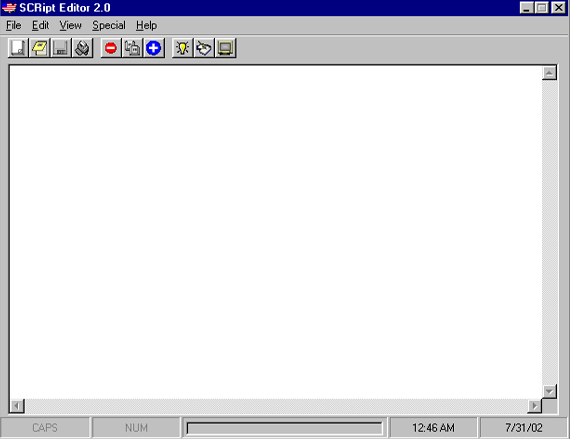
Script Editor v20
SCRipt Editor -Version 2.0- Author : MPowell1944 Release Date : 7/31/02 *DO NOT DELETE THE FILES IN THE NECESSARY FILES FOLDER THAT WAS INSTALLED WITH THE PROGRAM. THESE ARE RUN-TIME FILES THAT ARE NEEDED FOR THE PROGRAM, SO THAT IT MAY FUNCTION PROPERLY. YOU CAN EITHER LEAVE THEM IN THE INSTALLED FOLDER, OR ADD THEM TO YOUR WINDOWS/SYSTEM DIRECTORY.* Time Spent Making Program : 50+ hours (testing was main part of this) Description : Script editor for MOHAA. Also has many other features, making this a really good program to use. See below for details. Added Features for 2.0 : 1. Load Screen (MOHAA Theme) 2. Working Toolbar 3. Script Generator 4. Tutorial Generator 5. Screenshot Archive 6. Selected Programs can be Opened 7. Status Bar with working Data Transfer Progress Bar 8. Ability to now open/save any file versus specific ones only 9. Special Right-Click menu. (has same features as edit menu - just double right click in text area to activate it) 10. Edited ABOUT screen with more info on how to contact me Plans for 3.0: 1. More Scripts/Tutorials/Screenshots 2. Working Undo Command 3. Wordwrap 4. Insert Keyword command under Right-Click menu 5. Spell Checker 6. Program icon in Tray (lower-right on start menu) 7. Email Sender (maybe. not sure if i want to add this yet) 8. Run MOHAA from menu (still working on this one!) 9. Picture Viewer 10. Maybe some music/sound FX. : ) Side Notes : 1. DO NOT try to open any odd type of files (including pictures) with this editor. If you do, then the program will stop opening files, until you exit and reboot it. 2. While i am working on version 3.0, i am allowing submissions of screenshots/custom scripts/tutorials that you think would be cool added to the program. Just send me an email with your name or nickname, and tell me what you want to send me. If i agree to take your submission, then congratulations! 3. Sometimes if you exit the program via the X in the top bar, it might not prompt you to save your file. If this happens, then press Alt Ctrl Delete and End Task on the program. For some reason it dosent exit the program if it dosent prompt you to save your file. You shouldnt have much of a problem, but i decided to let you know just in case. Contact : Email - MikePowell1944@aol.com ICQ - 154870775 AIM - Insomnia1944 -------------------------------------------------------------------- The SCRipt Editor and all other program components are a registered trademark of MPowell1944 and The Modding Network. Copyright (c) MPowell1944 2002 - 2003
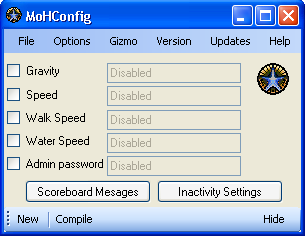
Moh Config v30
---------------------------------------------------------------------------------------------------------------------------------- -------PLEASE SCAN THE FILES WITH YOUR ANTIVIRUS AS A SAFETY PRECAUTION!!!------- ---------------------------------------------------------------------------------------------------------------------------------- Thankyou for downloading MoH Config v 3.0 Installation InStructions: If you already have installed another version of MoH Config, then you can simply run the MoH Config.exe file and it should work, although this may not work and will not install the program to your start menu! If you would like to install the program properly, just click on the setup file and wait for it to install! URGENT: DO NOT BY ANY MEANS MOVE ANY FILE INSIDE THIS .ZIP! UNZIP THE FILE AND LEAVE THE FILES AS THEY ARE ARRANGED! 1 FILE MOVED OR EDITED COULD COMPLETELY CORRUPT THE PROGRAM! JUST UNZIP THE FILE AND RUN THE SETUP FILE! TAKES A WHLE TO INSTALL BUT PLEASE BE PATIENT! Please Note: This program is designed for Windows® XP. I have thoroughly tested it for Windows ® XP but have not tested it on any other operating system! Please do not try to use it on an earlier version of Windows ® or a new version if you have downloaded this when another version is released! You are installing this at your own risk! I have thoroughly tested this program and have edited any bugs i found. Please remember that I cannot find every single bug in the prgram! It has not caused me any problems. I cannot be held responsible if anything does go wrong with your machine! Please just inform me of what is wrong so i can prevent it from happening again! If you find any bugs, please email them to smudger712@hotmail.com with instructions on how the bug became apparent and anyway to reproduce the bug or, go to the 'Help' menu in MoH Config and click on 'Report A Bug' and fill out the form that will appear on your screen! ------------------------------------------------------------------------------------ When you play a game for a while, you get a bit bored of it. Everything is the same as it was the last time you played it. Well, with this tool, you can easily design and create a config that you can use on your very own server! In this config, you can insert as many commands as you want which will brighten up the ingame experience! Simply run the program and create it! This program was designed for inexperienced players and those who know just about everyhting there is to know! Inexperienced players can use the set commands to brighten there game and experienced players can enter their own commands to the same effect! It's a multi purpose program that lets you create the config, and afterwards edit it in the built in 'Config Editor'. Updates from v 2.1: Fixed bugs in Gizmo, Bulk Gizmo, View Gizmo, Help, Cfg Editor Fixed bugs in Inactivity Settings. Changed Interface a little Changed Logo Added New Commands Removed Scores Message Added knew and improved Scores Interface Added Theme Function Updates from v 2.0: Fixed bug Gizmo Compilation Added "Important Alert" function! Updates from v 1.0: Rewrote the Help File to a higher standard. Modified Gizmo settings and interface Unlimited Gizmos Added 'Bulk Gizmo' and 'View Gizmos' windows Added Config Editor Modified specific coding for better capabilities and functionalities Future updates: Possibly add a 'Load Theme' so you can load a theme of your own. Create a 'Theme Creator' for you to create themes that you can load. Remember last theme used. Add more commands. Not sure what else =D Thankyou Zac Howard - Smith Your Mum

Tik Editor
A script editor (similar to notepad), made for .tik files instead of .txt.
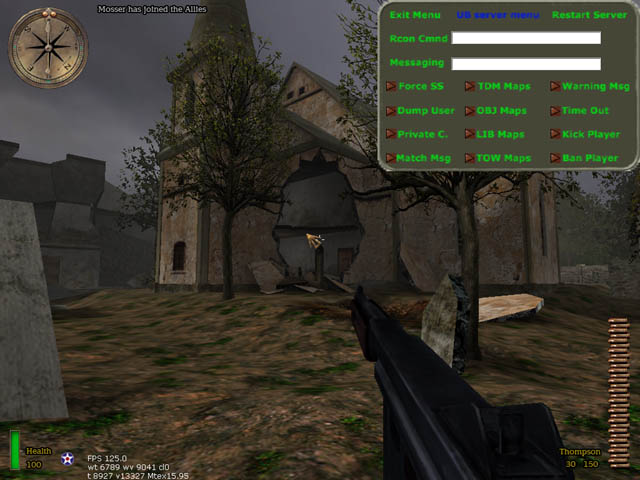
Ci Admin Menu
unclebob Milwaukee,WI 3/20/2006 Hay all unclebob with some more hopfully NOT useless stuff! It is a server ADMIN Menu for those of you that use CI = Counter Intelligence If at this point you are saying what is CI? Then you do not need this file, Move on to the next one! As always I tried to make it easy to use for all. INSTALLATION: Unzip the file you just D/L, wait I am in the Zip file ok scratch that. In the folder UB CI SERVER MENU with this readme are TWO items a .pk3 file & a config file each named UBmenu COPY both into YOUR (NOT the SERVER) games main folder Main = MOHAA MainTA = MOH SH MainTT = BT Now let’s set up a few things. Open the UBmenu.cfg with notepad or some text editor You should see this: ********************************************************************** // Sets up the menu Functions!! bind F8 "togglemenu UB_menu_SH_BT" rconAddress 00.00.00.00:12203 rconPassword ****** ********************************************************************* Ok you're there now. Don't do anything to this line: // Sets up the menu Functions!! If you want you can change the button the menu is binded to by changing the two stars to the key you want: bind ** "togglemenu UB_menu_SH_BT" Otherwise just use F8 Now add your server's IP Address. This way you can use the Menu even if you’re in another MOH server: rconAddress 00.00.00.00:12203 And finally your server's Rcon Pass: rconPassword ****** Now you don't need to type all that crap in each time right? Wrong! At this point if you were to start the game none of this would work. Because, we need to tell the game console to execute the config. There are two ways to do this. 1. Open the console each time you start MOH & type: exec ubmenu.cfg Then hit ENTER!!! 2. Right click on your Desktop icon for MOH then hit properties. Look for TARGET, in a box next to it is "C:\Program Files\EA GAMES\MOHAA\moh_Breakthrough.exe" Add this to the end +exec ubmenu.cfg Be sure to keep the space so it looks like this "C:\Program Files\EA GAMES\MOHAA\moh_Breakthrough.exe" +exec ubmenu.cfg Ok then hit apply at the bottom of the window & Then OK. Now start MOH, well in the main lobby hit F8 (or what ever key you bound the menu to) If all is well a bland Grey & Green Menu will pop down on the upper right corner of the screen & the rest will turn BLACK That’s it. It’s all ready to go. So go in your server & try it out. CAUTION: don’t hit 50 options in 30sec you will crash your server WHAT ARE THE OPTIONS: ********************************************************************************************* EXIT MENU UB Server Menu Restart Server Rcon Cmnd --------------------------------------------------------------- Messaging --------------------------------------------------------------- Force SS TDM Map Warning Msg Dump User OBJ Map Time Out Private C. LIB Map Kick Player Match Msg TOW Map Ban Player ********************************************************************************************* Exit is obvious but Restart Server ONLY restarts the map! So if you change something via Rcon & it doesn’t take effect hit restart & it will reload the map & your command should then take effect! RCON Cmnd = Just like the console just you don’t have to type RCON or hit the ~ key anymore Messaging = Is used to play GOD OF THE SERVER or to just say stuff as the console so ppl may actually listen, Yeah RIGHT! Force SS = Forces the standard anti cheat Screenshots on the player. Not that anyone ever sends them in!! Dump User = Writes that users info to the CI events log. Private C. = reset the servers private client slots so as to lock the server. Match Msg = Perset console messages for scrimmages or even a tourney. TDM, OBJ, LIB, & TOW Map are all the stock maps set to load with a click of a button (DONT run maps for SH & BT in MOHaa or BT maps in SH it will CRASH your server) Also OBJ maps run round based?? Working on it & when you end a map it goes back to the start of the map rotation BUT will stay in the game type of the last map until you restart the map! Warning Msg = Preset warning messages to the players via console. Time Out = Forces that player to spectator for a set amount of time. Kick Player = Like I need to explain! Ban Player = Banns that players IP from the server! ********************************************************************************************************************** As always! This is freeware so have fun but if it goes bad & the magic smoke comes out Don't even try to blame me. after all I'm broke!
Undercover Mod Original
(Algiers only!) A Master-Of-Fungus-Foo-D Production::MOHAA UNDERCOVER MOD::Version 2!!!! This isnt copyrighted, but plz dont try to steal my mod, ive worked hard and i dont want soem idiot to take credit for my work.. ill let you change the mod as long as yuo include this read me with any version you make, and in the script you must acknowledge me and that i made this in the script... thx, Master-of-fungus-foo-D ********************* INSTALLATION: ********************* Just throw the PK3 in main like any other quake 3 or MOHAA mod... ********************* SUPPORT: ********************* If you need support for this, or any other MOHAA thing, go to EA or (my favortie modding webby) www.planetmedalofhonor.com/map Im there, and my nick there is Master-Of-FUngus-Foo-D, you can get help from everyone there... ******************** CONTACT: ******************** PM me at the mentioned website or e-mail me at byob82@yahoo.com.. expect a respone in about 1 - 7 days (i dont check my e-mail that often) ******************** SPECIAL THX TO: ******************** Grassy, the one who made this, plublic server friendly version...
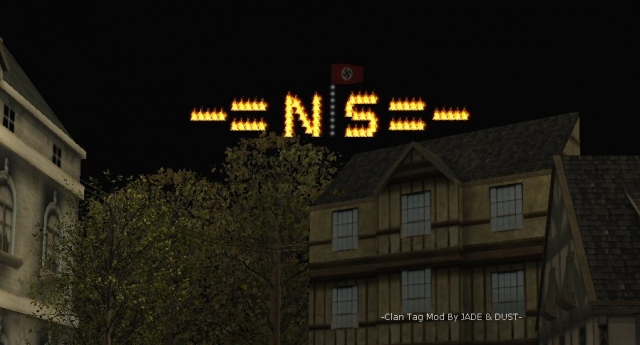
Dust_Clan_Tags_final
Clan Tag Mod By JADE & DUST- Changes: 1.) Made 1 folder for each letter type , now you only need to add exec FLAMES5/N5.scr::main Instead of exec LETTERS/ALWYAS_SHOW/EMMITERS/N5.scr::main. Folders are numbered with their colors. WHITE1 A-Z + - = | RED2 A-Z + - = | GREEN4 A-Z + - = | ( SH ONLY ) FLAMES5 A-Z + - = | FLASH A-Z + - = | ( make letters blink on or off all letter types in this folder you still use letter numbers just change the folder name ie exec FLASH/N2.scr::main would be blinking red N see note 3 below ) EMMITERS ( FIRE WORKS ) GLOBAL 2.) Added more letters for each color/type there are now 5 of each, which will give you more options on what you can make. 3.) Added 3 new characters - = | 4.) Removed the following letter types Blow Torch Breath Electric Arc Adams Spark Orange Letters 5.) Made the orb scales smaller for a crisper looking tag. 6.) Changed clantags_settings.txt to clantags_settings.cfg (for some reason Spearhead wudn''t exec it as a txt file) 7.) Added Spearhead maps to clantags_settings.cfg 8.) Made a clantgas_settings.scr file to be also used to replace the cfg if you wanted to, just change exec clantags_settings.cfg to exec clantags_settings.scr in ambient.scr. 9.) Made a flag.scr to replace the fireworks.scr if you want, I found that while the fire works looked cool, if you get too many people shooting it off it make server lagg. Install: 1.)Place the user_Clan_Tags_rev2.pk3 and the clantags_settings.cfg in main/mainta/maintt folder ( haven;t tested it on BT ) 2.) set up your clantags_settings.cfg ( I put my cfg in here as a template on how to do it ) Setting Up The Clantags_Setting.cfg: 1.) Make sure you have developer on so you can get your coords. 2.) Start a game, go to where you wish to place your clan tags. 3.) Open console type in coord, write down the coord, it will look like this, location: 504.00 216.00 -31.00 angles: 0.00 0.00 0.00 axis: 1.00 0.00 0.00 (use 'tele' or 'face' to set) all you need is the first set of numbers, 504.00 216.00 -31.00 Thats your starting point. 504.00 is left to right, 216.00 is in and out -31.00 is up or down. 4.) In the settings cfg add these numbers exec FLAMES5/N5.scr::main ( 504.00 216.00 -31.00 ) ( 0 0 0 ) 1 Now save it and go back in game and you will see a flaming N in that spot. Then just repeat this untill you have all your letters set. I found that once you get your first letter where you want it, sub tract 128 from the the first number and you will be close to where your next letter should be. ( 504.00 216.00 -31.00 ) so your next letter would be at ( 376 216 -31 ) exec FLAMES5/N5.scr::main ( 504.00 216.00 -31.00 ) ( 0 0 0 ) 1 exec FLAMES5/S5.scr::main ( 376 216 -31 ) ( 0 0 0 ) 1 If you use the letter I or the | in your tag you would sub tract 48, then back to sub tract 128 for the next letter. The last 2 letters in your coord will not change after they are set, all you need to do is get the first number right. **** NOTES **** 1.)You can't change the angles of letters so you are limited on where in the map you can put your tags, they only face one way. However with the extra letters you can put your tags in more than one place in the map. ( see screen shots ) 2.) In Spearhead you can not use the Weather11.scr for making it a night time look in the following maps: MP_Flughafen_TOW MP_Ardennes_TOW MP_Verschneit_DM 3.) Falshing letters are set as follows from bottom of letter scr's: blinky: while (1) { wait 10 // time to wait before hiding tags self hide wait 180 // time before showing tags again self show } end Video link http://social.xfire.com/videos/631c4f
EZM Admin Mod
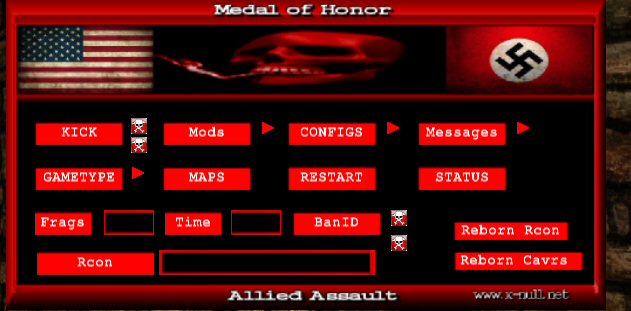
Easy Meat Mods First let me just say up front, I did not make all of the mods in here, I just edited some of them to do what I wanted. Any mod used here still has the modders name in the script file, if he put it there to start with. And then some I made, with a lot of help from the guys at X-Null. Now let me explain just what this thing is, it's a few mods I put together, with a simple way to turn them on or off. 1.) Random teleporters What this does is place random teleporters in all the maps, both the starting points and the ending points are random. They can be anywhere on the map, you might teleport to the Objective so you can set bomb, or you might end up in a mine field, you just never know. Or on a TDM map you mat end up on a roof, other teams spawn, anywhere at all, may teleport 30 feet in the air. 2.) V2 Anti Axis Rush Mod There is a teleporter in vent room, noob door and at begining of long hall, if a axis player crosses the orb he gets teleported back to spawn and all his weapons are taken away, except for the p38 wth no ammo, he has to bash the rest of the map. ( note: You need Reborn for the bash only to work. Without reborn player will have the ammo amount your pistol settings are set to. ) 3.) V2 No Spawn Camp Allies This is the no camp allies mod, that bombs allied spawn after so many seconds. 4.) Kick Grenades V 1.0 Lets you kick the grenades away from you. 5.) Weapons Switch Mod Lets you switch weapon class, example from any weapons to snipers only etc. Pistols and grenades are not removed, they remain how you have them set. Weapons Options: Snipers Only (Team Snipers) Rifles Only (Team Rifles) Bolt Action Rifles Only ( Team Snipers All Others Kar98 ) Springfield Only Kar98 Sniper Only Kar98 Only M1 Garand Only Shotgun Only No Rockets (Rockets Are Shotgun) SMG Only MG Only Pistol Only All Weapons Sniper and Shotgun Only No Rockets or Shotguns ( Rockets and Shotguns Are Team Rifles ) Team Weapons (all Team Weapons) 6.) Spawn Protection To install Mod : 1.) Put the zzzzz_Em_mods-reborn.pk3 ( Reborn Servers Only) in mohaa/main folder. ( On Server) 2.) Edit the mod.cfg and put it in mohaa/main folder. ( On Server) 3.) Add exec mod.cfg to your server.cfg. Install Menu: This is a full reborn admin menu, some sections you will need the mods, cfg's etc in order for it to work, Mefy's freeze-Tag...Elgbots...custom maps etc. Also if you wnat to exec different cfg's from menu you will need to make sure the cfg folder is on server. SEE EDITING READ ME !! 1.) Put the zzzzzzzzzz_weapons_Rcon_Menu.pk3 in your mohaa/main folder ( NOT ON SERVER.) 2.) Bind a key to open menu. ( open console type in bind ( pick a key) hit enter. ) Menu Note: You don't need to use the menu, you can change everything through the console, you must restart the map after changeing settings. If you have it set to snipers only and change it to rifles only you must first turn off snipers only ( set snipers 0) then turn on rifles only ( set rifles 1) This is why I made the mod menu it will do all that for you.
zzzzzzzzz_Admin_Menu.pk3
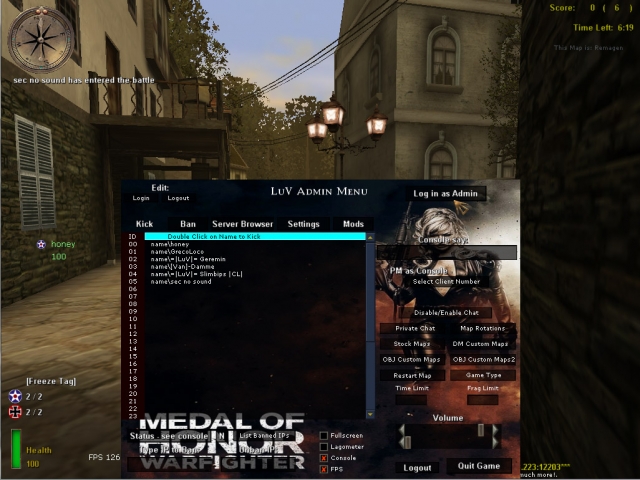
1) Place the file zzzzzzzzz_Admin_Menu.pk3 in your main folder 2) open the file with winrar or 7-zip and go to the folder configs 3) open mylogin.cfg and replace the name and password as discribed there 4) go to your server files and open admins.ini (comes with reborn patch) 5) and place a line like this: login=harry password=45passw354676 rights=7167 be sure that the name and password in mylogin.cfg are the same as in the admins.ini. after u done that (re)start your server. go in your server and press F1 to open the admintool (if it doesn not open type in console: bind f1 togglemenu admin, and try again). if the admintool opens click in the RIGHT UPPER CORNER, Log In As Admin.... and the tool should work. becease we pre-added the passwords etc u dotn have to type in passwords again... just hit the button Log In As Admin everytime u join the server. if the tool doent wokr be sure that u clicked the Log In As Admin Button. (on the left side it will display yellow letters that u are logged in as admin), so its hard to see... but u are logged in.. now test it!!........ 1 tip.... use admin pro with this it works realy great, download here http://www.mohaaaa.co.uk/AAAAMOHAA/content/adminpro-updated-version. problems with the tool??????... go to http://www.x-null.net/forums and make a thread and we will help you
Elgbot 2.2.1 Serverside Stats
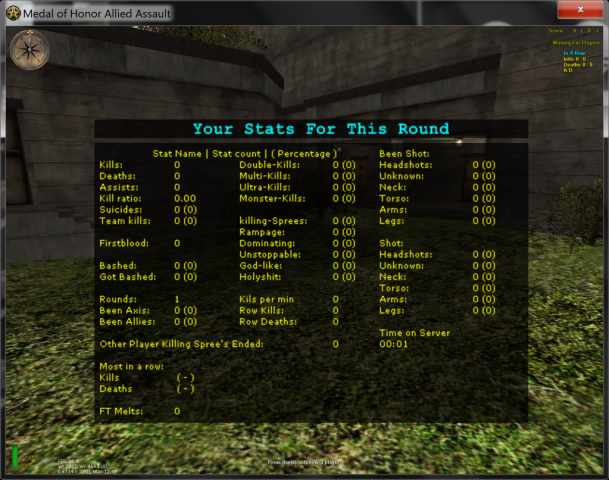
Tracks killing sprees and stats for your server. Using the client pk3 will give you Client side UT style event sounds. Killing spree's, Double kills, headshots, etc

Purple EventHandler for Reborn Patch
Very helpful script to help organise the Reborn events
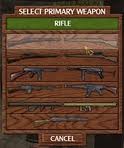
Purple weapon limiter
Purple weapon limiter - Completely CVAR controlled , including Ammo !!!!
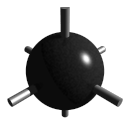
PurpleMine Mod
Includes Proxy Mine, Stickybombs with adjustable timers , and C4 !!!!!!
Grenade Timer Cooking
Purple made a grenade timer if anyone wants it ,so all it does it change the delay of the grenade to the amount of time the 'Fuse' has left on the clock. So if you throw the grenade with 5 seconds left on the clock it will explode after 5 seconds etc. Since its completely scripted there isnt the cooknade bug that occurs in SH where you can poke it through a door and it explodes. I might add sound to it later when we have the ability to play a sound for individuals, i tried with a small radius but it still work to well. http://www.x-null.net/forums/showthread.php?1842-Throw-Nade-timer-is-it-possible&p=17610&viewfull=1#post17610 Please see above post of instructions on setting the MAX fuse time ^^^ But its a simple as changing the number after the global/grenade_timer.scr 10 // The is the M2 grenade used for secondary fire & by AIs TIKI $include models/projectiles/m2fgrenade_base.txt init { server { exec global/grenade_timer.scr speed 700 minspeed 100 } }
Elgbot 30
Mostly a Player Stats tool (see Elgbot 2 & 4 for more info). Elgbot Version 3.0 Game; mohaa www.mods-r-us.net , modstheater.com , mohfiles.com elgan.sayer@gmail.com INSTALLING: 1. Extract the Elgbot folder anywhere on your pc. 2. place zzzElgbot.pk3 pk3 in your games main folder. 3. Run Elgbot.exe 4. Run your mohaa game. While in game elgbot should start automaticaly. To tell if its on. View your score table (tab) or look in the elgbot stats menu. A message "Elgbot on" will appear in both. If the scoreboard looks normal. Elgbot is off. YOUR NAME: it is important if you change your name elgbot is updated. If you use console to change your name. Please type into console "name". If you change your name in any other way. Please make sure elgbot detects the change. Your name is displayed in the scoreboard and the elgbot stats menu. Make sure it is the same as your game now. When you turn elgbot off from within your game. it will not still count stats. If you turn elgbot on half way through a game. It should slowly work through the whole game thgus far counting your stats still. Each level or round. Counts as a new map and the stats should stats fresh for the in game menu. 5. Bind a key to elgbotmain (stats window) A. To do this, look in the control options. 6. Send feedback.
Foresight Server Pack
========================== FSTe Foresight Server Pack by =|95th|=GenDonut[GiffE] -------------------------- Portions Based off of the original FST by slider_v ========================== Goal: Create a more expandable, feature-full, mod-able, foresight server pack, Yet maintain its control through the foresight application. There is now both a SH & an AA version. Only difference is that SH version does not have rebound damage. the Total Control menu will only FULLY work with this server pk3. Features: * Total Control Addon (add more settings, features etc) (maybe) * Spawn Delay - New Cvar sv_team_spawn_interval (one in foresight app server setup) * Stock FST Anti-Cheat (cvar on and off so you dont have to force those stupid useless alias on people) * Cvar Toggleable Rebound damage. (credits sorridstroker) * Player Event Expandability * 1st Person Spectate * Team Balancing * FST Commands * allies| and axis| commands to force a command on a whole team. * Expandable morph command * Expandable commands * Weapons Limiter * Spawn Protection - New Cvar g_invulnerable (one in foresight app server setup) * Join, Spawn, Die, Messages * Every fix made todate. * 3 New Screenshot types. * Error fixes in STOCK foresight * New punishment commands (from Jim's Punishment mod) Fixlist: * MG42 Team Swap fix * Grenade Team Swap Fix * Ladder Team Swap fix * MG42 Crouching Fix * Land Shark Fix * Grenade Drop Fix * Fps crash fix * Under Map detection all from elgan's documented fixes ==================== www.95thDivision.com www.darkgamers.nl www.mohanticheat.com [ not active ] for support www.mohforesight.com
Medal of Honor: Allied Assault Mods (MOHAA) — Complete Community Archive
Welcome to the premier repository for Medal of Honor: Allied Assault mods. Since the game's groundbreaking release in 2002 by 2015, Inc. and EA, MOHAA has inspired one of the longest-standing modding communities in first-person shooter history. MOH-DB preserves, categorizes, and serves over 1,600 verified community modifications, custom enhancements, and competitive utilities for Allied Assault, Spearhead, and Breakthrough.
Explore MOHAA Mod Categories
Player Skins & Uniforms
Over 700 historically accurate and creative player uniforms for Allied and Axis factions. Equip authentic U.S. Army Rangers, 101st and 82nd Airborne paratroopers, British Commandos, Soviet Red Army conscripts, Wehrmacht Heer infantry, Fallschirmjäger, and Waffen-SS camouflage patterns, as well as classic community clan skins.
Weapon Models & Reskins
Enhance your WWII arsenal with ultra-detailed weapon replacements and high-resolution textures. Popular downloads include authentic wood-finish Kar98k sniper rifles, realistic metallic sheen M1 Garand models with classic "ping" animation refinements, Thompson submachine guns, MP40s, BAR 1918 rifles, and custom iron-sight alignments.
Soundpacks & Realism Audio
Transform the sonic atmosphere of Allied Assault. Replace compressed 2002 Quake-engine sound effects with cinema-grade gunfire recordings, authentic distant artillery rumblings, terrifying Stuka dive-bomber sirens, supersonic bullet cracks, metal ricochets, and remastered German and American voice callouts.
HUDs, Menus & Crosshairs
Modernize the in-game interface for 1080p, 1440p, and 4K widescreen displays. Download minimalist competitive heads-up displays, custom dot and crosshair overlays, cleaner compass indicators, redesigned main menus, and unobtrusive health and ammunition counters favored by competitive league players.
Server Utilities & Admin Scripts
Run resilient, modern multiplayer game servers with essential server-side utilities. Includes automated map rotators, anti-cheat detection tools, voting scripts, custom match timers, ping balancers, and administrative rcon managers designed for dedicated servers running 24/7.
MOHAA Reborn 1.12 Community Patch
The gold standard community patch for modern MOHAA servers and clients. The Reborn 1.12 patch resolves legacy buffer overflows, fixes client query exploits, expands internal script limits for complex mods, and provides a built-in server browser to replace the defunct GameSpy master server.
How to Install MOHAA Mods: Quick Guide
Identify Your Target Directory
MOHAA stores all game assets in subfolders inside the root installation directory:
- MOHAA (Base):
.../MOHAA/main/ - Spearhead:
.../MOHAA/mainta/ - Breakthrough:
.../MOHAA/maintt/
Paste Without Extracting
Download the mod archive from MOH-DB. If it is zipped (.zip or .rar), extract the enclosed .pk3 file. Place this .pk3 directly into your game's /main/ folder.
How to Remove or Troubleshoot
To remove any mod, simply delete its .pk3 file from the /main/ folder. The game will immediately return to stock behavior without reinstalling.
Frequently Asked Questions about MOHAA Mods
To install MOHAA mods, copy the downloaded .pk3 file directly into your Medal of Honor Allied Assault installation folder under /main/ (or /mainta/ for Spearhead, and /maintt/ for Breakthrough). You do not need to unpack or extract the .pk3 archive—the game engine loads it automatically upon launch.