
Medal of Honor: Allied Assault Mods (MOHAA)
Discover and download community-created modifications to enhance your Medal of Honor: Allied Assault experience.
1676 Mods Found
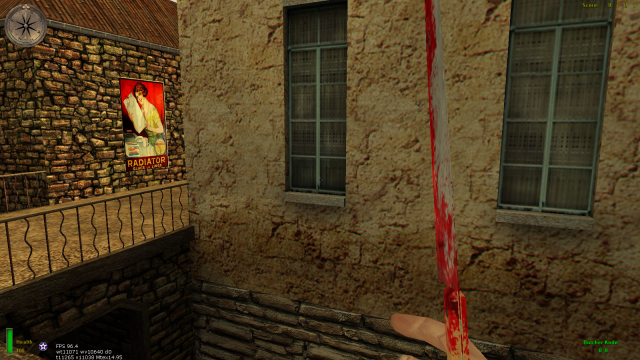

Admin++ for MOHAA 1.0
This is only for Linux! more info about this is on ModTheater on this link: http://modtheater.com/threads/mohaa-adminmod.22844/


Christmas Tree Script
//**********************************************************// //**********************************************************// //****** ******// //****** XMAS TREE System by [NER-HQ]Whisky :P ******// //****** ------------------------------------- ******// //****** ******// //****** Make what ever u want of this script BUT ******// //****** do not forget the original scripter! ******// //****** ******// //****** whisky@ner-clan.net - www.ner-clan.net ******// //****** ******// //**********************************************************// //**********************************************************// /////////////////////////////////////////////////////////////
Christmas Tree
// This file contains the instructions for the tree. To tell it how to display and what to to do. // This file is part of the christmas mod. It is executed by christmas.scr. /*.:*~*:._.:*~*:._.:*~*:._.:*~*:._.:*~*:._.:*~*:._.:*~*:._.:*~*:._.:*~*:. Christmas Mod Pattern file _...Q._ .' '. / \ ;.-""""--.._ | /'-._____..-'\| .' ; o o |`; / /| () ; \ _.-, '-' ; '.__.-' \ \ .-"`, | \_ / `'` '._`.; ._ / `'--.,_=-;_ \ \| `\ .\_ /` \ `._ \ \ `/ ``---| \ (~ _______________________ \ \. | o , \ (~ (~ |.---------------------.| \ \`_\ _..-' \ (\(~ || Released 23/12/2005 || \/ `` / \(~/ || Updated: 05/12/2006 || \__ __..-' - '. || By Elgan Sayer || \ \``` \ || www.mods-r-us.net || ;\ \o ; || Merry Christmas || | \ \ | ||_____________________|| ; \ \ ; '-----------..----------' \ \ \ _.-'\ / || '. \-' \ .' || _.-" ' \-' .-||-. \ ' ' ' \ '..---.- ' \ ' ' _.' \' ' _.-' \ _.-' ` By editing this file, you can create different looks for your christmas tree. You can also setup from this file how you want it to flash, blink, animate itself. .:*~*:._.:*~*:._.:*~*:._.:*~*:._.:*~*:._.:*~*:._.:*~*:._.:*~*:._.:*~*:.*/ //======================================================== // Added 05 December 2006 // // * Spiral Now works with "pattern" colour type also. // * Tree is not scaleable with default base scale // settings. level.work_out_dimensions must be set 1 // for the tree to work out its dimensions. This is // so u can edit the look of the tree further. wha // * For fun and guessing demand. Added lights like // from swedish god Ric-Hard's mod. With the lense- // flare and all. Tho these are not reacomended for // tree use. They are in by default anyway. // * Added some more options as settings to the "scale" // part of the tree pattern file. // // //======================================================== //======================================================== // Contact Information // // E-mail: Elgan.sayer@gmail.com // Website: http://www.mods-r-us.net // // Feel free to ask any questions in the forums or by // email. // //======================================================== //======================================================== // scale: This sets up the scale of the tree //======================================================== scale: //Set the dimensions of the tree. THe lights will spawn using these dimensions. // eg, top most lioghts till be at 440 above tree origin. local.tree[height] = 440.00 // Height of the tree local.tree[base_width] = 120 // Width of the base at base height local.tree[top_width] = 20 // Width of the top of the tree local.tree[baseheight] = 140 // Height at which we start drawing lights local.tree[fairy_distance] = 20.0 // Distance fairy is from height of tree local.tree[fairy_light_distance] = 50.0 // Distance fairy light is from height of tree level.work_out_dimensions = 1 //If this is set 1, ALl the above dimensions // are ignored and worked out by the tree scale. // If set to 0, the above dimensions are used. local.tree[scale] = 2 // scale of the tree. local.tree[light] = ( 0 0 0 ) // Light/ snow effect colour at tree local.tree[lightradius] = 000 // Light/ snow effect radius at tree local.tree[model] = "static/tree_winter_midpine.tik" //tree model end local.tree //======================================================== // decorate_pattern: This sets up how the tree looks // when it spawns. What the colour's // are and in what way they spawn. //======================================================== decorate_pattern: /* // The following are a list of threads that exist inside the Christmas script. //Threads 'spawn_lights_spiral' //========================================================//======================================================== // spawn_lights_spiral: Spawn a loop of lights that spirals down // // spawn_lights_spiral local.clockwise local.rings local.degrees_apart local.colour local.link local.linkcolour local.numsegments local.scale: // // local.rings ( integer ) - How many ring's of light to spawn? // local.degrees_apart ( int ) - The integer in degrees to form the distance between lights // local.clockwise ( integer ) - Spawn them clockwise // local.colour ( String ) - The colour/thread to use to spawn the lights // local.link ( integer ) - If 1 the coronas will link using a func beam // local.linkcolour ( vector ) - Colour to use for the func beam should it be used. // local.numsegments ( integer ) - Number of sections to use for the tree func beams // local.scale ( float ) - Scale for each corona, if NIL, default scale will be used. // // Returns - Array of the coronas spawned //========================================================//======================================================== 'spawn_lights_loop' //========================================================//======================================================== // spawn_lights_loop: Spawn a loop of coronas around // the base of the tree. // // spawn_lights_loop local.rings local.degrees_apart local.colour local.link local.linkcolour local.numsegments local.scale: // // local.rings ( integer ) - How many ring's of light to spawn? // local.degrees_apart ( int ) - The integer in degrees to form the distance between lights // local.colour ( String ) - The colour/thread to use to spawn the lights // local.link ( integer ) - If 1 the coronas will link using a func beam // local.linkcolour ( vector ) - Colour to use for the func beam should it be used. // local.numsegments ( integer ) - Number of sections to use for the tree func beams // local.scale ( float ) - Scale for each corona, if NIL, default scale will be used. // // Returns - Array of the coronas spawned //========================================================//======================================================== // */ // Available Colour Threads // /* 'redcorona' - Red 'orangecorona' - Orange 'regcorona' - White "redlight" - Red light with lensflare "bluelight" - Blue light with lensflare "yellowlight" - Yellow light with lensflare //"whitelight" - White light with lensflare //'utilcorona' - White // Not used 'random' - All the same random colour 'different' - Each colour is different the last 'all_random' - All colours are randomly picked 'pattern' - Use the loop_colour_pattern thread in this file to determine the colour of each ring */ // Edit how you want the tree to look here: //Setup a table to hold the information on the tree lights pattern local.spawn_pattern = makearray //spawn a set of loops //rings? //distance between coronas //what colour to use? //Link with a func beam //Colour of funcBeam //number of segments for fun beam if used //Scale of the coronas "spawn_lights_loop" "6" "15" "pattern" "1" ( 0.0 0.0 1.0 ) "1" "1" //spawn a spiral //clockwise //rings //distance between coronas //what colour to use? //Link with a func beam //Colour of funcBeam //number of segments for fun beam if used //Scale of the coronas "spawn_lights_spiral" "0" "6" "10" "pattern" "1" ( 1.0 1.0 1.0 ) "1" "2" //spawn a spiral //clockwise //rings //distance between coronas //what colour to use? //Link with a func beam //Colour of funcBeam //number of segments for fun beam if used //Scale of the coronas //"spawn_lights_spiral" "1" "6" "10" "pattern" "1" ( 1.0 1.0 1.0 ) "1" "1" endarray end local.spawn_pattern //======================================================== // loop_colour_pattern: When spawn_lights_loop is used // with colour 'pattern', the colour // for each ring of lights is pulled // from here // // For each ring the colour at the position in the list // below, that equals the number of the current ring will // be used when choosing a colour for the coronas. // If the amount of rings is greater or less then the // number of colours in the list below. The list will // start again from the beginning. //======================================================== loop_colour_pattern: local.loop_colour_pattern = makearray "redcorona" //- Red "yellowlight" //- Yellow light with lensflare "orangecorona" //- Orange "bluelight" //- Blue light with lensflare "redcorona" //- Red "all_random" //- White "redcorona" //- Red "redlight" //- Red light with lensflare endarray end local.loop_colour_pattern //======================================================== // blink_pattern: Set here ho the tree should blink. // // There are various threads/methods available to blink // the lights and the specific layer of lights in // different ways, at variable settings. // // The list starts from the top and works it's way down to // the bottom. Once it reaches the bottom, it starts again // from the top. This goes on until the level ends. // If a thread is sugested that is in-correct , it will be // skipped. For example if you have no loops and you want // a loop to blink, it cant. // // The following is a list of the threads/meathods you can // use. // // Each thread will have the parameter 'wait', This means // 'wait till done' or wait until this has finished. If set // then the thread will wait until it has finished before // moving onto the next thread. // // // 'wait_for_time' - This tells the loop to wait a // ============== specified amount of time. THis is // the only thread/method that does // not have a wait setting. // // NOTE: There must always be at least one of these // in the blink loop pattern or it will cause // the server to crash. If you have any trouble // of have any questions, feel free to contact // me, ask in the forums. Details on contacting // me can be found at the top of this file. // // time ( integer ) - Time to wait for. // ================================================== // 'loop_all_blink' - This blinks all the lights // on the rings / loops // Parameters: // time ( integer ) - Time to blink for, in seconds. // loop ( integer ) - Which loop to blink. // ================================================== // 'sprial_all_blink' - This blinks all the lights // on the spirals // Parameters: // time ( integer ) - Time to blink for, in seconds. // sprial ( integer ) - Which sprial to blink. // ================================================== // 'random_blink' - This blinks a random light // from all of the lights on the // tree. // Parameters: // time ( integer ) - Time to blink for, in seconds. // ================================================== // 'ring_blink' - This blinks all the lights on a // ring of a given loop. // // Parameters: // time ( integer ) - Time to blink for, in seconds. // loop set number ( int ) - which loop of rings. set // above, if u have spanwed // 2 sets of light_loops. // the total number will be // 2, putting 1, will mean // you want to blink some // lights in the first loop // you apawned. // ring number ( integer ) - This is the ring number // in the loop of rings you // spawned. For example, if // you spawned 1 loop of 3 // rings, the total ring // number will be 3. // // ================================================== // 'sequence_ring_blink' - This blinks all the lights // on a given ring in order. // Parameters: // time ( integer ) - Time to blink for, in seconds. // clockwise ( integer ) - Should we go clockwise or // anti-clockwise?, right or // left, arround the ring. // loop set number ( int ) - which loop of rings. set // above, if u have spanwed // 2 sets of light_loops. // the total number will be // 2, putting 1, will mean // you want to blink some // lights in the first loop // you apawned. // ring number ( integer ) - This is the ring number // in the loop of rings you // spawned. For example, if // you spawned 1 loop of 3 // rings, the total ring // number will be 3. // ================================================== // 'sequence_spiral_blink' - This blinks all the // lights on the spiral // in order. // // Parameters: // time ( integer ) - Time to blink for, in seconds. // up ( integer ) - This sets should the lights start // blinking from the top, or the // bottom, making them travel up or // down. // sprial ( integer ) - Which sprial to blink. // ================================================== // 'sprial_all_hide' - This hides all the lights // on the spiral. // Parameters: // sprial ( integer ) - Which sprial to hide. // ================================================== // 'sprial_all_show' - This unhides all the lights // on the spiral. // Parameters: // sprial ( integer ) - Which sprial to hide. // ================================================== // 'loop_all_hide' - This hides all the lights // on the loop. // Parameters: // sprial ( integer ) - Which sprial to hide. // ================================================== // 'loop_all_show' - This unhides all the lights // on the loop. // Parameters: // sprial ( integer ) - Which sprial to hide. // ================================================== // 'ring_show' - This hides all the lights on the // ring of the loop provided. // // loop set number ( int ) - which loop of rings. set // above, if u have spanwed // 2 sets of light_loops. // the total number will be // 2, putting 1, will mean // you want to blink some // lights in the first loop // you apawned. // ring number ( integer ) - This is the ring number // in the loop of rings you // spawned. For example, if // you spawned 1 loop of 3 // rings, the total ring // number will be 3. // ================================================== // 'ring_hide' - This unhides all the lights on the // ring of the loop provided. // Parameters: // loop set number ( int ) - which loop of rings. set // above, if u have spanwed // 2 sets of light_loops. // the total number will be // 2, putting 1, will mean // you want to blink some // lights in the first loop // you apawned. // ring number ( integer ) - This is the ring number // in the loop of rings you // spawned. For example, if // you spawned 1 loop of 3 // rings, the total ring // number will be 3. // ================================================== // Tip: It is usualy a good idea to have the last // section wait till finish. //======================================================== blink_pattern: // Edit how you want the tree to animate and blink here: local.blink_pattern = makearray //Thread to run // Wait //blinka all lights in spiral //wait for me to finish //Time to stay blinked for //sprial set number "spiral_all_blink" 1 1.15 1 //blinka lights in spiral //wait for me to finish //Time to stay blinked for //clockwise //loop set number //ring number "sequence_ring_blink" 0 0.05 1 1 1 //blinka lights in spiral //wait for me to finish //Time to stay blinked for //clockwise //loop set number //ring number "sequence_ring_blink" 0 0.05 1 1 2 //blinka lights in ring //wait for me to finish //Time to stay blinked for //clockwise //loop set number //ring number "sequence_ring_blink" 0 0.05 1 1 3 //hide all sprial lights //wait for me to finish //sprial set number "spiral_all_hide" 1 1 //blink a ring in loop //wait for me to finish //Time to stay blinked for //loop set number //ring number "ring_blink" 1 0.10 1 4 //blink a ring in loop //wait for me to finish //Time to stay blinked for //loop set number //ring number "ring_blink" 1 0.10 1 5 //blink a ring in loop //wait for me to finish //Time to stay blinked for //loop set number //ring number "ring_blink" 1 0.10 1 6 //blink a ring in loop //wait for me to finish //sprial set number "spiral_all_show" 1 1 //Special thread to cause a pause. NOTE: You can increase the time, you can decrease the time. You can add more wait_for_time threads. // however, You MUST NOT remove this. There must always be at least one wait_for_time, or the server will crash. "wait_for_time" 0.60 endarray end local.blink_pattern
Auto Rates
///////////////////////////////////// // Auto Rates v1.2 by Richard ////// /////////////////////////////////// /////// www.Ric-hard.tk ////////// ///////////////////////////////// ////////// 2006-04-10 ////////// /////////////////////////////// main: if (level.auto_rates_already_running == 1) { end } level.auto_rates_already_running = 1 level waittill spawn /*_/_/_/_/_/_/_/_/_/_/_/_/_/_/_/_/_/_/_/_/_/_/_/_/_/_/_/_/_/_/__/_/_/_/_/_/_/ \_| \_| /////////////////////////////////////////////////| \_| ///// Auto Rates v1.2 by Richard ////////////////| \_| /////////////////////////////////////////////////| \_| \_| Description: \_| This mod changes the servers sv_maxrate setting on the fly [uploadspeed / playeramount = maxrate]. \_| It can also adjust the clients rate to match the servers maxrate. \_| \_| Cvars: \_| sv_auto_rates 1 or 0 // Turns the mod on and off (its on by default). \_| sv_uploadspeed_in_bytes xxxxxx // xxxxxx = the servers UploadSpeedCapacity in bytes. \_| sv_adjust_clientrates 1 or 0 // Adjusts the clients rate (its off by default). \_| sv_max_maxrate xxxxxx // Default is 25000 [XDSL 25000] \_| sv_min_maxrate xxxxxx // Default is 5000 [ISDN 5000] \_| \_| Usefull Links: \_| www.dslreports.com/stest // SpeedTest \_| www.userbase.be/forum/portal.php?show=speed // SpeedTest \_| www.testmy.net/u_load.php // SpeedTest \_| www.digitaldutch.com/unitconverter/index.htm // Unitconverter \_| http://members.lycos.co.uk/userver/Sv_maxclientsCalculatorForMohaa.htm // MaxclientsCalculator etc.. \_| \_| Tip-of-the-Day: \_| 1 kbit = 128 bytes \_| \_/_/_/__/_/_/_/_/_/_/_/_/_/_/_/_/__/_/_/_/_/_/_/_/_/_/_/_/_/_/_/_/_/_/_/*/
Nami Lift v10
///////////////////////////////////////////////////////////////////////////////////////////////////////////////////////////// /////[][][][][][][][][][][][][][][][][][][][][][][][][][][][][][][][][][][][][][][][][][][][][][][][][][][][][][][][][][]//// /////[]/MODS BY NAMI/////////////////////////email me at= pc.freak.95@hotmail.com//////////////////////////////////////[]//// /////[][][][][][][][][][][][][][][][][][][][][][][][][][][][][][][][][][][][][][][][][][][][][][][][][][][][][][][][][][]//// ///////////////////////////////////////////////////////////////////////////////////////////////////////////////////////////// //=========================================================================================================================// ///////////////////////////////////////////////////////////////////////////////////////////////////////////////////////////// // ** * * ** ** *** // // * * * * * * * * * * // // * * * * * * * * * * // // * * * ******* * * * * // // * ** * * * * * // // * * * * * * *** // ///////////////////////////////////////////////////////////////////////////////////////////////////////////////////////////// //=========================================================================================================================// ///////////////////////////////////////////////////////////////////////////////////////////////////////////////////////////// //////////!! PLS Do-not Change Any Of The Below Script ! Unless You Understand It ! And Know What Your Doing !!////////////// ///////////////////////////////////////////////////////////////////////////////////////////////////////////////////////////// ///////////////////////////////////////////!! Have Fun And Alway's Share !!////////////////////////////////////////////////// ///////////////////////////////////////////////////////////////////////////////////////////////////////////////////////////// //exec global/namilift.scr ( 3748 2803 -283 ) //hunt coords 1/ to setup the elevator , just go to the desired spot , open console/type in..... coord & enter , wright down the coords. 2/ open your map.scr with a notepad editor and add this line under level waittill prespawn /-----> exec global/namilift.scr ( 0 0 0 )
Visitor Counter
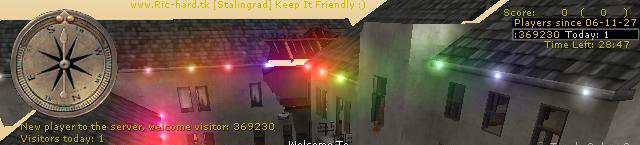
/*_/_/_/_/_/_/_/_/_/_/_/_/_/_/_/_/_/_/_/_/_/_/_/_/_/_/_/_/_/_/__/_/_/_/_/_/_/_/_/_/_/_/_/_/_/_/_/_/_/_/___/_/_/_/_/_/_/__/_/_/_//_/_/__/_/ \_| |_/ \_| /////////////////////////////////////////////////| |_/ \_| ///// VisitorCounter v1.0 by Richard ////////////| |_/ \_| /////////////////////////////////////////////////| |_/ \_| |_/ \_| Description: |_/ \_| Counts your clients (totals and todays) and displays this via a huddrawing in the top right corner, |_/ \_| its transparency is 0.2 while no new players have joined, when a new player |_/ \_| enters your server the huddrawtransparency changes to 1.0 during 2 seconds. |_/ \_| A yellow message is also displayed to the left of the screen when a new player joins that welcomes him/her. |_/ \_| |_/ \_| Supported Games: |_/ \_| Medal Of Honor: Allied Assault, Spearhead & Breakthrough. |_/ \_| |_/ \_| Supported Maps: |_/ \_| All stock-maps and all custom-maps that loads global/DMprecache.scr |_/ \_| |_/ \_| How to install: |_/ \_| 1. place the pk3 inside your mohaa main dir, usualy found at c:\program files\ea games\mohaa\main |_/ \_| 2. You must add this to your "server-cfg"-> seta counter_total_visitors amount (I think u only need to do this once, ty Hal:) |_/ \_| |_/ \_| *** NOTE *** |_/ \_| *** The mod is executed via DMprecache.scr which Ive bundled, (if the mod doesnt work = your MOH aint loading the) |_/ \_| *** the DMprecache.scr in this mod, what to do? well..u can add exec global/counter.scr to the DMprecache.scr that your |_/ \_| *** MOH loads *** |_/ \_| *** Btw, the counting isnt 100% accurate, more like 99,9 :P, anyways it gives u a good overview over your servertraffic *** |_/ \_| |_/ \_| Additional Cvars that u can tweak this mod with, add these to your server cfg the first time u run this mod (use seta): |_/ \_| counter_startdate YY-MM-DD // Default = "06-11-27" |_/ \_| counter_total_visitors amount |_/ \_| counter_reset_todays_visitors // Default = 0, set it to 1, to set it to the current playeramount (u can do this 1 via console). |_/ \_| |_/ \_/_/_/_/_/_/_/_/_/_/_/_/__/_/_/_/_/_/_/_/_/_/_/_/_/__/_/_/_/_/_/_/_/_/_/_/_/_/_/_/_/_/_/_/_/_/__/_/_/_/_/_/_/_/_/_/_/_/__/_/_/_/__/_/*/ ########################################### #Email : ric_hard_a@hotmail.com # #Mod home page : www.ric-hard.tk # #Release date : 2006-11-27 # ########################################### )|( (o o) +------(_)------+ |www.ric-hard.tk| +--Ooo-----ooO--+ || || ooO Ooo /Richard
Virus
title: Virus 1.0 When: 23:32 06/09/2008 Who? Elgan www.mods-r-us.net www.modtheater.com virus is a mod of survivor. When you die, instead of being put in spec like Objective. You are allowed to play on as a virus. No longer able to win. In Free For All mode. The last person to not be infected with the virus wins! In TDM. The last team alive ie, not infected with the virus wins! Each player is allocated a set amount of lives. once they run out, he is forced to spectate. Just the same as objective. This time, unlike objective. There is more than once chance! Why play objective team, when you get more chances to eliminate a team in virus? There is respawning, so you can still play on when your infected! To use: place the pk3 inside your main folder. Then from each map you want the game type to run. Place an exec line. or from ambient or dmprecache.scr exec virus/main.scr Thats it! CVARS! virus // 1= On, (default, or 0 = off virus_warmup // Default 30. In seconds, this is how many seconds the warm up lasts for. To set lives there is 3 cvars. virus_lives5 // if total players 10 (more than 10) Default: 2
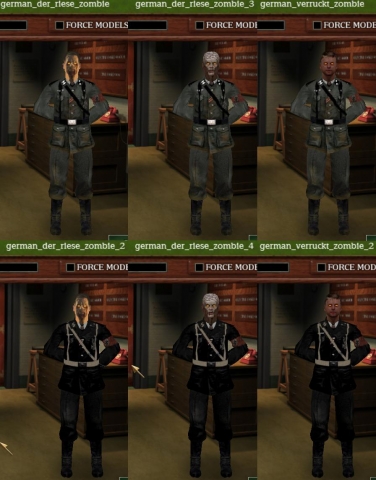
Call of Duty Nazi Zombie skins
A pack of skins recreating the nazi zombies from call of duty
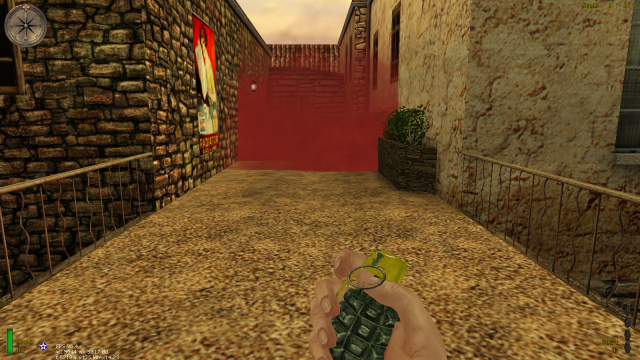
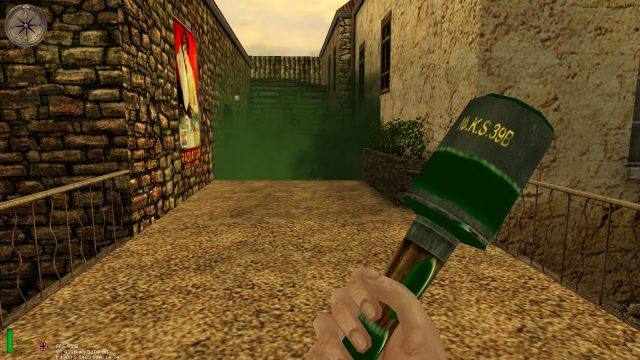
Vkoh Smoke Nades v20
Grenade is without pain (in comparison to V1.0).
Base Assault 0
¤--------------------------------------------¤ | | | BASE ASSAULT | | | | Version: 1.1 | Release date: 2014.01.06 | | | ¤--------------------------------------------¤ Play MOHAA with vehicles and make tactical routes to destroy enemy bases! Cover your teammates using cannons and machine guns or help them as a medic or as an engineer! Earn cash and purchase useful items, like artillery, airstrike and mortar! ----------------- 1. Description: ----------------- This server-side only mod is based on the notorious Base Assault gametype from the game 'Call of Duty: United Offensive'. As well as there, you can also drive a tank or shoot with a cannon here. Maps of Single Player campaigns are suitable in order to give fairly large but quite linear areas. Both teams have the same objectives: 'Destroy the enemy bases and blow them up!' (bases are oversized tank models). Each vehicle has his own physical attributes, which are similar to the real ones. ------------------- 2. Requirements: ------------------- - Medal of Honor: Allied Assault (MOHAA) v1.11 - Latest version of 1.12 Reborn Patch (3.5.1 or later) Note[1]: This mod has never been tested on Spearhead or Breakthrough, and it definitely doesn't work with these extensions. ------------------- 3. Installation: ------------------- Place the 'zzz-base_assault_v1-1.pk3' file to the 'MOHAA/main' folder. Place the 'rewards.txt' file to the 'MOHAA/main' folder. Place the 'global' folder to the 'MOHAA/main' folder (there's an 'accounts' folder in it). Add mod's cvars to your server config file. Note[1]: If you have Base Assault 1.0 already installed, you have to remove it. Note[2]: There is a 'DMPrecache.scr' file inside the pk3 that may cause conflicts with other mods. Note[3]: If a player registers, the mod creates a .txt file inside the 'accounts' folder. Note[4]: There are several cvars forced on players: 'cg_forcemodel' is set to 0 | 'ui_console' is set to 1 | 'rate' is set to 30000 | 'developer' is set to 0. Note[5]: The mod works with Shadow's & JoTo's anticham files (they need to be executed from DMPrecache). --------------------- 4. Uninstallation: --------------------- Remove the 'zzz-base_assault_v1-1.pk3' file from the 'MOHAA/main' folder. Remove the 'rewards.txt' file from the 'MOHAA/main' folder. Remove the 'global/accounts' folder. Remove the mod's cvars from your server config file. Note[1]: We recommend you to backup all player accounts before removing them. -------------------- 5. Configuration: -------------------- - MOHAA related cvars: g_statefile "global/AA/modok" // Sets the right path to the state files (modok_legs.st and modok_torso.st). g_gametype "4" // Sets the appropriate gametype for the mod. fraglimit "1" // Sets the number of rounds before changing to the next map (recommended is 1 for intense gameplay). roundlimit "20" // Sets the limit of a round in minutes (recommended is 20). sv_maplist "m1l3a m1l3b m4l0 m4l1 m4l3 m5l2a m5l3" // Sets the map rotation. map "m1l3a" // Sets the first map to be loaded. - Mod related cvars: g_bas 1|0 default: 0 // Enables/Disables the 'Base Assault' gametype. sv_account 1|0 default: 1 // Enables/Disables the account and rewards system. max_rewards 0-X default: 5 // Sets the maximum number of reward items that can be activated at once. base_health 0-X default: 10000 // Sets the health of the bases. bas_planting_time 0-X default: 15 // Sets the time of bomb planting in seconds. bas_defusing_time 0-X default: 10 // Sets the time of bomb defusing in seconds. bas_countdown 0-X default: 60 // Sets the time of bomb countdown in seconds. gunship 1|0 default: 0 // Enables/Disables the gunship on m4l0. If enabled, a walkie-talkie spawns randomly on the map which teleports into a flying c47. heatseeker 1|0 default: 0 // Enables/Disables the heatseeker weapon. If enabled, it is placed randomly on the map. heatseeker_amount 0-X default: 0 // Sets the amount of heatseeker projectiles in a round for one player. medic_caste 1|0 default: 0 // Enables/Disables the medic class. engineer_caste 1|0 default: 0 // Enables/Disables the engineer class. reviving_time 0-X default: 2 // Sets the time of reviving in seconds. tank_camera 1|2 default: 1 // Sets the position of tank camera: 1 - above the tank (3rd person) | 2 - besides the cannon (1st person) teambalance 1|0 default: 0 // Enables/Disables team balancing. undermap_fix 1|0 default: 1 // Enables/Disables the fix against getting under the map. spawn_protect 1|0 default: 0 // Enables/Disables the protection when a player spawns. Note[1]: Use 'seta' prefix before cvars. Note[2]: Some of the reborn cvars have to be disabled as follows: sv_antiwh to 0, sv_antistwh to 0, sv_recoilemulation to 0, sv_stufftextdetection to 0. --------------- 6. Features: --------------- - Account and rewards system: Creating an account: 1. Connect to your server. 2. Open the console. 3. Type in 'scmd rew_reg username password' without quotes. ('username' is your chosen account name and 'password' is your secret key to log in) Activating your account: 1. Connect to your server. 2. Open the console. 3. Type in 'scmd rew_login username password' without quotes. ('username' is your chosen account name and 'password' is your secret key to log in) Note[1]: You need to activate your account every time you join the server. Opening the store menu: During the play if you are neither in a vehicle or turret nor in spectator mode, press the F7 button or type in 'keyp 1001' without quotes. Closing the store menu: Press the USE button. Purchasing an item: Use the MOVE FORWARD and MOVE BACKWARD buttons to select the desired item. Press the FIRE button to purchase it. Opening the activation menu: During the play if you are neither in a vehicle or turret nor in spectator mode, press the F8 button or type in 'keyp 1002' without quotes. Closing the activation menu: Press the USE button. Activating an item: Use the MOVE FORWARD and MOVE BACKWARD buttons to select the desired item. Press the FIRE button to activate it. Double class points [ 600$ ] // You need to purchase 'Cash for class works' first. Player extras [ 500$ ] // You get maximum ammunition every time you spawn and hit indicator sound. Instant medic healthpack [ 600$ ] // Healthpacks give full health. Instant medic reviving [ 1000$ ] Faster engineer repair [ 800$ ] // One and a half times faster repairing. Sniper extras [ 800$ ] // Extra zoom for the scopes. Reduced bomb planting/defusing time [ 550$ ] // It takes only 3 seconds to plant or defuse a bomb. +50% RIFLE damage [ 1000$ ] +50% SMG damage [ 1000$ ] +50% MG damage [ 1000$ ] Double cash [ 4000$ ] // You get twice more cash for killing enemies. Cash for class works [ 1600$ ] // You can earn cash by repairing vehicles and cannons or by reviving, healing, supporting teammates. -1 second tank reloading time [ 2000$ ] +25% vehicle speed [ 1500$ ] Engineer ammodrop [ 1000$ ] // If you're engineer, you can drop ammunition packs by pressing the SECONDARY ATTACK button. Airstrike [ 3500$ ] // Use binoculars to select your target and press the FIRE button. Artillery [ 4000$ ] // Use binoculars to select your target and press the USE button. Portable machinegun [ 2200$ ] // If you are axis, you get MG42, else you get M1919 Browning machine gun. Mortar [ 4000$ ] // Crouch and hold the USE button to mount it. Note[2]: If you want to change the costs, you can edit 'rewards.txt'. - Useable vehicles: allied jeep [equipped with M1919 Browning machine gun and headlights] - for 2 players king tiger tank [equipped with cannon and 1 turret machine gun] - for 2 players tiger tank [equipped with cannon and 1 turret machine gun] - for 2 players panzer tank (desert and green) [equipped with cannon and 1 turret machine gun] - for 2 players - Useable cannons: nebelwerfer flak88 - Classes: medic [select shotgun to become a medic and get equipped with SMG] [drop healthpacks when weapons are in holster, by pressing the FIRE button] [revive players by holding the USE button while crouching above dead soldiers] engineer [select bazooka or panzerschreck to become an engineer and get equipped with RIFLE] [repair damaged vehicles and cannons after holstering, by pressing the FIRE button] - Other useful things: [Press the 'i' key to call for ammo.] [Press the 'k' key in a vehicle to call for an engineer.] [Press the 'l' key to call for a medic.] there are engineer and medic points which limit class works there are 'teleporting doors' on m4l0 in order to roam unreachable areas several panzerschreck and bazooka picking up place anti-tank rocket launcher projectiles are modified for better sighting soundfix for weapons on single player maps undermap fix anti-telefrag system - Supported maps: m1l3a [Desert Road] m1l3b [Grounding the Airfield] m4l0 [Dog Kennel] (the unfinished, hidden single player map) m4l1 [Rendezvous with the Resistance] m4l3 [The Command Post] m5l2a [The Hunt for the King Tiger - Destroyed Village] m5l3 [The Bridge] --------------------------------- 7. Known issues & other infos: --------------------------------- - Every player has the chance to stuck with vehicles, because the game engine is not so compatible and there are exploits/bugs on the supported maps, too. - Some of the vehicles are permeable, because their collisions are not done. - [occurently] high ping and server load. - [occurently] console flood due to emulated sounds (e.g. welding torch, M1919 Browning machine gun ). - [rarely] client crash with 'ReadDeltaEntity' error message. - [frequently] server crashes (autorestarter application is recommended). - Scripts contain Hungarian words/expressions. ------------------- 8. Dedicated to: ------------------- - members of Amalgamated Allied Assault Alliance - members of Medal of Honor Filefront - members of Mods-R-Us - members of ModTheater - members of xNULL -------------- 9. Credits: -------------- Written and main idea by: Veers [HU] Further ideas, testing and English translation by: Bulldozer [HU] Server providing and contributing by: Heatsinkbod [UK] and the =[M.A.W]= clan -------------- 10. Contact: -------------- Contact us to report problems/crashes and translation mistakes. Especially, we are pretty opened for new ideas! Veers = Xfire: genveers87 Bulldozer = Xfire: bulldozerecske | E-mail: bulldozerecske [at] gmail [dot] com Website: http://www.moddb.com/mods/base-assault -------------- 11. Warning: -------------- You are not allowed to modify this mod (except changing values) without the permission of the creators.


World War I
README: MEDAL OF HONOR WORLD WAR 1 =================================================== Title : Medal of Honor World War 1 Description : You've all waited so long, but finally, its here ! This Full overlay A.K.A total conversion mod replaces almost everything in your Game. New menu's have been made, Loads of maps, Loads (and loads) of skins and all new Weapons. This mod was made with an very good view at realism, atleast for what you see, to not spoil the fun of the game, we've tried to find a good balance between realism and fun. There are 14 maps ( including some of the same maps, but with the addition of bots ) Release Date : 28 - 01 - 09 Version : 1 Filename : zzzUser-Medal_of_Honor_World_War_1.pk3 ( no installer ! ) Authors : East, Magna_Carta, MOHI-KAHN, Samboring, Herr_Kruger, Dark'nStein, Proximo, Areskiller, Elite-3D. ( all owners of used mods/scripts in moh:ww1 and/or mod team members ) Email : MATSEAST92(AT)msn(DOT)com =================================================== * Construction * Buildtime : Way too long... Compile Time : Way too long... Base : MOH:AA Editor : PAKSCAPE, The Gimp 2.0, Lightray 3D, MOH-Radiant, and probably lots more. Map Known Bugs : - Gametype Known Bugs : - Features : New animations, models, skins, maps. ( total conversion ) Secret : - New Textures? : Yes New Sounds? : Yes Custom Soundtrack? : Tchaikovsky Compile Machine : Several. =================================================== * Play Information * Game : MOH:AA ( Medal of Honor: Allied Assault ) Supported Modes : All ( for single player click maplist in the main menu ) Requires : MOHAA =================================================== * Installation * INSTALL THIS FILE ( zzzUser-Medal_of_Honor_World_War_1.pk3 ) DIRECTLY IN MAIN FOLDER!! INSTALL THIS FILE ( mus_MainTheme.mp3 ) IN MAIN\SOUND\MUSIC WARNING! DO NOT FORGET TO SAVE ORIGINAL FILE!! INSTALL THIS FILE ( Folder called : Verdun ) IN MAIN\SOUND ---------------------------------------------------------------------------------------------------------------------------- *PLAYERS* Select works from the multiplayer server list. =================================================== * Credits * Electronic Arts Inc By East: Project Leader Webley revoler SMLE Rifle SMLE Sniper Rifle Enfield P14 Rifle Lewis LMG SMLE Grenade Rifle Flamethrower Mauser C96 Pistol Gewehr98 Rifle Gewehr98 Sniper Rifle MP18 SMG MG08/15 LMG Gewehr98 Grenade Rifle German Grenade Bayonet Webley and Mauser C96 Animations MG 08 MG42 Replacement Multiplayer Flamethrower Gastank Multiplayer German Hat .URC Files For All Weapons Ubersound Edit Medal of Honor: World War 1 Logo Dead Models In The Somme ( + More ! ) Moddeld by East, Skinned by Magna_Carta: Multiplayer M16 Helmet Multiplayer M16 Helmet Strapped Multiplayer British Ammo Pouches By Magna_Carta: Multiplayer Skinner Multiplayer axis_german_ww1_Inf Multiplayer axis_german_ww1_Inf 2 Multiplayer axis_german_ww1_Inf 3 Multiplayer axis_german_ww1_Inf 4 Multiplayer axis_german_ww1_NCO Multiplayer axis_german_ww1_Offr Multiplayer Allied_British_Scottish_ww1pte Multiplayer Allied_British_ww1_Brit_coat Multiplayer Allied_British_ww1_Brit_coat2 Multiplayer Allied_British_ww1_FT Multiplayer Allied_British_ww1_gas Multiplayer Allied_British_ww1_Sniper Multiplayer Allied_British_ww1_sniper2 Multiplayer Allied_British_ww1Engr Multiplayer Allied_British_ww1LCPL Multiplayer Allied_British_ww1OFFR Multiplayer Allied_British_ww1pte Multiplayer Allied_British_ww1pte2 Multiplayer Allied_British_ww1SGT Multiplayer Allied_British_ww1SGT2 ( + Even more, and all hard work on all the FPS files, Thanks Steve ! ) By MOHI-KAHN: Menu Maker Full Option Main Menu Check Player Model Function Multiplayer Menu ( Ingame ) By Samboring: Mapper Map: The Trench Map: The Trench Night Map: The Fort Map: The Bunker Map: Winter Map: Nomansland Map: Nomansland Night By Herr_Kruger: Mapper Map: Verdun Map: The Somme By MOHAA:S: (expansionpack) Mills Grenade MP18 Animations By Dark'n'Stein: Animator Lewis Animations By Proximo: botmapper Botmapping Map: The Trench Botmapping Map: The Trench Night Botmapping Map: The Fort Botmapping Map: The Bunker Botmapping Map: Winter Botmapping Map: Nomansland Botmapping Map: Nomansland Night Botmapping Map: Verdun Botmapping Map: The Somme Adding Magna_Carta's Player Skins Flamethrower Flamescript: Permission to use gotten by Elite3D Bloodmod By: Areskiller =================================================== * Permissions* You may not use any of the contents of this ZIP file without permission, with exeption of the Spearhead stuff, and the animations made by dark'n'stein. Stolen content will be proven stolen by the MOH:ww1 Team. so just save an effort ;) =================================================== * Warning - Must Read and Understand Before Use* The author of this file accepts no responsibility for damage to data, or physical damage to hardware, caused by the appropriate or inappropriate use of this file. It is deemed that users who run this file, automatically are considered as having read and understood this liability clause before using the said file. =================================================== ENJOY !!!
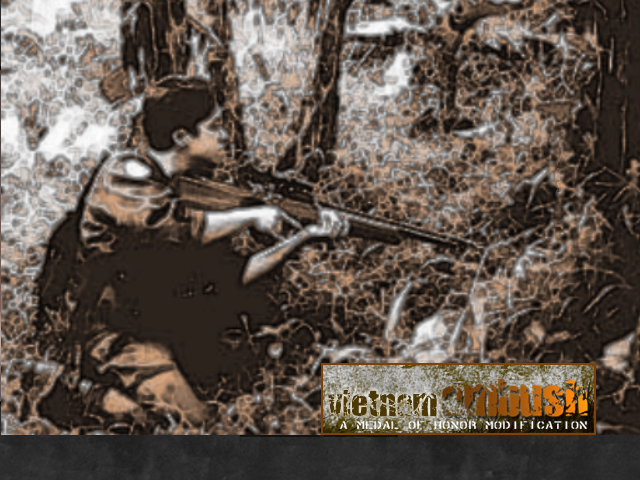
Vietnam Ambush
Vietnam total conversion for Medal of Honor Allied Assault. Includes all new Vietnam era weapons, player skins and two custom maps. VietNam : Ambush MOHAA TC Public Beta 1.0 - Jungle CTF Map (Push City Hall Style - KillerKind) - Base Assault Map (Object - mohaa_rox) - Custom Jungle Textures (Balr14) - Total Vietnam Weapon Conversion and New Anims ({*CCCP*}Dave, mohaa_rox and KillerKind) M2 Carbine M16 Rifle M21 Sniper Rifle M26 Grenade M79 Grenade Launcher M60 Machine Gun Winchester 870 Shotgun Colt 1911 Pistol SKS Carbine AK47 Rifle RPD Machine Gun RPG Raucket Launcher SVD Dagunov Sniper Rifle Tokarev TT33 Pistol Viet Cong Frag Grenade - New Vehicle and Map Models ({*CCCP*}Dave, mohaa_rox and KillerKind) PT76 Tank ({*CCCP*}Dave and mohaa_rox) Cayuse Helicopter ({*CCCP*}Dave and mohaa_rox) Vietnamese Huts (KillerKind) US Barrakes (KillerKind) Various US/Vietnamese Map Models (KillerKind) Various Custom Foliage Models (KillerKind) - Viet Cong Player Skins and Head Model (Lucifer and Kia) - US Jungle Marine Player Skins (by Kia) - Allied Murphy Player Skin (Lucifer) --

Vietnam 11
------------------------------------------------------------------------------------------------------------------------------------------------------------ MoH:Vietnam 1.1 www.an-studios.com/games ------------------------------------------------------------------------------------------------------------------------------------------------------------ This modification will not affect your regular medal of honor gameplay it runs separately. When joining a game online, insure the server is also running to Vietnam. You can find Vietnam servers by checking the servers map. If the map containing *mv* in its name it is running the Vietnam mod. Check our website for lists of servers running to mod. If you want to host this mod please email us your I.P address and server name so we can add your to our list. Remember to set up the vietnam maps in rotation, we recommend only running vietnam maps when running MoH:Vietnam. admin@an-studios.com You do not need Vietnam 1.0 to run this mod. We recommend you uninstall or remove any other mods you are running. ======================================================================================= Fixes / improvements ======================================================================================= Fixes from 1.0 1. allied skins bug fixed. 2. wheelless f4 jet fixed. 3. typo on esc menu corrected. 4. weapon name bug fixed. 5. the taunt commands fixed. 6. lz area loop removed 7. default loading centred. 8. m16 muzzle flash fixed. 9. m14 and m60 reload sounds fixed. 10. m16 bolt reuved and skinned. 11. pistols reskined more accurately. 12. tt33 holding position improved. 13. m16 and m79 sounds improved. 14. jet map loading time fixed. 15. different user qualities available for jet map. 16. m16 reload and holding animation improved. 17. grenade names fixed. 18. rpk reskinned and bolt added. 19. new map called temple added. 20. m14 remodel and reskinned. 21. jungle map added. 22. picture display added for all weapons. 23. completely new assault rifle animations. 24. new pistol hold positions. 25. menu added. 26. loads of player skins added. 27. sks remodeled/reskinned completely. 28. mussle flash for m60 changed. 29. mounted m60 added. 30. toggable ironsites for rifles and pistols added. 31. toggable fire modes full and semi for m16. 32. svd reload fixed. 33. damage decreased. 34. cambodia raid and dock maps added. 35. new cursor. 36. stance hud display added. 37. reworked jet script. 38. weapon sounds updated 39. ww2 skins removed. 40. toggable ironsights adjusted. 41. vietnam version of survivor added. 42. crosshair changed. 43. peacemaker added for survivor. 44. theme music added. ======================================================================================= Installion ======================================================================================= Installer version - Double click on the install.exe, follow the instructions then use the vietnam icon on the desktop to run the mod. pk3 version - Put the file *zzuser-mohvn1.1.pk3* in the directory *C:\Program Files\EA GAMES\MOHAA\main* Put the folder *g* in the directory *C:\Program Files\EA GAMES\MOHAA\main\sound\dialogue\Multiplayer* (you should back up the old sound *g* sound folder as a precaution) thats it. enjoy :-) Changing Jet map quality - The jet map is a very large and utilize alot of processing power. The default quality it medium this should run on most system. The instructions below only apply if you wish to change the quality it is not required the operate the modification. High quality - If your computer has good specifications take advantage of the higher quality. Put the file *zzzuser-mohvn1.1jethigh.pk3* in the directory *C:\Program Files\EA GAMES\MOHAA\main* Low quality - Computer with low specifactions should use low quality to improve loading time and gameplay enjoyment. Put the file *zzzuser-mohvn1.1jetlow.pk3* in the directory *C:\Program Files\EA GAMES\MOHAA\main* ======================================================================================= System Requirements ======================================================================================= 100 MB free hard disk space Windows XP, Windows Me, Windows 2000, Windows 98, or Windows 95 1.0 GHz or faster Intel Pentium III or AMD Athlon processor 64 MB or greater supported OpenGL capable video card with OpenGL and DirectX 8.0 compatible driver 8x CD-ROM/DVD-ROM drive DirectX 8.0 compatible sound card Keyboard 128 MB RAM Mouse The specification above is recommended. The minimum requirements haven’t been established, the above is our guideline. ======================================================================================= Dev team ======================================================================================= Ajacks - player skins DaRKaNGeL - modeller, animator, some scripting Don - modeller, animator E3D - leader, modeller, skinner (aka ElitE3D) Elgan {sfx} - scripting Mj - mapping Phil {sfx} - scripting Rainx - player skin Wacko - mapping ======================================================================================= Contributors/Unactive Dev ======================================================================================= Apocalypse - misc reskins Assass[N] - players Balr14 - some map textures Cobra {sfx} - scripting DreadHead - players, skinner ======================================================================================= Controls ======================================================================================= planes controls - stand at the rear of the jet and press use to enter. Mouse - steer use - changing weapon left click - use weapon right click - drop bomb staft left - spin left staft right - spin right jump - ejects jump while falling opens parachute crouch - view behind flashlight - To draw press the pistol button twice. "Fire" toggles it on or off. knife - press item/binocular key draw. "Secondary Fire" swings the knife. ======================================================================================= Server Settings ======================================================================================= MoH:Veitnam 1.1 uncompatible with 1.0 servers. Servers should use the pk3 version. setcvar "planecrash" "1" //crash when shot down or just explode , 1 - on setcvar "planejumpcrash" "1" //crash when jump out or wait 2 then explode , 1 - on setcvar "pilot_health" "100" //health that the pilot (plane has during flight) setcvar "stuka_bombs" "6" ///ammount of bombs stuka and c47 have setcvar "fighter_bombs" "2" //ammount of bombs the fights have setcvar "p47speed" "1450" //speed of this plane setcvar "fw190speed" "1450"//speed of this plane setcvar "ju87speed" "950"//speed of this plane setcvar "c47speed" "800"//speed of this plane setcvar "Flyable" "1" //0 -off, 1 -on. the code runs or not setcvar "pro" "0" //stearing is slow or fast setcvar "Elgan_eject" "1"//can eject setcvar "rockets" "5" //rockets per plane setcvar "rocketsspeed" "1900" //rockets travel speed setcvar "rocketrange" "10000" //range before rockets explode setcvar "torpedo" "0" //planes have torpedos or not setcvar "elgan_debug" "0" //1 or 2 or 0 for off setcvar "plane_easy" "1" //shoot planes down easier setcvar "crash_eject" "1" //can eject when crashing setcvar "airshow" "1" //can have airshow, 0 cant have smoke ======================================================================================= Copyright © 2005 AlterNation ======================================================================================= All rights reserved. All contents of this compressed file belong to AlterNation and SFX. Taking anything from this modification without the respective authors permission is an infringe of copyright. ------------------------------------------------------------------------------------------------------------------------------------------------------------
Medal of Honor: Allied Assault Mods (MOHAA) — Complete Community Archive
Welcome to the premier repository for Medal of Honor: Allied Assault mods. Since the game's groundbreaking release in 2002 by 2015, Inc. and EA, MOHAA has inspired one of the longest-standing modding communities in first-person shooter history. MOH-DB preserves, categorizes, and serves over 1,600 verified community modifications, custom enhancements, and competitive utilities for Allied Assault, Spearhead, and Breakthrough.
Explore MOHAA Mod Categories
Player Skins & Uniforms
Over 700 historically accurate and creative player uniforms for Allied and Axis factions. Equip authentic U.S. Army Rangers, 101st and 82nd Airborne paratroopers, British Commandos, Soviet Red Army conscripts, Wehrmacht Heer infantry, Fallschirmjäger, and Waffen-SS camouflage patterns, as well as classic community clan skins.
Weapon Models & Reskins
Enhance your WWII arsenal with ultra-detailed weapon replacements and high-resolution textures. Popular downloads include authentic wood-finish Kar98k sniper rifles, realistic metallic sheen M1 Garand models with classic "ping" animation refinements, Thompson submachine guns, MP40s, BAR 1918 rifles, and custom iron-sight alignments.
Soundpacks & Realism Audio
Transform the sonic atmosphere of Allied Assault. Replace compressed 2002 Quake-engine sound effects with cinema-grade gunfire recordings, authentic distant artillery rumblings, terrifying Stuka dive-bomber sirens, supersonic bullet cracks, metal ricochets, and remastered German and American voice callouts.
HUDs, Menus & Crosshairs
Modernize the in-game interface for 1080p, 1440p, and 4K widescreen displays. Download minimalist competitive heads-up displays, custom dot and crosshair overlays, cleaner compass indicators, redesigned main menus, and unobtrusive health and ammunition counters favored by competitive league players.
Server Utilities & Admin Scripts
Run resilient, modern multiplayer game servers with essential server-side utilities. Includes automated map rotators, anti-cheat detection tools, voting scripts, custom match timers, ping balancers, and administrative rcon managers designed for dedicated servers running 24/7.
MOHAA Reborn 1.12 Community Patch
The gold standard community patch for modern MOHAA servers and clients. The Reborn 1.12 patch resolves legacy buffer overflows, fixes client query exploits, expands internal script limits for complex mods, and provides a built-in server browser to replace the defunct GameSpy master server.
How to Install MOHAA Mods: Quick Guide
Identify Your Target Directory
MOHAA stores all game assets in subfolders inside the root installation directory:
- MOHAA (Base):
.../MOHAA/main/ - Spearhead:
.../MOHAA/mainta/ - Breakthrough:
.../MOHAA/maintt/
Paste Without Extracting
Download the mod archive from MOH-DB. If it is zipped (.zip or .rar), extract the enclosed .pk3 file. Place this .pk3 directly into your game's /main/ folder.
How to Remove or Troubleshoot
To remove any mod, simply delete its .pk3 file from the /main/ folder. The game will immediately return to stock behavior without reinstalling.
Frequently Asked Questions about MOHAA Mods
To install MOHAA mods, copy the downloaded .pk3 file directly into your Medal of Honor Allied Assault installation folder under /main/ (or /mainta/ for Spearhead, and /maintt/ for Breakthrough). You do not need to unpack or extract the .pk3 archive—the game engine loads it automatically upon launch.