
Medal of Honor: Allied Assault Mods (MOHAA)
Discover and download community-created modifications to enhance your Medal of Honor: Allied Assault experience.
1676 Mods Found
Unclebobs Map Mods
by unclebob Milwaukee, WI Oct 18 2005 So just a basic MOD via map script for a few stock maps! These are desinged to work with MOH Allied Assault! This MOD adds some weapons, ammo & steps to get around the maps easier. No known glitches or errors. But as always this is a free MOD & I take no responsibility for any harm or damage that may occur due to this Modification or your use of it. unclebob@wiDOTrrDOTcom MODed map list MOHaa maps: Southern France, Destroyed Village, Remagen, Crossroads, Snowy Park, Stalingrad, Algiers.
Billys Map Mods
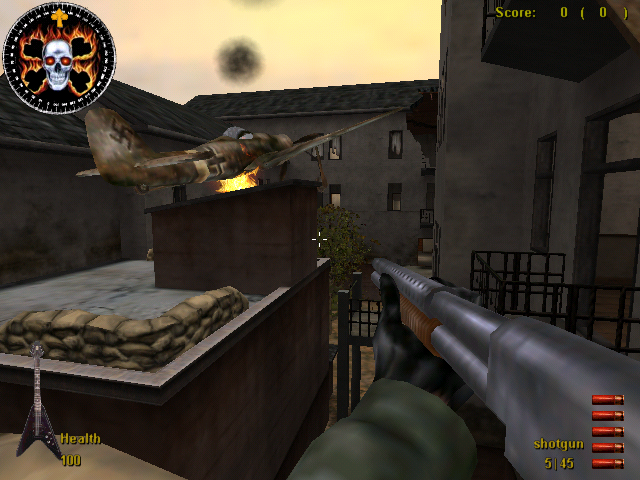
Map Mods By CplBilly RO.cplbilly@hotmail.com www.rock.clanservers.com come on forums modding section any questions Just put in mohaa/main maps 123467 our modded trucks tanks etc on all maps couple of surprizes map 1 sandbag city map 2 couple of trucks airplane Burning 1 tank map 3 tank trucks map 4 Trees and two trucks map 6 trees and airplane Burning Map 7 trucks tanks obj 1 trucks tank cars obj2 Fire buring under rocket

Animated Tank Add
With this file you can replace M4 Sherman in "Destroyed Village" map with a Tiger IV [tracks moving like stuck in mud] and replace cars in "The Crossroads" map with same track animated TigerIV and a second static Tiger tank. [Do not forget to delete other vehicle add-on files if you have any.] Install: Copy pk3 file under Mohaa/main folder. Uninstall: Delete file. Leon / leonmohaa@hotmail.com [Do not distribute my files without written permission.] -----------------------------------------------------------------------------------------------------------------
Toiletmasters Death Messages
+===========+ |(un)install| +===========+ Just place the toiletmasterdeathmessages.txt-file in your mohaa/main folder. To uninstall, remove it. ------- +===========+ |Description| +===========+ It changes a lot of messages in the game. ------- +==========+ |READ THIS!| +==========+ DO NOT CHANGE THE NAME OF THIS FILE, YOU MAY TRANSPORT IT, BUT ONLY IF YOU GIVE ME -TOILETMASTER- SOME CREDIT FOR IT! -------
Rfs Death Messages
***** R || F ***** Release Date: 01-28-03 ReCoil || Factor Custom Startup and Death Messages ****WARNING CONTAINS ADULT LANGUAGE**** Client Side only MOD! If your stupid like me, that means that everyone has to have it to experience the fun. For SpearHead Only!!!.. Reworked the localization file to provide a some what shocking and could be received as vulgar in game messages. Definitely not in the realm of realism. I would not have normally made such a shocking mod but yours truly - "Captain Kick Your Ass" made me. So kindly direct all negative feedback to him... LOL Feel free to change and mod to your own liking as well... :) Skin not wroking? Try unchecking the box "Texture Compression" in SpearHead - Options - Video. This goes for MOHAA as well.. :) **************************************************************************************************** Place the .pk3 file into the MOHAA/mainta folder in Medal of Honor SpearHead. To remove the skin, just delete the .pk3 file. Enjoy :) tcfool@attbi.com ******************************************************************************************************* Disclaimer: All images were either created, modified, improved upon and/or because I have no real talent blatantly ripped off by ReCoil || Factor. So if you see some graphical rendition in my work that you think is yours "Well Thanks" and please remember one thing - There is a Very Fine Line Between "Hobby" and "Mental Illness"
Hitmans Death Messages Ii
Hitman's Death Messages Creator: [DS] SGM. Hitman Time Created: 8/4/02 Installation: Simply place this file in your Global folder, or, lacking that, just put it in your Mohaa/main folder. Comments: New release, people may not have liked my first release... This one does not chagne too much. Please post your comments on site or send comments to mwood@beld.net NOTE: This mod changes names of certain weapons and messages like "5 seconds to clear room" You have been warned!
Swear Filter V11
Redsoccerdevil & Bazooka Joe's MOH Swear Filter V1.1 Hello, and thanks for downloading our mod for Allied Assault! Hopefully, you are a server administrator, and already have a good concept on how to alter files on your server. This README is going to be brief, and straight to the point. If you have any problems running this script properly, please feel free to drop an email to: fogbazookajoe@aol.com with "Swear Filter Help" as the subject. Here's what this script does. Red and I discovered that the localization.txt file can carry out commands as basic as chat in game. So we figured why not built a filter database that will block all "naughty" words that don't belong in a game? We've made this file, consisting of over 750 expletives that should and WILL be blocked in your server game. Among these words, are also variations, including words in all caps, with exclamation points, question marks, etc. INSTALLATION/UNISTALLATION In this .ZIP file is this README that you are viewing right now, and a folder called "global", with a file named "localization.txt inside of it. Extract the folder "global" into your MOH\main directory. (EXAMPLE: C:\Program Files\EA Games\Allied Assault\Main ) MAKE SURE the "global" folder is placed in Main, and NOT the MOH folder. Now, simply start Medal of Honor. THAT'S IT! The script will be detected by MOH, and will run the filter from there. For any reason you decide you should not need this mod, just simply delete the global folder from your MOH\Main folder. CREDITS This mod was brought to you by: Bazooka Joe Redsoccerdevil Thanks to: Ktog (for suggestions) AA.COM server members (for testing) FAQ • I can't add my Message Of The Day to the file. How do I do this? – Send me an email at fogbazookajoe@aol.com, along with the MOTD you wish to add, and I will add it for you. • How come a death message mod I have will not work with the chat filter? – The chat filter overrides any other files that modify the localization.txt file, so if you want custom death messages, you must please send us the file that contains the custom messages, and we will modify it for you. • You missed a word! Can I add it? – You probably can't. Send us the word in an email, and we'll add it to the next release! • When Medal Of Honor first boots up, it takes longer than usual. Is this because of your mod? – Yes. Medal Of Honor must read and identify all of the swear words before it can load them to your game. This, unfortunately, takes a few extra minutes, so don't think that you game has froze, it's just loading the filter. Did we miss any words? Suggestions? Please, LET US KNOW!!! We can make this script better with YOUR feedback! Email us at fogbazookajoe@aol.com
Team Counter HUD
Install: Place in MAIN folder Uninstall: Remove from MAIN folder Usage: **REQUIRES REBORN PATCH (Not Included) AND EVENT HANDLER (Included)** Displays a HUD in the lower right of the screen that shows the number of players alive and the total number of players on a team for each team. Useful for gametypes that do not include a HUD with MEFY's gametypes. Uses dmprecache to execute eventhandler.scr and teamb.scr. Add the lines to the bottom of your dmprecache if necessary: exec global/eventhandler.scr exec global/teamb.scr Thanks to Purple Elephant for the Reborn Event Handler. Thanks to Own3mAll for the team counting script from his Last Man Standing mod. For any support with this mod, visit www.clanbrats.org, or email me: darren@clanbrats.org.
Budweiser Beer Health Pack
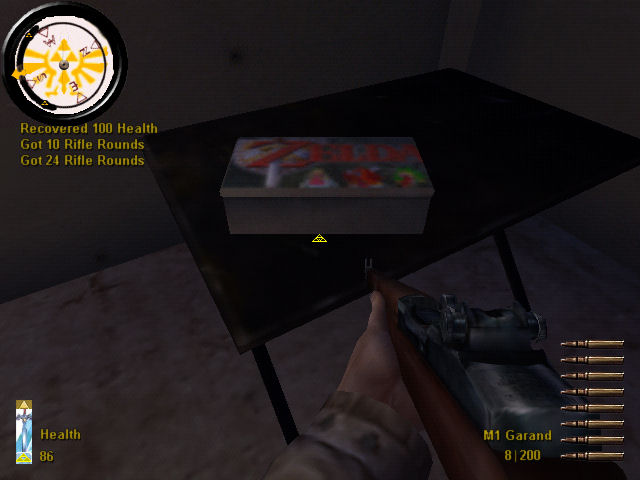
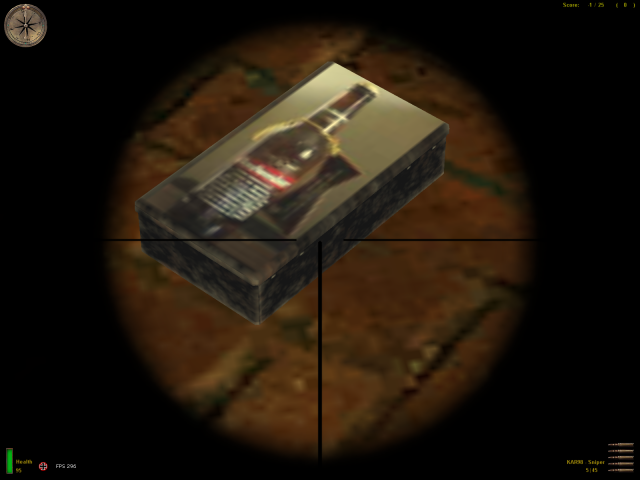
Here u go custom health kit with budweiser beer bottle on box and you hear beer pouring when u pick up health kit enjoy!email flakrider@hotmail.com

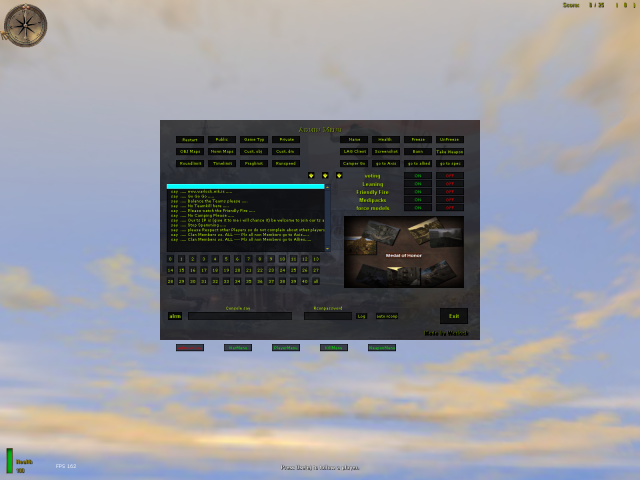
RCON Player Menu
Older versions are included as well. Updated as of March 18th 2009! ~ Version 1.06 ~ Mod Edited by ~ Ghost ~ A.K.A {PC}{²/¹/¹}Sgt.PPCLI © 2009 Credit!!! Please do not remove this File!! Thank You This Menu was original designed as an Rcon Menu, The original Author is unknown as far as I know admintool_goldenduck The following is a link to the original mod http://medalofhonor.filefront.com/file/Admin_tool_Goldenduck;79930 ______________________________________________________________________ I also took User-EasyPicKCross and placed his mod into this one User-EasyPicKCross.pk3 Created By: BaTtOuSaI Date: 5.10.05 Email: nomqn92@yahoo.com Version: 1.0 The following is a link to the original mod http://medalofhonor.filefront.com/file/Crosshair_Chooser;41795 _____________________________________________________________________ Project Raptor 46 Crosshair Chooser F11 Created By: *>DM
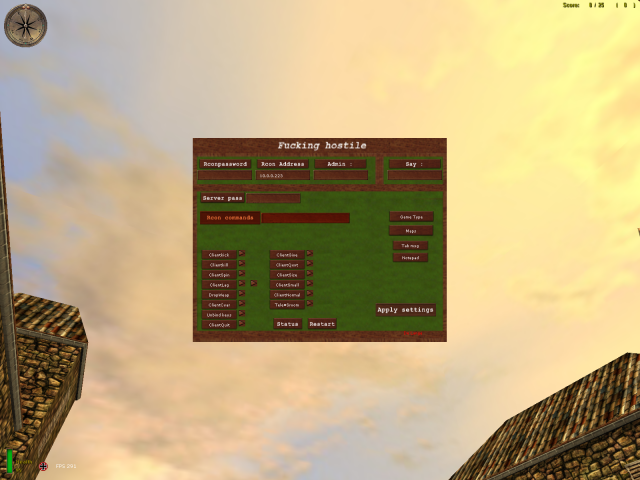
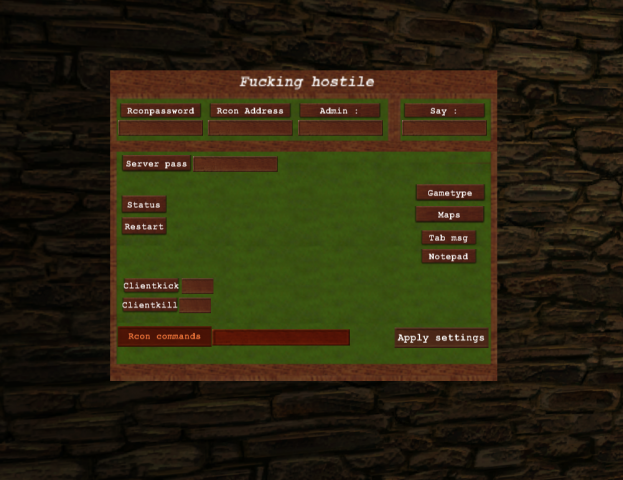
RCON Menu MOHAA Style Final
------------------------------------------------------------------ ------------------------------------------------------------------ ***INSTAL: Place everything in your C:\Program files\EAgames\MOHAA\main *Fill in your rconpassword in rconpassword.cfg -Banlist *Press on the notepad button on the menu. A little text editor will show up. Press file/open then select banlist.txt and change the ip's of your choice. When your done press file again and save. The rest should be verry easy to understand =) If you have any questions\requests you can add me on xfire : delangste ------------------------------------------------------------------- ------------------------------------------------------------------- ***uninstal Remove the files in your MOHAA/main Enjoy !! WWW.FYCCREATIONZ.COM We do not support hacking anymore!!!!!!!!!!!!!!
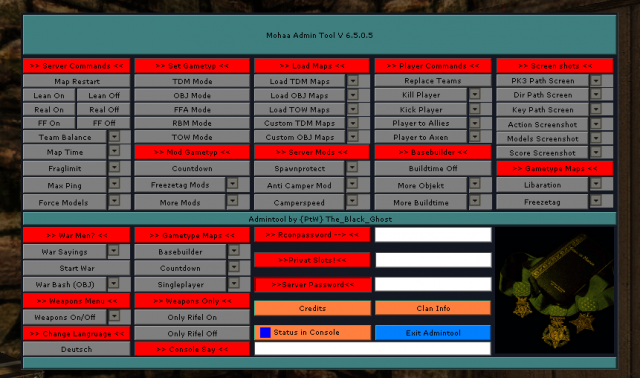
Ptw Admin Menu
Readmy {P†W} Admin Client V 6.5.0.1 Installation: - Put the two fils ({PtW} Admin Client and {PtW} Adminbefehle) in your Main/Mainta or Maintt folder! - Now you can open the Admintool over the "n" Key (English version) Reamamber this Mod will only work correctly withe the {PtW} Adminmod Server! The following features can you aktivate or disable over the Tool: - Map Restart - During the running backs on or off - Real mode on or off - Frendly Fire on or off - Time Limit and Fraglimit can change - You can load all stock Gametype modes and maps - Many Costume Maps are in the tool (all the maps you get on www.ptw-fun.de) - Anti Campermod - Kill / kick function - Rifel only on and off - Weapons can also be banned and allowed - Many Gametyp mods (for example Freezetag, countdown or Basebuilder) can be loaded - Singleplayer maps can be loaded And more..... For the change of the gametype mods (for example, from FFA to Freezetag) is the {PtW}Adminmod Server tool on your server needed!!!!!!!!!!!!!!!!!!!!!!!!!!!!!!!!!!!!!!!!!!!!!!!!!!!!!!!!!!!!!!!!!!!!!!!!!! and Admin menu: Readmy English Installation: 1 Find the right tool for the Admin Server you out! 2 Carrying Info.cfg please in your Clandatas! 3 Now the ortner Gametyp.cfg open each file and in the Startmap and the map rotation list according to their own desires set! You can also stuff like Fraglimit timeout and default are to! 4 now all the data from the folders of the Servermod to it and want to use All config dadeien aud Gametyp.cfg folder on the server eirem Upload! 5 Now you need to your Server.cfg as follows: -very top-writes her: exec ci.cfg this is important so that the Tool Server is loaded correctly! -further below, then insert the following: seta countdown 0 so the countdown mod is not always on -To also from the beginning to the right game you need to start now following: name of the exec server.cfg you want to start (e.g. ffa.cfg exec staret the Free For All mode! 6 Server re-start and have fun! 7 Lock at the server.cfg exec ci.cfg // You need this to start the admin server mod! set cheats "0" set g_gravity "800" set g_speed "320" set sv_maxRate "8000" set sv_cheats "0" set sv_hostname "Servername" set sv_maxclients "16" set g_gametype "1" set sv_pure "0" set rconpassword "test" set sv_privateclients "0" set sv_privatepassword "0" set sv_maxping "200" set sv_floodprotect "1" set flood_persecond "4" set sv_gamespy "1" set fraglimit "50" set timelimit "0" set g_warmup "0" set g_inactivekick "600" set g_inactivespectate "600" set g_teamforcebalance "0" set g_teamdamage "0" seta g_motd "Welcome to Server" set g_log "logs/games.log" set sv_team_spawn_interval "0" set g_forceteamspectate "0" set g_allowvote "0" set sv_allowdownload "0" set dmflags "262144" // allow lean seta countdown 0 // This must be set or Countdown will run every time!! // Game Config´s //exec capture_the_flag.cfg // Capture The Flag //exec countdown.cfg // Countdown //exec demolation.cfg // Demolation //exec freezetag_ctf.cgj // Freezetag-Capture The Flag //exec freezetag_demolation.cfg // Freezetag-Demolation //exec freezetag_obj.cfg // Freezetag-Objective //exec freezetag_tdm.cfg // Freezetag-Team //exec freezetag_tow.cfg // Freezetag-Tug Of War //exec liberation.cfg // Liberationexec ffa.cfg // Free for all //exec tdm.cfg // Team //exec obj.cfg // Objective //exec rbm.cfg // Round based //exec tow.cfg // Tug Of War seta sv_master1 "mohmaster.2015.com" seta sv_master2 "master0.gamespy.com" seta sv_master3 "master1.gamespy.com" seta sv_master4 "clanservers.net"
Menu Shooting Sounds
Replaces menu drum [trampete] sounds with shooting / reloading sounds of Lee Enfield and Kar 98 rifles. Install: Copy file under Mohaa/mainta folder. Uninstall: Delete file. Leon leonmohaa@hotmail.com ----------------------------------------------------------------------------------------------------------------------------------------
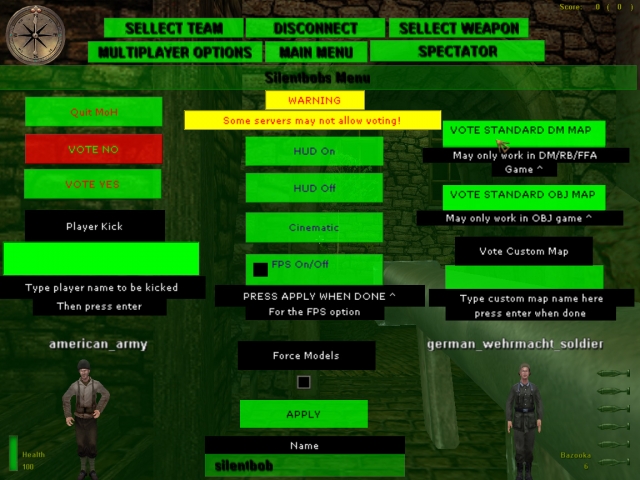
Vote Menu
SILENTBOBS VOTE MENU A simple vote menu, bring it up by pressing escape or whatever button you have dm_main binded to. This menu a monkey could work, big buttons BUT you may not be able to vote on some servers. Made this menu because most people dont know how to vote. ------------ To instal place the pk3 in your main folder _______ To uninstal delete the file from your main folder ________________________________________________________ Email= silent_bob_8@hotmail.com

Ghosts Admin Menu
***Ghost's Admin Menu*** ***Version 1*** -------- 1.Info This is my first menu :p There are 3 menu's inside the .pk3: -adminmenu -playermanu -serverlistmenu There are also sounds in the menu --------- 2.Install info 1* -Place ghost admin menu.pk3 in: C:\1_Games\EA GAMES\MOHAA\mainta if u play Medal of Honor Allied Assault(tm) Spearhead C:\1_Games\EA GAMES\MOHAA\maintt if u play Medal of Honor Allied Assault(tm) Breakthrough C:\1_Games\EA GAMES\MOHAA\main if u play Medal of Honor Allied Assault 2* Then go in your moh game 3* Now enter the following into the CONSOLE: bind x togglemenu ghostmenu (the x can by a letter of your choice , I have it on n). !!!Not tested at Medal of Honor Allied Assault!!! !!!The serverhost doesnt need the file!!! ---------- 3.uninstall info Delete the file ---------- 4.other info See the screenshots ---------- 5.credits Making menu's: -Ghost -server list menu wasnt made by me (doesnt know who made it) some help: -A tutorial to make menu's,doesnt know who made it crosshairs: -XKM -naked_snake -some others ---------- 6.Questions,bugs,contact me contact me: xfire:ghost0620 msn:story_matthias@hotmail.com ---------- Enjoy ...

Fanos RCON Menu
This Rconmod is made by FanoBliv. The ZzZzZ-RconUpdated mod is made by GlocK. Improvments : I fixed The Instant kill option. This option works for AA, SH and BT now ! I fixed the Drop Weapons option. This option works for AA, SH and BT now ! I fixed the Force allies option. This option works for AA, SH and BT now ! I fixed the Force axis option. This option works for AA, SH and BT now ! I fixed the Force Spectator option. This option works for AA, SH and BT now ! I added an option 2 SPIN the player. This option will spin the player for 10 seconds. I added an option to force a screenshot on a player. This gives the player a forced screenshot (he must send it in) I added (aa) and (sh) in front of the maps so you know whats an AA and whats an SH map. I deleted the option : Freeze. How to get this version work : Place the user-Fanosrconmenuorignial file in your main, mainta or maintt. Place the ZzZzZ-RconUpdated file in your FTP server. (If you dont do this the new things wont work the old things will still work.
Medal of Honor: Allied Assault Mods (MOHAA) — Complete Community Archive
Welcome to the premier repository for Medal of Honor: Allied Assault mods. Since the game's groundbreaking release in 2002 by 2015, Inc. and EA, MOHAA has inspired one of the longest-standing modding communities in first-person shooter history. MOH-DB preserves, categorizes, and serves over 1,600 verified community modifications, custom enhancements, and competitive utilities for Allied Assault, Spearhead, and Breakthrough.
Explore MOHAA Mod Categories
Player Skins & Uniforms
Over 700 historically accurate and creative player uniforms for Allied and Axis factions. Equip authentic U.S. Army Rangers, 101st and 82nd Airborne paratroopers, British Commandos, Soviet Red Army conscripts, Wehrmacht Heer infantry, Fallschirmjäger, and Waffen-SS camouflage patterns, as well as classic community clan skins.
Weapon Models & Reskins
Enhance your WWII arsenal with ultra-detailed weapon replacements and high-resolution textures. Popular downloads include authentic wood-finish Kar98k sniper rifles, realistic metallic sheen M1 Garand models with classic "ping" animation refinements, Thompson submachine guns, MP40s, BAR 1918 rifles, and custom iron-sight alignments.
Soundpacks & Realism Audio
Transform the sonic atmosphere of Allied Assault. Replace compressed 2002 Quake-engine sound effects with cinema-grade gunfire recordings, authentic distant artillery rumblings, terrifying Stuka dive-bomber sirens, supersonic bullet cracks, metal ricochets, and remastered German and American voice callouts.
HUDs, Menus & Crosshairs
Modernize the in-game interface for 1080p, 1440p, and 4K widescreen displays. Download minimalist competitive heads-up displays, custom dot and crosshair overlays, cleaner compass indicators, redesigned main menus, and unobtrusive health and ammunition counters favored by competitive league players.
Server Utilities & Admin Scripts
Run resilient, modern multiplayer game servers with essential server-side utilities. Includes automated map rotators, anti-cheat detection tools, voting scripts, custom match timers, ping balancers, and administrative rcon managers designed for dedicated servers running 24/7.
MOHAA Reborn 1.12 Community Patch
The gold standard community patch for modern MOHAA servers and clients. The Reborn 1.12 patch resolves legacy buffer overflows, fixes client query exploits, expands internal script limits for complex mods, and provides a built-in server browser to replace the defunct GameSpy master server.
How to Install MOHAA Mods: Quick Guide
Identify Your Target Directory
MOHAA stores all game assets in subfolders inside the root installation directory:
- MOHAA (Base):
.../MOHAA/main/ - Spearhead:
.../MOHAA/mainta/ - Breakthrough:
.../MOHAA/maintt/
Paste Without Extracting
Download the mod archive from MOH-DB. If it is zipped (.zip or .rar), extract the enclosed .pk3 file. Place this .pk3 directly into your game's /main/ folder.
How to Remove or Troubleshoot
To remove any mod, simply delete its .pk3 file from the /main/ folder. The game will immediately return to stock behavior without reinstalling.
Frequently Asked Questions about MOHAA Mods
To install MOHAA mods, copy the downloaded .pk3 file directly into your Medal of Honor Allied Assault installation folder under /main/ (or /mainta/ for Spearhead, and /maintt/ for Breakthrough). You do not need to unpack or extract the .pk3 archive—the game engine loads it automatically upon launch.