
Medal of Honor: Allied Assault Mods (MOHAA)
Discover and download community-created modifications to enhance your Medal of Honor: Allied Assault experience.
1676 Mods Found

Bullet Mouse Cursor
created on 8-26-02 This pack contains three different bullet cursors 1.plain-just a plain bullet 2.tracer-bullet with redtip 3.armour piercing-bullet with black tip I molded them after a 20mm round. To install: find the one you like from the pics and extract the matching pk.3 file to your main folder.. To uninstal: just delete the pk.3 from your main folder. contact: captkickyourass@cox-internet.com
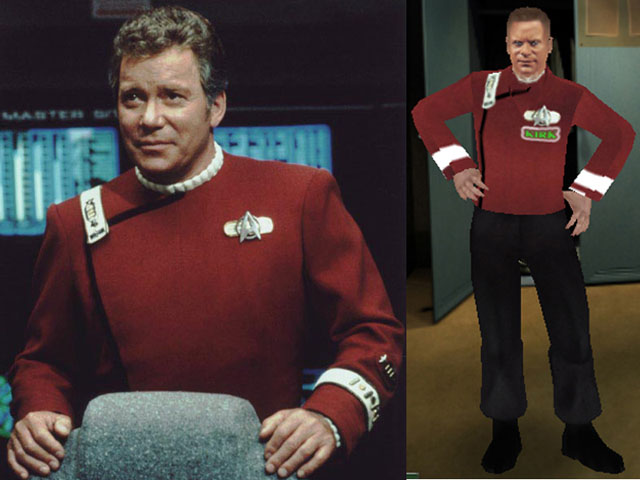
allied_admiral_kirk
This skin is available for all teams: allied_admiral_kirk allied_british_admiral_kirk allied_russian_admiral_kirk german_admiral_kirk This skin was made by MARBLEZILLA, currently a member of the SBS (sandboxsoldiers) gaming clan. I've made about 25 custom skins so far for fellow clan members and some just for fun. I run MOHAA with the Breakthrough expansion pack. I never installed Spearhead, although I'm sure many of the maps and skins I browse through have many Spearhead aspects. ------------------------------------------------------------------------------------ Our clan's website is www.sandboxsoldiers.com. My website is www.geocities.com/marblezilla. My E-mail is marblezilla AT hotmail DOT com. --------------------------------------------------------------------------------------- I started with a kirk skin I've seen many times on different server's skin-packs. I re-did the face from an old Shatner pic I had. I also created the tunic/shirt from a movie photo I downloaded. The shirt has his name in the front along with the words Starfleet. On the back is a pic of the USS.Enterprise with the words "Set Phasers On Melt". ------------------------------------------------------------------------------------------ Each skin has 4 sets of TIK files. One german pair and 3 allied ones. A allied (US), allied_british & allied_russian. This is so you can use all the weapons from each nationality. They are located in the Models/Player folder in the PK3. Each skin has a shader file located in the Scripts folder in the PK3. Each skin has TGA images with custom, unique names located in the Textures/(Skin Name) folder in the PK3. I don't include any of the standard SKD skeletal files as you should already have them. All skin image editing done with Adobe Photoshop CS2. All PK3s made with PakScape. My thanks to all that helped me in various ways, including SBS Trinity, SBS Bullrtproof, SBS Charmed Vixen & many others. Tutorials include the Nemesis skinning/modding site, Wolfman's site and quite a few others. To test the skins, I remove all my custom skin PK3s and check out the skins in the multiplayer select mode and use them in a lan game with 2 CPUs at my house. ------------------------------------------------------------------------------------------ Install: If your running Spearhead, open up the zip file and copy the skin PK3 to your EA Games/MOHAA/Mainta folder. if your running Breakthrough, open up the zip file and copy the skin PK3 to your EA Games/MOHAA/Maintt folder. -------------------------------------------------------------------------------------------- Legal disclaimer: Have fun with them. Mod them. Use them on your clan's server. The only thing I ask is remember who made them. Haaaa, not me. I only got creative and modified them. Oh yea ... Freeze-Tag RULES !!!!!!!!, haaaaaaa.
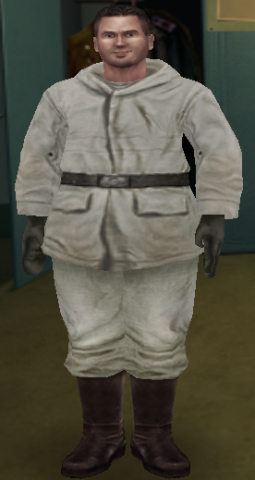
Allied_Snowball
This skin was made for the Snowball Contest mod (by jv_map) & Snowball Map (by 7th.DeltaAssassin). This skin is available for allies & axis: Allied_Snowball German_Snowball
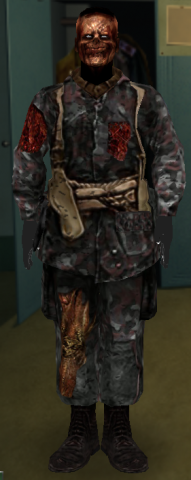
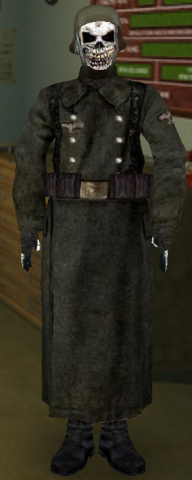
allied_american_pmoh_zombie1
This skin is available for American (Allies), British & Russian: allied_american_pmoh_zombie1 allied_british_pmoh_zombie1 allied_russian_pmoh_zombie1
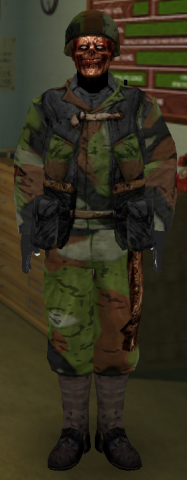
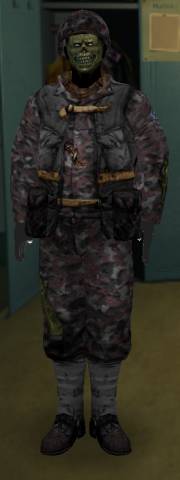
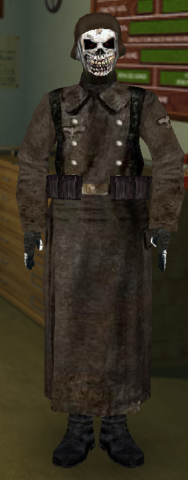
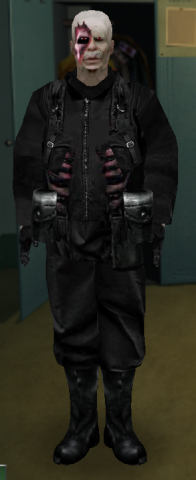
allied_american_pmoh_zombie2
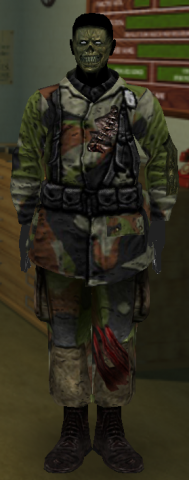
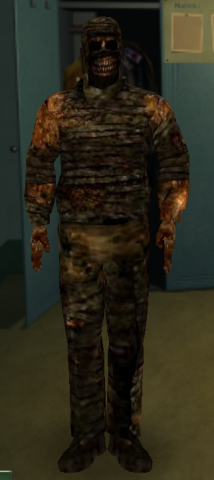
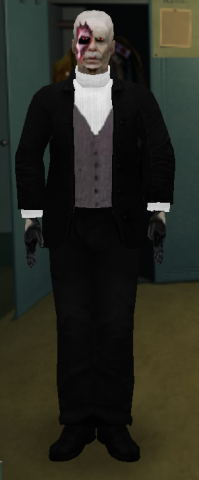
This skin is available for Allies, British & Russian. allied_american_pmoh_zombie2 allied_british_pmoh_zombie2 allied_russian_pmoh_zombie2
Cleaners Map Mods
MPSH modside map pak for Spearhead Server-side modded alliedassault maps for Spearhead. These and others were only available by request in the past but decided to make them available to the public. -these are modded alliedassault maps for a spearhead server. Maps included: (mohdm1) Southern France 1944 (mohdm2) Village of Breil (mohdm3) Remagen Rhineland 1945 (mohdm5) Finland:Soviet invasion 1940 (mohdm6) Stalingrad Southern Russia 1942 (mohdm7) Algiers North Africa 1942 (obj_team3) Omaha Beach:Charlie Sector maps were modded to increase play-action and to maximize enjoyment -fps & lag also went into consideration when modding these maps and key spawns have been protected but not infested (these maps do not contain 80 panzer tanks laid out all over the place as in some mods turning the maps into a unplayable scrapyard of military vehicles) These maps are modded to enhance battleplay in mind. NOTE: these set of maps are currently for spearhead only. Some of these maps will work in alliedassault- if you are running an alliedassault server you may contact me and I will send you the modside maps for AA. installation: unzip and upload/place the .pk3 file into your MAINTA directory, make sure to remove other server side map mods if they are dm/mohdm maps. contact: cleaner@75thabn.com The Firefight Arena - 66.151.132.167 www.75thabn.com/mpshmodz
Lamrons Map Mods V8
Map mods for stock SH Multiplayer maps (and for 2 AA maps, so those might work in AA as well). 2 Files present, 1 of them is only small and contains only 1 map so probably an update on the original one.
Roc Pain Sound Mod
-RoC-In-Pain-Sound-Mod- I have made adjustments to the aliases used for the pain and death sounds when playing multiplayer. I picked out the funniest sounds I could find to make it entertaining when someone jumps, gets shot or dies. If you have suggestions or requests. Feel free to email me at synapses11@yahoo.com or come to IRC on Gamesnet channel #|=RoC=| Just unzip the pk3 inside this archive to your /Ea Games/Mohaa/main folder on the server and reboot your server. This is not made to be client side although it might work when you connect to different servers. Players do not need this file to hear the changes. Only need on the server the player connects to. To try it out before installing it connect to the Reign of Carnage's MOHAA server and see for yourself. Reign Of Carnage 66.151.182.51:12203 |=RoC=|Syn synapses11@yahoo.com
Themed Commands Mam
/* ================================================================================ Rindogs UberMenu and Rindogs_ThemedCommands_MAM_Addon for Medal Of Honor: Version 1.0 (10/10/04) Copyright (c) 2003-2004 Ron Schacht email: mods@rindog.com Permission is hereby granted, free of charge, to any person obtaining a copy of this software and associated documentation files (the "Software"), to deal in the Software without restriction, including without limitation the rights to use, copy, modify, merge, publish, distribute, sublicense, and/or sell copies of the Software, and to permit persons to whom the Software is furnished to do so, subject to the following conditions: The above copyright notice and this permission notice shall be included in all copies or substantial portions of the Software. THE SOFTWARE IS PROVIDED "AS IS", WITHOUT WARRANTY OF ANY KIND, EXPRESS OR IMPLIED, INCLUDING BUT NOT LIMITED TO THE WARRANTIES OF MERCHANTABILITY, FITNESS FOR A PARTICULAR PURPOSE AND NONINFRINGEMENT. IN NO EVENT SHALL THE AUTHORS OR COPYRIGHT HOLDERS BE LIABLE FOR ANY CLAIM, DAMAGES OR OTHER LIABILITY, WHETHER IN AN ACTION OF CONTRACT, TORT OR OTHERWISE, ARISING FROM, OUT OF OR IN CONNECTION WITH THE SOFTWARE OR THE USE OR OTHER DEALINGS IN THE SOFTWARE. ================================================================================ */ ******************************************************************************** ******************************************************************************** Credit to Buzz_LightBeer for MAM(Mohaa Admin Mod). ******************************************************************************** Credit to TMT(modtheater.com) for publishing a superior site that has proven to be an excellent resource for mods. ******************************************************************************** Credit to .Map(http://dynamic4.gamespy.com/%7Emap/mohaa/index.php) for publishing a superior site that has proven to be an excellent resource for mods. ******************************************************************************** Credit to MohAdmin.com for publishing a superior site that has proven to be an excellent resource for server admins. ******************************************************************************** Credit to members of the community for voluntarily posting helpful info to make this mod possible ******************************************************************************** ******************************************************************************** Special Thanks to: Jv_Map - for his countless little tricks that have made their way into this mod in so many ways. Mefy - for his extended gametype mods and continued support for the community. tltrude - for his many examples and input in the forums. bdbodger - for his dogs and continued support in the forums. ******************************************************************************** To integrate with MAM: 1. Place zzzzz-ThemedCommands.pk3 in the corresponding folder for each game: maintt for Breakthrough mainta for Spearhead 2. Register the mod with MAM by adding this line to ci.cfg or custom.cfg depending on your MAM setup. append mam_register_mod "global/Rindogs_Themedcommands.scr" Users of the menu only need to do step 1. Step 2 is for setting the commands up on the server. [b]Big[/b] - [i]Change Axis/Allies/or All to giants[/i] [b]Bigpoppa[/b] - [i]turns the client into a giant/disables gun/spams client[/i] [b]Crusher[/b] - [i]client is crushed by piano[/i] [b]Disarm[/b] - [i]takes away all weapons of the client[/i] [b]Flip[/b] - [i]clients view is flipped by a given angle[/i] [b]Fugitive[/b] - [i]the target half of the Sheriff command[/i] [b]Ghost[/b] - [i]client is bashed to death by a ghost[/i] [b]Greystone[/b] -[i]client is turned to stone and weapon shoots blanks[/i] [b]Inferno[/b] - [i]burns the client to death[/i] [b]Jumpglitch[/b] - [i]makes client jump[/i] [b]Kickwarn[/b] - [i]client gets a message and must hit escape to remove the message[/i] [b]Myst[/b] - [i]vaporizes the client to death[/i] [b]Normal[/b] - [i]Change Axis/Allies/or All to normal size[/i] [b]OTD[/b] - [i]client is attacked by a dog[/i] ([b]O[/b]ur[b]T[/b]eam [b]D[/b]og) [b]Rindog[/b] - [i]client is attacked by a dog[/i] [b]Rinspin[/b] - [i]spins the client[/i] [b]Rocket_mod[/b] - [i]rapid fire rockets with scope[/i] [b]Rocket_ammo[/b] - [i]gives client unlimited ammo[/i] [b]Rocket_dud[/b] - [i]causes clients rocket to shoot duds[/i] [b]Rocket_smoke[/b] - [i]causes clients rocket to shoot smoke[/i] [b]Runt[/b] - [i]turns the client into a Midget/disables gun/spams client[/i] [b]Sheriff[/b] - [i]Allows an Admin to fly a plane and target problem players...2 part command along with Fugitive[/i] [b]Shortstack[/b] - [i]turns the client into a Midget/disables gun/spams client[/i] [b]Small[/b] - [i]Change Axis/Allies/or All to midgets[/i] [b]Snype[/b] - [i]client is sniped and then kicked[/i] [b]Sparks[/b] - [i]client is electrocuted to death[/i] [b]Stackem[/b] -[i]client is killed by a stack of bombs[/i] [b]Stonecold[/b] -[i]client is turned to winter stone and weapon shoots blanks[/i] [b]Storm[/b] -[i]Rain cloud above client/client struck by lightning[/i] [b]Striker[/b] -[i]client is struck to death[/i] [b]Thrasher[/b] -[i]client is attacked by Thrasher[/i] [b]Twister[/b] -[i]client viewangle gets twisted[/i] [b]Wolfpack[/b] -[i]client hears a pack of dogs while being attacked[/i] (not working properly because of sound error...still delivers damage to client) [b]Yo_mama[/b] -[i]client sees flowers/slowy killed with kindness[/i] Ghost and Striker are the same, and Runt and Shortstack are the same also. Inferno, Myst, and Sparks deliver the same damage, but use different effects. Ghost and Striker deliver more damage quicker than Inferno, Myst or Sparks. All commands are no longer case sensitive, so "Rinspin" is the same as "rinspin". Bigdaddy,Runt, and Shortstack won't change the clients point of view. Only other players see them as a midget or giant. And it causes their weapon to shoot blanks, but they can still bash. And it spams the client with a message. All commands, except Snype, Jumpglitch, Kickwarn, Big, Small and Normal can be turned on and off by entering the same command again. e.g. [b]rcon set command "Rinspin 0"[/b] e.g. [b]rcon set command "rinspin 0"[/b] Just replace "Rinspin" with the command of your choice and change the "0" to the correct client number Big, Small and Normal take one of three parameters. (axis, allies, all). These commands do not affect the players health or weapons. I also added code to change the bounding box of the player depending on his size, but it's not working properly yet. e.g. [b]rcon set command "big axis"[/b] turns all axis into giants e.g. [b]rcon set command "small allies"[/b] turns all allies into midgets e.g. [b]rcon set command "normal all"[/b] returns all players to normal size Flip takes two parameters. The client number and an angle. The code is a little choppy, but it works for now. If you use my menu for the command, the angle is automatically set to 180. You must use the console if you want to use a different angle. Enter the command once to flip the client to the desired angle. Enter it again to return the client to a normal view. The second time the command is entered, regardless of the angle, the player will be returned to a normal view. e.g. [b]rcon set command "flip 0 180"[/b] flips the given client 180 degrees e.g. [b]rcon set command "flip 0 90"[/b] flips the given client to the right 90 degrees e.g. [b]rcon set command "flip 0 -90"[/b] flips the given client to the left 90 degrees Jumpglitch is designed so that when your jump is disabled(game glitch that causes the player to not be able to jump) you can apply it to yourself. Alls it does is moves the players origin up 2 feet, which fixes the glitch. Kickwarn is an example of messaging a client so that they can't say they never saw the message. It forces a dialog box on them that they must hit escape to get out of. We can add more messages if we want.
Modside Pro Ubersound Fix
This fixes the ubersound issues in Spearhead (and the sounds from SinglePlayer maps (converted to MultiPlayer), might also fix Dog sounds). Might be needed Client & Server- side, but not sure, haven't tested it.
Stadt Ladder Fix
A ladder fix for the map Stadt. Not sure what ladder it actually fixes or what was wrong with it, haven't tested/checked it out myself.
Suomi M31 Smg
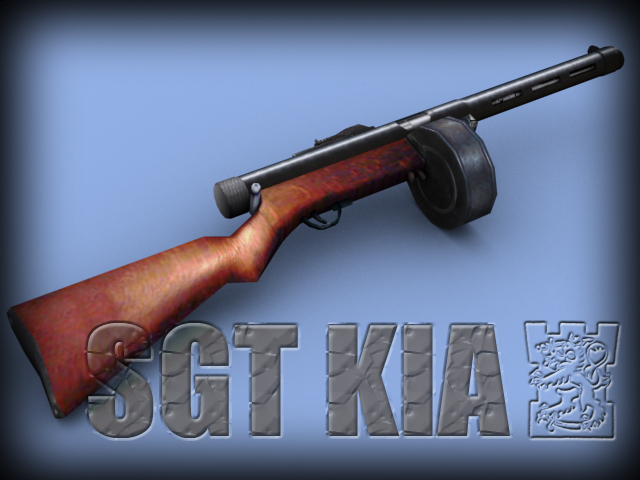
README - Sgt. KIA's Suomi M31 SMG for MOHAA - 31.8.2003 ** CREDITS ** I'd like to thank Smartti and Finnish Defence Forces (FDF) Mod for Operation Flashpoint for letting me use their sound for an M31. Many thanks again. Please visit their great site at http://koti.mbnet.fi/~fdfmod/ and download their mod. Many thanks to Simo Häyhä for image resources. Last but not least: Promitheas, the author of Lightray3D. Thanks for tuts and all your help. ** FEATURES ** - This mod introduces a Suomi M31 SMG for Medal of Honor: Allied Assault. Its NOT meant for Spearhead. There are two .pk3 files in this .zip. One for each side (allies, axis). However, you should use only one at a time (see below). - The M31 replaces Thompson SMG or MP40 depending which one you're about to install. - The round clip has 70 bullets. - Firerate is set to 900 rpm. - In order to see the new animations fully working the mod must be installed on a server too. On client side there are two clip during reload animation, which may seem a bit acward. - ONLY 1ST PERSON VIEW ANIMS ARE MADE. 3rd person view anims werent done due to the so many files involved. Thus, holding position places left hand partly inside the clip in 3rd person view. ** IMPORTANT ** - For AA only - Remove other custom SMG weapon mods before you run this one. - Use only one of the files at a time. If you use both, original ALLIED animations for SMGs are used and seen on allied side. - This mod needs to be installed on serves to enable all animations, clip size and firerate. ** INSTALL ** - To install put one of the files into ...\mohaa\main -folder - TO uninstall remove the file ** ADMINS PLEASE NOTE ** If you decide to run this mod on your server, please let me know about it so that i can join in a game someday ;). ** AUTHOR ** Everything else except the sounds is made by Sgt KIA. Author: Sgt KIA Email: sgt_kia@hotmail.com Homepage: http://personal.inet.fi/peli/mohaa.col.kuolo/
Medal of Honor: Allied Assault Mods (MOHAA) — Complete Community Archive
Welcome to the premier repository for Medal of Honor: Allied Assault mods. Since the game's groundbreaking release in 2002 by 2015, Inc. and EA, MOHAA has inspired one of the longest-standing modding communities in first-person shooter history. MOH-DB preserves, categorizes, and serves over 1,600 verified community modifications, custom enhancements, and competitive utilities for Allied Assault, Spearhead, and Breakthrough.
Explore MOHAA Mod Categories
Player Skins & Uniforms
Over 700 historically accurate and creative player uniforms for Allied and Axis factions. Equip authentic U.S. Army Rangers, 101st and 82nd Airborne paratroopers, British Commandos, Soviet Red Army conscripts, Wehrmacht Heer infantry, Fallschirmjäger, and Waffen-SS camouflage patterns, as well as classic community clan skins.
Weapon Models & Reskins
Enhance your WWII arsenal with ultra-detailed weapon replacements and high-resolution textures. Popular downloads include authentic wood-finish Kar98k sniper rifles, realistic metallic sheen M1 Garand models with classic "ping" animation refinements, Thompson submachine guns, MP40s, BAR 1918 rifles, and custom iron-sight alignments.
Soundpacks & Realism Audio
Transform the sonic atmosphere of Allied Assault. Replace compressed 2002 Quake-engine sound effects with cinema-grade gunfire recordings, authentic distant artillery rumblings, terrifying Stuka dive-bomber sirens, supersonic bullet cracks, metal ricochets, and remastered German and American voice callouts.
HUDs, Menus & Crosshairs
Modernize the in-game interface for 1080p, 1440p, and 4K widescreen displays. Download minimalist competitive heads-up displays, custom dot and crosshair overlays, cleaner compass indicators, redesigned main menus, and unobtrusive health and ammunition counters favored by competitive league players.
Server Utilities & Admin Scripts
Run resilient, modern multiplayer game servers with essential server-side utilities. Includes automated map rotators, anti-cheat detection tools, voting scripts, custom match timers, ping balancers, and administrative rcon managers designed for dedicated servers running 24/7.
MOHAA Reborn 1.12 Community Patch
The gold standard community patch for modern MOHAA servers and clients. The Reborn 1.12 patch resolves legacy buffer overflows, fixes client query exploits, expands internal script limits for complex mods, and provides a built-in server browser to replace the defunct GameSpy master server.
How to Install MOHAA Mods: Quick Guide
Identify Your Target Directory
MOHAA stores all game assets in subfolders inside the root installation directory:
- MOHAA (Base):
.../MOHAA/main/ - Spearhead:
.../MOHAA/mainta/ - Breakthrough:
.../MOHAA/maintt/
Paste Without Extracting
Download the mod archive from MOH-DB. If it is zipped (.zip or .rar), extract the enclosed .pk3 file. Place this .pk3 directly into your game's /main/ folder.
How to Remove or Troubleshoot
To remove any mod, simply delete its .pk3 file from the /main/ folder. The game will immediately return to stock behavior without reinstalling.
Frequently Asked Questions about MOHAA Mods
To install MOHAA mods, copy the downloaded .pk3 file directly into your Medal of Honor Allied Assault installation folder under /main/ (or /mainta/ for Spearhead, and /maintt/ for Breakthrough). You do not need to unpack or extract the .pk3 archive—the game engine loads it automatically upon launch.