
Medal of Honor: Allied Assault Mods (MOHAA)
Discover and download community-created modifications to enhance your Medal of Honor: Allied Assault experience.
1676 Mods Found

MOHSH 200 211 Patch
You need to install this patch first before any other if you have a clean install of spearhead. After this you'll have to download the 2.11 to 2.15 patch, that one will make it fully up to date. Both this and that one are needed (you can't skip this one).

MOHSH 211 215 Patch
Before you can install this patch, you NEED to have the 2.11 patch installed already.

MOHSH No Cd Crack 215
Just replace the moh_spearhead.exe from this zip file with the moh_spearhead.exe from your Spearhead folder. Don't forget to backup your own moh_spearhead.exe before replacing (just to be safe).

OPENMOHAA
This is a snap shot of the files on Source forge -: http://sourceforge.net/p/openmohaa/code/HEAD/tree/ http://openmohaa.sourceforge.net/ Running ======================= a) extract archive to your MOHAA installation directory. -or- b) Copy all pak*.pk3 files and the sound/ directory from your MOHAA/main directory into openmohaa's 'main' directory. Install Microsoft Visual C++ 2010 Redistributable from http://www.microsoft.com/download/en/details.aspx?id=5555 Please report bugs to #openmohaa on freenet IRC. Compiling ======================= *NIX: make sure you have compiler + libraries installed Required extra libaries: libopenal-dev libsdl-dev libmad-dev Run 'make' WIN: You will need include files and libraries for OpenAL, SDL and libmad: ===== SDL http://www.libsdl.org/ download Source code, compile ===== OpenAL http://connect.creativelabs.com/openal/default.aspx download OpenAL soft source download CMake at http://www.cmake.org/cmake/resources/software.html run cmake on OpenAL, compile ===== LibMAD http://www.underbit.com/products/mad/ download source code, compile ===== MSVC solution files are in misc/msvc/ (VC9) and misc/msvc10 (VC10) Open .sln file, set include and library directories for your SDL, OpenAL and LibMAD COMPILE! Can also be compiled with mingw, just run 'make'. MOSX: Run './make-macosx-ub.sh' You will need openal, sdl and libmad. The built binaries reside in the 'build' directory. For further instructions: Please refer to ioquake3's README (README.ioq3). Or get in touch with any of our developers (->forums/irc). Developing ======================= You are always welcome in our irc channel and forums. If you find bugs, or things not yet implemented, please tell us or if you can write a fix and submit it to us. URL ======================= http://openmohaa.sf.net/

BSP Editor
Tutorial by EasyMeat BSP Editing Tutorial with tools needed to do the editing. Follow the instructions in the zip file. Mostly covers adding, removing, making new player spawn point. Tools include Pakscape, spawn creator, and xvi32 hex editor. Instructions are in both English and Spanish Blame Google Translator for in mistakes in the Spanish Instructions.

user-mefy-extgametypes-1_2_2-STOCKMAPS+fixes3
Freezetag -Stock maps
Popup Dudes
Add fake models to the map to make the player thinking is a real player. This models was only for the map The Crossroads To make the mod working call on the map script or DMprecache "exec global/pop_up_dudes.scr".
animated_luger
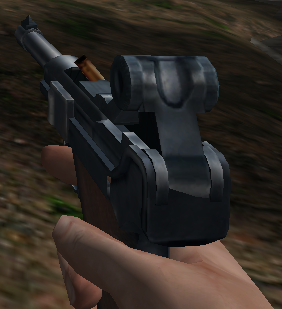
Acme's more detailed CoD luger models with firing animations by Soares93. You have a regular model and a silenced luger model. Place the zzzz_animated_luger.pk3 in your 'main' folder, to uninstall it just delete the file. Enjoy.
CorpseStay SP v1.0 addon
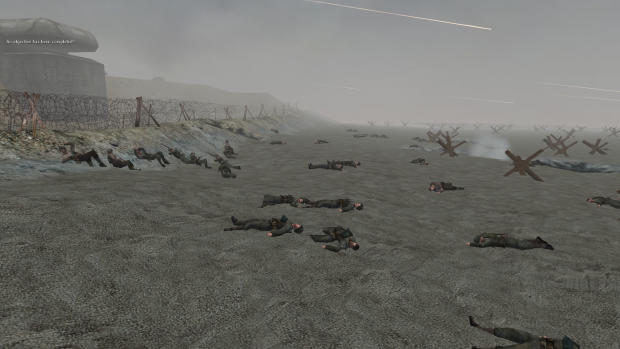
This is a SP 'corpse stay' mod, meaning AI that die leave 'permanent' corpses! Currently only supports Allied Assault. // ------------------------------------------------------------------------------- // ------------------------------------------------------------------------------- // CorpseStay SP v1.0 by Smithy // ------------------------------------------------------------------------------- // ------------------------------------------------------------------------------- // INFO This is a SP corpses stay mod, meaning AI that die leave 'permanent' corpses! **NOTE**: Please note that this mod changes some default files. You will need to merge any changes if you have mods that conflict with this one. Change are commented with 'crpsty' in the files. // INSTALLATION: For Allied Assault: Put the zzz_CorpseStayAA_SP.pk3 file inside your mohaa/main directory. For Spearhead: NOT SUPPORTED YET For Breakthrough: NOT SUPPORTED YET Example config: seta crpsty_sp_corpses "50" seta crpsty_sp_debug "0" __________________________________________________________________________________________ // CONFIG - you can input these commands into the console when you load up a level __________________________________________________________________________________________ crpsty_sp_corpses - is the number of corpses allowed at any given time (use wisely). Minimum of 5 corpses Maximum of 100 corpses Default is 30 corpses crpsty_sp_debug - is whether or not to print debug messages to the console If you DON'T want debug messages, use 0 If you DO want debug messages, use 1 You can change these cvars at any point during the map. Changes to crpsty_sp_corpses will kick in as soon as any AI dies again. // NOTES crpsty_sp_corpses has a maximum of 100 as we don't want to flood the game with too many entities. It is more than enough though. You will rarely hit 100 corpses. Keep an eye on your fps. If it gets too low on some missions, just decrease crpsty_sp_corpses
CorpseStay Multiplayer
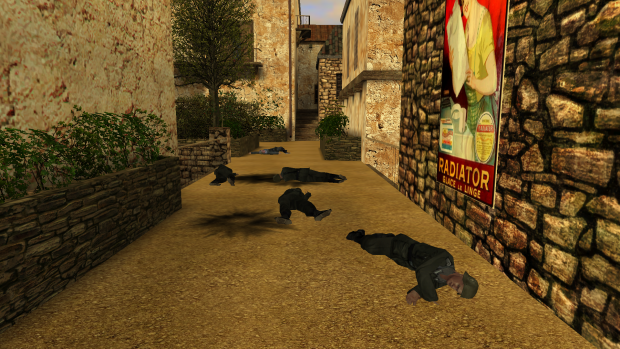
// ------------------------------------------------------------------------------- // ------------------------------------------------------------------------------- // CorpseStay v2.2 by 1337Smithy // ------------------------------------------------------------------------------- // ------------------------------------------------------------------------------- // INFO This is a server-side corpses stay mod, meaning players who die will leave 'permanent' corpses! **NOTE**: Please note that this mod changes two files used by the player model tikis. Be sure to merge these changes with any changes you may or may not have made to the same files (found in models/player/base). The changes simply 'exec' either 'crpsty_playerspawned2.scr' or 'crpsty_setdeathanim2.scr', so just search for these in those files to find what I changed. // INSTALLATION: For Allied Assault: Put the zzz_CorpseStay_AA_MP.pk3 file inside your server's mohaa/main directory. For Spearhead: Put the zzz_CorpseStay_SH_MP.pk3 file inside your server's mohaa/mainta directory. For Breakthrough: Put the zzz_CorpseStay_BT_MP.pk3 file inside your server's mohaa/maintt directory. Then do: Put "exec global/corpsestay2.scr" (without quotes) inside your global/DMprecache.scr (or however you start your mod scripts) Example server config: seta crpsty_mp_corpses "5" seta crpsty_mp_deathsink "1" seta crpsty_mp_debug "0" And if it's installed right, you should get "***[CorpseStay]***: (game) MP version 2.2 is running!" in your server console when the server finishes booting up. // CONFIG crpsty_mp_corpses is the number of corpses allowed at any given time (use wisely). If you want NO corpses to stay, use 0 If you want UNLIMITED corpses, use -1 (not recommended) If you want any other (positive) number, use any other (positive) number! duh :P crpsty_mp_deathsink is whether or not to make the corpses sink into the ground when they are removed If you want NO sinking, use 0 (they just pop out of the world like normal) If you DO want sinking, use 1 crpsty_mp_debug is whether or not to print debug messages to the server console If you DON'T want debug messages, use 0 If you DO want debug messages, use 1 You can change these cvars at any point during the map. Changes to crpsty_mp_corpses will kick in as soon as any player dies again, the rest are instant. !!!ADVICE!!! Make sure to use crpsty_mp_corpses wisely and be mindful of how many your server should have. Not only does it affect the FPS with all those polys lying around, but it also increases the number of level entities being syncronised on your server. There is a maximum, you know! So if your server crashes because of 'no free edicts', you'll probably know why! :) But don't worry TOO much, you'd probably need a lot of corpses before that issue arises.
Eye of the Beholder - Doom Mod - Texture Pack
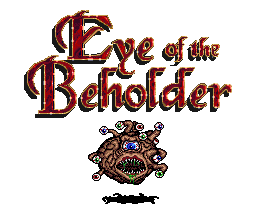
Dungeon textures for mappers or modders. These are textures from the DOS game Eye of the Beholder 1 2 & 3 Dungeon type textures include walls, keys, floors, liquids, doors, items... etc
Jh Admin Punishment Mod Menu
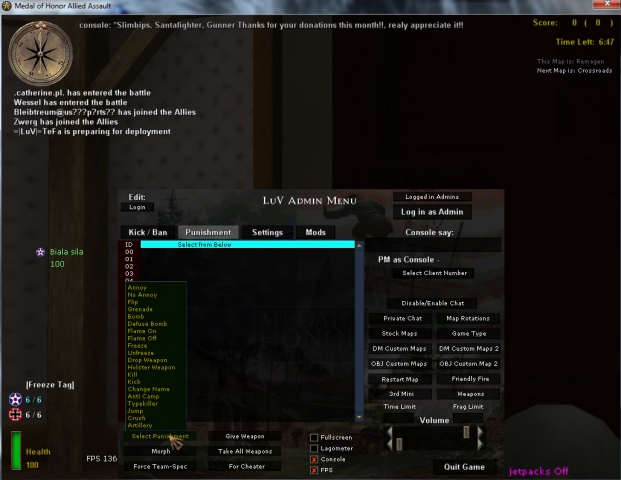
An edited version of the JH Admin Tool/Menu, now also including a menu (integrated) for Jim's Punishment 2 Mod.
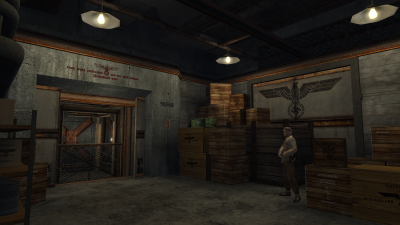
Morocco SP v1.1 addon
//==========================================================================================================// // LEVEL: test_morocco (SP) // CAMPAIGN: Operation Torch // TITLE: Morocco // VERSION: 1.1 (27/02/19) // GEOMETRY/DESIGN: 1337Smithy // SCRIPTING: 1337Smithy //==========================================================================================================// //==========================================================================================================// *** INSTALLATION //==========================================================================================================// Remove any mods you already have installed, then put the zzzzzzzzzzzzzzzzzzzzzz_Morocco_SP.pk3 file into your MOHAA/main folder. //==========================================================================================================// *** RUNNING (AND CHOOSING DIFFICULTY) //==========================================================================================================// ***If you want to set a difficulty (other than default), make sure to do it BEFORE loading the map.*** Firstly, choose a difficulty via console (no quotes): EASY: "skill 0" MEDIUM: "skill 1" HARD: "skill 2" Secondly, type "map test_morocco" (no quotes) in console to run the map. //==========================================================================================================// *** STORY //==========================================================================================================// You are an OSS operative sent behind enemy lines on the eve of Operation Torch in Morocco. Your objective is to sabotage enemy activity in the area and acquire any intelligence the Germans may have on the allied operation. Another intelligence officer disappeared in this area some time ago, so we need to find out if she was captured and if so what information they 'acquired' from her. //==========================================================================================================// *** INFO //==========================================================================================================// First part of my Morocco singleplayer campaign. I am releasing this on its own as I may not be able to release the other parts as quickly as I'd like. This ensures at least some of the campaign is played. I am including the map file with this release. Anyone is free to take assets from this package, be it level geometry, scripts or anything else. This is your permission, so no more is needed :). //==========================================================================================================// *** CREDITS //==========================================================================================================// A few textures were taken from Enhanced Textures mod for MOHAA (https://www.moddb.com/mods/enhanced-textures) Some axis skins taken from several authors. The rest is basically me. Some inspiration from the original missions of course.
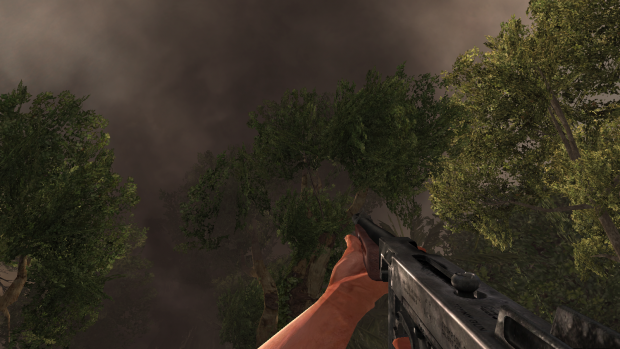
AA Weapons Converted
This mod aims to enhance the models of the MoHPA weapons. The new enhanced weapons use the original textures, in order to mantain the original art style of the game. I've only tested the mod on the Origin version of the game. Compatibility with other releases of the game are unknown.
Mefy Locations Creator
******** HOW TO SETUP THE MOD ********* 1- Put the mefy code you normaly use on the map script to use the map with freezetag 2 - To create the locations on the map read the txt file is on the mod
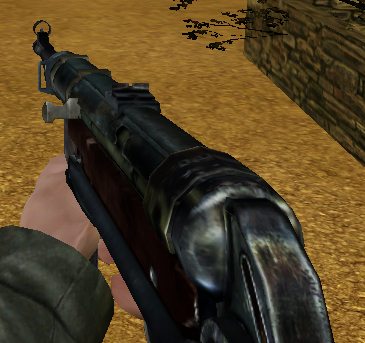
zzS93_K98_MP40
Soares93 Kar98 and MP40 reskins Reskins of the Call of MP40 from Angel and Kar98 sniper rifle from 'Reactivated v2' mod for Allied Assault only. These skins will appear in the 3rd update of my Extra Weapons mod. Install: -Place the 'zzS93_K98_MP40.pk3' in your 'MAIN' folder. Unninstall: -Delete the file from your 'MAIN' folder. Hope you enjoy these weapons reskins.
No Recoil Hack Fix Aash
A serverside fix for both AA & SH to block the no-recoil hack. Fyi: The Reborn Patch does this as well for AA servers, by setting sv_recoilemulation to 1. Ok as you can see from this thread work on this has been ongoing for a long time by many people. I think at last a reasonable if not good solution to this problem has been developed. This is still in Beta form but I have been testing it alot and found as many bugs as can, I therefore think that it is now good enough for people to leave on their servers for some more long term testing. At the moment I have only made an Allied Assault version, expansions will follow in time, but I'm sure you can appretiate because of my job I have very little of this to give to such a project (be patient). If you use this and notice bugs and or performance issues please let me know here. What does this do? - Well nothing! lol If you do not hack you will notice little difference apart from a slight pause at weapon raise, and a message. However if you use any form of recoil hack (and yes I mean any!) you will find it no longer works. How the **** does that work? - I thought recoil was undetectable? Yup it is as the recoil is handled by the client the server has no clue if recoil is being used or not. - so what I did: 1. I forced everyone on the server to have norecoil, to put everyone on a level playing field - to do this I had to completely scrap the default weapons and create custom serverside weapons, these of course have no recoil whatsoever. 2. I implemented a script written by jv_map for a unrelated mod to applie recoil to the weapons, therefore bypassing the recoil system alltogether. This is all handled by the server 100% so cannot be bypassed. EDIT********************************************* jv_map has developed a better version with less conflicts for beta testing. Please use his instead.
Medal of Honor: Allied Assault Mods (MOHAA) — Complete Community Archive
Welcome to the premier repository for Medal of Honor: Allied Assault mods. Since the game's groundbreaking release in 2002 by 2015, Inc. and EA, MOHAA has inspired one of the longest-standing modding communities in first-person shooter history. MOH-DB preserves, categorizes, and serves over 1,600 verified community modifications, custom enhancements, and competitive utilities for Allied Assault, Spearhead, and Breakthrough.
Explore MOHAA Mod Categories
Player Skins & Uniforms
Over 700 historically accurate and creative player uniforms for Allied and Axis factions. Equip authentic U.S. Army Rangers, 101st and 82nd Airborne paratroopers, British Commandos, Soviet Red Army conscripts, Wehrmacht Heer infantry, Fallschirmjäger, and Waffen-SS camouflage patterns, as well as classic community clan skins.
Weapon Models & Reskins
Enhance your WWII arsenal with ultra-detailed weapon replacements and high-resolution textures. Popular downloads include authentic wood-finish Kar98k sniper rifles, realistic metallic sheen M1 Garand models with classic "ping" animation refinements, Thompson submachine guns, MP40s, BAR 1918 rifles, and custom iron-sight alignments.
Soundpacks & Realism Audio
Transform the sonic atmosphere of Allied Assault. Replace compressed 2002 Quake-engine sound effects with cinema-grade gunfire recordings, authentic distant artillery rumblings, terrifying Stuka dive-bomber sirens, supersonic bullet cracks, metal ricochets, and remastered German and American voice callouts.
HUDs, Menus & Crosshairs
Modernize the in-game interface for 1080p, 1440p, and 4K widescreen displays. Download minimalist competitive heads-up displays, custom dot and crosshair overlays, cleaner compass indicators, redesigned main menus, and unobtrusive health and ammunition counters favored by competitive league players.
Server Utilities & Admin Scripts
Run resilient, modern multiplayer game servers with essential server-side utilities. Includes automated map rotators, anti-cheat detection tools, voting scripts, custom match timers, ping balancers, and administrative rcon managers designed for dedicated servers running 24/7.
MOHAA Reborn 1.12 Community Patch
The gold standard community patch for modern MOHAA servers and clients. The Reborn 1.12 patch resolves legacy buffer overflows, fixes client query exploits, expands internal script limits for complex mods, and provides a built-in server browser to replace the defunct GameSpy master server.
How to Install MOHAA Mods: Quick Guide
Identify Your Target Directory
MOHAA stores all game assets in subfolders inside the root installation directory:
- MOHAA (Base):
.../MOHAA/main/ - Spearhead:
.../MOHAA/mainta/ - Breakthrough:
.../MOHAA/maintt/
Paste Without Extracting
Download the mod archive from MOH-DB. If it is zipped (.zip or .rar), extract the enclosed .pk3 file. Place this .pk3 directly into your game's /main/ folder.
How to Remove or Troubleshoot
To remove any mod, simply delete its .pk3 file from the /main/ folder. The game will immediately return to stock behavior without reinstalling.
Frequently Asked Questions about MOHAA Mods
To install MOHAA mods, copy the downloaded .pk3 file directly into your Medal of Honor Allied Assault installation folder under /main/ (or /mainta/ for Spearhead, and /maintt/ for Breakthrough). You do not need to unpack or extract the .pk3 archive—the game engine loads it automatically upon launch.