
Medal of Honor: Allied Assault Mods (MOHAA)
Discover and download community-created modifications to enhance your Medal of Honor: Allied Assault experience.
1676 Mods Found
Jvbots Multiplayer Bot Script V11
These are the 2 standard files that are needed when playing with bots in multiplayer games. Mostly they come standard with each download of each individual botted maps. The 2 files are: jv_bot01.pk3 jv_bot01_update1.pk3 Multiplayer Bot script for MoH:AA obj ============================================= by jv_map version 1.1-update#1 --------------------------------------------- Copyright (c) 2002-2003 Jeroen Vrijkorte All rights reserved. --------------------------------------------- Redistribution is unrecommended. COPYRIGHT HOLDERS WILL NOT BE LIABLE FOR ANY DIRECT, INDIRECT, SPECIAL OR CONSEQUENTIAL DAMAGES ARISING OUT OF ANY USE OF THE SOFTWARE OR DOCUMENTATION. --------------------------------------------- jv_map@planetmedalofhonor.com http://www.planetmedal.com/freebrief --------------------------------------------- Minor update & bugfix. Should not be used with anything but jv_bot01.pk3. For personal use only (do not distribute this pk3 along with your maps).
Modded SP MP Maps Package
I collected a bunch of (modded) SP to MP map conversions and added them to one package. Note: None of these files are mine or made/modded by me. I will try to give credits to all those that deserve it, however I couldn't track the creators of all files. Some of the files might not work properly or aren't finished, but who knows, someone might still benefit from them or edit/complete them. Files: zzzzzzmap_m2l3m2l2am6l3b_v12.zip - by Stoobing zzzzzzmap_m2l3m2l2am6l3b.zip - by Stoobing zzzzz-rats-in-a-trap_m4l3.pk3 - by ViPER zzzzz-m6l1a_shock+aweTEST.pk3 - by FUNGUS zzzzz-m1l3c_conversion.pk3 - by ViPER zzzzz-gas-facility_m6l3d.pk3 - by ViPER zzzzz-Gain_Ground_mod.pk3 - by ViPER ZZZZZ_SFX_E1L3_MP.pk3 - by Cobra & ViPER zzzzm5l1b.pk3 - by Cobra zzzz{sfx}m6l2a.pk3 - by SFX zzz-VIperst1l1.pk3 - by ViPER ZZZ_M5L1B_FT.pk3 - by {**CD**} psychotoxic ZZZ_M4L0.pk3 - by Unknown ZZZ_M3L3_SFX_Para_Demo.pk3 - by SFX ZZZ_M1L2B_OBJ.pk3 - by Cobra zzz_AA_SP-2-MP_maps.pk3 - by Unknown User-Vince-m4l2.pk3 - by Vince user_M2L1_obj.pk3 - by Phil m5l3.pk3 - by 88china m4l0.pk3 - by Unknown m1l3c_viper.pk3 - by ViPER m1l3b.pk3 - by Cobra Kind Regards, Shadow
Sky Textures
viperskyshader.pk3 inside of viperskyshader.rar is needed in order for the sky textures to work. (It's included within the zip file.)
Flots Single Player Conversions v10
FLOT's Single Player Conversions v1.0 - Readme file ======================= Thank you for downloading my mod! Contact info: email: admin@flotserver.net url: www.flotserver.net X-Fire (www.xfire.com): grosskopf First, credit where credit is due: Thanks go out to Falc for converting: M1L2A, M2L1, M3L3, M4L3, M5L1A, M5L1B, T1L1, T2L4 Thanks go out to (+)RW(+)blmeanie for converting: M6L2A Thanks go out to PoSSe9939 for converting: M4L2 Thanks go out to Creaper: M4L1, M5L2A Thanks go out to Sweetrobot: M4L0 My original conversions: M2L2A, M6L2B, T1L2, T1L3, T3L1 Included with this mod should be two sound fixes. (name here) is server side. This will fix issues with some of the single player sounds on the server side of things. (name here) is the client side fix. This is Falc's single player sound fix with a slight modification that makes it so you hear the "radio" sound when you chat in the game. This file is for those sounds that can't be fixed server side. Notes: 1. This mod contains the following single player maps, ready to be played: M1L2A, M2L1, M2L2A, M3L3, M4L1, M4L2, M5L1A, M5L1B, M6L2A, M6L2B, T1L2, T1L3, T2L4. T3L1. I took all of the single player maps that I run on my server and added rotating spawns to help limit spawn killing. 3. Not all of the maps have Free For All spawn points. I run TDM and that's what I've focused on. Feel free to add them to the maps. Installation: Put it in your server's mainta directory and restart your server. If you use other single player map conversions that run the same maps, move them out of your server's main, mainta or maintt directory (whichever is applicable). If you need any help, feel free to email me.
Dogs Script
If you want to spawn dogs into your stock MP maps with no pathnodes then add this file to your main or mainta directory it contains dmdogs.scr and a sample script for mohdm2 usage: in level script main: level waittill spawn exec global/dmdog.scr end in thread or script exec global/dmdog.scr::dogspawn example: exec global/dmdog.scr::dogspawn ( -1053 -2847.22 -4.12 ) 45 1 5 axis 1 FFA example: exec global/dmdog.scr::dogspawn ( -1053 -2847.22 -4.12 ) 45 1 5 also creates two variables level.axis_dogs and level.allies_dogs that you can use in script JV's soundfix added for sounds dog sounds work for mohaa on a server . You can also precache this .tik dogsounds.tik which I think may work for spearhead . If not try maybe makeing a .scr file with the dogsounds you need and run it from the level script .
Player Spotlight
// To use this script, make script_models with model miscobj/searchlightbase.tik and give them // all the same targetname .You can also give the spotlights health and color .Then execute the script like this . // // local.s1 = spawn script_model model miscobj/searchlightbase.tik origin ( 4056.53 -4411.25 216.13 ) // local.s1 angles ( 0 205 0 ) // local.s1 targetname myspot // local.s1.color = ( 1 1 0) // local.s1.health = 100 // // exec global/player_spotlight.scr mytargetname // // When a player press the use key down it lights up, and it goes off when use is pressed again . // It will follow the players view while it is on.
Flakfire
Sample script for mohdm4 add the following lines to dm/mohdm4.scr local.flakbase = spawn models/statweapons/flak88base.tik local.flakbase.origin = ( 18.860 2906.859 240.125 ) local.flakbase.angles = ( 0.000 270.242 0.000 ) local.flak = spawn models/statweapons/flak88turret.tik targetname flak88 local.flak.origin = ( 18.860 2906.859 296.125 ) local.flak.angles = ( 0.000 270.242 0.000 ) local.flak exec global/flakfire.scr
Global Plane Strafe Script 2
This is my global strafeing script . It is simular to the global/bomber.scr but for strafeing and bombing . It is easy to use and setup . It has lots of defaults so you can have it ready to go in a very short time . To use it all you need to do it make a path useing info_spline pathnodes the same as you would do in the global/bomber.scr . All you need to do is put this in your level.script exec global/strafe2.scr The first node must have a targetname of strafe_path and you must give all the nodes on the same path a set number . If that set number is 1 for example then your script might look like this main: level.script = maps/mymap.scr . this is for useing the setthread key exec global/strafe2.scr this sets up the script and numbers the nodes thread global/strafe2.scr::strafe 1 this spawns the plane and begins the strafeing run end Now for the options . You can also use the plane that you choose as well by setting the mdl key just like the bomber.scr and my special touch you can use a script model as the plane as well like you see in the picture on the top . There are keys that you can set on any of the nodes to turn the guns on or off , have the plane drop a bomb either on a target or not , change the scale of the plane and/or the bomb , you can run a thread in your level script at any of the nodes , you can run a thread in your level script when a bomb is droped , you can make the plane bomb every time it is spawned or set how often you want it to bomb or even set it to randomly choose to drop a bomb or not . You can even choose the explosion to use when the bomb drops . As well you can setup kill zones useing trigger and if a player is in the zone he becomes the bomb target . All you need to do is make a trigger with the targetname of stkillzone and have it target one of the nodes on your path . example of a spawned kill zone :( see sample script for test_strafe.bsp ) exec global/strafe.scr local.zone = spawn trigger_multiple targetname "stkillzone" local.zone setsize ( -100 -100 -100)(100 100 100) 200x200 local.zone.origin = (1389.58 623.78 -94.88) local.zone.target = level.strafenode[1][2] local.zone2 = spawn trigger_multiple targetname "stkillzone" local.zone2 setsize ( -100 -100 -100)(100 100 100) local.zone2.origin = (2108.30 107.64 -94.88) local.zone2.target = level.strafenode[3][4] thread global/strafe2.scr::killzone Here are is a list of keys you can use look at the docs for an explanation of the keys --------------------------------------------------------------------------------------------------- First info_splinepath node keys --------------------------------------------------------------------------------------------------- Key:$targetname Value: strafe_path ( not optional ) Key:#set Value: ( set each each node to same set# each path to a different set # ) Key:$mdl Value: ( Plane model default vehicles/p47fly.tik) Key:$scrplane Value: ( Script object brush model for plane instead of $mdl ) Key:angles Value: ( pitch yaw roll ) Key:#planescale Value: ( plane scale default 1 ) Key:#gunangle Value: ( gun pitch angle default 30 ) Key:#guns Value: ( guns on or off (1,0) default 1 on ) Key:#sideoffset Value: ( gun offset from center * #planescale( damage trigger 100x100 * scale on center ) default 70 ) Key:#forwardoffset Value: ( gun forward offset from origin default 100 ) Key:#heightoffset Value: ( gun height offset from origin default 0 ) Key:#damage Value: ( health when new plane spawned or after plane death default 1000) Key:#destroyable Value: ( 1 destoyable 0 not destroyable default 1 overrides #damage ) Key:$planeexpmdl Value: ( plane explosion emitter default animate/fx_mortar_higgins.tik) Key:#planeexpscale Value: ( plane explosion scale default 1 ) Key:#pause Value: ( optional time to wait after spawn before flying in sec ) --------------------------------------------------------------------------------------------------- All info_splinepath nodes keys ( read from node ) --------------------------------------------------------------------------------------------------- Key:#set Value: ( set each each node to same set# each path to a different set # ) Key:$setthread Value: ( optional level.script thread to run when plane flys over node passes #set and #node to thread ) Key:model Value: ( optional editor model ( editor only )) Key:#planescale Value: ( optional new plane scale ) Key:#bombstart Value: ( optional spawn # delay for bombing if #bomb or #singlebomb set ) Key:#bomb Value: ( optional value for bombing every # spawns (after #bombstart if #bombstart set)) Key:#singlebomb Value: ( optional value for single bomb drop , resets #bomb to NIL after bombing can be used with #bombstart ) Key:#randombomb Value: ( optional Value for random bombing chance of bomb 1 to #randombomb ) Key:$bombtarget Value: ( optional entity targetname for bombing ( is reset to default bombing angles or $statictarget after bombing)) Key:$statictarget Value: ( optional entity targetname for bombing ( is not reset to default and is overridden if $bombtarget set)) Key:$bombmodel Value: ( optional model for bomb default ammo/us_bomb.tik ) Key:#bombscale Value: ( optional bomb scale set each node default 1 ) Key:bombsound Value: ( optional sound for dropping bomb default drop_bomb ) Key:bombdamage Value: ( optional bomb damage default 500 ) Key:bombradius Value: ( optional bomb damage radius default 500 ) Key:$expmodel Value: ( optional explosion model for bombing default models/emitters/explosion_mine) Key:#expscale Value: ( optional explosion model scale set each node default 1 ) Key:$bombthread Value: ( optional level.script thread to run after bomb explosion passes #set and #node to thread) Key:#guns Value: ( optional value to start/stop guns fireing ( 1 on 0 off )) Key:#gunangle Value: ( optional new gun pitch angle ) Key:speed Value: ( optional new speed setting at node default 1 or speed set in editor ) --------------------------------------------------------------------------------------------------- Level Nodes ( Keys can be changed by script see Keys above ) --------------------------------------------------------------------------------------------------- level.strafenode[set #][node #].origin ( node origin ) level.strafenode[set #][node #].angles ( node angles ) level.strafenode[set #][node #]. ( read from node each flight ) level.startbomb[set #][node # ] ( Stored after node setup can be changed to delay ) ( bombing or set #bomb Key to NIL to stop bombing ) level.index[set #][node #] ( counter for #bombstart and #bomb key , 1 to ) ( startbomb then 1 to #bomb )

Mp3 Player V21
How to use SkulpingNipples Mp3 player? WATCH IT: The file could have a autoexec file, first try the pk3 without any binds by pressing K or L in singleplayer or Multiplayer. If nothing happens, you have to bind the keys to the menus!!!! For MOHAA: Place the "SkulpingNipples-MP3Player (2 Skins).pk3" file in the main directory and make a directory called "mp3" in the MOHAA directory. Just place some mp3 files into that directory and call them song1, song2 etc. (maximum 60 songs). Now make a file called all.cfg and add a the 2 lines: bind l (or key of you're choice) "togglemenu mp3" bind k (or key of you're choice) "togglemenu 2mp3" TIP: YOU DON"T HAVE TO BIND BOTH SKINS, IF YOU WAN'T THE NEW SKIN ONLY BIND 2mp3, IF YOU WAN'T THE NEW SKIN ONLY BIND mp3!!!!! YOU CAN CHECK THE SKINS OUT WITH THE SCREENSHOTS!!! Save this file into you're main directroy. And then open the properties of you're MOHAA shortcut and at the line + exec all.cfg You're shortcut will look like this now: "C:Program FilesEA GAMESMOHAAMOHAA.exe" + exec all.cfg Now you are ready to use the MP3 Player. Now if you press l (or you're binded key) you will bring down the old improved version of this Mp3 player. But i you press k (or you're binded key) you will bring down the new improved version of the MP3 player. (I prefer this one) Have Fun!!! As for MOHAAB and MOHAAS just place the files in the maintt and mainta directory. SkulpingNipple (Lennard Fonteijn, Netherlands) Whats New - A New Mp3 menu - You can place you're mp3's now in youre mohaa directory in stead of youre main. If you got suggestions, send an e-mail to SkulpingNipple@hotmail.com
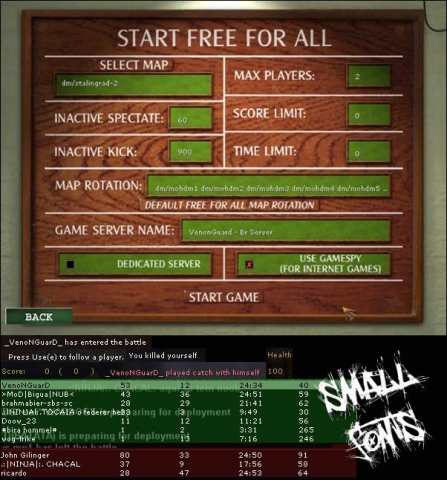
Small Fonts
-=========== Small Fonts ============- -=========== made by VenonGuard ============- Copy "zz-small_fonts.pk3" to your main or mainta folder. Credit for the mod goes to me, VenonGuard (venonguard@hotmail.com). Its not leeched ... dont believe f***k you. -=========== Small Fonts ============- -=========== criado por VenonGuard ============- Copie o arquivo "zz-small_fonts.pk3" para a pasta main ou mainta.Creditos pela modificação vai para mim, VenonGuard (venonguard@hotmail.com).

Ryzzos Explosion Mod
This is abou' 2 months old, i just never published it:D its an explosion thingy. the explosion is pretty good, i like the brighter flash texture and there's like fragments flying:D the white stuff:P "RYANRYZZO"
Multiplayer Text Modification
Made for SH, but some texts might still work in AA (not tested). Readme File: {{{{{{{{{{{{{ CONTAINS EXPLICIT LAUNGUAGE }}}}}}}}}}}}}}} Only users who have this mod can see the results (mod is for SH only) Reworked the localization file (provided by Recoil Factor) to change ABSOLUTLY EVERYTHING in multiplayer mode that can be changed to more realistic and some explicit messages EG [#name# is preparing for deployment] changes to ["#name# says goodbye to his family and prepares for war] *Mod may be changed to users liking * _____________________________________________________________________ Put PK3 file in your MOHAA/Mainta folder To remove the skin, just delete the .pk3 file. Have Fun .. MikeyMarriner@gmail.com ______________________________________________________________________ Disclaimer: All Text was edited or improved on Recoils Work because who can write all that from zero? Therefore, any internal errors may be directed at him. there is a difference to a bit of freindly advice and an allout critisism
Weapon Control Center v4
this mod will allow server admins to set cvars to limit weapons for there server all you will need to do is set a cvar in your server.cfg and this mod added all single player map to mutiplayer and all weapon sounds serverside (no client fix needed) also all single player maps will run in freeze tag gametype the cvars are: set sniper 1 // this will make your server sniper only set rifle 1 // this will make your server rifle only set sprinfield 1 // this will make your server springfield only set kar98sniper 1 // this will make your server kar98sniper only set m1grand 1 // this will make your server m1 only set kar98 1 // this will make your server kar98 only set shotgun 1 // this will make your server shotgun only set rocket 1 // this will make your server bazzoka only set all_weapons 1 // this will make your server all weapons set smg 1 // this will make your server smg only set mg 1 // this will make your server mg only set pistol 1 // this will make your server pistol only set dual_sniper 1 // this will make your server dual sniper only no lean set no_lean 1 relistic aiming set breath 1 spawn protect set spawn 1 force rate on clients 30000 set rate 1 you also can change the cvar on the fly ***NOTE*** if you have lets say sniper only on you will need to set (set sniper 1) to (set sniper 0) then set (set rifle 1) then do a rcon restart then the server will be rifles only this mod uses mikes st files so if you use a custom st file you can add this to the state STAND { states { PLAYER_SPAWNED : NEW_WEAPON } } state PLAYER_SPAWNED { movetype legs entrycommands { exec global/player_spawned.scr // execute script on spawned player } states { STAND_REAL : default } } to install place in mohaa/main folder on the server then pick 1 on the cvars you want for your server and add it to your server.cfg
No Rechamber Mod SH
ok this is for all you peaple who wants faster rifles without replacing the kar with the m1 all none scoped rifles in mohaa and sh fire like the m1 and the m1 reloads in mid clip the first one is for mohaa and the second one is for mohsh read the readme this mod uses custom mikes st files also this uses the server fixes :icon_pray:giffe posted for aa and sh it fixes sharking and more - - - Place in mohaa main ========================== Patched State Files Patches made by Elgan and found in Admin Pro Fixes compiled by =|95th|=GenDonut[GiffE] ========================== This Fixes: * MG42 Team Swap fix * Ladder Team Swap fix * MG42 Crouching Fix * Land Shark Fix * Grenade Drop Fix * Fps crash fix ==================== www.95thDivision.com
No Rechamber Mod AA
ok this is for all you peaple who wants faster rifles without replacing the kar with the m1 all none scoped rifles in mohaa and sh fire like the m1 and the m1 reloads in mid clip the first one is for mohaa and the second one is for mohsh read the readme this mod uses custom mikes st files also this uses the server fixes :icon_pray:giffe posted for aa and sh it fixes sharking and more - - - Place in mohaa main ========================== Patched State Files Patches made by Elgan and found in Admin Pro Fixes compiled by =|95th|=GenDonut[GiffE] ========================== This Fixes: * MG42 Team Swap fix * Ladder Team Swap fix * MG42 Crouching Fix * Land Shark Fix * Grenade Drop Fix * Fps crash fix ==================== www.95thDivision.com
Chat Sound Removal Mod
9-20-02 Detail: Are ya tired of that annoying click sound when people talk and things transpire in the game , well this is a fix for that . This is a new lower frequency sound that is very quiet so ya don't hear that annoying click click. Enjoy Fubah Install to main lamaddog2001@yahoo.com
MOHAA Status Mod
File : MoHAA Status Mod Author : Rookie One Version : 0.1 Release Date : 29.12.2002 Description : This mod allows you to have a "status", just like in ICQ or AIM! Now, you can tell the other players that you're away, eating or talking by phone with just one keystrike! Default keys are: Insert - available (just nick without status text before) Delete - away Home - be right back End - out for lunch Page Up - on the phone Page Down - lagged. You can, of course change them by editing custom.cfg file. Installation : Just put custom.cfg file into your MoHAA/main directory. Then, edit it, following the included instructions. Version history : 0.1 First version. Contact : Email : rookie_one@wp.pl ICQ : 146098049 YIM : rookie_one26 MSN/Windows Msg : es_rookie_one@hotmail.com -------------------------------------------------------------------- This mod may be edited without my permission :)
Anti Name Change
antinamechange 1 or 0 turns it on/off. maxnamechanges is the maximum allowed name changes. Change to your needs. printnamechanges 1 or 0 prints players name change to console and logfile add them to your server.cfg: seta antinamechange 1 seta maxnamechanges 3 seta printnamechange 1 By: JoTo Other credits to: Plomos & armageddon
Medal of Honor: Allied Assault Mods (MOHAA) — Complete Community Archive
Welcome to the premier repository for Medal of Honor: Allied Assault mods. Since the game's groundbreaking release in 2002 by 2015, Inc. and EA, MOHAA has inspired one of the longest-standing modding communities in first-person shooter history. MOH-DB preserves, categorizes, and serves over 1,600 verified community modifications, custom enhancements, and competitive utilities for Allied Assault, Spearhead, and Breakthrough.
Explore MOHAA Mod Categories
Player Skins & Uniforms
Over 700 historically accurate and creative player uniforms for Allied and Axis factions. Equip authentic U.S. Army Rangers, 101st and 82nd Airborne paratroopers, British Commandos, Soviet Red Army conscripts, Wehrmacht Heer infantry, Fallschirmjäger, and Waffen-SS camouflage patterns, as well as classic community clan skins.
Weapon Models & Reskins
Enhance your WWII arsenal with ultra-detailed weapon replacements and high-resolution textures. Popular downloads include authentic wood-finish Kar98k sniper rifles, realistic metallic sheen M1 Garand models with classic "ping" animation refinements, Thompson submachine guns, MP40s, BAR 1918 rifles, and custom iron-sight alignments.
Soundpacks & Realism Audio
Transform the sonic atmosphere of Allied Assault. Replace compressed 2002 Quake-engine sound effects with cinema-grade gunfire recordings, authentic distant artillery rumblings, terrifying Stuka dive-bomber sirens, supersonic bullet cracks, metal ricochets, and remastered German and American voice callouts.
HUDs, Menus & Crosshairs
Modernize the in-game interface for 1080p, 1440p, and 4K widescreen displays. Download minimalist competitive heads-up displays, custom dot and crosshair overlays, cleaner compass indicators, redesigned main menus, and unobtrusive health and ammunition counters favored by competitive league players.
Server Utilities & Admin Scripts
Run resilient, modern multiplayer game servers with essential server-side utilities. Includes automated map rotators, anti-cheat detection tools, voting scripts, custom match timers, ping balancers, and administrative rcon managers designed for dedicated servers running 24/7.
MOHAA Reborn 1.12 Community Patch
The gold standard community patch for modern MOHAA servers and clients. The Reborn 1.12 patch resolves legacy buffer overflows, fixes client query exploits, expands internal script limits for complex mods, and provides a built-in server browser to replace the defunct GameSpy master server.
How to Install MOHAA Mods: Quick Guide
Identify Your Target Directory
MOHAA stores all game assets in subfolders inside the root installation directory:
- MOHAA (Base):
.../MOHAA/main/ - Spearhead:
.../MOHAA/mainta/ - Breakthrough:
.../MOHAA/maintt/
Paste Without Extracting
Download the mod archive from MOH-DB. If it is zipped (.zip or .rar), extract the enclosed .pk3 file. Place this .pk3 directly into your game's /main/ folder.
How to Remove or Troubleshoot
To remove any mod, simply delete its .pk3 file from the /main/ folder. The game will immediately return to stock behavior without reinstalling.
Frequently Asked Questions about MOHAA Mods
To install MOHAA mods, copy the downloaded .pk3 file directly into your Medal of Honor Allied Assault installation folder under /main/ (or /mainta/ for Spearhead, and /maintt/ for Breakthrough). You do not need to unpack or extract the .pk3 archive—the game engine loads it automatically upon launch.