
Medal of Honor: Allied Assault Mods (MOHAA)
Discover and download community-created modifications to enhance your Medal of Honor: Allied Assault experience.
1676 Mods Found
4th July Fireworks Mod
=|95th|= 4th of July Fireworks Mod by =|95th|=GenDonut [GiffE] 95thDivision.com Giff1118@gmail.com ================================== Adds spawn able fireworks to each tdm map except mohdm5. ================================== to add fireworks to your map add: exec global/fworks.scr::prepare above level waittill prespawn and add: exec global/fworks.scr below level waittill spawn ================================= This is a remake of my first released mod, and is just to have some independence day spirit on your server. DO NOT RIP OR TAKE CREDIT FOR THIS MOD gif
Stalingrad Spotlight Killers
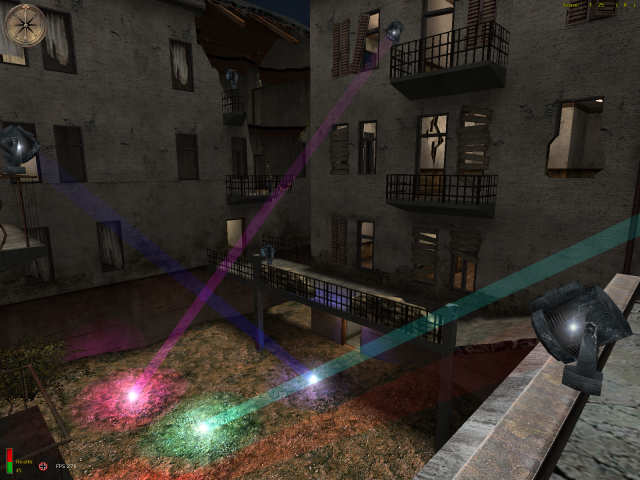
Stalingrado spotlight killers To Install:Just put the .pk3 file in your main folder in MOHAA directory or, if you have a server, put the file in the main To Unstall:Just remove the .pk3 file of your main folder in MOHAA directory or, if you have a server, remove the file of his main

Milkshape MOHAA Plugin
Beta version for ya. As i've had to rush, part of it is still hard coded !!! 1. Download the 2 files, stick them in your milk folder. 2. Create a folder c:\games\mohaa Run milk. load a model export MOH SKL ... follow prompts. *NOTES: exported files will be in the folders created under c:\games\mohaa, this includes textures, shader, tik, skd and skc files. If your exporting a model with animations, make sure that every keyframe is set. If it gives a warning, then just goto frame 1, set the frame, frame 2 set the frame etc all the way through the number of frames you have. Once the model is exported, the standard tik and shader, will let u view it in Radiant, or spawn them into a map. Of course you can alter the tik to your own liking (but remember if you re-export it will overwite the tik ). Anyway, it's only a beta, have fun and let me know your thoughts. Heres the 2 files: SKL_2_SKX.EXE MOH SKL Plugin (scorpiomidget)
Urc Editor
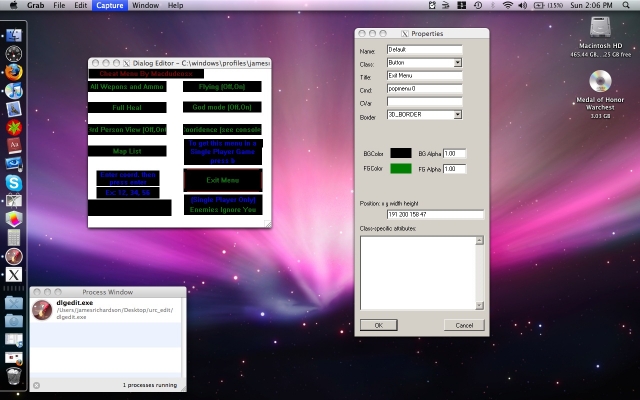
This program visually edits the .urc menu files so you can make your own custom menus for medal of honor. Windows User: Just unzip and run the program. Mac users (Intel only): Make sure you have X11 installed (v10.5 and above, you dont need to worry about this) and download this http://www.kronenberg.org/darwine/ Install it, then double click the program and it will run. All credit goes to the creator of this program. I do not know who it is because the version I downloaded does not have a readme file with the author's information. I am redistributing this because this file is extinct on the internet, I cannot find it anywhere (except my hard drive) Questions? macdudeosx@hotmail.com
MOHAA Server Launcher v10
Metal Of Honor Server Launcher v1 ========================== (C)2003 Zeppelin Design - Zeppelin ========================== Just a simple program to avoid having to edit a batch file to run a dedicated server, nothing too complicated. :) Have any problems feel free to email me . Zeppelin - zeppelin_fnr@hotmail.com
Moh Batch v10
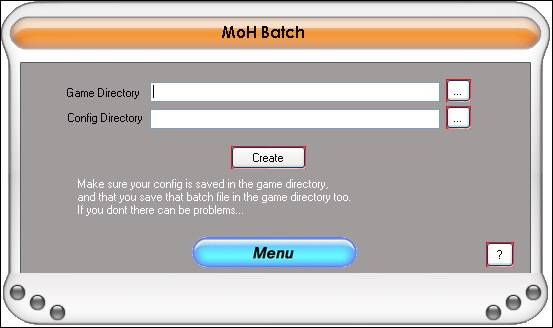
---------------------------------------------------------------------------------------------------------------------------------- -------PLEASE SCAN THE FILES WITH YOUR ANTIVIRUS AS A SAFETY PRECAUTION!!!------- ---------------------------------------------------------------------------------------------------------------------------------- Thankyou for downloading MoH Batch v 1.0 Installation InStructions: If you already have installed another program written by MoH Mods, then you can simply run the MoH Batch.exe file and it should work, although this may not work and will not install the program to your start menu! If you would like to install the program properly, just click on the setup file and wait for it to install! URGENT: DO NOT BY ANY MEANS MOVE ANY FILE INSIDE THIS .ZIP! UNZIP THE FILE AND LEAVE THE FILES AS THEY ARE ARRANGED! 1 FILE MOVED OR EDITED COULD COMPLETELY CORRUPT THE PROGRAM! JUST UNZIP THE FILE AND RUN THE SETUP FILE! TAKES A WHLE TO INSTALL BUT PLEASE BE PATIENT! Please Note: This program is designed for Windows® XP. I have thoroughly tested it for Windows ® XP but have not tested it on any other operating system! Please do not try to use it on an earlier version of Windows ® or a new version if you have downloaded this when another version is released! You are installing this at your own risk! I have thoroughly tested this program and have edited any bugs i found. Please remember that I cannot find every single bug in the prgram! It has not caused me any problems. I cannot be held responsible if anything does go wrong with your machine! Please just inform me of what is wrong so i can prevent it from happening again! If you find any bugs, please email them to smudger712@hotmail.com with instructions on how the bug became apparent and anyway to reproduce the bug or, go to the 'Menu' button in MoH Batch and click on 'Report A Bug' and fill out the form that will appear on your screen! ------------------------------------------------------------------------------------ This program was designed as a sort of brother for MoH Config. You create the config on MoH Config and create the run file on MoH Batch. It as easy as that. simply select the two required files, follow the instructions that appear on screen and then compile it! Updates from v 1.0: This is 1.0! Future updates: Maybe inprove the functionality of the program such as make it so you dont need to remove a bit of the filename. Not sure lol Thankyou Zac Howard - Smith Your Mum
Moh Cfg Maker V130
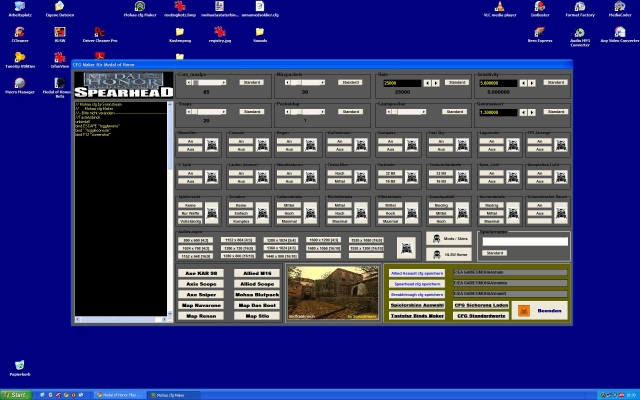
Made by Sonicstream Mohaaplayer at the first Time E-Mail: tommops@t-online.de Have fun with this CFG Maker Fixed the MWHEELDOWN and UP Funktion Version 1.30
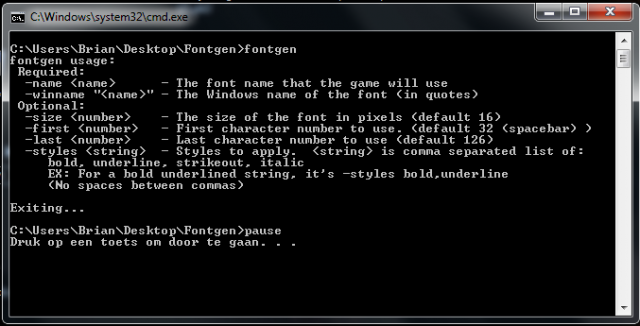
Fontgen
An application made to create your own fonts for in-game. Some info pictures are included within the zip file (taken from posts on forums). Some more links for help: http://www.ritualistic.com/forums/showthread.php?t=16857&highlight=fontgen http://www.modtheater.com/threads/font-problem.9520/ http://www.ritualistic.com/forums/showthread.php?t=13331&highlight=fontgen http://www.ritualistic.com/forums/showthread.php?t=14058&highlight=fontgen http://www.ritualistic.com/forums/showthread.php?t=16692&highlight=fontgen http://www.ritualistic.com/forums/showthread.php?t=15900&highlight=fontgen
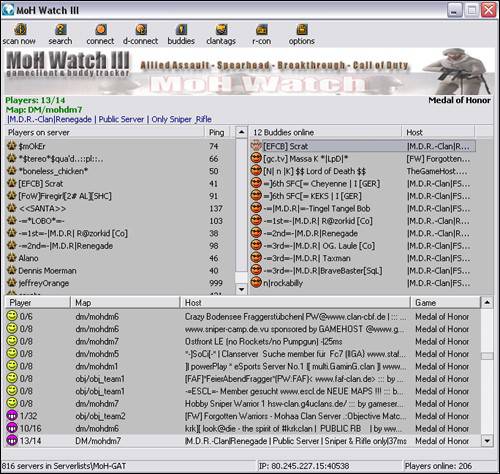
Moh Watch 310
By: Phil Description: This is the upgrade for MoH Watch. Please read the readme for full upgrade information on this tool. Readme: Description: ------------ Version 3.10 gameclient & buddy tracker for + Allied Assault + Spearhead + Breakthrough + Call of Duty Features: -> find playing friends or clan-members -> import, export HLSW or ASE serverlists -> serverlist editor -> serverlist auto-update via Internet -> WatchWeb Browser -> search for servers, maps or ip's -> seperate server and rcon passwords for each server -> connect with rconpassword -> see if you own the servermap -> see map-cycle, ping and more... -> default _rcon server -> sort output by map, server, players or game -> admin your server with -advanced remote console- -> Mapchanges incl. editable maplist (MoH default) -> Kick and ban players. Ban by CLANTAG, NAME or IP! (incl. editable banlist) -> improved cheatskin-check incl. editable cheatskin-list (MoH: AA/SH/BT only!) -> and more... Homepage: www.moh-tools.de.vu
Match Watch
MatchWatch, is a program specifically designed for monitoring matches. It checks and records all server settings, displaying the information to players in the game. It checks and records players names, IP’s, pings, and skins used, reporting any changes that either should not occur or could affect the match outcome. Used in conjunction with MAM, MatchWatch can utilize the game’s screenshot function by forcing this action on players in games. Can be used to monitor and maintain the integrity of a Clan match. Author: Anex
Mod Manager
This application lets you activate or DeActivate Modification in MOHAA. In the next versions you will get a script editor and some tutorials. Author: MrChichi
MOHAA Launch Manager
Launch MOHAA with ease. Store multiple MOHAA servers. Launch into the game easily. Some features: Change your game name. Add your own parameters for launching the game. Check your ping on the currently selected server. Store and launch a clan web site. Add comments about the server. Enter the server password (if you know it). Automatically be notified of updates within the software. Written for Windows 98/ME/2000XP. Author: -=|7th Rangers|= Thor
MOHAA Mod Manager
Very simple interface mod manager for MOHAA Author: Snow


MOHAA Linux Files
To use this: 1) Install MOH:AA on a Win32 system. 2) Patch it up to 1.11. 3) Copy the installed game to a Linux box. (Suggestions on how to do this without Windows are welcome.) 4) Copy the Linux binaries to that Linux box, so that the "mohaa_lnxded" binary and "fgameded.so" are in the same directory as the "main" subdir. In the main subdir there should be pk3 files and such. The binaries should be one level BELOW this. Do not put the binaries in the "main" subdir! 5) Run the server. It doesn't have to be run as root, and it doesn't need to be run from the same directory you installed it in (moh:aa will figure out the correct fs_basedir from where the binary is located). You can punch in commands at the console, or +exec a script or whatnot like other Q3 games. To get running, you'll need to at least do something like: g_gametype 1 map dm/mohdm1 6) Subscribe to the mailing list: to do so, send a blank email to mohaa-subscribe@icculus.org ... discussion of server problems will occur there, so it will be in your best interest to subscribe. 7) Bug reports go to https://bugzilla.icculus.org/ ... there is a Medal of Honor component in the bugtracking system. This is ONLY for bug reports and requests on the Linux version! Win32 bugs will be marked "invalid"! _PLEASE_ make sure your pakfiles aren't corrupted! Running "md5sum *.pk3" in the "main" directory should produce this: 172dd011e999bf9d74bf35b63f3b4a07 Pak0.pk3 1e96e77a2b123186986d089e198c8f66 Pak1.pk3 1e2e77461a03f02a9878508a7e035c2f Pak2.pk3 08ae9d7ee5bb25bf9115fbe4bd071714 Pak3.pk3 fff8f0f1e6f9c2a6f1fb0dc194c5822b Pak4.pk3 50acbda9a8634a1dd33154c88ee8b506 Pak5.pk3 230b78842357b85f9875e164f34d5a0b pak6.pk3 If it doesn't, your pakfiles are corrupted, and you should reupload from a trusted source. Some new cvars and commands that aren't in the win32 version: - Added cvar: fs_userpath ... defaults to $HOME/.mohaa ... this is used to load files, in addition to the standard fs_basepath. - Added cvar: fs_outputpath ... defaults to $HOME/.mohaa ... this is where files (logs and such) will be written to, since, unlike Windows, the basepath may not have write permissions. This can be different than the userpath, but generally you set these to be the same. - Added cvar: logfilename ... defaults to "qconsole.log" ... use it, along with fs_outputpath, to put your logfiles somewhere else. If you set fs_outputpath to "/usr/local/mohaa" and logfilename to "moh.log" then it will be written to /usr/local/mohaa/main/moh.log ... - Added command: writeconfig ... will write out some relevant cvars to {fs_outputpath}/main/config/. - Added cvar: sv_chatter ... defaults to 0 ... set to 1 to see player's chat messages on the server console. You do _NOT_ need to set the "developer" cvar for this to work! - Added cvar: sv_debuggamespy ... defaults to 0 ... set to 1 see information going to and coming from gamespy...If you aren't showing up in the server browser, enable this and see if anything is happening. (This cvar is in the win32 version, too, but doesn't print anything.) Credits and thank yous: Making the MOH:AA server run on Linux was the result of many people's efforts. Here's an incomplete list of people that negotiated for, worked on, and tested the Linux version: EA and 2015: - David Howe - Vince Zampella The primary testers: - Dekard and OFxLedzeplin at GameAdmins (http://www.gameadmins.com/) - Chris Warden at The Cyberspace Matrix (http://www.cyberspacematrix.net/) The beta testers, in no specific order: - Rudi "flurk" Donne - [MOSS]-Zaphod - [^DD^]Hellboy, www.devil-dogs.net - Andrew Chen - Per W Sandberg, Norway - Eric Koldeweij, The Netherlands. - Matt "French school girls" H. - Charles "wokka" Goldsmith - Damon aka Dc|| - Sam Evans (who let me have ssh access to his server!) - Wingman69 - Monthos "Dave Kasper" - ...and a cast of thousands. You know who you are; thank you! Others: - zakk, for ongoing support. - alkini, for risking linux gamer flames. - vogon, for battling ninjas. - zeph, for all sorts of stuff. Me: - Ryan C. Gordon (http://icculus.org/) Thank you to everyone involved! Have fun, --ryan.

MOHSH Linux 215 Beta 5 Patch
These are the public beta Medal of Honor: Allied Assault dedicated server binaries. This version is 2.15 bring the beta to five. ACHTUNG: This is BETA quality code. Run this code at your own risk. It is NOT production quality yet. Do not put it on servers that need extreme uptime. That being said, your feedback is most appreciated. Please get on the mailing list, and submit bugs to Bugzilla. Bugs sent directly to my inbox are deleted without being read. You Have Been Warned. This binary will refuse to run in about 30 days, but there will be updates (and hopefully an official, non-expiring version) before then. To use this: 1) Install Medal of Honor: Allied Assult on a Win32 system. 2) Install the Spearhead expansion pack. This will patch win32 MOHAA up to 1.11 and add the spearhead files, too. 3) Patch Spearhead up to the latest version (2.15 at the time of this writing) 4) Copy the installed game to a Linux box. (Suggestions on how to do this without Windows are welcome.) 5) Copy the Linux binaries to that Linux box, so that the "spearhead_lnxded" binary is in the same directory as the "main" subdir, and the *.so files are in "mainta". Please note that this is different than the layout of the original MOHAA Linux server. Do not put the spearhead_lnxded binary in the "mainta" subdir! Theoretically, an Allied Assault and Spearhead server can both run out of the same tree without clashing, but this has not been tested (reports of success and failure are welcome). 6) Run the server. It doesn't have to be run as root, and it doesn't need to be run from the same directory you installed it in (spearhead will figure out the correct fs_basedir from where the binary is located). You can punch in commands at the console, or +exec a script or whatnot like other Q3 games. To get running, you'll need to at least do something like: g_gametype 1 map dm/mohdm1 There are a LOT of options! Please check out GameAdmins' excellent example configs for Medal of Honor: http://gameadmins.com/modules.php?name=Sections 7) Subscribe to the mailing list: to do so, send a blank email to mohaa-subscribe@icculus.org ... discussion of server problems will occur there, so it will be in your best interest to subscribe. Mailing list archives (which include discussions about the original Allied Assault server that are still relevant) are here: http://icculus.org/cgi-bin/ezmlm/ezmlm-cgi?23 8) Bug reports go to https://bugzilla.icculus.org/ ... there is a Medal of Honor component in the bugtracking system. This is ONLY for bug reports and requests on the Linux version! Win32 bugs will be marked "invalid"! _PLEASE_ make sure your pakfiles aren't corrupted! Running "md5sum *.pk3" in the "main" directory should produce this: 172dd011e999bf9d74bf35b63f3b4a07 Pak0.pk3 1e96e77a2b123186986d089e198c8f66 Pak1.pk3 1e2e77461a03f02a9878508a7e035c2f Pak2.pk3 08ae9d7ee5bb25bf9115fbe4bd071714 Pak3.pk3 fff8f0f1e6f9c2a6f1fb0dc194c5822b Pak4.pk3 50acbda9a8634a1dd33154c88ee8b506 Pak5.pk3 230b78842357b85f9875e164f34d5a0b pak6.pk3 And running "md5sum *.pk3" in the "mainta" directory should produce this: f030b95c358eeed05891e0bbc9b8e361 pak1.pk3 16fceb0c8410ae87b0c6bae1ae761c5b pak2.pk3 099d46871c7b7bbefbea0c72ccd6cea5 pak3.pk3 c4cd23103785916f723658159e9962b4 pak4.pk3 e07af969447d25d91c28f5dd00b84adc pak5.pk3 If it doesn't, your pakfiles are corrupted (or you didn't patch to Spearhead 2.15 on windows), and you should reupload from a trusted source. Some new cvars and commands that aren't in the win32 version: - Added cvar: fs_userpath ... defaults to $HOME/.mohaa ... this is used to load files, in addition to the standard fs_basepath. - Added cvar: fs_outputpath ... defaults to $HOME/.mohaa ... this is where files (logs and such) will be written to, since, unlike Windows, the basepath may not have write permissions. This can be different than the userpath, but generally you set these to be the same. - Added cvar: logfilename ... defaults to "qconsole.log" ... use it, along with fs_outputpath, to put your logfiles somewhere else. If you set fs_outputpath to "/usr/local/mohaa" and logfilename to "moh.log" then it will be written to /usr/local/mohaa/main/moh.log ... - Added command: writeconfig ... will write out some relevant cvars to {fs_outputpath}/main/config/. - Added cvar: sv_chatter ... defaults to 0 ... set to 1 to see player's chat messages on the server console. You do _NOT_ need to set the "developer" cvar for this to work! - Added cvar: sv_debuggamespy ... defaults to 0 ... set to 1 see information going to and coming from gamespy...If you aren't showing up in the server browser, enable this and see if anything is happening. (This cvar is in the win32 version, too, but doesn't print anything.) This doesn't need the "developer" cvar to function. Credits and thank yous: Making the Spearhead server run on Linux was the result of many people's efforts. Here's an incomplete list of people that negotiated for, worked on, and tested the Linux version: EA and 2015: - David Howe - Vince Zampella - Jon Galvan - Keith Francart - Mark Doctermann The primary testers for the original Allied Assault: - Dekard and OFxLedzeplin at GameAdmins (http://www.gameadmins.com/) - Chris Warden at The Cyberspace Matrix (http://www.cyberspacematrix.com/) The beta testers for the original Allied Assault, in no specific order: - Rudi "flurk" Donne - [MOSS]-Zaphod - [^DD^]Hellboy, www.devil-dogs.net - Andrew Chen - Per W Sandberg, Norway - Eric Koldeweij, The Netherlands. - Matt "French school girls" H. - Charles "wokka" Goldsmith - Damon aka Dc|| - Sam Evans (who let me have ssh access to his server!) - Wingman69 - Monthos "Dave Kasper" - David M. Graham (AkA Firewalker) - ...and a cast of thousands. You know who you are; thank you! Me: - Ryan C. Gordon (http://icculus.org/) Thank you to everyone involved!

MOHAA Linux 111 Beta 2 Patch
First, this is a beta. There will be bugs. There will be crashes. Second, I know the sound is a very wonky. Third, there is no Spearhead support right now. Spearhead _does_ work on Linux, but I want to focus on just the original MOHAA first, since most bugs would apply to both. To install: - Install the retail Medal of Honor on Windows from a legal copy of the retail discs. Patch it up to the latest version. - Copy the installed game to a Linux box. - Unpack this archive in the root of game's directory. - Run ./mohaa_lnx Do not send bug reports to me directly or to the server admin's mailing list. They will be ignored. There is no game client mailing list at this time. Send bugs to https://bugzilla.icculus.org/ Changes from last version: - Built with gcc3 (which fixes various meshes in the wrong place, etc). - Mouse handling should suck less. --ryan.


MOHAA Linux Dedicated Server Files
This file is for setting up a dedicated MOHAA server on a linux computer.
Medal of Honor: Allied Assault Mods (MOHAA) — Complete Community Archive
Welcome to the premier repository for Medal of Honor: Allied Assault mods. Since the game's groundbreaking release in 2002 by 2015, Inc. and EA, MOHAA has inspired one of the longest-standing modding communities in first-person shooter history. MOH-DB preserves, categorizes, and serves over 1,600 verified community modifications, custom enhancements, and competitive utilities for Allied Assault, Spearhead, and Breakthrough.
Explore MOHAA Mod Categories
Player Skins & Uniforms
Over 700 historically accurate and creative player uniforms for Allied and Axis factions. Equip authentic U.S. Army Rangers, 101st and 82nd Airborne paratroopers, British Commandos, Soviet Red Army conscripts, Wehrmacht Heer infantry, Fallschirmjäger, and Waffen-SS camouflage patterns, as well as classic community clan skins.
Weapon Models & Reskins
Enhance your WWII arsenal with ultra-detailed weapon replacements and high-resolution textures. Popular downloads include authentic wood-finish Kar98k sniper rifles, realistic metallic sheen M1 Garand models with classic "ping" animation refinements, Thompson submachine guns, MP40s, BAR 1918 rifles, and custom iron-sight alignments.
Soundpacks & Realism Audio
Transform the sonic atmosphere of Allied Assault. Replace compressed 2002 Quake-engine sound effects with cinema-grade gunfire recordings, authentic distant artillery rumblings, terrifying Stuka dive-bomber sirens, supersonic bullet cracks, metal ricochets, and remastered German and American voice callouts.
HUDs, Menus & Crosshairs
Modernize the in-game interface for 1080p, 1440p, and 4K widescreen displays. Download minimalist competitive heads-up displays, custom dot and crosshair overlays, cleaner compass indicators, redesigned main menus, and unobtrusive health and ammunition counters favored by competitive league players.
Server Utilities & Admin Scripts
Run resilient, modern multiplayer game servers with essential server-side utilities. Includes automated map rotators, anti-cheat detection tools, voting scripts, custom match timers, ping balancers, and administrative rcon managers designed for dedicated servers running 24/7.
MOHAA Reborn 1.12 Community Patch
The gold standard community patch for modern MOHAA servers and clients. The Reborn 1.12 patch resolves legacy buffer overflows, fixes client query exploits, expands internal script limits for complex mods, and provides a built-in server browser to replace the defunct GameSpy master server.
How to Install MOHAA Mods: Quick Guide
Identify Your Target Directory
MOHAA stores all game assets in subfolders inside the root installation directory:
- MOHAA (Base):
.../MOHAA/main/ - Spearhead:
.../MOHAA/mainta/ - Breakthrough:
.../MOHAA/maintt/
Paste Without Extracting
Download the mod archive from MOH-DB. If it is zipped (.zip or .rar), extract the enclosed .pk3 file. Place this .pk3 directly into your game's /main/ folder.
How to Remove or Troubleshoot
To remove any mod, simply delete its .pk3 file from the /main/ folder. The game will immediately return to stock behavior without reinstalling.
Frequently Asked Questions about MOHAA Mods
To install MOHAA mods, copy the downloaded .pk3 file directly into your Medal of Honor Allied Assault installation folder under /main/ (or /mainta/ for Spearhead, and /maintt/ for Breakthrough). You do not need to unpack or extract the .pk3 archive—the game engine loads it automatically upon launch.