
Medal of Honor: Allied Assault Mods (MOHAA)
Discover and download community-created modifications to enhance your Medal of Honor: Allied Assault experience.
1676 Mods Found
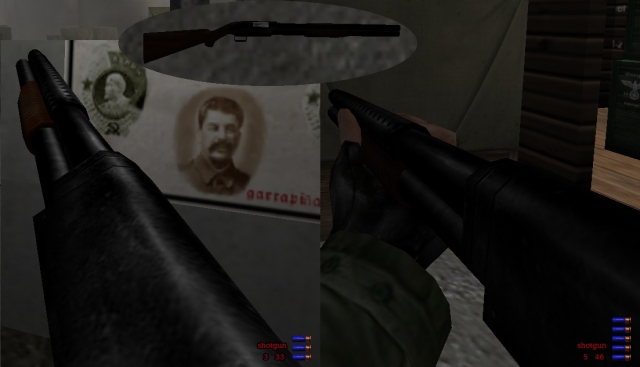

Black Mesa Desert Eagle
9-10-02 Fubah Black Mesa Detail: Used Da Groove texture from his Beretta and also The Desert Eagle skin combine to make Black Mesa . Install to main Enjoy Fubah lamaddog2001@yahoo.com
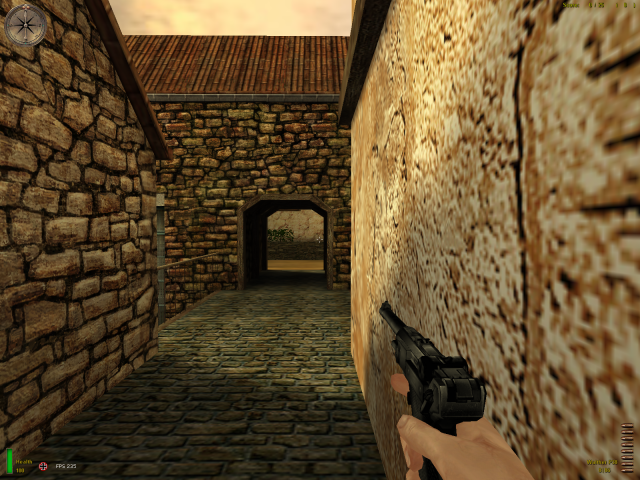

Black Glock
LZs Black Glock textures by LZ Model by hobbs ------------ install in main mohaas or mohaab depending on game ------------------- by LZ [|¦Cø£¦|Liger-Zero]
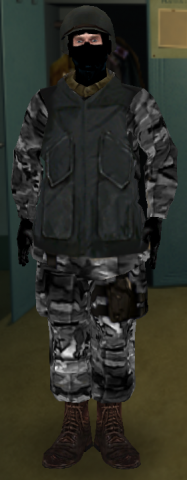
allied_breach&clear
This adds a new soldier skin to MoH:AA. Most textures are totally new. Bugs in previous version fixed (the flashing disco light helmet) It's a SWAT style breach and clear soldier....bit counter-strike inspired. Take a look at screenshot Install to your 'Main' directory, look for 'allied_breach&clear' in the allied player skin selection. Hope you enjoy my first and not my last skin :)
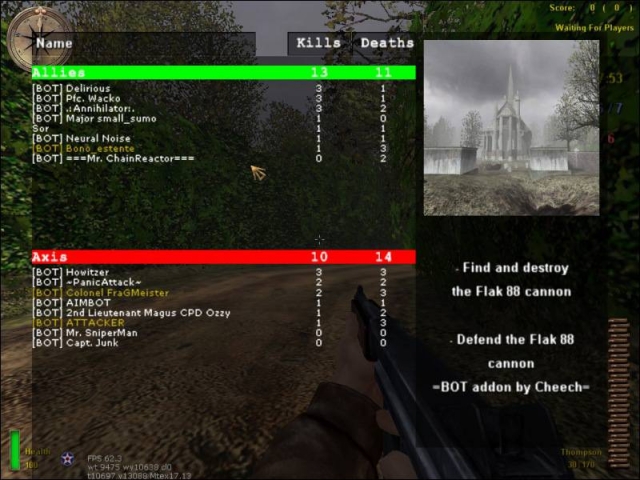
Complete Bots Mod V31
///////////////////////////////////////////// /////////////The Complete Mod v3.1/////////// ///////////////////////////////////////////// Thank you for downloading this file at www.mohaairborne.co.cc VERSION: 3.1 TYPE: Bot Fix, Mod Addon, Mod fix DATE: 24th of May 2009 CREDIT: Proximo & $or – Botaddon, mods… $or - Fixes {SFX} Cobra - C47 Mod >>>>>>>>>>>Zip Contents>>>>>>>>>>>>>>>>>>>>>> V3.0? >>>>>>>>>>>>>>>>>>>>>>>What else was New??>>>>>>>>>>>>>>>>>>>>>>>>>FIXES>>>>>>>>>>>>>>>>>>>>>>>>>IMPORTANT NOTES don't forget to set team damage "ON" (see team damage on.jpg) >>>>>>>>>>>INSTALLATION>>>>>>>>>>UNINSTALLATION>>>>>>>>>>>>>>>>>>>>>>>>Bot Scoreboard V3.0>>>>>>>>>>>>>>>>>>>>>>>>Bot Killboard V2.1>>>>>>>>>>>>>>>>>>>>>>>>Misc Features>>>>>>>>>>>>>>>>>>>MOD CONTENTS<<<<<<<<<<<<<<<<<<<<<<<<< view the xyz_plane_c47_fix.txt/.rtf file for the additions/fixes that file brings. ****PLANES Compatiblity**** DM OBJ ------- ---------- despair Bastogne (tank+planes) omaha doggreen beachobj gloomcove bob_carentan hitler's farm bobobjaa01 m3l3 bobobjaa02 m5l1b bobobjaa03 mohdm1 gloomcove mohdm2 obj_maromg mohdm3 obj_omaha_doggreen mohdm4 obj_stalingrad_final_bots mohdm5 obj_team1 mohdm6 obj_team3 mohdm7 obj_team4 mp_anzio_dm omaha 60th annivesairy mp_bahnhof_dm Prado1_obj mp_berlin_tow st renan mp_bizerteharbor_dm st lo mp_flughafen_tow swordbeach mp_gewitter_dm utah mp_holland_dm 0815_final_fixed mp_malta_dm ALL OTHER MAPS DON'T HAVE PLANES OR DO ALREADY HAVE PLANES ****TANK Compatiblity**** mohdm2 Bastogne ****C47 Compatiblity**** obj_team3 xyz_botaddon_TheSiege xyz_botaddon_OperationSealion xyz_botaddon_obj_longest xyz_botaddon_m5L1b xyz_botaddon_anubis xyz_botaddon_duenkirchen bobobj001 bobobj002 bobobj003 ****Parachute Mod Compatibility**** All maps who support the Planes-Mod and the C47-Mod ---------------------------------------------- Any problems,bugs,requests or if you want to play this mod on your server(or publish it on your site)PLS contact us On our Site: www.mohaairborne.co.cc Or just e-mail us: PROXIMO $oldier Of Ra mohaa_j_fox@hotmail.com MOHAALennySoldier@hotmail.com Check the site for awsome skins, more botmaps and more, we have over 130 botmaps!!!!! On our Site: www.mohaairborne.co.cc
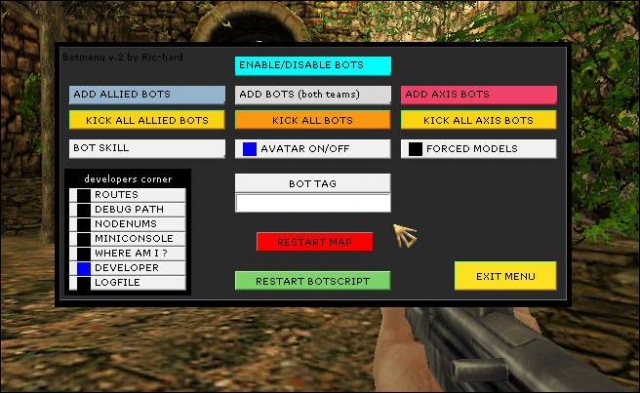
Bot Scoreboard Bot Menu v2
//////////////////////////////////////////////// ////////BOT SCOREBOARD and Botmenu_V2////////// ////////////////////////////////////////////// VERSION: 1.0 Beta TYPE: Bot tools DATE: 10th of July 2008 CREDIT: Bot Menu (v2) - Ric-Hard Bot Scoreboard - URC Clan >>>>>>>>>>>>>>>>>Installation>>>>>>>>>>>>>>>BOT SCOREBOARD: BETA>>>>>>>>>>>>>>>Bot Menu V2>>>>>>>>>>>>>>>CONTACT
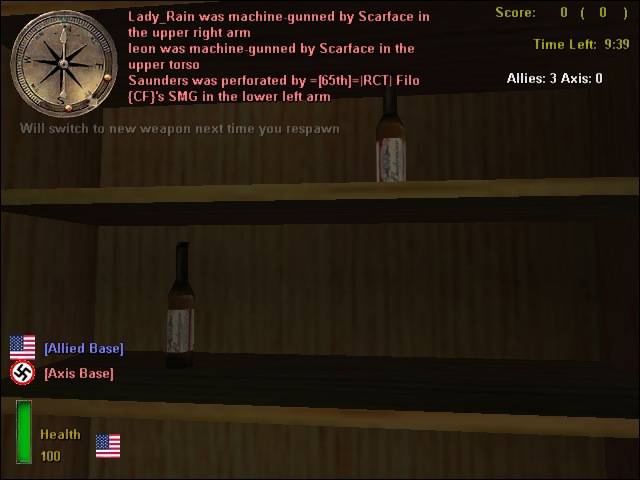
Alcohol Glass Textures
Vdog77's Jack daniel's Whiskey,Budweiser beer, Smirnoff Ice, Heinieken and Glasses mod Textures by Vdog77 //////////////////////////////////////////////////////////////////////////////////////////////// **Description- This is a mod in which the Default beer,whiskey,vodka, and green bottles have been fitted with a Jack Daniels logo,a budweiser label, a Heinieken label and a Smirnoff label. The glasses also have a brown liquid inside of them. //////////////////////////////////////////////////////////////////////////////////////////////// **Installation- Place pk3 in MOHAA/Main and ur good to go! WARNING: This file has not been tested in Spearhead or Breakthrough so it might no work for them! If you have any questions contact me at: sp0rtdude101@yahoo.com (sp0rtdude101 AT YAHOO DOT COM) or at MOHAA filefront forums"Vdog77" Thanks!
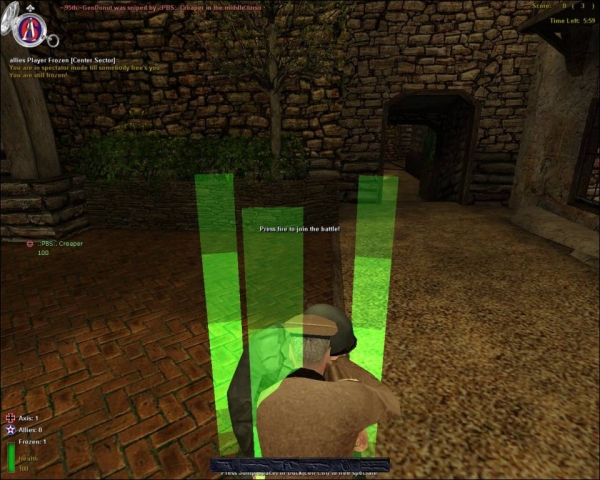
Tag Team
Tag-Team Gametype by =|95th|=GenDonut (GiffE1118) Description ----------- When players die the become frozen. Then when another player of any team melts him. He joins the team of the melter. First team to get all players in the server wins.. This gametype correctly displays how the fields of battle really were. The teams werent always even and a major factor in the battle is how many men you have. With this gametype you must work together and beat the other team by taking their players for yourself. It discourages camping, since u will be deserted and left alone against everyone else on the server. Gotta give out some credit to the following people due to the tremendous amount of help they gave me: bdbodger sorridstroker Beta Testers: =|95th|= Division Clan www.95thDivision.com .:PBS:. Clan www.PBSclan.com Change Log ------------- v1.0 - Currently Stable initial release v1.2 - Unstable Release Added weapons trade/limiter New settings system Fixed some bugs New server config Added Elgan's mg nade fix Added 2 new OBJ maps Added Sudden-Death v1.2.1 - Unstable Release Added SH weapons v1.2.2 - Unstable Release URGENT FIX! Fixes Melting! Had to remove many settings to get it to work again. v1.3 - Stable Release Bugs Fixed (if not all, then most) Added New spectator mode Added Win Camera Added Melting Sound Added New Settings New Config Removed g_ttgameversion cvar and replaced it with a setting in the txt Fixed settings - All settings work Added disable gun feature to weapons limiter for AA only Removed SuddenDeath for more work on it needs to be done -=- v1.4 - Preview/Plans Join original team at end of round Try and finish SD find and fix bugs :P Installation ------------ Drag the user-tagteamV13.pk3 AND TT_Settings.txt into your /main folder. Hosting a Game -------------- Look at the sample Server config included. Make your config have the same settings as the sample. You can then edit the settings in the text file to your liking. Uninstall --------- Just remove the user-tagteam pk3 file from your server's directory. Bugs --------- There may be bugs please report them to the email below any more bugs please email to me at GiffE1118@gmail.com Known bugs: ----------- Sudden Death Does not work Error with weapon name Error with tag_auxdata.frozen have no effect on gameplay though
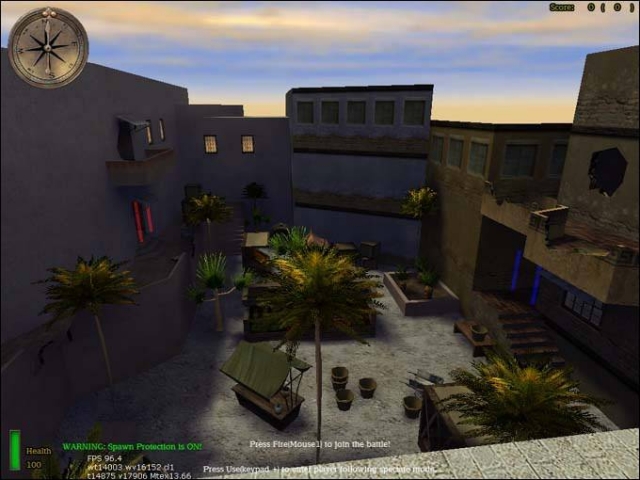
Spawn Protect v10 SH BT
Most likely for SH & BT only. unclebob's spawn protect V1.0 by unclebob Milwaukee, WI USA 10/17/05 Hello all, I have put together my own spawn protect MOD it may seem similar to other spawn protect MODs except unlike others it dose not have Glitches holes & or ways to exploit the system. At least we haven’t found any to date!! Installation: Works with Spearhead & Breakthrough Put the file zzzzzzz_UB_SpawnProtectMOD_V1.pk3 into your Mainta or Maintt folder for your server then restart your server. the code is now active on the servers console. But nothing happens? That’s because the MOD uses a activation code. g_pkill 1 for ON g_pkill 0 for OFF you can ether use Rcon or put it in the servers .exec file. I wouldn’t put it in the .exec! Anyone that has run a server before should understand how this works! Features: The spawn Protect give 2 layers of protection! First layer starts at the warning poles and hurts the enemy player that enters the protected area. Then if they continue into the spawn they hit the second layer & DIE!!!!! No running fast enough to get through no going over the defenses it kills the enemy player. Spawn Poles: are color coded to each side Blue for allied Red for Axis Warning Message: in the lower left corner tells the players if the Spawn Protect is ON or OFF. Bright Green for ON. Dark Blue for OFF. if you don’t want the Dark Blue OFF message on screen all the time you will have to restart your server being sure you don’t have the activation code in your server .exec file!! Has been tested to work with Foresight V1.5.0 I haven’t tested other anti cheat systems as Foresight is what my clan uses. This is free to the public & I hold no responsibility for its use or any problems it may cause the MOD & its code that is! If you do have a problem unclebob@wiDOTrrDOTcom & I will maybe get back to you in a week as I don’t check my email that often.
Squadmaker
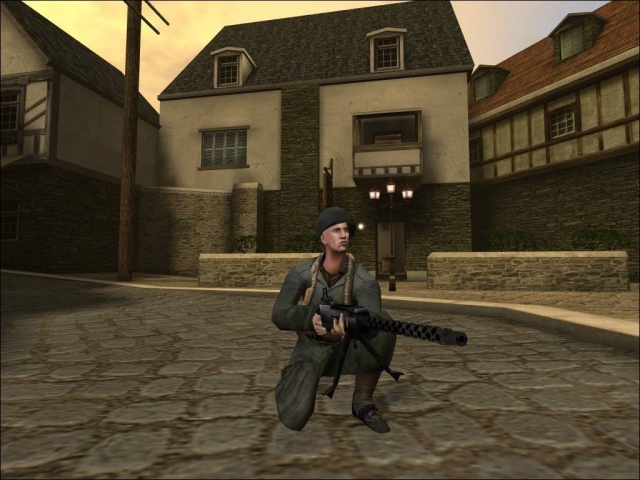
======================================== Squadmaker 1.0 by jv_map ======================================== A Server-Side Weapons Limiter For Medal Of Honor: Allied Assault Copyright (c) 2006 Jeroen Vrijkorte All rights reserved. This modification is FREE and not for any commercial use. I cannot accept responsibility for damage to equipment or lack of funds arising out of the use of this modification. Use at own risk. Not certified for use in nuclear facilities. Not airworthy. Not seaworthy. Don't eat. -------------------------------------- Contents -------------------------------------- 1. Introduction 2. Installation 3. Configuration 4. Customisation 5. Squadmaker Configuration Profiles 6. Supportgun Configuration Profiles 7. Technical Information 8. Thanks 9. Contact -------------------------------------- 1. Introduction =============== Overview -------- Squadmaker is an advanced weapons limiter with some extra features. Players are grouped into squads. You cannot freely choose a weapon, but instead indicate a preference with the weapon selection menu. Whether you get your preferred weapon depends on how many are currently in use in your squad. If your preferred weapon is unavailable, you're forced to use another weapon that is available. Your preferred weapon may again become available when a squad member dies or when a new squad is initiated. Squadmaker also comes with a support gun mod. Each squad can have a single support gunner, who carries the MG42 or M1919 (.30cal) machinegun. These weapons are extremely deadly, but the gunner needs to holster the gun to quickly move to a different location. This leaves him/her defenseless so protection by teammates is a necessity. Finally Squadmaker is designed to be extremely customisable, and every aspect of it can easily be modified. See Sections 3-6 for more information. Short Summary of Features ------------------------- - Automatic weapon assignments leading to balanced matches. - Carryable MG42 and M1919 support weapons. - A hud system with useful information about the mod. - Authentic grouping in squads from various divisions. - Automatic skin assignment based on your division. - Fully server-side, players don't have to download anything. - Extreme moddability. 2. Installation =============== To install Squadmaker on a server, please follow the below instructions: 1) Place squadmaker.pk3 in your server's 'main' folder. 2) Place user-squadmaker_maps.pk3 in your server's 'main' folder. (*) 3) Open your server.cfg (or main/configs/unnamedsoldier.cfg) and add the line: sets sqdmk "" This allows server browsers like ase and hlsw to check if your server runs Squadmaker. 4) On many servers the number of grenades your start with is modified (normally you get 6). If this is the case on your server, add another line to your server.cfg: seta sqdmk_grenade_startammo 3 Where '3' would be the number of grenades you *normally* get on your server. If this value is not set correctly, you may get too many or too few grenades, possibly even a negative number of grenades. Hence it is very important this setting is right. 5) To allow making quick modifications to Squadmaker's configuration, you may wish to upload the squadmaker_config and supportgun_config folders to your server's main folder (i.e. main/squadmaker_config and main/supportgun_config). (*) If your server runs a combination of mods, user-squadmaker_maps.pk3 is likely to conflict with other mods on your server. The best solution to this problem differs from server to server, but I recommend the following procedure: Do NOT upload user-squadmaker_maps.pk3, at all. For each map you want Squadmaker to run on, edit the map script. The map script can normally be found in pak5.pk3 (dm maps) and pak6.pk3 (obj maps), but other mods you have on the server may override these scripts. Either way use the map script from the pk3 with highest search order (alphabetically), or from the main/maps/ folder if present (always highest search order). Edit the .scr file (example mohdm6.scr) with a text editor, and add the following lines: (do this very carefully) ABOVE 'level waittill prespawn', add the line: waitthread global/support/support.scr::soundcache BELOW 'level waittill spawn' (for obj maps, BELOW 'level waittill roundstart'), add: level.squadmaker_areaname = "in Stalingrad" // (optional map location name) exec global/squadmaker/squadmaker.scr Save the modified .scr file and upload to your server. Squadmaker should now run on this map. 3. Configuration ================ To make sure Squadmaker meets your needs, virtually every aspect of the mod can itself be modded. The easiest way to do this is via console variables (cvars), which can be set in a .cfg file (server.cfg) or on-the-fly via the server console or rcon. The following settings are available: (best disable word-wrapping to view this list) sqdmk : Set to 0 to disable squadmaker globally (default 1) sqdmk_msgecho : Whether to echo server console (error) messages to all clients (default 0) sqdmk_force_skins : Force all members of squad to use the same skin (and use officer skin for squad leader) (default 1) sqdmk_show_command_level : Shows command level to squad members (commanding, 2i/c, 3i/c etc) (default 0) sqdmk_show_unit : Shows divisional unit of squad to squad members (default 1) sqdmk_grenade_startammo : dmstartammo setting for grenades (set to 3 for ckr 1.1) (default 6) sqdmk_subconfig : Set custom configs in below-level priority, seperate configs by commas (example: 'art_of_war,winterwar'). Later configs gain priority. May be overridden by level config. (default "") (*) sqdmk_superconfig : Set custom configs in super-level priority, seperate configs by commas (example: 'art_of_war,winterwar'). Later configs gain priority. May override level config. (default "") (*) sqdmk_enable_preference : Whether to let players use their preferred weapon (if available). If set to 0, a weapon will be assigned regardless of player preference. (default 1) sqdmk_verbose : Enables extra debugging info when using a custom configuration (default 0) sqdmk_showinfo : Whether to show additional game info on hud during play (default 1) sqdmk_huddraw_element : Which huddraw element to use for Squadmaker, only change if conflicts with other mods occur (default 83, must be in range 1-255) sqdmk_huddraw_nudge_x : Shift hud horizontally by this many pixels (default 0) sqdmk_huddraw_nudge_y : Shift hud vertically by this many pixels (positive is up) (default 0) support_droppable_dm : Whether support guns can be dropped in respawning matches (default 0) support_droppable_obj : Whether support guns can be dropped in roundbased matches (default 1) support_showammobelt : Whether to show an ammobelt on machinegunners (default 1) support_config : Support gun configuration, can be 'default', 'realism', 'equal' or a custom config (default default) (**) All of these console variables can be set and changed in the following way: 'seta sqdmk_showinfo 1' (in .cfg file or server console), or: 'rcon seta sqdmk_showinfo 1' (via remote console). (*) See: 5. Squadmaker Configuration Profiles for more information. (**) See: 6. Supportgun Configuration Profiles for more information. 4. Customisation ================ Another way to customise Squadmaker is by modifying its configuration files. This requires you to upload the squadmaker_config and/or supportgun_config folders to your server's 'main' folder. In the main/squadmaker_config/default folder, you will find 9 files: config_info.txt Configuration information file. Do not modify this file. divisions_allied.txt Allied division names and skins. divisions_axis.txt Axis division names and skins. hudmessages.txt Hud messages. loadout.scr Weapon loadout script, this requires some more scripting skills to edit. Edit this if you want to change which classes receive a pistol or other items; or if you wish to add more classes. squadnames_allied.txt Allied squad names. squadnames_axis.txt Axis squad names. squad_allied.txt Allied squad buildup. squad_axis.txt Axis squad buildup. All .txt files contain additional information on how to edit them. When changes are made, simply save the modified files on the server and any changes will take effect on the next map transition. Rebooting the server is not necessary. In the main/supportgun_config/default folder, you will find 2 files, gun_allied.scr and gun_axis.scr. Both files may be modified to change weapon properties of the MG42 and .30cal machineguns. Changes take effect without the need to reboot the server. 5. Squadmaker Configuration Profiles ==================================== Even more customisation is possible using 'Configuration Profiles'. These profiles let you define different Squadmaker configurations on a per-map basis, switch between different configurations on-the-fly via rcon, or combine several configurations. For example, you could have 1 profile defining the squad buildup, another defining the divisions and skins, and a 3rd with the hudmessages. You could choose a different combination for each map in rotation. How to make a new profile ------------------------- Create a new folder in squadmaker_config/ , for example squadmaker_config/example/. Then copy those files you wish to modify with this profile over from squadmaker_config/default/. So suppose you only want to modify hudmessages.txt, then only copy hudmessages.txt. Make changes to the copied files as needed. Finally, edit the config_info.txt file in the custom directory. Change the configuration name into some nice, identifiable name. How to remove a profile ----------------------- You can at any time remove a profile by removing the squadmaker_config/example folder. It doesn't matter if the profile is currently in use, Squadmaker will automatically stop using it after the next map transition. How to use a profile -------------------- There are 3 ways to tell Squadmaker to use one or more profiles: - sqdmk_subconfig console variable - sqdmk_superconfig console variable - level.squadmaker_config level variable (set in map script) Each of these variables can specify one or more config directories, seperated by commas (','). For example you could rcon: 'set sqdmk_subconfig example' ; or 'set sqdmk_subconfig example1,example2'. Do not type a space after the comma. What happens is Squadmaker combines all 3 in a configuration list of the form: default>>sqdmk_subconfig>>level.squadmaker_config>>sqdmk_superconfig Where anything later in the configuration list (more to the right) takes priority over anything more to the left. This means that if a file is present in more than 1 configuration, the file from the configuration farthest to the right will be used. Clearly, any custom configuration will override the default configuration, and a superconfig will override everything else. The level.squadmaker_config can be used to specify a different configuration for certain maps in rotation. You can set this variable in the map script, above the line 'exec global/squadmaker/squadmaker.scr' but below 'level waittill spawn'. //------------------------------------------------ Script Example: (...) waitthread global/support/support.scr::soundcache level waittill prespawn (...) level waittill spawn (...) (level waittill roundstart) (only for obj) level.squadmaker_config = "example1,example2,example3" level.squadmaker_areaname = "in this example" exec global/squadmaker/squadmaker.scr //------------------------------------------------ Squadmaker comes standard with the Art-of-War profile, which changes squads to a much more authentic and challenging setup. Most players are forced to use rifles and consequently squads heavily rely on clever use of the support weapons. To enable Art-of-War: (rcon) seta sqdmk_superconfig art_of_war 6. Supportgun Configuration Profiles ==================================== Similar to Squadmaker profiles, profiles are available for the support weapons seperately. Contrary to Squadmaker profiles, only 1 Supportgun profile can be active at a time. All maps use the same Supportgun profile, too. A Supportgun profile merely specifies a set of weapon properties to use for the support guns. Squadmaker comes with 3 preset profiles, 'default', 'realism' and 'equal'. default : Standard, great for stock play. realism : 25% more damage, better for servers running realism like CKR. equal : Allied and Axis guns are exactly equal, damage is similar to default. In addition, you can add any number of profiles by simply adding more folders to the supportgun_config/ directory. Simply copy the files from an existing config and modify some values. You can select which profile is used via the support_config console variable. It can be set in the server.cfg or via rcon. You can also change it at any time via rcon, changes take effect at the next map transition. Set the value of the console variable to the directory name of the desired config. Example: rcon seta support_config realism 7. Technical Information ======================== Squadmaker uses custom state (.st) files. This may cause it to conflict with other mods using custom statefiles, the only solution being to combine the statefile sets (a major effort). Unfortunately this cannot be avoided. Squadmaker's statefiles contain the usual fixes for most well known game bugs and exploits: - landsharking - team switch on ladder - grenade bug This means you don't have to worry about your server becoming vulnerable to these exploits with Squadmaker installed. Squadmaker's statefiles do not contain fixes for bugs related to static turrets. If these pose a problem on your server, I recommended just removing them altogether using: removeclass TurretGun Below 'level waittill spawn' in the map script. This version of Squadmaker is tested on Medal Of Honor: Allied Assault v1.11. It may or may not work on other versions of the game. 8. Thanks ========= Special thanks to two groups who've helped me greatly in the early testing of the mod: {SFX} team, in particular Cobra and Elgan. http://www.mods-r-us.net 1stSSF clan, in particular Floyd and Joey. http://1stssf.com Thanks also to everyone who playtested the mod and gave me feedback on it. Much appreciated! 9. Contact ========== If you have any further questions, run into technical difficulties or simply want to get in touch, please e-mail me at: jv_map@planetmedalofhonor.com My site: http://freebrief.planetmedalofhonor.gamespy.com/ My fav moh sites: http://map.planetmedalofhonor.gamespy.com/ http://modtheater.com http://mods-r-us.com ----------------------------------------- OMG you made it to the end of the readme! Time to enjoy Squadmaker now... Have fun! -----------------------------------------
Mbuilder
When you've created a map in Radiant, you can actually build/compile it with this program to make it playable.
Self Heal
use exec global/selfheal.scr in the map file use set selfheal 1 in the server.cfg Chrouch to regain health.
Self Heal v2
CREDIT FOR THIS GOES TO JV_MAP!!!!!!!!!!!!!!!!! this was jv_maps snowcontest but i made it give you health so if your below 99 heath all you need to do is crouch and not move your heath will begin to go up this is server side so place it on your server main folder and all the player will beable to use the self heal mod --- --- --- this is a new version of the old self heal mod v2. changes: cleaned up the code a bit (thx to gooser13) added a cvar add this to your server cfg set self_heal 1 v1. this was jv_maps snowcontest but i made it give you health so if your be This mod will allow you to add self healling to your mohaa server. So if you health is lower then 99 you can heal your self by crouching.
Moh Mouse Cursor Pack
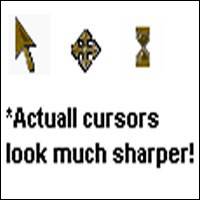
Thank you for Downloading! This Medal of Honor theme pack was compiled by Ben Mora! To use these cursors, go to your computers Mouse Options, by going to your Control Panel then Mouse Options. Then select the pointers tab then the pointer you would like to replace, choose the Browse option, and locate the pointer you want, in the directory you installed it! Then click the "Save As" button and save the new mouse theme as, what ever you want! (example; Medal of Honor Theme) Hope you enjoy!
Q3e Minimizer V15
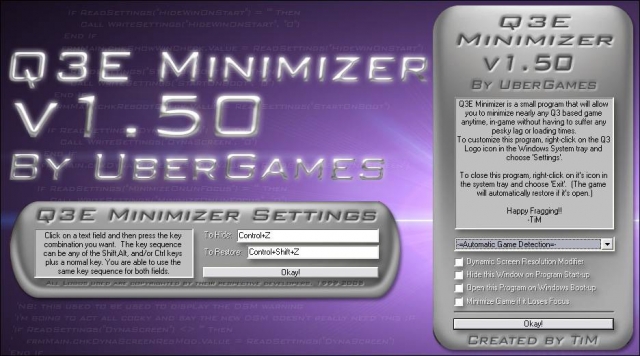
=-=-=-=-=-=-=-=-=-=-=-=-=-=-=-=-=-=-=-=-=-=-=-=-=-=-=-=-=-=-=-=-=-=-=-= Q3E Minimizer v1.50 by UberGames =-=-=-=-=-=-=-=-=-=-=-=-=-=-=-=-=-=-=-=-=-=-=-=-=-=-=-=-=-=-=-=-=-=-=-= File Name: Q3E Minimizer v1.50 Version: 1.50 File Size: 272k Developer: TiM Date Created: 11/11/05 1:03AM Creation Time: A few weeks (10% coding, 90% Debugging... gah!! ;P) Programs Used: Visual Basic 6, Adobe Photoshop CS Website: http://www.ubergames.info =-=-=-=-=-=-=-=-=-=-=-=-=-=-=-=-=-=-=-=-=-=-=-=-=-=-=-=-=-=-=-=-=-=-=-= About: Q3E, or Quake 3 Engine Minimizer is a program that has been created to give you the ability to quickly and easily minimize nearly every game that has been coded using the Q3 engine as a base. The reason I made this was because I was tired of having to spectate, or suffer being killed over and over again as I used Alt-Enter to switch to my desktop which took practically forever so I could answer MSN or ICQ. The concept of the "un-Alt-Tab-able" game minimizer isn't mine. This one is more of an extension to an idea that someone else had, that I thought could be expanded furthur. I was cruising JK2files.com one day, looking at the utilities section (I had just sent in KT 101 and was looking to see if anyone had d/led it yet) when I saw a file called "JK2 Minimizer" created by a very cool d00d who goes by the name of Deathwish. Being interested, I downloaded the file and found out how simple it was, yet at the same time, so very very useful. Responding to people on MSN/ICQ, etc was no longer a grueling task. Later on, I was playing STV: Elite Force online and found that I greatly missed the ability to minimize it like I could with JK2. So, I took it upon myself to create my own Minimizer. Using snippets of VB code around the internet, I managed to create a similar program I named "EF Minimizer", that I submitted to effiles.com. Many people found it immensely useful, and I was extremely happy with the feedback. ^_^ A few months later, I attended a LAN party (My first ever LAN party actually :D ) where I got involved in a heated battle of Q3A with some other people there. After a few minutes, I, by reflex, tried to minimize Q3. When nothing happened, I said to myself at that point, "I'm going to make a version of EF Minimizer that can minimize all Q3 based games". After the LAN party, I clean forgot about doing that, so the half finished "Uni Minimizer" (I hadn't thought of a good name then) sat on my hard drive for a month. After a month, I downloaded the new Jedi Knight: Jedi Academy demo (May I point out, an AWESOME demo). Whilst I was playing it, someone on MSN messaged me, and I realised that I was stuck in-game, having to alt-enter out. At that point, I remembered Uni Minimizer, and decided to complete work on it. So, after a few nights of working, I brought you version 1.0 of the new Quake 3 Engine Minimizer, or Q3E Minimizer, but now, I bring you version 1.50 of Q3E Minimizer! =-=-=-=-=-=-=-=-=-=-=-=-=-=-=-=-=-=-=-=-=-=-=-=-=-=-=-=-=-=-=-=-=-=-=-= Features: -=Features new to v1.50=- -Now supports these games: *Quake 4 (Same boat as Doom 3 -See Below ;) ) *American McGee's Alice *Game Over in Machinimation *Medal of Honour Allied Assault *Medal of Honour Allied Assault Spearhead *Medal of Honour Allied Assault Breakthrough -Fraggin' Huge Codebase Revamp Thanks to my programming work on the EF mod RPG-X, I've learnt a great deal more about programming, which I was able to incorporate into Q3E Minimizer. :) Through a LOT of recoding (very nearly re-wrote the whole thing!) and optimisation, I managed to chop off about 50kb off of the size from the previous version! :D! -Revamped Key Selection I recoded how you select hotkeys, so it is now a lot more flexible. Not just alphabetic characters, but nearly any key on your keyboard you can use now! :D (NB: Although I didn't disable it, you may want to avoid F12 as some windows apps need that one :P ). Additional flexibilty include being able to assign the same key twice (so you can just use the same keys to toggle in and out of game) and being able to set no keys at all (Could be useful in some instances. I can think of a few) -All New DSM I COMPLETELY RECODED THE DYNAMIC SCREEN MODIFIER. Having finally grasped the concept of API functions and how to use them right, I found out how inefficient the DSM function was. It's now been totally redone from scratch and I think it's safe to say, it's a lot faster and it'll leave your icons alone now. ^_^! -Remade Icons I resized and optimized the games icons used, so they should look a lot more crisp and less blocky in the system tray now. -Minimize Game if it Loses Focus A requested feature. When this is active, if the game loses focus (ie, the user switches to another window or hits the windows key), it'll automatically minimize the game. -Command Line Arguments Not really a detailed feature, but it could prove useful. Basically, as you start up this program, you can add the command line argument '-run "" ', and when Q3E Minimizer runs, it'll start up that program too. :) -More efficient registry settings I went through and consolidated a few of the registry settings into single entries, thereby saving a tad more memory lol. :) -Subclass Message Support This was another requested feature. I added support for external developers to be able to send commands directly to the program from their own programs using the Windows SendMessage API function. Supported commands include Toggle, Minimize, Maximize, SaveGameRes, GotoDesktopRes, and GotoGameRes. Unless you're a programmer, you probably won't be using this feature at all. ;) Any developers interested in trying this out, e-mail me and I'll send you the necessary defines. :) -=Features new to v1.45=- -Minor UI Adjustments I made a few changes to the interface background pictures. See if you can spot the differences. ;) -Screen DPI Adaption It was pointed out to me that when a person's screen had it's DPI set to anything other than the default 96, it would totally throw the program's interface out of whack (The buttons wouldn't be in the right spot etc,). That being the case, Q3E Minimizer now has the ability to detect this and adjust the UI accordingly so everything still matches. -Bug Fixes *The HORRENDOUS (;P) bug in whereas the Dynamic Screen Modifier would crash the program if you tried to turn it on has now been fixed. Not only that, but I noticed that the modifier wasn't working correctly anyway, so I've recoded most of it so it now does (Fully tested on my Desktop PC and laptop PC with satisfactory results :D ) *If the Automatic Game Detector detected Jedi Academy Multiplayer, the program would crash. This has been taken care of. *More odds and ends have been tidied up. ;P -=Features new to v1.40=- -Revamped Codebase It's been about a year since I released Q3E Minimizer 1.0. Since then, I've graduated from high school, gone to uni, and formally studied programming. So now that I understand programming methods much better, I've noticed that the code for thisthing was in some cases quite in-efficient. As a result, I've totally redone a large portion of the code, which will definately let the program run more efficiently/quickly now. :) -Minimzer has the option to open upon Windows startup. -The main window (The one that pops up at the start) now has the option of not appearing when Q3E Minimizer starts up. -Reconfigured Hot Key Registration I've found that when the Minimzer is open, even when not ingame, the active hotkeys (Which disable that command for any other program) made working in other areas more difficult (For example, ctrl-z is the 'undo' command for many programs.) As such, I've now made it that the hotkeys are now active only when an active game is detected. This should make the presence of the minimzer less visible now. :D -Now additionally supports these games: *Call of Duty: United Offensive (SP) *Call of Duty: United Offensive (MP) *Doom 3 (NOTE: Doom 3 seems to override the hotkeys Q3E Minimizer assigns in-game, meaning it doesn't work when directly in Doom 3. To get around this, press alt-tab first, and then try the minimzer's hotkeys. Getting back into Doom 3 is the same as any other game though) (EXTRA NOTE: Okay Okay, I know that Doom 3 is TECHNICALLY not a Quake 3 based engine, but I still got several requests by people who wanted support for it anyway. So uh here it is :) Then again, Doom 3 WAS created by the same company, and they would have been foolish to not recycle bits and pieces from Q3. So, theoretically, on a remote scale, it could be considered Q3. ;P But I think I'll draw the line here. No more deviations from Quake 3 games. ;) ) -=Features new to v1.30=- -At the criticism of one of the admins at jk2files.com, I have now removed the prompt you get when quitting Q3E Minimizer whilst a game is active. -I also redid the offline icons for SoF2 SP and MP so they have much better quality. -Now additionally supports these games: * Call of Duty (SP) * Call of Duty (MP) * Heavy Metal: F.A.K.K² (Thanks goes to Oomjan and Flying Fool for sending me the details to integrate these games!) -=Features of v1.20=- - If a game is active, and you choose to close Q3E Minimizer, it will now prompt you to make sure you really have chosen to close it whilst a game is active. - Major Overhaul on the Dynamic Screen Resolution Modifier. Now, when you quit the game, it won't keep the screen at the same resolution as your game. If you quit Q3E Minimizer whilst the game is still running though, it will keep it at the same resolution. -Whilst a game is running under automatic detection, you can change the game while the game is still running. (In 1.10, when the game was active, the menu was locked.) The user will need to quit the game if they want to re-enable auto detection however (But you had to do that anyway. ;) ) -Now supports these games: * Soldier of Fortune II: Double Helix (SP) * Soldier of Fortune II: Double Helix (MP) * Return To Castle Wolfenstein: Enemy Territory (Thanks goes to OomJan and coffee for the help in order to support these games) -=Features of v1.10=- -Auto Game Detetection Users now have the abilitity to set the minimizer to automatically scan for any active Q3 game, and then automatically set that game as the target for minimization. This feature is optional, and users may still manually choose which game they want the minimizer to target. (The detector will only work right if only one Q3 based game is running. If more than one is active, it will choose one itself) Whilst the detector and game are running, the drop-down menu is locked to prevent changing the game as it may cause errors. -Dynamic Screen Resolution Modifier A large number of gamers play their games at lower screen resolutuions, usually to get better performance from their video card, or due to older hardware. When a person normally minimizes the game, it will display their desktop at the same resolution as the game, which is usally quite ugly and quite difficult to operate with. At the request of several people, v1.10, and 1.20 come with the feature to activate an option that will automatically adjust the user's resolution upon minimization and restorization, depending on what the resolutions are when the game is minimized and the game is active. - Version 1.10 supports these new games: *Star Wars: Jedi Knight: Jedi Academy (SP) *Star Wars: Jedi Knight: Jedi Academy (MP) (If you still want to play the JKA demo, select the JKA SP choice as they are both the same thing. :) ) -Updated Interface -=Original, Primary Features=- -Will Minimize/Restore a specified Q3 based game at the touch of a key -Now has an all new graphical interface (Format is GIF to minimize size) -Runs in the background so as not to take up many system resources, leaving it all for fragging! -Icon in the system tray changes depending what game is running -Left-Clicking on the system tray icon will bring up the hot keys window, If game is running, it will instead restore the game -Right-Clicking the icon will access a simple menu to configure or quit the minimizer. -Quitting the minimizer will automatically restore the game. -Version 1.0 Supports the following Q3-based games: *Quake III Arena *Star Trek Voyager: Elite Force (SP) *Star Trek Voyager: Elite Force Holomatch (MP) *Star Trek: Elite Force II *Star Wars: Jedi Knight II: Jedi Outcast (SP) *Star Wars: Jedi Knight II: Jedi Outcast (MP) *Star Wars: Jedi Knight: Jedi Academy Demo (No longer in v1.10/1.20/1.30/1.40/1.50) *Return to Castle Wolfenstein (SP + MP) [Wolfenstein had the nifty feature of naming both MP and SP windows the same thing, so I was able to put SP and MP into one option. ^_^] =-=-=-=-=-=-=-=-=-=-=-=-=-=-=-=-=-=-=-=-=-=-=-=-=-=-=-=-=-=-=-=-=-=-=-= Instructions for Use: 1. Open the Q3EMinimizerv150_Setup.exe and follow the instructions. 2. Once installed, and upon opening Q3E minimizer, the main window will appear. In the drop-down menu located near the bottom of the window, choose which game you would like the minimizer to currently focus on, or leave it at Auto Game Detection, if you wish. 3. Start up that game as you would normally. 4. To minimize the game, press the default keys: Control-Z 5. To restore, press Shift-Control-Z To configure the hot keys, right-click on your current game's icon in the system tray, and choose "Settings...". From there, use the interface to select your new keys. =-=-=-=-=-=-=-=-=-=-=-=-=-=-=-=-=-=-=-=-=-=-=-=-=-=-=-=-=-=-=-=-=-=-=-= Trouble-Shooting: -=ARGH! WTF!? I'M AN ATI USER AND MY SCREEN GOES DARK IF I MINIMIZE!?!=- This has been the number one mentioned glitch in this program. :( From testing various settings, it appears to me that ATi did this on purpose whenever windows were switched to keep each view at the native settings. It is definately a feature inserted into the latest ATI Graphics drivers, and as such, I don't think there's much I can really do. :( Only prob is that when Q3 is restored, it doesn't actively update it's gamma, so u get normal desktop gamma ingame. >.:( ). As a sort-of fix for this, there are three things you can do: *In the Q3 console, type '/r_ignorehwgamma 1' and then '/vid_restart'. This will work, but might require a bit of tweaking of the gamma setting after that to get it look the same as it was before. *Create a bind script that changes your gamma ('/r_gamma') to a different value, and then changes it back. This is kind of hacky, but works well. *Go out and buy an nVidia brand graphics card. This issue doesn't seem apparent with them. >.
New Map Builder
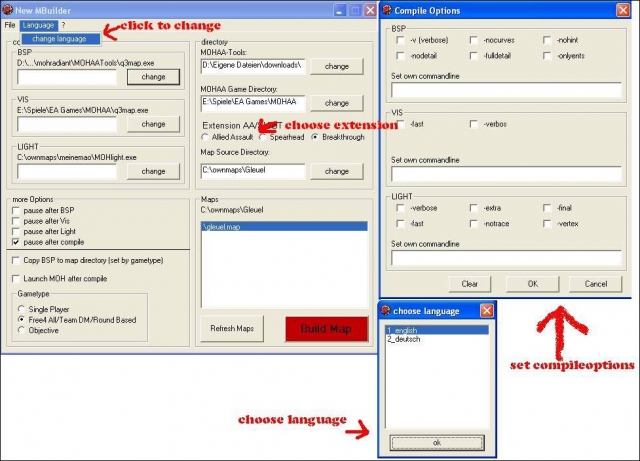
Here is the New Map Builder Install: Extract NMBuilder.zip were ever u want and start NMBuilder.exe Description: NMBuilder is a mapbuilder(converter) for MOH:AA, MOH:AA SH and MOH:AA BT NMBuilder based on the old MBuilder written by Sotilas Jane. NMBuilder fixes many bugs the old version had and modified some options. Functions: - Convert *.map files to *.bsp files - Pause after every compile step - Copy *.bsp to the Mapdirectory of AA SH or BT after compile _ Starts MOH:AA, SH or BT after compile - language can be chosen but for now just english and german if u have time and speek an other language u can write a new language file u can find it in the folder /lang
City Nights Weapons Pack
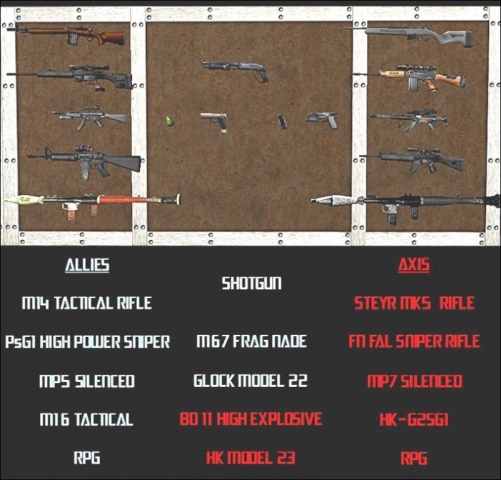
Weapons By-HOBBS -Glock:Model by sas.stu,Skin by -X- -HK-Scoped: Authors= Lonewolf,Sixshooter,and Deadmeat. -Tactical M16: Authors= IrocladEndorphin,Galen,Sixshooter,Raven, and Bad Karma. Mosseberg Shotgun: Model by Minion, skin by sixshooter Weapons By-DR. DELETO FN-FAL Sniper PSG1 Sniper HK-23 M14 Sighted MP7 Sighted MP5 Styer-MK5 RPG launcher Grenades. All edited, scripted, and converted by Dr De|eto for the MohAA "City Nights" Mod RPG: Converted from Soldier of fortune 2 projectile model by me M67 fragmentation grenade: original model and skin by: Dominic Bd11 HE Grenade original model and skin by: Birdhouse mp5 submachine gun (thompson replacement) original model by: TechMarine original skin by: Galen mp7 submachine gun (mp40 replacement) original model by: -={GDF}=-Hopsefloh original skin by: -={GDF}=-Hopsefloh Holosight and scope by: Murdock under barrel handle model by me. m14 Rifle (m1 garand replacement) original Hacked Weapons model by: Dead Meat Various Parts: Slinkey\Nomad. Various Parts: Raven. Various Parts: SixShooters\Endorphin\Bulitt. Various Parts: Molotov Billys M14. Various Parts: Shrike & the_Aim. Various Parts: Defcon\Helldog. Various Parts: Ne0Rae. original skin by: Fighting Chance Steyr Mk5 rifle (mauser replacement) original model by: sPiN'FuZoR original skin by: Endorphin HK 23 handgun (p38) original model by: Timbo original skin by: Wannabe FN FAL Sniper Rifle (KAR) original Hacked Weapons model by: Murdock various parts: Shrike/Lonewolf various parts: bullit various parts: Endorphin/Sixshooter various parts: Darkhunter/Nirvy various parts: Sas.stu/-X-. various parts: Darkhunter/Nirvy PsG1 Sniper Rifle (sp03) original model by:? no readme included with model original skin by:? no readme included with model You MAY edit or convert any of these models as long as you give full credit to the authors and editors. you MAY NOT include these in any mod for money making or profit purposes. thanks to all that modeled these originally. If I forgot anyone I'm deeply sorry!
Mod Manager Editor
Pk3/Mod-Manager/Editor (v. 3.2.0) if you have Pk3/Mod-Manager/Editor (v. 3.1.7 and below) you need to uninstall it. to uninstall goto Control Panel and click add or remove programs 1. This will let you turn on and off your pk3 files 2. edit them 3. and now edit bsp map files!!! What Version 3.1.7 Fixed 1."ocx" being out-of-date What version 3.2.0 Fixed 1.the "Run-Time error '76' path not fond" on start up 2.When you click "Extract" there is no name 3.The "Fix !!" button on the bsp editor 4.Fixes it so i can make a patch so there is no need to unistall each time 5.A "Errors and Bugs" Page To add a file in side a pk3 file or out side of you! Double-click the pk3 file in the Mod on list or Mod off list or click view Projects Now click new project type in the name of the project then select the project in the dropdown list Look at the files in the treeview or click add file if you selected a file in the treeview(pk3 file) then click add to project. after adding all the files to your project you can now click view project now you can change the name or edit the file or bsp file and change the path and make your project in to a pk3 file
Medal of Honor: Allied Assault Mods (MOHAA) — Complete Community Archive
Welcome to the premier repository for Medal of Honor: Allied Assault mods. Since the game's groundbreaking release in 2002 by 2015, Inc. and EA, MOHAA has inspired one of the longest-standing modding communities in first-person shooter history. MOH-DB preserves, categorizes, and serves over 1,600 verified community modifications, custom enhancements, and competitive utilities for Allied Assault, Spearhead, and Breakthrough.
Explore MOHAA Mod Categories
Player Skins & Uniforms
Over 700 historically accurate and creative player uniforms for Allied and Axis factions. Equip authentic U.S. Army Rangers, 101st and 82nd Airborne paratroopers, British Commandos, Soviet Red Army conscripts, Wehrmacht Heer infantry, Fallschirmjäger, and Waffen-SS camouflage patterns, as well as classic community clan skins.
Weapon Models & Reskins
Enhance your WWII arsenal with ultra-detailed weapon replacements and high-resolution textures. Popular downloads include authentic wood-finish Kar98k sniper rifles, realistic metallic sheen M1 Garand models with classic "ping" animation refinements, Thompson submachine guns, MP40s, BAR 1918 rifles, and custom iron-sight alignments.
Soundpacks & Realism Audio
Transform the sonic atmosphere of Allied Assault. Replace compressed 2002 Quake-engine sound effects with cinema-grade gunfire recordings, authentic distant artillery rumblings, terrifying Stuka dive-bomber sirens, supersonic bullet cracks, metal ricochets, and remastered German and American voice callouts.
HUDs, Menus & Crosshairs
Modernize the in-game interface for 1080p, 1440p, and 4K widescreen displays. Download minimalist competitive heads-up displays, custom dot and crosshair overlays, cleaner compass indicators, redesigned main menus, and unobtrusive health and ammunition counters favored by competitive league players.
Server Utilities & Admin Scripts
Run resilient, modern multiplayer game servers with essential server-side utilities. Includes automated map rotators, anti-cheat detection tools, voting scripts, custom match timers, ping balancers, and administrative rcon managers designed for dedicated servers running 24/7.
MOHAA Reborn 1.12 Community Patch
The gold standard community patch for modern MOHAA servers and clients. The Reborn 1.12 patch resolves legacy buffer overflows, fixes client query exploits, expands internal script limits for complex mods, and provides a built-in server browser to replace the defunct GameSpy master server.
How to Install MOHAA Mods: Quick Guide
Identify Your Target Directory
MOHAA stores all game assets in subfolders inside the root installation directory:
- MOHAA (Base):
.../MOHAA/main/ - Spearhead:
.../MOHAA/mainta/ - Breakthrough:
.../MOHAA/maintt/
Paste Without Extracting
Download the mod archive from MOH-DB. If it is zipped (.zip or .rar), extract the enclosed .pk3 file. Place this .pk3 directly into your game's /main/ folder.
How to Remove or Troubleshoot
To remove any mod, simply delete its .pk3 file from the /main/ folder. The game will immediately return to stock behavior without reinstalling.
Frequently Asked Questions about MOHAA Mods
To install MOHAA mods, copy the downloaded .pk3 file directly into your Medal of Honor Allied Assault installation folder under /main/ (or /mainta/ for Spearhead, and /maintt/ for Breakthrough). You do not need to unpack or extract the .pk3 archive—the game engine loads it automatically upon launch.