
Medal of Honor: Allied Assault Mods (MOHAA)
Discover and download community-created modifications to enhance your Medal of Honor: Allied Assault experience.
1676 Mods Found
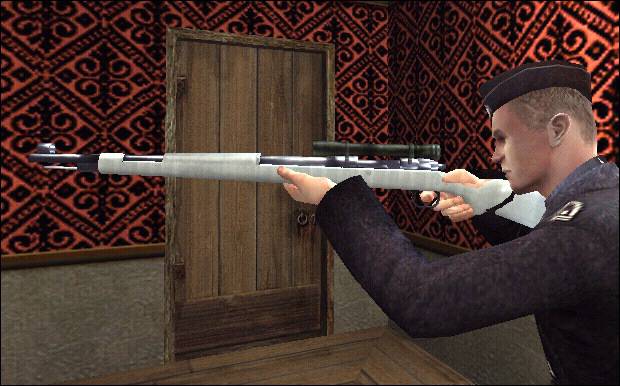
Winter Mauser Kar98
A skin of the German rifle ( kar 98 mauser ) and the german sniper ( kar 98 sniper ) this skin is winter skin and they looks like snow.
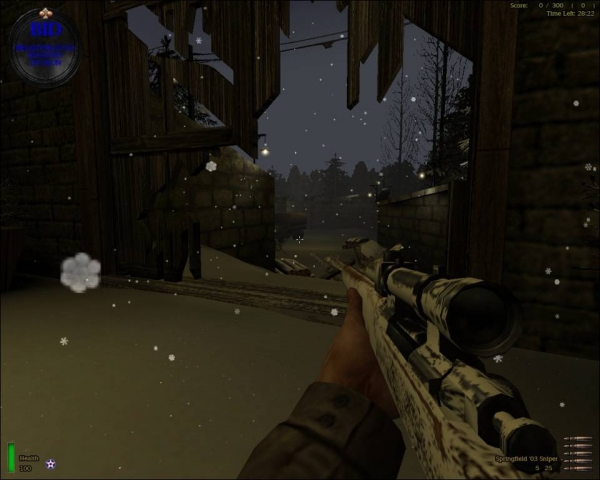
Snowy Springfield
Description: This is a Snowy Springfield 03 skin I made for Moh:AA but it works in Spearhead and Breakthrough. Installation instructions in readme. It is especially good I think for winter maps like Snowy Park. This is my first weapon skin so I hope you like it. Readme: Snowy Springfield skin ver. 1 ----------------------------------------------------------------------------------------------- Install: There is 1 PK3 File in this pack. It is for MOH AA, Spearhead and Breakthrough. Just take the .PK3 file saying " user-BID.pk3 ", and drop it on your MAIN folder for AA, mainta for Spearhead and maintt for Breakthrough in Medal of Honor Allied Assault Directory. ----------------------------------------------------------------------------------------------- Uninstall: Just take the pk3 out of the main folder or delete it from the folder ----------------------------------------------------------------------------------------------- Made by �|ßIÐ|�Goa.Patton(IRL) http://www.freewebs.com/pattonsquad/index.htm c:2008
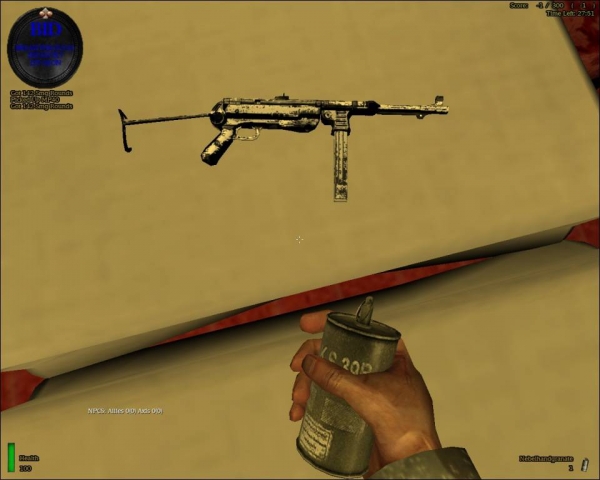
Snowy Mp40
MP40 skin ver. 1.0 ----------------------------------------------------------------------------------------------------------------------- Install: There is 1 PK3 File in this pack. It is for MOH AA, Spearhead and Breakthrough. Just take the .PK3 file saying " user-Pattonssnowymp40.pk3 ", and drop it on your MAIN folder in Medal of Honor Allied Assault Directory. ----------------------------------------------------------------------------------------------------------------------- Uninstall: Just take the pk3 out of the main folder or delete it from the folder ----------------------------------------------------------------------------------------------------------------------- Made by †|ßIÐ|†Goa.Patton(IRL) http://www.freewebs.com/pattonsquad/index.htm c:2008
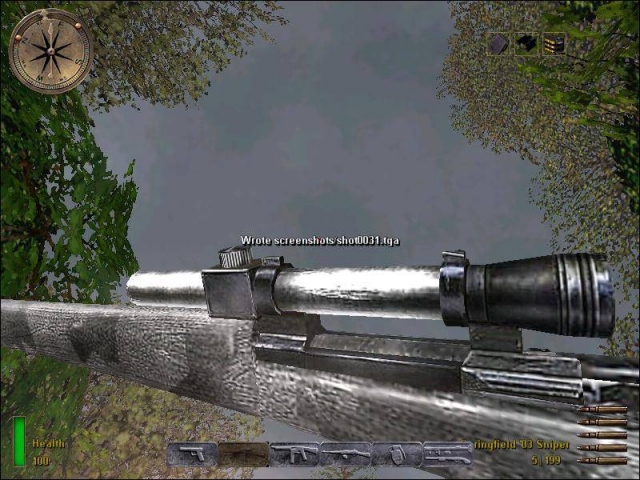
Enhanced Winter Springfield
I've tried once again to make a decent Springfield skin, so here it is, it's got winter camo and a red scope...lets see how you like it! I tweaked some more effects on it so it should look better than my other ones... Install in your main folder... Questions, comments, complaints, suggestions: MpSnaredrummer@aol.com By: Yossarian
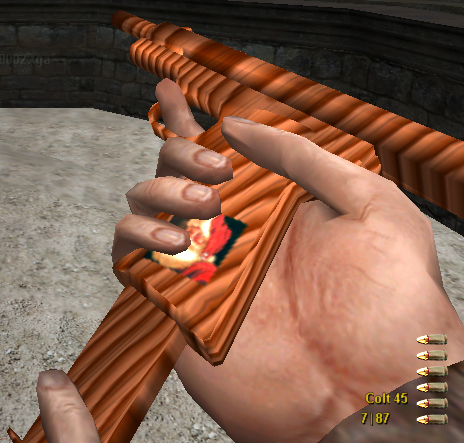
Christmas Toy Pistols
«- SolidScope -» Created: 12/10/03 SolidScope "Christmas Toy Pistols" Info: Wooden toy guns that you've always wanted to get under your tree. But be careful, Old Saint Nick is watching on the handle of the pistols. Install: Place .pk3 in your MOHAA/main folder. Uninstall: Delete .pk3 from MOHAA/main folder Contact: XSolidScopeX@hotmail.com
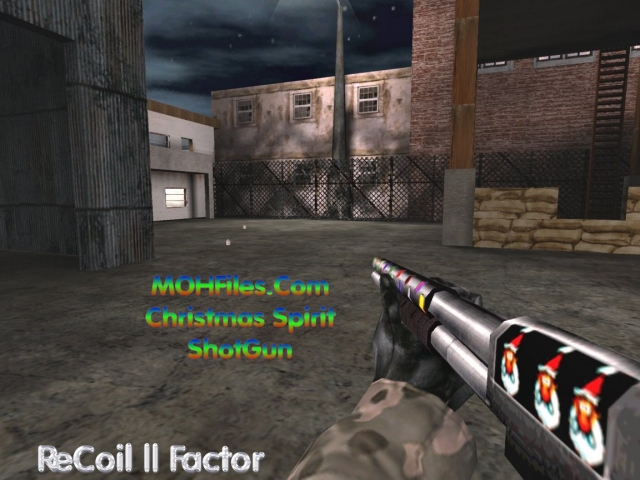
Christmas Spirit Shotgun
***** R || F ***** Release Date: 12-01-02 ReCoil || Factor MOHFiles.com Christmas Spirit ShotGun Paul Modelewski, Site Manager for MOHFiles.com asked if I could make a festive shotgun! Well, reworked the weapon to give it a more festive look...I hope.. lol enjoy! :) Merry Christmas to all... **************************************************************************************************** Place the .pk3 file into the MOHAA/mainta folder in Medal of Honor. To remove the skin, just delete the .pk3 file. Enjoy :) tcfool@attbi.com
Christmas Tree Compass 1
A christmass tree with the 2 christmass colors sorounding it. Green and Red. ITS A PRETTY CHRISTMASS TREE!!!! -By Jehuty
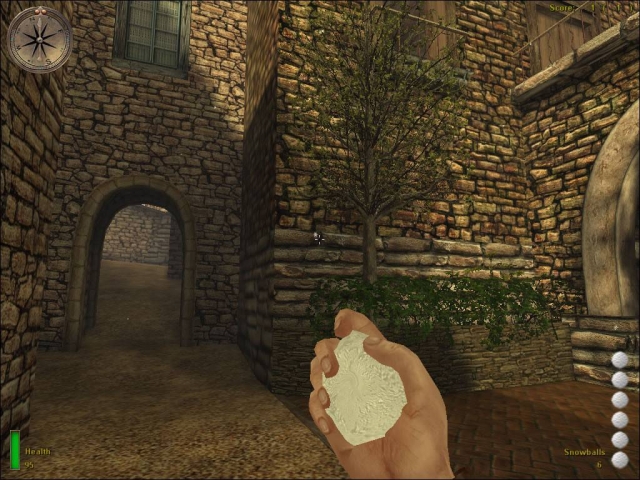
Snowball Contest v2
Snowball contest v1.1 by jv_map Thanks to mohaa_rox for the snowball model! ------------------------------- Enables snowball mode for all stock mohaa maps. To install: extract user-snowcontest2.pk3 to your \main folder To uninstall: remove user-snowcontest2.pk3 from your \main folder. Changes since v1.0 ------------------------------- Below is a list of changes since the previous version of this snowball contest mod. For each change it is noted whether this is a server-side or client-side change, or both. - Disabled all stationary machineguns (mg-42s) (server) - New snowball model (client) - Scripted snow in all maps (functionality can be disabled server-side) (server + client) - Hud now says 'Snowballs' instead of 'Frag Grenade' (client) - New message every 2 minutes with download link for mod (server) - Adjusted fog and sky settings for all stock maps (server) - Fixed issue where players would sporadically spawn with regular weapons in obj and roundbased matches (server) - Fixed script error that caused a whale of errors when a player had left the server (server) Compatibility ------------------------------- With this version installed you should be able to join any server, so it doesn't matter what snowball contest version the server is running. Players with older snowball contest versions should still be able to join a server running v1.1 without any issues at all. You may have older versions of this mod in your \main folder (user-snowcontest.pk3). It shouldn't hinder v1.1 in any way. Info For Developers ------------------------------- To add this to user-made maps: In the map's script add 'exec global/snowcontest.scr' below 'level waittill spawn'. Furthermore, you can specify whether you want scripted snow in your map using the following line: level.addsnow = 1 This line needs to be added between 'level waittill spawn' and the 'exec global/snowcontest.scr' line. In addition, you may want the snow contest script to adjust fog, sky and ambient sound settings server-side. To do this, type: level.snowmood = 1 between 'level waittill spawn' and 'exec global/snowcontest.scr'. Example: level waittill spawn level.addsnow = 1 level.snowmood = 1 exec global/snowcontest.scr Disabling Scripted Snow ------------------------------- In case the scripted snow is somehow causing troubles to you, it can be disabled server-side. To disable the snow on a dedicated server, type the following directly in the server console: sc_nosnow 1 Or, to make mohaa remember not to use scripted snow: seta sc_nosnow 1 If you have rcon access to a server, type: rcon sc_nosnow 1 If you're hosting a game yourself on a non-dedicated server, make sure first to enable 'console' in the advanced options. Press 'ok' and bring down the console with the ~ key. Then type: sc_nosnow 1 When you've performed any of these actions, the snow should disappear after a short while. You can 'restart' the snow by simply setting 'sc_nosnow' back to '0'. At any time the amount of snow clients see is dependent on their setting for 'effects detail' in advanced options ('max' means most snow). ------------------------------- Enjoy! jv_map e-mail: jv_map@planetmedalofhonor.com website: http://www.planetmedal.com/freebrief/ http://www.planetmedal.com/map/
Frosty Snowman Script
// Frosty the Snowman! // by Sor // --------------------- // Spawn a kind snowman in your map but if someone tests his patience he // will fight back! You can make him drop gifts (healthpacks), make him smoke // cigarettes and even make him talk!! // // USE: // ---- // thread global/snowman.scr::frostman // // - Origin: ( X Y Z ) Location in the map // - Angles: ( X Y Z ) Direction he's facing // - Team: ( String ) Choose "axis" or "allies" this is ONLY for the speech // - life: ( Integer ) How many times can Frosty get shot before he dies? // Use 9999 or something to make him invincible. // - Scale: ( Float ) Scale of the model? // - Model: The model of frosty; default: "player/german_Winter_1.tik" // // OPTIONS: // -------- // level.frosty_gift = does frosty need to drop gifts (healthpacks)? // level.frosty_talk = may frosty say things? // level.frosty_smoke = can frosty smoke?

MOHBT Game Server Configulator Gsc
A Game Server Configulator (GSC) is a tool that offers the user a way to configure and launch a (multiplayer) game server that runs in a LAN or online. The tool offers various options that are standard for the corresponding game, but also has additional options that may not be available from within the game. The user can load and save several different configurations to easily set up different types of game. When the game server is launched, the GSC offers a server management window in which several administrative tasks can be done. All of these options and tasks may vary, because some games do not offer support for all of the possible features. The GSC is always used in conjuntion with third-party game software, either full game versions or dedicated server executables that run under Unix. GSCs run on the Mac OSX platform and are developed using Cocoa technology. If you've ever hosted a dedicated multiplayer game on your Macintosh you know how annoying it is that you cannot set all of the options that the Quake 3 engine offers from within the game menus. You also cannot control the games and players on your server, except by typing in remote console commands. By using a Game Server Configulator X you can use all of the in-game serving options, and several more. Apart from that, you are enabled to save several different configurations to run a game server. The GSC for MoH: Breakthrough provides an easy interface on top of the "JKJA Dedicated Server" executable and offers an easy way to fully configure and run it.

MOHSH Game Server Configulator Gsc
A Game Server Configulator (GSC) is a tool that offers the user a way to configure and launch a (multiplayer) game server that runs in a LAN or online. The tool offers various options that are standard for the corresponding game, but also has additional options that may not be available from within the game. The user can load and save several different configurations to easily set up different types of game. When the game server is launched, the GSC offers a server management window in which several administrative tasks can be done. All of these options and tasks may vary, because some games do not offer support for all of the possible features. The GSC is always used in conjunction with third-party game software, either full game versions or dedicated server executables that run under Mac OSX's Darwin Unix environment. GSCs run on the Mac OSX platform and are developed using Cocoa technology. If you've ever hosted a dedicated multiplayer game on your Macintosh you know how annoying it is that you cannot set all of the options that the Quake 3 engine offers from within the game menus. You also cannot control the games and players on your server, except by typing in remote console commands. By using a Game Server Configulator you can use all of the in-game serving options, and several more. Apart from that, you are enabled to save several different configurations to run a game server. The GSC for MoH: Spearhead provides an easy interface on top of the "mohaas_server" executable and offers an easy way to fully configure and run it.

MOHBT Game Server Configulator X Gscx
A Game Server Configulator X (GSCX) is a tool that offers the user a way to configure and launch a (multiplayer) game server that runs in a LAN or online. The tool offers various options that are standard for the corresponding game, but also has additional options that may not be available from within the game. The user can load and save several different configurations to easily set up different types of game. When the game server is launched, the GSCX offers a server management window in which several administrative tasks can be done. All of these options and tasks may vary, because some games do not offer support for all of the possible features. The GSCX is always used in conjuntion with third-party game software, either full game versions or dedicated server executables that run under Unix. GSCXs run on the Mac OSX platform and are developed using Cocoa technology. If you've ever hosted a dedicated multiplayer game on your Macintosh you know how annoying it is that you cannot set all of the options that the Quake 3 engine offers from within the game menus. You also cannot control the games and players on your server, except by typing in remote console commands. By using a Game Server Configulator X you can use all of the in-game serving options, and several more. Apart from that, you are enabled to save several different configurations to run a game server. The GSCX for MoH: Breakthrough provides an easy interface on top of the "JKJA Dedicated Server" executable and offers an easy way to fully configure and run it.

MOHSH Game Server Configulator X Gscx
Game Server Configulator X (MoH: Spearhead) © 2007-2008 GSCX Soft - James Richardson © 2003-2006 P-Edge media - Martin van Spanje version 0.1 -------------------------------------------------------- Macintosh (Intel and Power PC) Version only, if you want to port it to windows, there are souce files at www.gscx.org --------------------------------------------------------- IMPORTANT! Please read chapter 1.2 "Installation" and make sure you have installed the "mohaa_server" tool before you start. GSCX Mohaa will not work otherwise. IMPORTANT! This is an alpha release, Newer versions of this app will be released very soon, as soon as you guys in the real world test it for me. Please e-mail me with any suggestions or problems at jamesrichardson2@gmail.com. There will also be releases for other quake engine games such as Call of Duty and all of the Moh series. ------------------What is GSCX Mohaa?--------------------- A Game Server Configulator X (GSCX) is a tool that offers the user a way to configure and launch a (multiplayer) game server that runs in a LAN or online. The tool offers various options that are standard for the corresponding game, but also has additional options that may not be available from within the game. The user can load and save several different configurations to easily set up different types of game. When the game server is launched, the GSCX offers a server management window in which several administrative tasks can be done. All of these options and tasks may vary, because some games do not offer support for all of the possible features. The GSCX is always used in conjuntion with third-party game software, either full game versions or dedicated server executables that run under Mac OSX's Darwin Unix environment. GSCs run on the Mac OSX platform and are developed using Cocoa technology. If you've ever hosted a dedicated multiplayer game on your Macintosh you know how annoying it is that you cannot set all of the options that the Quake 3 engine offers from within the game menus. You also cannot control the games and players on your server, except by typing in remote console commands. By using a Game Server Configulator X you can use all of the in-game serving options, and several more. Apart from that, you are enabled to save several different configurations to run a game server. The GSCX for MoH: Spearhead provides an easy interface on top of the "mohaa_server" executable and offers an easy way to fully configure and run it.

MOHAA Game Server Configulator X Gscx
Game Server Configulator X (MoH: Allied Assault) © 2007-2008 GSCX Soft - James Richardson © 2003-2006 P-Edge media - Martin van Spanje version 0.1 -------------------------------------------------------- Macintosh (Intel and Power PC) Version only, if you want to port it to windows, there are souce files at www.gscx.org --------------------------------------------------------- IMPORTANT! Please read chapter 1.2 "Installation" and make sure you have installed the "mohaa_server" tool before you start. GSCX Mohaa will not work otherwise. IMPORTANT! This is an alpha release, Newer versions of this app will be released very soon, as soon as you guys in the real world test it for me. Please e-mail me with any suggestions or problems at jamesrichardson2@gmail.com. There will also be releases for other quake engine games such as Call of Duty and all of the Moh series. ------------------What is GSCX Mohaa?--------------------- A Game Server Configulator X (GSCX) is a tool that offers the user a way to configure and launch a (multiplayer) game server that runs in a LAN or online. The tool offers various options that are standard for the corresponding game, but also has additional options that may not be available from within the game. The user can load and save several different configurations to easily set up different types of game. When the game server is launched, the GSCX offers a server management window in which several administrative tasks can be done. All of these options and tasks may vary, because some games do not offer support for all of the possible features. The GSC is always used in conjuntion with third-party game software, either full game versions or dedicated server executables that run under Mac OSX's Darwin Unix environment. GSCs run on the Mac OSX platform and are developed using Cocoa technology. If you've ever hosted a dedicated multiplayer game on your Macintosh you know how annoying it is that you cannot set all of the options that the Quake 3 engine offers from within the game menus. You also cannot control the games and players on your server, except by typing in remote console commands. By using a Game Server Configulator X you can use all of the in-game serving options, and several more. Apart from that, you are enabled to save several different configurations to run a game server. The GSCXGSCX for MoH: Allied Assault provides an easy interface on top of the "mohaa_server" executable and offers an easy way to fully configure and run it.

MOHAA Linux Game Server Configulator Gsc
A Game Server Configulator (GSC) is a tool that offers the user a way to configure and launch a (multiplayer) game server that runs in a LAN or online. The tool offers various options that are standard for the corresponding game, but also has additional options that may not be available from within the game. The user can load and save several different configurations to easily set up different types of game. When the game server is launched, the GSC offers a server management window in which several administrative tasks can be done. All of these options and tasks may vary, because some games do not offer support for all of the possible features. The GSC is always used in conjunction with third-party game software, either full game versions or dedicated server executables that run under Linux Unix environment. GSCs run on the Linux:GNUStep platform and are developed using Cocoa technology. If you've ever hosted a dedicated multiplayer game on your Linux you know how annoying it is that you cannot set all of the options that the Quake 3 engine offers from within the game menus. You also cannot control the games and players on your server, except by typing in remote console commands. By using a Game Server Configulator you can use all of the in-game serving options, and several more. Apart from that, you are enabled to save several different configurations to run a game server. The GSC for MoH: Allied Assault provides an easy interface on top of the "mohaa_lnxded" executable and offers an easy way to fully configure and run it.

MOHAA Game Server Configulator Gsc
A Game Server Configulator (GSC) is a tool that offers the user a way to configure and launch a (multiplayer) game server that runs in a LAN or online. The tool offers various options that are standard for the corresponding game, but also has additional options that may not be available from within the game. The user can load and save several different configurations to easily set up different types of game. When the game server is launched, the GSC offers a server management window in which several administrative tasks can be done. All of these options and tasks may vary, because some games do not offer support for all of the possible features. The GSC is always used in conjunction with third-party game software, either full game versions or dedicated server executables that run under Mac OSX's Darwin Unix environment. GSCs run on the Mac OSX platform and are developed using Cocoa technology. If you've ever hosted a dedicated multiplayer game on your Macintosh you know how annoying it is that you cannot set all of the options that the Quake 3 engine offers from within the game menus. You also cannot control the games and players on your server, except by typing in remote console commands. By using a Game Server Configulator X you can use all of the in-game serving options, and several more. Apart from that, you are enabled to save several different configurations to run a game server. The GSC for MoH: Allied Assault provides an easy interface on top of the "mohaa_server" executable and offers an easy way to fully configure and run it.
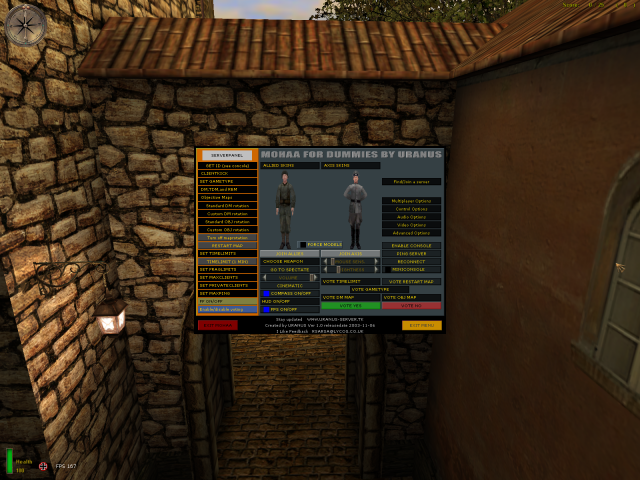
MOHAA Dummies v10
**NOT THE ORIGINAL READ ME, CREATED AS READ ME WAS NOT INCLUDED FOR MOD BY ORIGINAL AUTHOR** MOHAA FOR DUMMIES CREATED BY URANUS PLACE z_MOHAA_FOR_DUMMIES_V1_(Use_By_Pressing_F10.pk3) INTO MOHAA/MAIN AT ANY POINT WHILE IN-GAME PRESS F10 TO BRING UP MENU . SELECT EITHER CLIENT OR 1 (OF 2 TYPES) SERVER . THE MOD ALSO INCLUDES 18 CUSTOM MAPS . MOHAA FOR DUMMIES CREATED BY URANUS DM MAPS AFTERMATH2 AFTERMATH REVISED DESERT ASSAULT DM ARENA ESCHER FAILURELAND LANDHAUS MOHDUST OSIEDLE SMALLCITY SNIPERVALLEY STS-SNIPERSTURM TITLEIST DM1 TRAINING CENTER OBJ EF2 AXIS STATION HANGER SE RENAN THE LOST VILLAGE CLIENT OPTIONS CONNECT TO IP FIND/JOIN A SERVER CONTROL OPTIONS AUDIO OPTIONS VIDEO OPTIONS ADVANCED OPTIONS ENABLE CONSOLE PING SERVER RECONNECT CHOOSE SKIN FORCE MODELS CHOOSE WEAPON JOIN TEAM SPECTATE VOLUME ADJUST VOLUME (CINEMATIC) MOUSE SENSITIVITY BRIGHTNESS COMPASS ON/OFF HUD ON/OFF FPS ON/OFF SERVER OPTIONS GET ID CLIENT KICK SET GAMETYPE RESTART MAP SET TIMELIMITS SET MAXPING FF ON/OFF ENABLE/DISABLE VOTING **NOT THE ORIGINAL READ ME, CREATED AS READ ME WAS NOT INCLUDED FOR MOD BY ORIGINAL AUTHOR**
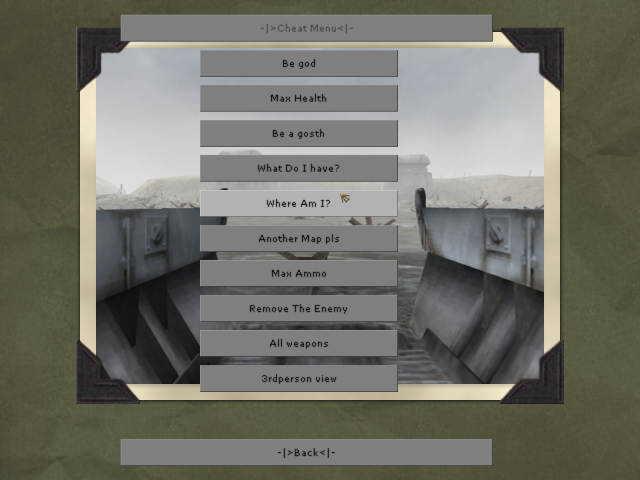
Single Player Cheat Menu
NOTE: This is a cheat menu ONLY for Single Player, NOT for Multiplayer. The settings of this menu might autokick you from online servers (plus, these cheats only work in single player to begin with). -|>Cheatmenu
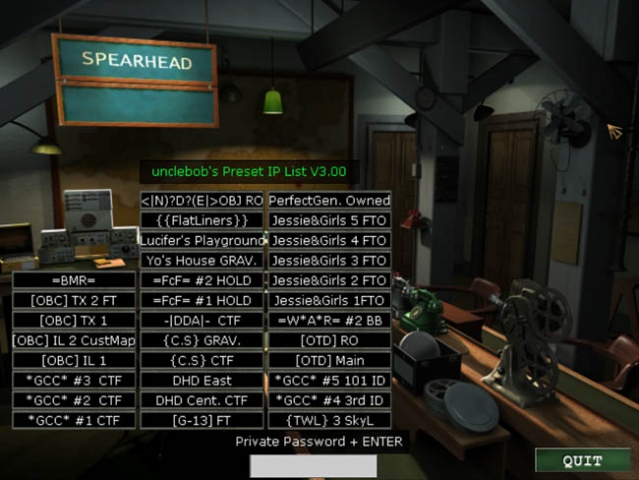
Ubs Ip List v30
by unclebob Milwaukee, WI 03/10/2007 Hello all UB here & I got a useful tool for you! It Slices It Dices ........ Yeah well ok maybe not but it works with MOH SH & could be adapted for BT & AA if needed Huh you say, well check out the screenshots & check out the file if you still don’t get it. ========================================================================================================= IP List 3.00 can list 32 server's for easy on the fly connection. Once you start MOH SH it will open to the main game lobby where you will see the 32 new buttons I have added. If you have had my old IP Lists then you know they were designed off a pull down menu like the skin selection in the multiplayer options room. This was limited to a compressed .pk3 file so players without the knowledge as to change & recompress such files where unable to customize the old lists. Version 3.00 changes all that Before anyone starts crying! The reconnect button is Slider_V's idea. He said it was ok fo me to use it. After you have Downloaded this file & unzipped it you will find your self reading this I hope, If not you most likely don’t have a clue what your looking at & will fumble around in the files till they are corrupted & you will need to re download the file. (be sure to save your self the headache & erase the 1st one you corrupted) OK! So I have changed it up a bit for those that don’t know how to open or compress .pk3 files by giving you the files in a referenced data file format. This means there is no more need to now how to extract or compress files, no more need to remember a file structure. HOW TO USE!!!!! Put the "USER_UB_IPlist_V3.00.pk3" the UBmenu.cfg & "UBmenu" folder into your MainTA folder. (It is important that they go in the mainTA folder as this version is only meant for MOH SpearHead.) The IP list has 32 stock servers from the Midwest & other regions of the United States already listed, all of which can easily be changed in a matter of minutes. Now that you have moved the files start MOH SH. You will see that the main game lobby has changed a lot. I made it so the IP List is king of the page, moving the single player load & save options to the single player map room through the first door on the right. through the second door you will see the IP list as well, but slightly rearranged to fit. HOW TO CHANGE IP ADDRESSES & BUTTON NAMES!!!!!! To start copy the folder "UBmenu" to your desktop. THAT WAS COPY NOT CUT! this folder contains the .cfg or config files that the IP List looks at for its information In the folder you will find "serv1con.cfg" - "serv32con.cfg" & "IP_Listings_UB.cfg" Each of the serv#con.cfg files has a IP address in it that is linked to one of the 32 buttons of the IP List the IP_Listings_UB.cfg file is used to change the names shown in game on each button I would suggest trying the stock settings before you attempt to change anything that way you know how it works!!! TO REDIFINE A BUTTON!!!!!! Step One: Chose the button you want to change. (easiest way is to go in game & pick one that is curently named.) Step Two: Go into the IP_Listings_UB.cfg find the same name in that list & remember or write down what button number it corresponds to. Step Three: Edit the listed server name to your new server name. (18 too 20 characters is the max) Step Four: open the corresponding serv#con.cfg file & edit the IP address to the new server's (You can add a reference at the bottom of the file so you know what button the IP is for.) ******************************************************************** Example follows! // unclebob's Advanced IP List Version 3.001 // Put the full IP address for the server that corisponds to the Name you added to the button. Should look like this when done // connect "0.0.0.0:12203" connect "213.244.180.35:12203" // J. Girls 5
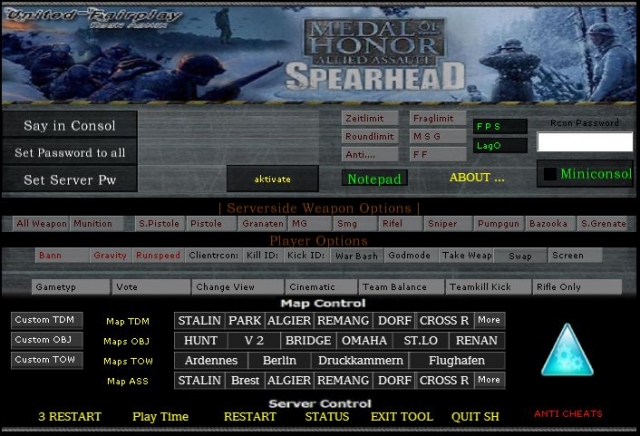
United Fairplay Spearhead Admin Menu
This is a new Rcon Admin for Medal of Honor Spearhead! It is avable in English and German! The Original Downloadside of this tool is: http://www.united-fairplay.de The_Black_Ghost
Medal of Honor: Allied Assault Mods (MOHAA) — Complete Community Archive
Welcome to the premier repository for Medal of Honor: Allied Assault mods. Since the game's groundbreaking release in 2002 by 2015, Inc. and EA, MOHAA has inspired one of the longest-standing modding communities in first-person shooter history. MOH-DB preserves, categorizes, and serves over 1,600 verified community modifications, custom enhancements, and competitive utilities for Allied Assault, Spearhead, and Breakthrough.
Explore MOHAA Mod Categories
Player Skins & Uniforms
Over 700 historically accurate and creative player uniforms for Allied and Axis factions. Equip authentic U.S. Army Rangers, 101st and 82nd Airborne paratroopers, British Commandos, Soviet Red Army conscripts, Wehrmacht Heer infantry, Fallschirmjäger, and Waffen-SS camouflage patterns, as well as classic community clan skins.
Weapon Models & Reskins
Enhance your WWII arsenal with ultra-detailed weapon replacements and high-resolution textures. Popular downloads include authentic wood-finish Kar98k sniper rifles, realistic metallic sheen M1 Garand models with classic "ping" animation refinements, Thompson submachine guns, MP40s, BAR 1918 rifles, and custom iron-sight alignments.
Soundpacks & Realism Audio
Transform the sonic atmosphere of Allied Assault. Replace compressed 2002 Quake-engine sound effects with cinema-grade gunfire recordings, authentic distant artillery rumblings, terrifying Stuka dive-bomber sirens, supersonic bullet cracks, metal ricochets, and remastered German and American voice callouts.
HUDs, Menus & Crosshairs
Modernize the in-game interface for 1080p, 1440p, and 4K widescreen displays. Download minimalist competitive heads-up displays, custom dot and crosshair overlays, cleaner compass indicators, redesigned main menus, and unobtrusive health and ammunition counters favored by competitive league players.
Server Utilities & Admin Scripts
Run resilient, modern multiplayer game servers with essential server-side utilities. Includes automated map rotators, anti-cheat detection tools, voting scripts, custom match timers, ping balancers, and administrative rcon managers designed for dedicated servers running 24/7.
MOHAA Reborn 1.12 Community Patch
The gold standard community patch for modern MOHAA servers and clients. The Reborn 1.12 patch resolves legacy buffer overflows, fixes client query exploits, expands internal script limits for complex mods, and provides a built-in server browser to replace the defunct GameSpy master server.
How to Install MOHAA Mods: Quick Guide
Identify Your Target Directory
MOHAA stores all game assets in subfolders inside the root installation directory:
- MOHAA (Base):
.../MOHAA/main/ - Spearhead:
.../MOHAA/mainta/ - Breakthrough:
.../MOHAA/maintt/
Paste Without Extracting
Download the mod archive from MOH-DB. If it is zipped (.zip or .rar), extract the enclosed .pk3 file. Place this .pk3 directly into your game's /main/ folder.
How to Remove or Troubleshoot
To remove any mod, simply delete its .pk3 file from the /main/ folder. The game will immediately return to stock behavior without reinstalling.
Frequently Asked Questions about MOHAA Mods
To install MOHAA mods, copy the downloaded .pk3 file directly into your Medal of Honor Allied Assault installation folder under /main/ (or /mainta/ for Spearhead, and /maintt/ for Breakthrough). You do not need to unpack or extract the .pk3 archive—the game engine loads it automatically upon launch.