
Medal of Honor: Allied Assault Mods (MOHAA)
Discover and download community-created modifications to enhance your Medal of Honor: Allied Assault experience.
1676 Mods Found
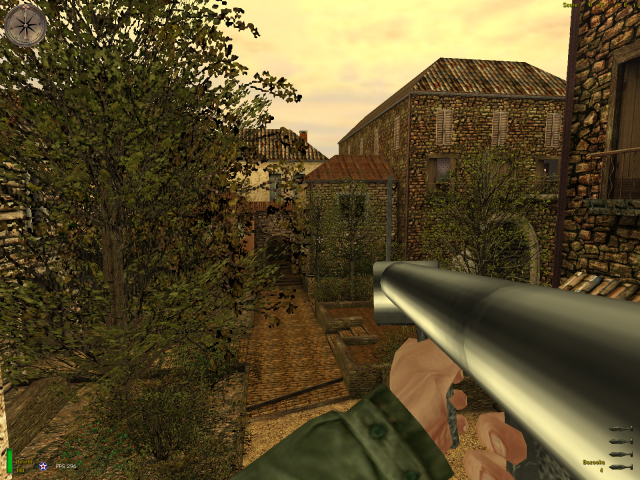
Metal Z00ka
Texture compression has to be checked OFF in your options menu, in order to show this skin. Otherwise it'll look just like a regular bazooka. A nicely done skin on a Bazooka. Feels good to blow someones head off with those chrome rockets :P. Just download it and see what you think :) Blow them up! ;) ---------------------------------------------------- {Credits to Flakrider for awesome tips, thx m8} ---------------------------------------------------- Name: Metal of Zooka Original by: WW2FreakSniper - koensieben622@hotmail.com Author's E-mail: koensieben622@hotmail.com ----------------------------------------------------
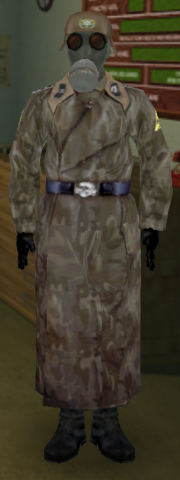
german_NBC_soldier_gasmask
Sgt KIA's SS NBC soldier ^^^^^^^^^^^^^^^^^^^^^^^^^^^^^^^^^^^^^ Install the .pk3 file into ..\mohaa\main folder. Unistall by deleting the file from the folder. Version: 1.1 = Final Nothing else has changed since ver. 1b but the gasmask. !! Many thanx to Krzysztof who modelled the real gasmask !! ^^^^^^^^^^^^^^^^^^^^^^^^^^^^^^^^^^^^^ Author: Sgt KIA Email: sgt_kia@hotmail.com
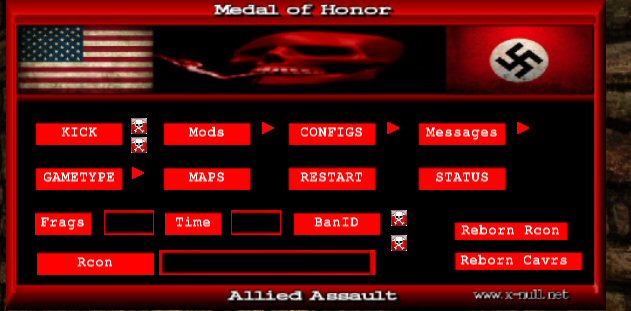
Ezm Admin Menu
This is an admin menu that works with Reborn as well (it also uses some Reborn commands). There is a mod list as well, although you might need the full EZM Mods package on the server in order to use them. You can find the full package of mods (& menu) here: http://www.mohaaaa.co.uk/AAAAMOHAA/content/ezm-mods-admin-menu There's a ReadMe file included that shows you how to edit the menu. Install Menu: This is a full reborn admin menu, some sections you will need the mods, cfg's etc in order for it to work, Mefy's freeze-Tag...Elgbots...custom maps etc. Also if you wnat to exec different cfg's from menu you will need to make sure the cfg folder is on server. SEE EDITING READ ME !! 1.) Put the zzzzzzzzzz_weapons_Rcon_Menu.pk3 in your mohaa/main folder ( NOT ON SERVER.) 2.) Bind a key to open menu. ( open console type in bind ( pick a key) hit enter. ) Menu Note: You don't need to use the menu, you can change everything through the console, you must restart the map after changeing settings. If you have it set to snipers only and change it to rifles only you must first turn off snipers only ( set snipers 0) then turn on rifles only ( set rifles 1) This is why I made the mod menu it will do all that for you.

MOHAA Evolution Davens Fixes
This is a package with all of Daven's fixes (MOHAA Evolution Patch) for Spearhead & Breakthrough (2.30 & 2.40). Includes Old server fixes & Alpha-Beta releases. There are readme's included for every individual patch (game), I will post the one for Spearhead here below: ================================================================== Spearhead Server Fixes for Spearhead v2.15 version: 100809 (REPACK) - 09/08/10 (DD/MM/YY) by Daven ================================================================== Unofficial patch that fixes most known game bugs and adds some new features ================================================================== INSTALLATION ================================================================== First make a backup of your moh_spearhead_server.exe and copy these files in your MOHAA directory: -BTPatch.dll (optional) -moh_spearhead_server.exe -mainta\autoexec2.cfg -mainta\dgamex86.dll -mainta\listip.cfg -mainta\PK3_Fixes_SH_2.15_&_Demo_(101231).dpk3 ------------------------------------------------------------------ It should look like this: "MOHAA" directory (C:\program files\EA GAMES\MOHAA\) -BTPatch.dll -moh_spearhead_server.exe "MOHAA\mainta" directory (C:\program files\EA GAMES\MOHAA\mainta\) -autoexec2.cfg -dgamex86.dll -listip.cfg -PK3_Fixes_SH_2.15_&_Demo_(101231).dpk3 ("C:\program files\EA GAMES" is just an example of where i have the game installed) ------------------------------------------------------------------ IMPORTANT: Make sure you are running the server with the dedicated executable moh_spearhead_server.exe otherwise my patch will not get loaded If you have rented a dedicated server and the host runs the server with moh_spearhead.exe, delete or rename it, copy moh_spearhead_server.exe from my patch and rename it to moh_spearhead.exe (thanks to Krones for this trick) ================================================================== FEATURES ================================================================== * Fixes - leave_team - callvote default votation list - cheats - Turns client cheats off/on (r_farplane_nofog, r_lightmap, cg_3rd_person, etc). Can be bypassed - Sys_SendPacket: bad address type - callvote text overflow - buffer-overflow - directory traversal - q3rconz - anti-shark - fps models - getting weapons from opposite team - getting weapons from different nationality - infinite nade charging - nade crash bug - door nade bug - time/numSnapshotEntities wrapping * New commands - Cvar "sv_cheats 0/1": Turns server cheats off/on (wuss, dog, give, etc) - Scripting command "adddeaths": Give or take deaths from the player - Server command "dumpclient [client number]": Shows info from clients · Server command "sv [command]" (Eg.: sv addip 1.2.3.4) - addip [ip address]: Adds a single IP or IP mask to the banned list - removeip [ip address]: Removes a single IP or IP mask from the banned list - writeip: Saves banned ips to mainta/listip.cfg - listip: Lists banned ips to the console * Other - "sv_allowdownload 0" and "g_dropclips -1" by default - "g_shownpc" doesn't turn to 1 when developer is 1 - RunningBon's dll patched to work with Breakthrough - High/Low ping kick screen - Commands "dumpuser" and "reloadmap" revised - In-game chat text length limit changed to two lines per player - In-game chat prefix "(all)" All fixes and new commands of Breakthrough v2.40 are included ================================================================== CREDITS ================================================================== A list of fixes included in my patch that were not made by me: (Author and fixes) Elgan - anti-shark - original fps fix script (my fix is based on his script) - script strings.scr Luigi Auriemma - buffer-overflow - directory traversal - q3rconz RunningBon - BTPatch.dll sorridstroker - weapons from opposite team ------------------------------------------------------------------ Thanks to everyone who helped me in testing, suggestions, etc: bigidigi Creaper Herr Klugscheisser Krones LeBabouin modder nanobahr supportMOH vuurvent
Paintball Bullets
This mod changes the bullet impacts/holes into paintball splashes.
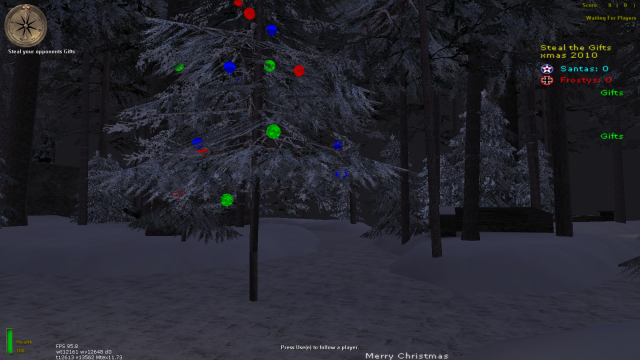
Snow Mod
A mod that makes it snow in your maps. Please check the added readme and settings files to figure out how to set this up properly.
Mg Protection
The old Crouch and Nade fix - possibly in Admin Pro now
HUD Messenger 2
More info can be found here: http://www.modtheater.com/threads/jims-hud-messenger-2.23898/ a easy and effective way of clearly displaying server messages in style. All server side so does not require a program to run externally to provide the messages and does not print the messages either in the player chat area or compass area, preventing these areas from being clogged and pissing off players on your server. features- unlimited message length- you can now make your main body of each message unlimited in length (if you wished to). Script will parse a message cvar into the ammount of lines that will then fit into the HUD messenger display area. fancy looking fade and scroll- for messages longer than 3 lines, the messages will scroll upwards to reveal the next line of the message. Top line scrolls upwards and fades out and bottom line scrolls upwards and fades in (see pic 3). Random message function- set m_random to 0 or 1 to enable the random display of all message cvars. The same message will never be broadcast twice in a row Obj text- same as before, allows you to display custom messages in the alliedobjtext and axisobjtext (visible on the scoreboard, bellow the map picture and name) show next map function- can display what map is next on the HUD. Can either parse the sv_maplist to find the next map or if you use a mixed gametype config, will use "nextmap" to find out the nextmap. nextmap must be set to use this feature if you dont use sv_maplist to hold your rotations. can be disabled (see pic 2). teams unbalanced messages- can display messages on the HUD if teams are unbalanced. Frequency of these messages can be changed or disabled totaly (see pic 1). Text color- can select the color of the title message text and the main message text using RGB values. (use a program like paint and its color picker to determine RGB values- see any pic for an example of the text colours.) Top/ Bottom display- the messages can either be displayed in the top right hand corner or the bottom left hand corner. installation- just drop the user-Jims_HUD_messaging-2.pk3 into your main/ta/tt folder and then call the jmc.cfg file via your server config (exec jmc.cfg) by the way..... lots of changes so the potential for lots of bugs arrises :***: let me know if (or when) they do so i can give em a fix. This mod has been fully tested by me on various settings but that doesnt guarente it will work for everyone. If you have issues try installing the remove_dm_precache.pk3- if dmprechache is called twice it could screw up the running of the mod. Tested on SH and should work for AA and BT without a hitch.
Fog Maker
Gotcha's Fog Maker script To use just drop it in your main and exec in your map script or dmprecache "exec global/FogMaker.scr" Explanation: I made this script so I can just sit back and watch it roll until I find the perfect fog for the level I'm working on, or set custom fog on the go until I get to something I wanted. It automatically cycles through infinite colors, one every 10 seconds. It displays the settings of the fog on the hud so you can easily set it in your script and see what you're looking at. Also added the ability to log it via cvar so it'll just pop into your logfile so you can copy and paste it into your map script, or fog/night script. It prints as seen below. With RFS loop | Without RFS loop //------------------------------------- | //------------------------------------- //--------Fog Settings-------------- | //--------Fog Settings-------------- $world farplane_color ( 1 1 1 ) | $world farplane_color ( 1 1 1 ) $world farplane 3500 | $world farplane 3500 while(1) { | //r_fastsky was OFF, no need for stufftext loop. local.player = parm.other | //---------End Fog Settings-------- if(local.player != NIL && local.player != NULL) { | //------------------------------------- local.player stufftext "r_fastsky 1" | wait 3 | } | waitframe | } | //---------End Fog Settings-------- | //------------------------------------- | | Cvars: This script also has other cvars to tweak your fog exactly as you want it, and displays your custom settings on the hud as well as print them. 1.) fogdist "xxxxx" - This sets the farplane, default is set at 3500 2.) rfs "x" - 0 or 1, off by default, this turns r_fastsky on and off 3.) fog "x x x" - This is used to set a custom color, if you see a color you like you can see the numbers on the hud and tweak the RGB values via entering them in here and making your changes, you must set this cvar back to "" in order to resume the auto changing fog you also must use quotations when you enter your fog color. 4.) log "x" - Off by default, just type log 1 in console, this will iprintln the current settings so you can see them in the log if you wish. 5.) stop "x" - 0 or 1, off by default, this will stop the fog when it's auto scrolling, so if you find a color you like you can stop on it and walk around. 6.) night "x" - 0 or 1, off by default, added this last second as an easier way to set color to 0 0 0 for night

Map Info
The mod will print message about current map and next map in the top right corner
Message Center
Standalone version of the message center in Admin Pro (and edited). [i]Ok i know Elgan will probs have a heart attack at how i did this, but its done and i cbf doing it the proper way, i just got asked to do it that many times i decided to get it over and down with..[/i] [i]A few changes had to be made to get it to work,[/i] [i]Firstly it is executed from dmprecache.scr by the line [b]exec global/server_messages.scr[/b][/i] [i]THEN turned on via cvar [b]message_center "1"[/b][/i] [i]Messages and Settings are located in global/messages.txt file, ( was going to use Admin pros Settings folder, but might conflict ) It is set out very similar to how it was in Admin Pro, only different being that the 'Settings' are set directly into level variables and not into an array and processed later.[/i] [i]Also added Compass messages ( yellow and white )[/i]
Let It Snow V12
/*_/_/_/_/_/_/_/_/_/_/_/_/_/_/_/_/_/_/_/_/ \_| )) O (( * . * |_/ \_| ( ) |_/ \_| * / \ Let it snow v1.2 by Ric-hard |_/ \_| ( ) * |_/ \_| /'-' \ www.ric-hard.tk |_/ \_| ( ) . . |_/ \_| /'. _ .\ |_/ \_|( ) Released 2005-12-10 |_/ \_| .___ . * * |_/ \_| (____) . |_/ \_/_/_/_/_/_/_/_/_/_/_/_/_/_/_/_/_/_/_/_*/ ------------ Description: ------------ This is a serverside mod that makes it snow. ---------------- Supported Games: ---------------- Medal Of Honor Allied Assault & Spearhead. --------------- Supported Maps: --------------- Southern France Destroyed Village Remagen Crossroads Snowy Park Stalingrad Algiers The Hunt V2 FACILITY Omaha The Bridge --------------------------------------------------- How to turn the mod on and off? (its on by default) --------------------------------------------------- cvar "sv_snow" 1 = on 0 = off (Default = 1) ---------------- How to install ? ---------------- Unzip and put zzz-Let it snow v1.2 By Richard.pk3 into MAIN (Eagames/mohaa/>>MAIN
Storm Mod
*************************** THE SCRIPT IS A SERVER-SIDE SCRIPT *************************** •Filename: StormMod.zip •Installation: Place the ZzZ-Storm.pk3 in your Main, Mainta, MainTT, Demota or whatever you are usings folder lol, a simple way to know where to add it is put it in the same folder as the Pak.pk3 files. •Contact: You can contact me with any problems requests, or whatever you need at Miketothebell@yahoo.com •Description: This script adds a Storm to your server. Rain, Thunder, Lightning, Darksky(night). •Details: This script will make your server have a storm on it, it will rain, thunder and there will be lightning. It gives you a feeling of really being in a storm, on a map that doesnt usually storm that is... •Bugs: There are a few bugs, the one that stands out the most is that the rain will fall through buildings, therefore making it rain inside, Unless all the doors/shutters etc. are closed in that building lol. Very.. strange. •Troubleshooting: If this mod isnt working it has to be because either you installed it incorrectly, theres another mod interferring with it, or you simply are doing it wrong lol. If the case is that there is another mod interferring with it, send me all the mods you want combined and ill be happy to combine and resend it to you. •Again if you would like help in setting this on your server or any other things you may need to talk with me about. Please E-mail me. ALSO, PLEASE REPORT ALL BUGS OR MISTAKES TO ME. EVEN IF THERE VERY SIMPLE.(Besides the rain through the buildings). ALSO I WOULD LOVE TO GET COMMENTS ON MAKING THIS MOD BETTER. •Well thanks for downloading and i will be working on other usefull commands and other things to do via scripting. i would be releasing them as soon as i finish them. -GLø¢K¹º
Advanced Weather Mod
place the zzzzzzzzz-DUST-advanced-weather.pk3 & advanced_weather_settings text files in you server's main,mainta or maintt. before uploading to server. open the advanced_weather_settings text file and set the weather you wont on each map. save changes and upload them to the server. and play ! have fun,,,!,,,,,,test them all :).! read the advanced_weather_settings text file for the settings you can set !!! :).! ----------------------------------------------------------------------------------------------------- i will be making a updated ver of this with more settings for each map. keep a eye out on the website !!!!. pls keep these credits running for peeps to find this mod :) !!! always share !!! :) . thanks for downloading and useing the mod,mods :). links in messages are to http://www.mods-r-us.net/ http://www.esnips.com/web/dustmidlands-mods?docsPage=1#files change the number to what settings you wont :) v2_1/ v2_2 only not tested on AA but it should work on them all AA,SH,BT. ///////////////////////////////////////////////////////////////////////////////////////////////////////////////////////////// /////[][][][][][][][][][][][][][][][][][][][][][][][][][][][][][][][][][][][][][][][][][][][][][][][][][][][][][][][][][]//// ////[]/MODS BY DUST//////////////////////////////email me at=dustmidlands@hotmail.com///////////////////////////////////[]/// /////[][][][][][][][][][][][][][][][][][][][][][][][][][][][][][][][][][][][][][][][][][][][][][][][][][][][][][][][][][]//// ///////////////////////////////////////////////////////////////////////////////////////////////////////////////////////////// //=========================================================================================================================// ///////////////////////////////////////////////////////////////////////////////////////////////////////////////////////////// // ****** * * ******* ********* // // * * * * * * // // * * * * ******* * // // * * * * * * // // * * * * * * // // ***** **** ****** * // ///////////////////////////////////////////////////////////////////////////////////////////////////////////////////////////// //=========================================================================================================================// ///////////////////////////////////////////////////////////////////////////////////////////////////////////////////////////// // set each map with its own advanced_weather affects.these are exstreme weather scripts :) ///////////////////////////////// ///////////////////////////////////////////////////////////////////////////////////////////////////////////////////////////// // avalible setting are as follows // map being the map name (ie) hunt_1a: // // // // pls note that v2 has only 2 settings v2_1 & v2_2 and v2_0 // // map_0: //normal weather. // // // // v2_0 //normal. // // V2_1 //day-light,foggy. // // V2_2 //night-low-light,foggy. // // // // map_1a: //day-light,slightly more fog. // // map_1b: //day-light,foggy. // // map_1c: //day-light,very foggy. // // // // map_2a: //night,slightly-lower-lighting,more fog. // // map_2b: //night,more-lowered-lighting,foggy. // // map_2c: //night,very-low-lighting,very-foggy. // // // // map_3a: //day-light,more-foggy,rain. // // map_3b: //day-light,very-foggy,rain. // // // // map_4a: //night,less-light,foggy,rain. // // map_4b: //night,very-low-light,very-foggy,rain. // // // // map_5a: //day,more-foggy,rain, storm. // // map_5b: //day,very-foggy,rain, storm. // // // // map_6a: //night,low-light,foggy,rain, storm. // // map_6b: //night,very-low-light,very-foggy,rain, storm. // /////////////////////////////////////////////////////////////////////////////////////////////////////////////////////////////
Pain Animation Patch SH
Spearhead Pain-Animation Patch (version 1.0) Compiled by MPowell1944 Description : This patch fixes the funky pain animations in MOH:Spearhead. That would be the buttscooting, sliding, and flailing of the arms when a person gets hurt. Usually this occurs when a person falls or gets shot. This patch is a server-side only patch. If you are an admin, just add this .pk3 file to your server's /mainta folder, and restart your server. For those of you wanting to know if this can work client-side, all I can say is you can try it out but I cannot promise any results. Disclaimer : Because I have spent many hairpulling hours trying to get this patch finished, I nicely ask of you not to duplicate or make any small changes and release it as your own. If you decide to do so, the credit to you will not be valid. Bugs : The only known bug is as follows. If you are holding either a RIFLE, ROCKETLAUNCHER, allied SMG or a BAR, and you get hurt, you will be almost floating on your feet in a semi-walk animation, but is not very noticeable. As I said, this only occurs with the above^ weapons and only while the person is getting hurt. But even with this minor bug, it is still 10x better than the default animations. Check out this bug for yourself and you will see what I mean. Updates : I will be working on fixing the above bug for the next version. Hopefully this can be quite soon. SideNotes : If you would like to see the mod in action, please stop by the Stripes Spearhead clan server at 66.230.149.84. If you have any bugs to report, please send them to the email below as you find them. The more bugs to fix for the next version, the better. Contacts : Email : MikePowell1944@aol.com AIM : MikePowell1944 MSN : MPowell1944@hotmail.com Thanks for downloading this patch. Hopefully this can bring a better playing experience to all of the Spearhead players on your server.


Client Crash Map Change Fix
Fixes random player crash fix on map change for Stock maps
Medal of Honor: Allied Assault Mods (MOHAA) — Complete Community Archive
Welcome to the premier repository for Medal of Honor: Allied Assault mods. Since the game's groundbreaking release in 2002 by 2015, Inc. and EA, MOHAA has inspired one of the longest-standing modding communities in first-person shooter history. MOH-DB preserves, categorizes, and serves over 1,600 verified community modifications, custom enhancements, and competitive utilities for Allied Assault, Spearhead, and Breakthrough.
Explore MOHAA Mod Categories
Player Skins & Uniforms
Over 700 historically accurate and creative player uniforms for Allied and Axis factions. Equip authentic U.S. Army Rangers, 101st and 82nd Airborne paratroopers, British Commandos, Soviet Red Army conscripts, Wehrmacht Heer infantry, Fallschirmjäger, and Waffen-SS camouflage patterns, as well as classic community clan skins.
Weapon Models & Reskins
Enhance your WWII arsenal with ultra-detailed weapon replacements and high-resolution textures. Popular downloads include authentic wood-finish Kar98k sniper rifles, realistic metallic sheen M1 Garand models with classic "ping" animation refinements, Thompson submachine guns, MP40s, BAR 1918 rifles, and custom iron-sight alignments.
Soundpacks & Realism Audio
Transform the sonic atmosphere of Allied Assault. Replace compressed 2002 Quake-engine sound effects with cinema-grade gunfire recordings, authentic distant artillery rumblings, terrifying Stuka dive-bomber sirens, supersonic bullet cracks, metal ricochets, and remastered German and American voice callouts.
HUDs, Menus & Crosshairs
Modernize the in-game interface for 1080p, 1440p, and 4K widescreen displays. Download minimalist competitive heads-up displays, custom dot and crosshair overlays, cleaner compass indicators, redesigned main menus, and unobtrusive health and ammunition counters favored by competitive league players.
Server Utilities & Admin Scripts
Run resilient, modern multiplayer game servers with essential server-side utilities. Includes automated map rotators, anti-cheat detection tools, voting scripts, custom match timers, ping balancers, and administrative rcon managers designed for dedicated servers running 24/7.
MOHAA Reborn 1.12 Community Patch
The gold standard community patch for modern MOHAA servers and clients. The Reborn 1.12 patch resolves legacy buffer overflows, fixes client query exploits, expands internal script limits for complex mods, and provides a built-in server browser to replace the defunct GameSpy master server.
How to Install MOHAA Mods: Quick Guide
Identify Your Target Directory
MOHAA stores all game assets in subfolders inside the root installation directory:
- MOHAA (Base):
.../MOHAA/main/ - Spearhead:
.../MOHAA/mainta/ - Breakthrough:
.../MOHAA/maintt/
Paste Without Extracting
Download the mod archive from MOH-DB. If it is zipped (.zip or .rar), extract the enclosed .pk3 file. Place this .pk3 directly into your game's /main/ folder.
How to Remove or Troubleshoot
To remove any mod, simply delete its .pk3 file from the /main/ folder. The game will immediately return to stock behavior without reinstalling.
Frequently Asked Questions about MOHAA Mods
To install MOHAA mods, copy the downloaded .pk3 file directly into your Medal of Honor Allied Assault installation folder under /main/ (or /mainta/ for Spearhead, and /maintt/ for Breakthrough). You do not need to unpack or extract the .pk3 archive—the game engine loads it automatically upon launch.